
On this page
Start here
Quick answer
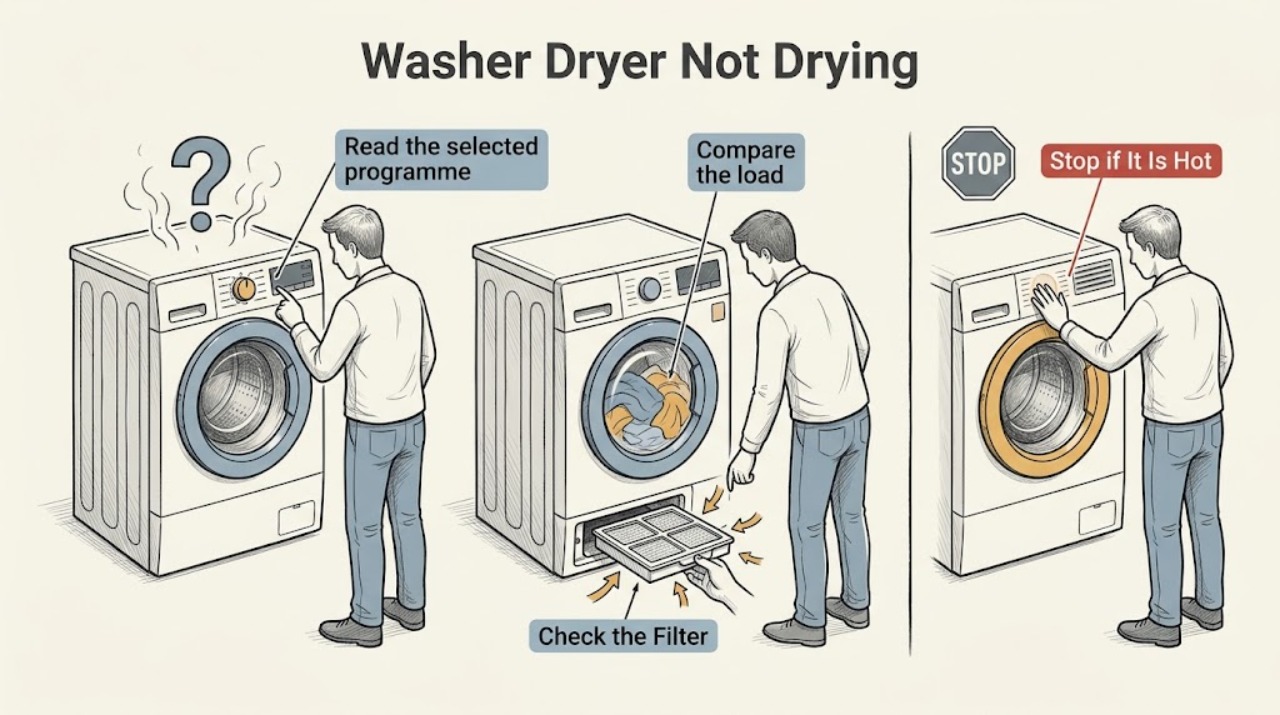
If a Haier washer-dryer finishes with damp clothes, first check whether the drying programme and level were selected, whether the load is within the model's drying capacity, and whether the clothes are bunched against the drum wall. Clean the model's accessible lint or drying filter and keep its filter surface dry before reinstalling it. Confirm that the wash has drained properly and that the drain path is not blocked, because excess water leaves more moisture for the drying stage to remove. If a drying filter warning returns, the dryer overheats, the drum does not turn, the cycle stops with an error, or clothes remain wet after the correct load and filter checks, stop using the drying function and arrange qualified Haier service.
Work through in order
Diagnostic checks
Use only checks that match the exact appliance or system and its official guide.
-
Check 1
Read the selected programme and dry-level setting in the exact Haier manual, then compare the result with what the programme is designed to deliver; confirm that a wash-only, air-only, delayed, or other non-drying option was not selected.
Expected result: A drying programme and level are selected, or the cycle did not include the expected drying stage.
Next step: Select the model-documented drying programme and level for one supervised test. If the correct programme is selected but the result is still damp, continue with the load, filter, and drain checks.
Why this matters
Why: A washer-dryer can finish without producing a dry result when the drying stage was not selected or when its available dry-level controls differ from another model.
-
Check 2
Compare the load with the exact Haier washer-dryer's drying capacity, remove excess items, and spread clothing through the drum instead of leaving it packed against the inner wall.
Expected result: The load exceeds the model's drying limit or clothing is bunched against the drum wall, or the load is within the model guidance and freely arranged.
Next step: Remove excess items, redistribute the rest, and run the model's documented dry programme for one supervised test. If a correct smaller load remains damp, continue with the filter and drainage checks.
Why this matters
Why: Haier identifies excess load and clothing positioned against the drum wall as conditions that can trigger a drying alert or reduce the drying result.
-
Check 3
Stop the machine and clean the accessible drying lint filter, filter box, or primary and secondary filters identified for the exact model; remove lint from the filter seal and drying-air corners only where the manual permits.
Expected result: The filter contains lint or residue, is wet after cleaning, is installed incorrectly, or the accessible filter path is clear and correctly installed.
Next step: Clean the filter as documented, dry any washable surface before refitting, and seat every filter correctly. If the warning returns or the drying result does not improve, stop the drying function and arrange service.
Why this matters
Why: Haier states that lint or cotton dust in the drying filter can reduce drying effectiveness, and an incorrectly installed filter can produce a model-specific alert.
-
Check 4
Check whether the wash stage left water in the drum or whether the drain hose is kinked, crushed, blocked, or installed contrary to the model manual; inspect only accessible hose and filter areas after stopping the programme.
Expected result: Water remains, the drain path is restricted, or the drum is empty and the drain path appears clear.
Next step: Correct only an accessible hose position or model-approved filter blockage and run the documented drain or spin step before retesting drying. If water remains or the pump area is not user-accessible, arrange qualified service.
Why this matters
Why: A washer-dryer cannot achieve a normal dry result when the clothes enter the drying stage with excess retained water; a restricted drain path can also stop a cycle or leave residual water.
-
Check 5
Record any display message or error code during the drying stage and compare it with the exact Haier model manual; note whether the drum rotates, the cycle stops, or the machine becomes unusually hot.
Expected result: The display identifies a drying filter or load condition, or the cycle stops without a user-remedy message and the drum or temperature behavior is abnormal.
Next step: Apply only the manual's stated remedy and retry once if there is no stop symptom. If the message returns, the drum does not turn, heat is abnormal, or the cycle stops again, stop using the drying function and arrange service.
Why this matters
Why: A model-specific message can distinguish an accessible filter or load correction from a drying-system fault; an unexplained stop, stalled drum, or abnormal heat needs professional diagnosis.
-
Check 6
After the correct load, clean filter, and completed drain are confirmed, run one supervised drying cycle while observing from outside for normal drum movement, airflow, and the absence of unusual odor or heat.
Expected result: The smaller load dries normally, clothes remain damp without an error, the drum stalls, or a burning odor, smoke, or abnormal heat appears.
Next step: Stop immediately for smoke, burning odor, abnormal heat, or a stalled drum. Otherwise stop after the single retest and arrange qualified Haier service if drying remains inadequate.
Why this matters
Why: A successful smaller-load test supports a capacity or filter cause; persistent dampness or a stalled drum after the basic checks points to an airflow, temperature, motor, sensor, or control fault. Burning symptoms are a safety issue.
Use your observations
Decision map
Find the observation that best matches what you see, then follow the next safe action.
-
PATH 01Next step
What you see
The selected cycle did not include the expected drying stage or the model's dry-level setting was not selected.
Do this next
Use the exact Haier manual to select the appropriate drying programme and level, then perform one supervised test with a model-appropriate load.
-
PATH 02Next step
What you see
The load exceeds the drying capacity or clothes are bunched against the drum wall.
Do this next
Remove excess items, redistribute the load, and retry once. If the smaller correct load remains damp, continue to service escalation.
-
PATH 03Next step
What you see
The drying filter or filter box is lint-filled, wet, or incorrectly seated.
Do this next
Clean and dry the accessible filter as the model manual directs, reinstall it fully, and retry only once. A returning alert or persistent dampness requires service.
-
PATH 04Next step
What you see
Water remains after washing or the drain hose, pump filter, or household drain is restricted.
Do this next
Correct only an accessible, model-approved drain issue and complete the drain or spin step before retesting. Arrange service for residual water or an inaccessible pump fault.
-
PATH 05Next step
What you see
The drying cycle still leaves clothes damp after the correct load, clean filter, and completed drain.
Do this next
Stop using the drying function and arrange qualified Haier service for airflow, temperature, motor, sensor, or control diagnosis.
-
PATH 06Next step
What you see
The machine overheats, stalls, emits smoke or a burning odor, leaks near an electrical connection, or repeatedly stops with an unexplained fault.
Do this next
Stop the cycle, disconnect power only if it is safe to do so, keep clear of the appliance, and obtain qualified appliance or electrical service before using it again.
Helpful context
Understand the symptom
Start with the drying result, not a guessed part
Damp clothes can mean the cycle ended with too much water in the load, the drying load was too large, the programme or dry level was not selected, airflow was restricted, or the machine stopped on a model-specific message. A washer-dryer also has a lower drying capacity than its washing capacity on many models, so the exact manual matters. The same symptom does not prove that the heater, motor, or control board has failed.
Keep filter work safe and model-specific
Stop the programme before opening a filter door and place a container or towel where the manual expects water to escape. Only remove a filter that the exact model identifies as user-accessible. If a filter was rinsed, let it dry as directed before refitting it. Do not open the cabinet, touch heating elements, bypass a thermal safety device, or work on live wiring.
When damp clothes indicate a real fault
A single damp load after overloading or poor drainage can be a correctable setup problem. Damp clothes after a correct load, a clean filter, a completed drain, and the model's normal drying programme are more significant. Repeated errors, overheating, unusual noise, a stalled drum, smoke, or a burning smell are stop conditions, not reasons to run more cycles.
Only after diagnosis
Potential parts
- drying lint filter or filter box
Only consider a filter or filter-box component if the exact model's accessible filter is damaged or cannot seat correctly after cleaning and a qualified technician or model documentation confirms replacement is required.
Confirm the exact Haier model and manufacturer's component information before ordering any part. - drying airflow or temperature component
Only consider an airflow or temperature component after the load, filter, programme, and drain checks pass and a qualified technician confirms a drying-system fault.
Do not infer compatibility from appearance; use the exact Haier model documentation and technician diagnosis. - drain pump component
Only consider a drain-pump component when residual water remains after accessible hose and filter checks and a qualified technician confirms the pump-side fault.
Confirm the exact Haier model and approved component information before replacement.
When checks do not resolve it
Need a professional?
A qualified Haier technician should diagnose persistent poor drying after the model-specific programme, load, filter, and drain checks, especially when airflow, heater, temperature sensor, motor, or control faults are suspected.
Common questions
FAQ
Why does my Haier washer-dryer leave clothes damp?
Check the drying programme and level, drying load size, load arrangement, drying filter, and whether the wash drained fully. If a correct smaller load remains damp after those checks, stop using the drying function and arrange service.
Can an overloaded Haier washer-dryer dry poorly?
Yes. Haier's model-specific guidance identifies an excessive wash-and-dry load or clothing positioned against the inner cylinder as a condition that can trigger a drying alert or reduce the result. Follow the exact model's drying capacity.
How often should I clean a Haier washer-dryer drying filter?
Follow the exact model instructions. Haier's official filter guidance calls for cleaning the applicable lint or drying filter after drying use and reinstalling it correctly; filters that are washed must be dry before refitting where the model instructions require it.
Can poor drainage make a Haier washer-dryer fail to dry?
Yes. Clothes entering the drying stage with residual water are harder to dry, and a restricted drain path can stop or disrupt the cycle. Check only the accessible hose or filter path described in the manual and arrange service if water remains.
Read the exact guide
Official sources
- HWD120-B14979 washer and dryer machine displays E9Haier Malaysia · Model-specific Haier guidance that a wash-and-dry alert can reflect excessive load or clothes positioned against the inner cylinder before drying.
- How to clean the drying filter box?Haier India · Haier's official guidance to clean cotton dust from the drying filter box after using the drying function to preserve drying effect.
- How to clean the upper drum lint filter of laundry center HWD140-BD14LCGNU1Haier Malaysia · Haier's official model-specific instructions for primary and secondary drying-filter cleaning, drying-air corners, dryness before refitting, and filter installation alerts.
- Not wash of front load washing machineHaier India · Haier's official troubleshooting guidance for power, door lock, water supply, drainage, programme selection, and child lock before service.
- 〖ドラム式〗エラー表示が出たHaier Japan · Haier's official model-family error guidance for drain, door lock, spin, water supply, drying-filter, and drying-system faults; exact model instructions apply.
Community feedback
Share a repair observation
Share a plain-text repair observation. Accepted observations are published automatically; this page may take a moment to update.