
On this page
Start here
Quick answer
If an Electrolux washer-dryer is not drying, first record the exact model, code, cycle stage, load size, and whether the fan can be heard from outside. Confirm the water tap is on, use the correct drying program and a smaller drying load, and clean only the air or drain filters that the exact manual identifies as user-accessible. The fan motor is inside the appliance: do not remove panels, access the motor, or use a meter on its wiring. ED8 or ED9 are fan-related references in one Electrolux service manual and must not be applied across models; E50, C9, or F9 also require service when the exact code is present. Stop for smoke, burning or electrical odor, a leak, water near electricity, abnormal heat, or a recurring fault, and arrange qualified Electrolux appliance service.
Before you begin
Safety first
- This article supports ordinary-access observation and model-approved filter or control checks only. Do not open panels, access the fan motor, use a meter on internal wiring, bypass an interlock, or touch wet electrical equipment.
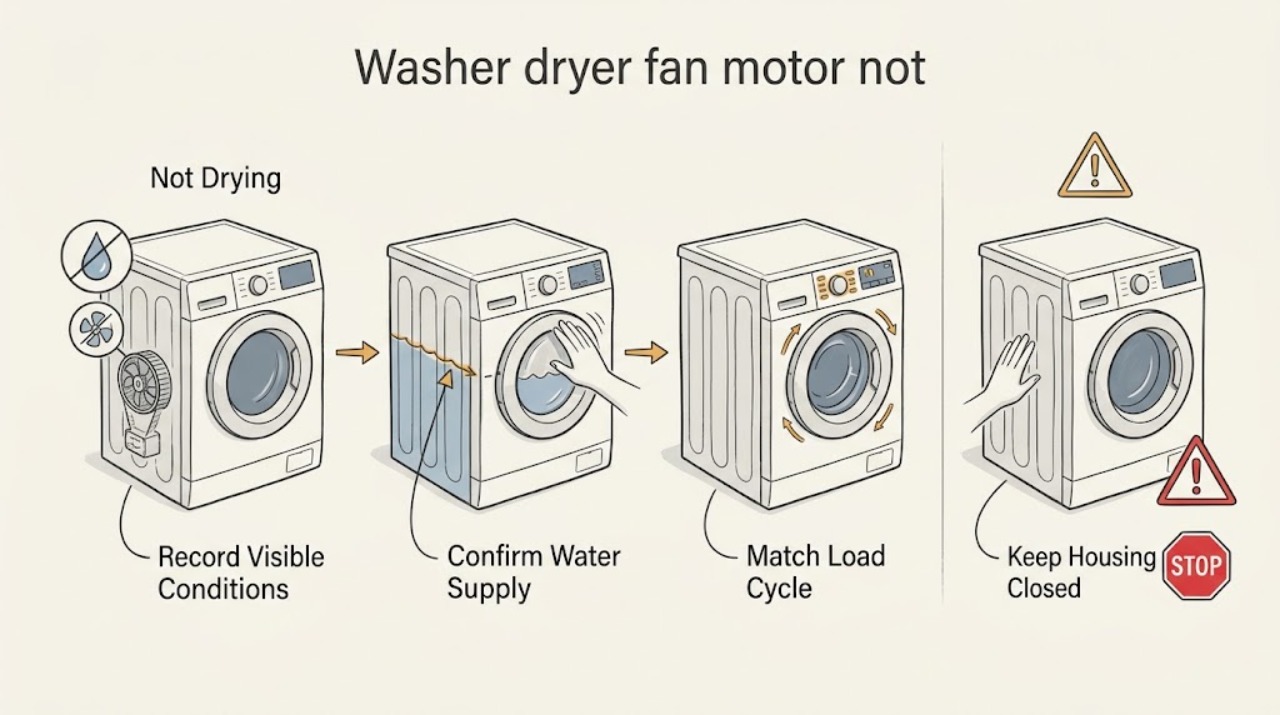
Work through in order
Diagnostic checks
Use only checks that match the exact appliance or system and its official guide.
-
Check 1
From outside the Electrolux washer-dryer, record or photograph the complete model number, exact display code, cycle, phase, load size, and whether the drum is warm and the fan can be heard.
Expected result: Note whether the problem appears at the start, during wash, during drying, or at the end; record damp laundry, no airflow sound, unusual noise, water remaining, or a post-drying blank control.
Next step: Use the exact manual for the recorded model and continue only if the appliance is stable, cool enough to inspect, dry outside, and fully stopped.
Stop if: Stop immediately for smoke, burning or electrical odor, sparking, abnormal heat, a leak, water near electricity, or a breaker event.
Why this matters
Why: The same symptom can come from settings, water or drainage, airflow, fan hardware, wiring, or controls. ED8/ED9 and E50/C9/F9 are meaningful only when the exact code and model match the applicable source.
-
Check 2
Verify from the appliance exterior that the water tap is open and the washer-dryer is not showing an inlet or drain warning; do not loosen the hose or open a connection.
Expected result: Record whether the tap was closed, the supply is interrupted, a warning is shown, or the machine completes wash but still fails only during drying.
Next step: Correct only the accessible tap or documented control setting, then use the exact manual's normal procedure; arrange service if water flow, leaks, or warnings persist.
Stop if: Stop for a hose leak, water near the outlet or cord, inability to shut off water safely, or any electrical odor.
Why this matters
Why: Electrolux states that a washer-dryer can need water during drying. A closed tap or water issue can therefore resemble a drying fault, while a normal fill does not prove the fan is healthy.
-
Check 3
Compare the load with the exact Electrolux drying capacity, fabric care symbols, and selected drying program; remove items or reduce the load to the documented drying limit.
Expected result: Record whether the load is substantially smaller after reduction, mixed fabrics are present, the program was wash-only or unsuitable, or the same load repeatedly ends damp.
Next step: Run one model-approved drying program with the reduced, suitable load; if the result remains abnormal, continue to the filter and service boundary rather than adding more heat or time.
Stop if: Do not exceed the drying limit, dry items whose care symbols prohibit it, or continue if the drum or cabinet is abnormally hot.
Why this matters
Why: Electrolux notes that drying capacity is lower than washing capacity, especially for non-stop cycles, and directs users to match the cycle to the load and care symbols. An overloaded or mismatched cycle does not identify a fan failure.
-
Check 4
If the exact model is a heat-pump washer-dryer and its manual identifies primary or secondary air filters as user-accessible, inspect and clean those filters from the documented access point with the appliance stopped and cool.
Expected result: Record whether lint or visible blockage is present, whether the filter can be removed without tools or panel removal, and whether it is clean and correctly refitted.
Next step: Reinstall the clean, dry filter exactly as the manual shows and make one normal drying verification; if the filter is inaccessible, damaged, or the symptom persists, arrange service.
Stop if: Do not remove panels, reach into the fan or duct, operate with a missing filter, or use water on a filter unless the exact manual permits it.
Why this matters
Why: Electrolux's drying guidance specifically calls out primary and secondary air filters for heat-pump washer-dryers; this is not a universal instruction for every washer-dryer design.
-
Check 5
Only when the exact manual says the drain filter is user-accessible, inspect and clean it using the model procedure after the appliance is unplugged from a dry safe location, fully stopped, and cool.
Expected result: Note whether water drains as documented, lint or debris is present, the filter seals normally, and no leak remains after refitting.
Next step: Refit the filter and run one documented verification only if the area is dry and the appliance is intact; seek service for standing water, a leak, a stuck filter, or repeated no-dry.
Stop if: Do not open a hot or pressurized area, touch wet electrical equipment, force a filter, or continue if water reaches the cord or outlet.
Why this matters
Why: Electrolux lists the drain filter among checks for washer-dryers that take too long or do not dry, but filter location, draining, and hot-water precautions vary by model.
-
Check 6
With the cabinet closed, listen and observe from outside during a model-approved drying phase; do not open the appliance or use a meter on the fan motor or its wiring.
Expected result: Record normal airflow, no airflow, a rattling or grinding sound, a fan that starts and stops, or a fan symptom paired with an exact ED8, ED9, E50, C9, or F9 code.
Next step: Stop using the washer-dryer and arrange qualified service with the exact model, code, timing, and sound description; do not select a motor part from the symptom alone.
Stop if: Stop for smoke, burning smell, abnormal heat, sparking, a breaker trip, exposed damage, or water near electrical parts.
Why this matters
Why: The outside symptom can prioritize service evidence but cannot distinguish a motor from wiring, tachometer feedback, control board, duct, or another model-specific fault. The cited service manual's ED8/ED9 mapping is limited to its model family; Electrolux lists E50/C9/F9 as motor-failure codes.
-
Check 7
After the applicable checks and only with no safety warning, run one normal model-approved drying verification with a suitable reduced load while remaining nearby.
Expected result: Record whether the drum warms normally, airflow is present, the program completes, clothes are drier, and the exact fault returns.
Next step: If it still does not dry, keep the appliance off and provide the service record to qualified Electrolux appliance service.
Stop if: Stop the program for smoke, burning or electrical odor, abnormal heat, unusual fan noise, leak, water near the outlet, or a recurring code.
Why this matters
Why: Improvement after load, water, cycle, or filter correction supports an operating-condition problem; a persistent or recurring fault points to service diagnosis, not repeated resets.
-
Check 8
Prepare a service record without opening the washer-dryer: model, exact code, cycle and stage, load size, water-tap status, filter findings, airflow sound, temperature impression, and verification result.
Expected result: Note whether the fault is repeatable, whether it occurs only in drying, whether a fan starts and stops, whether water remains, and whether the unit fails to power on after drying.
Next step: Arrange qualified Electrolux washer-dryer service and provide the record; keep the appliance unused if the fan-related or motor code returns.
Stop if: Do not bypass an interlock, remove covers, access the motor, or continue cycles to reproduce the fault.
Why this matters
Why: These observations help a technician separate settings, water or drainage, airflow, fan motor, wiring, control, and post-drying power behavior without unsafe access.
Use your observations
Decision map
Find the observation that best matches what you see, then follow the next safe action.
-
PATH 01Safety boundary
What you see
The load exceeds the model's drying capacity, the program does not match the fabrics, or the care symbols do not permit the selected drying setting.
Do this next
Use the exact program and a suitable reduced load once, then escalate if drying remains poor.
Why this path and its safety boundary
Why it matters: An operating-condition problem is more likely than a failed fan motor, but it does not rule out a second fault if a suitable reduced-load test still fails.
Safety stop: Do not exceed the drying limit or continue with abnormal heat.
-
PATH 02Safety boundary
What you see
The water tap was closed, an inlet warning appeared, or the symptom began with another water-related abnormality.
Do this next
Correct only the accessible tap or documented setting; service persistent warnings, leaks, or failed fills.
Why this path and its safety boundary
Why it matters: Water supply or a related water-control issue is more likely because Electrolux says washer-dryers may need water during drying.
Safety stop: Stop for leaks or water near electricity.
-
PATH 03Safety boundary
What you see
A model-approved air filter on a heat-pump unit or accessible drain filter is visibly blocked and the appliance otherwise remains safe.
Do this next
Clean and refit only the documented filter, then verify once; service if the symptom or warning returns.
Why this path and its safety boundary
Why it matters: Restricted airflow or drainage is more likely than a fan-motor failure, but the exact manual determines whether the filter is user-serviceable.
Safety stop: Do not remove panels or force a filter.
-
PATH 04Safety boundary
What you see
The exact model shows ED8 or ED9, or the closed-cabinet observation is no fan airflow or abnormal fan noise after the safe checks.
Do this next
Keep the unit off and arrange qualified service with the exact code and model; do not order a motor from the symptom alone.
Why this path and its safety boundary
Why it matters: An internal fan, tachometer feedback, wiring, control board, or another model-specific airflow fault is more likely. The ED8/ED9 interpretation is limited to the cited service manual's model family.
Safety stop: Do not open panels or use a meter on the motor circuit.
-
PATH 05Safety boundary
What you see
The exact display shows E50, C9, or F9 on an Electrolux washer-dryer.
Do this next
Stop using the appliance and provide the exact code and model to qualified service.
Why this path and its safety boundary
Why it matters: Electrolux's cited support guidance treats these codes as motor-failure indications and directs the user to authorized service; it does not identify a replaceable part for every model.
Safety stop: Do not clear and repeatedly run cycles or access the motor.
-
PATH 06Safety boundary
What you see
The appliance still will not dry after one applicable model-approved check, the same fault recurs, or it will not switch on after a drying cycle.
Do this next
Keep the washer-dryer off and arrange qualified service with the complete service record.
Why this path and its safety boundary
Why it matters: The issue has crossed the user-check boundary and may involve internal components or a safety fault.
Safety stop: Stop for smoke, burning or electrical odor, leak, abnormal heat, sparking, or water near electricity.
Helpful context
Understand the symptom
Confirm what “not drying” means
Record the complete model number, exact display code, cycle and phase, load size, and whether the drum is warm, the fan can be heard, or the program ends with damp laundry. “Not drying” can describe a wrong cycle or overloaded drum, restricted moisture removal, a water-supply issue, or an internal fan, wiring, or control fault. Do not infer a fan-motor failure from damp clothes alone.
Start with the drying conditions Electrolux documents
Electrolux says a washer-dryer may need the water tap open during drying. Verify the tap is open and that no water-inlet or drain warning is present, without loosening hoses. Drying capacity is lower than washing capacity, especially on a wash-and-dry program, so compare the load with the exact manual and reduce it if needed. Choose the program and fabric setting that match the load and care symbols.
Check only model-approved airflow and drainage access
On heat-pump washer-dryers, Electrolux says to check the primary and secondary air filters; other designs may not have these user-cleanable filters. Check or clean a drain filter only when the exact manual identifies it as accessible, the appliance is cool and stopped, and the procedure can be done without exposing electrical parts. Never remove a cabinet panel to reach a fan or duct.
Keep fan-motor codes model-specific
A fan motor is an internal component. In one Electrolux service manual, ED8 refers to a missing washer-dryer fan-motor tachometer signal and ED9 to a fan-motor driving-circuit alarm; the listed possibilities include the fan motor, wiring, or washer-dryer control board. Those references are not universal Electrolux code meanings. If the exact model shows ED8, ED9, E50, C9, or F9, or the fan is absent or abnormal after the safe checks, stop and provide the code and model to qualified service.
Make one safe verification, then escalate
After the applicable user checks, run one normal model-approved drying verification only if there is no leak, heat hazard, electrical odor, or damage. Note whether airflow, warmth, and drying improve. A repeated no-dry symptom, recurring code, no fan sound, unusual fan noise, or a unit that will not power on after drying is a service diagnosis, not a reason to keep resetting or opening the appliance.
Safety boundary
Stop conditions
- Stop for smoke, burning or electrical odor, sparking, abnormal heat, a leak, water near the cord or outlet, a hot plug, or a breaker event.
- Do not remove the cabinet, reach the fan motor, access internal wiring, use a meter on the motor circuit, or bypass an interlock.
- Do not apply ED8, ED9, E50, C9, or F9 meanings to a different model, code, or appliance without the exact Electrolux documentation.
- Do not clean or remove an air or drain filter unless the exact model manual identifies that access as user-serviceable; keep the area and electrical connections dry.
- Do not run a cycle with a missing filter, damaged cord, leak, abnormal fan noise, or an appliance that is unusually hot.
- After one safe, model-approved load, water, filter, and drying verification, arrange service for a recurring no-dry symptom, no fan airflow, or a returning code.
Only after diagnosis
Potential parts
- washer-dryer drying fan motor
Consider this category only after the exact model code or qualified diagnosis links the symptom to the fan motor; damp laundry alone is not enough.
Confirm the complete Electrolux model, motor specification, connector, and service documentation before selecting a part. - fan-motor wiring, tachometer, or control board
Consider these categories only when the exact model documentation or qualified diagnosis identifies a feedback, wiring, or control fault such as the cited model-specific ED8/ED9 paths.
Confirm the complete model and circuit design; do not infer compatibility from a code shared by another model. - model-specific air or drain filter
Consider a replacement filter only when the exact manual identifies it, the installed filter is damaged or cannot be restored by documented cleaning, and diagnosis confirms it is the restriction.
Filter design and user access vary by washer-dryer model, especially between heat-pump and other designs.
When checks do not resolve it
Need a professional?
Arrange qualified Electrolux washer-dryer service when ED8, ED9, E50, C9, or F9 appears on the exact model; when the fan is absent or abnormal from outside; when drying still fails after the applicable load, water, filter, and cycle checks; when the unit will not power on after drying; or whenever a leak, electrical symptom, abnormal heat, or damage is present.
Safety scope: This article supports ordinary-access observation and model-approved filter or control checks only. Do not open panels, access the fan motor, use a meter on internal wiring, bypass an interlock, or touch wet electrical equipment.
Common questions
FAQ
Can a washer-dryer need water while it is drying?
Yes. Electrolux's washer-dryer drying guidance says to make sure the water tap is on because these appliances may use water during drying. Verify the accessible tap and any warning without loosening hoses; service leaks or persistent water faults.
Does damp laundry prove the Electrolux fan motor is bad?
No. Electrolux first points to water supply, applicable filters, drying load, and cycle or fabric selection. A fan motor is internal, and a code or qualified diagnosis is needed before treating it as the cause.
Which Electrolux washer-dryer models have user-cleanable air filters?
The cited Electrolux guidance specifically mentions primary and secondary air filters on heat-pump washer-dryers. Do not assume another design has the same access; use the exact model manual.
What do ED8 and ED9 mean on an Electrolux washer-dryer?
In the cited Electrolux service manual, ED8 is associated with a missing fan-motor tachometer signal and ED9 with a fan-motor driving-circuit alarm. These references are limited to that manual's model family and require qualified service; do not apply them to another model without documentation.
What do E50, C9, or F9 mean on an Electrolux washer-dryer?
Electrolux's cited support page treats E50, C9, or F9 as motor-failure indications and directs the user to authorized service when the exact code is displayed. The code does not by itself select a compatible replacement motor.
Can I open the washer-dryer to test the fan motor?
No. Ordinary users should not remove panels, access the fan motor, or use a meter on internal wiring. Record the exact code and model, keep the appliance off if the fault recurs, and arrange qualified service.
Read the exact guide
Official sources
- Drying cycle of washer dryer takes too long, too short or not drying at allElectrolux · Official Electrolux support article for washer-dryers; apply filter and drying checks only where the exact model and manual support them.
- Washing machine displays error message E50Electrolux · Official Electrolux support article applying only when the exact E50, C9, or F9 code is actually displayed on an applicable washing machine or washer-dryer.
- Washer - dryer does not switch on after a drying cycleElectrolux · Official Electrolux washer-dryer support article for a unit that does not switch on after drying; exact model and electrical safety conditions still control.
- SERVICE MANUALElectrolux · Official Electrolux service manual for its documented model family; ED8/ED9 meanings are not universal and internal service work is for qualified technicians.
Community feedback
Share a repair observation
Share a plain-text repair observation. Accepted observations are published automatically; this page may take a moment to update.