
On this page
Start here
Quick answer
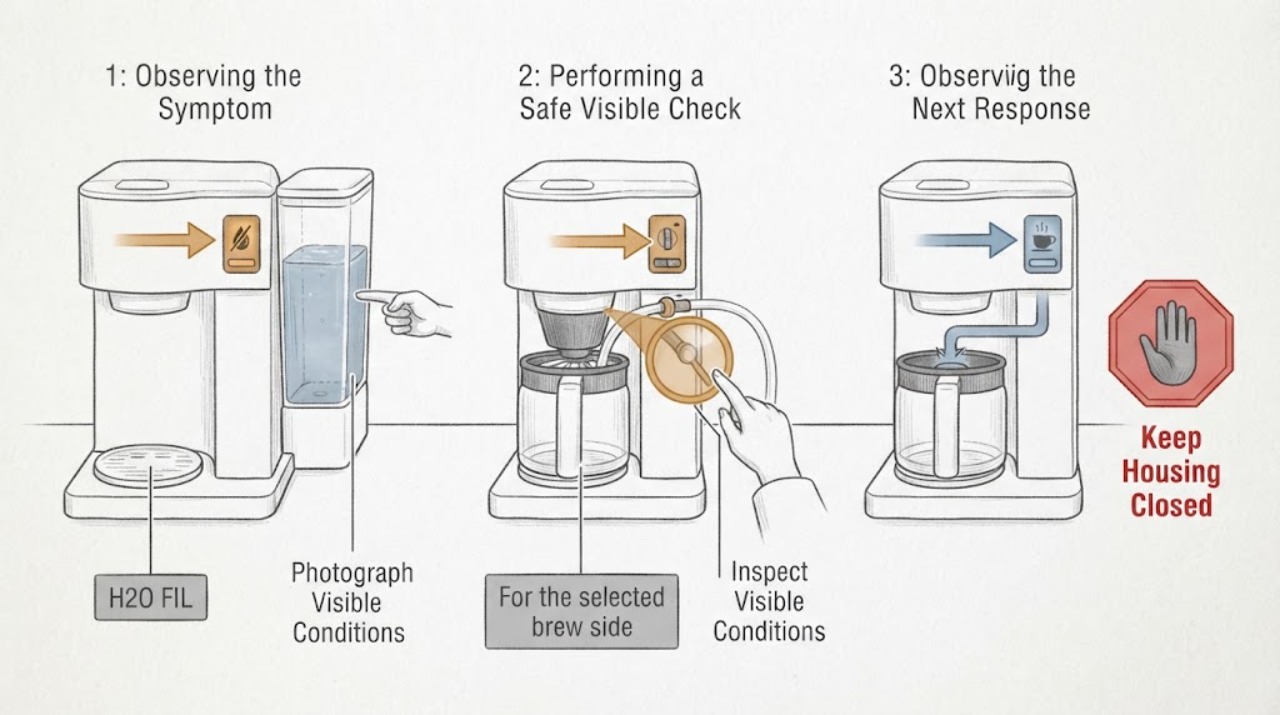
On Hamilton Beach Type A124 2-Way FlexBrew coffee makers, H2O FIL means the machine has detected insufficient water for the brew. Add cold water to the correct reservoir, stay within the amount for the selected single-serve or carafe mode, close the lid, and press BREW NOW. If H2O FIL remains while the reservoir has water, or the message clears but the machine still will not brew, do not infer a failed sensor, pump, or control board and do not open the housing; use the documented removable-part cleaning procedure or arrange authorised service.
Work through in order
Diagnostic checks
Use only checks that match the exact appliance or system and its official guide.
-
Check 1
Photograph the display and read the rating label before changing settings. Confirm that the appliance is a Hamilton Beach Type A124 coffee maker, with a model in the guide's 49940, 49950, 49956, or 49976 family, and transcribe H2O FIL exactly.
Expected result: The label identifies a Type A124 model and the display reads H2O FIL, or the model or display differs.
Next step: For a confirmed Type A124 H2O FIL display, continue to the reservoir check. For another model or an unclear display, retrieve that model's Use & Care guide before attempting a reset.
Stop if: Do not repeatedly restart the unit or remove covers to find the label. Stop immediately for smoke, sparks, burning odor, a hot or damaged cord, or liquid in the base.
Why this matters
Why: The official Type A124 guide assigns H2O FIL to insufficient water. A different model or message may use another detection rule, so the Type A124 interpretation must not be copied across the product range.
-
Check 2
For the selected brew side, add cold water to its water reservoir and remain within the guide's limit: up to 10 ounces (296 ml) for a single-serve pack or up to 14 ounces (414 ml) for single-serve ground coffee. Close the reservoir and main lids fully.
Expected result: The reservoir was empty or below the required amount, the reservoir now contains water within the mode limit, or the display remains H2O FIL despite adequate water.
Next step: If the reservoir was low, continue with one normal BREW NOW attempt. If adequate water is present but H2O FIL remains, stop repeated retries and arrange model-specific service.
Stop if: Use cold water only. Do not overfill, pour water into the housing, or dismantle the reservoir or control area.
Why this matters
Why: An empty or insufficient reservoir matches Hamilton Beach's documented H2O FIL meaning. A persistent message with adequate water is an unresolved detection or control condition; the guide does not identify a user-replaceable sensor from this display alone.
-
Check 3
With the lids closed and a suitable cup, travel mug, or carafe in position, press BREW NOW once to start the normal brew sequence. Observe the display and whether water begins moving, without opening the lid during brewing.
Expected result: H2O FIL clears and brewing starts, H2O FIL returns, or the message clears but no water or coffee is dispensed.
Next step: If brewing starts, let the supervised cycle finish. If the message returns or no brew occurs, unplug and cool the unit, then use only the applicable documented cleaning or service path.
Stop if: Do not lift the lid over hot water, run repeated dry cycles, or test live wiring or internal components.
Why this matters
Why: Clearing after the reservoir is filled supports the documented low-water condition. A returning display or a no-brew symptom means the water check did not resolve the problem and does not identify a specific internal part.
-
Check 4
If H2O FIL has cleared but the single-serve side still will not brew, unplug the coffee maker and allow it to cool. Inspect and clean only the removable piercing needle holder as shown in the guide; if mineral buildup is suspected, follow the guide's cleaning procedure rather than opening the housing.
Expected result: The needle is visibly clogged, the guide's cleaning procedure restores normal brewing, or the needle appears clear and the no-brew condition remains.
Next step: Reassemble the documented removable parts and perform one normal water-only check if the unit is cool and dry. Arrange service if brewing remains abnormal or the display returns.
Stop if: Do not clean while plugged in or hot, use a metal tool beyond the guide's specified method, remove the bottom cover, or disassemble the unit.
Why this matters
Why: Hamilton Beach lists a clogged piercing needle and mineral deposits as separate causes of a no-brew symptom. A clear needle or a persistent failure does not prove that H2O FIL was caused by a particular sensor, pump, or board.
Use your observations
Decision map
Find the observation that best matches what you see, then follow the next safe action.
-
PATH 01Next step
What you see
The Type A124 display clearly reads H2O FIL and the reservoir is empty or below the amount needed for the selected brew mode.
Do this next
Add cold water within the mode limit, close the lids, and press BREW NOW once. Monitor the brew without opening the lid.
Why this path and its safety boundary
Why it matters: This matches Hamilton Beach's documented insufficient-water notification rather than a confirmed internal failure.
-
PATH 02Next step
What you see
The Type A124 reservoir contains adequate water but H2O FIL remains or returns immediately.
Do this next
Stop repeated retries, unplug the unit from a dry safe position, and arrange Hamilton Beach or qualified small-appliance service with the model, display photo, and reservoir state.
Why this path and its safety boundary
Why it matters: The documented low-water response did not resolve the display. The official guide does not justify naming a failed water sensor, pump, or control board from this symptom alone.
-
PATH 03Next step
What you see
H2O FIL clears after adding water, but the coffee maker still does not dispense coffee.
Do this next
After unplugging and cooling, follow the documented removable-needle and cleaning procedure once. Arrange service if the no-brew condition remains.
Why this path and its safety boundary
Why it matters: The water notification has cleared, while the guide's separate no-brew causes include a clogged piercing needle or mineral deposits; this is not evidence that H2O FIL identified the failed part.
-
PATH 04Next step
What you see
The display is accompanied by a leak, overflow, smoke, sparks, burning odor, a hot or damaged cord, or liquid near the electrical base.
Do this next
Stop using the coffee maker and disconnect power only from a dry, safe position. Keep it out of service and obtain qualified service assistance.
Why this path and its safety boundary
Why it matters: The immediate electrical, burn, or liquid hazard takes priority over interpreting a notification or attempting cleaning.
Helpful context
Understand the symptom
What H2O FIL means on Type A124
The Hamilton Beach Type A124 guide covers the 2-Way FlexBrew models 49940, 49950, 49956, and 49976. In its single-serve troubleshooting table, H2O FIL is defined as not enough water, so the first check is the water reservoir rather than the pump or electronics. Confirm that the display really reads H2O FIL; CLEAN, CLOSE LID, and NEEDLE are separate notifications with different instructions.
Add water for the selected brew mode
Use cold water in the reservoir and follow the guide's mode-specific limit. For a single-serve pack, the guide describes up to 10 ounces (296 ml); for single-serve ground coffee, it describes up to 14 ounces (414 ml). Close the reservoir lid and the main lid, then press BREW NOW. Do not keep adding water to force the message away or use hot water in the reservoir.
When the message clears but brewing still fails
If H2O FIL clears after water is added but coffee still does not dispense, the guide lists other documented possibilities such as a clogged piercing needle or mineral deposits. Unplug the coffee maker and let it cool before handling the removable needle holder, and use only the guide's cleaning steps. A persistent H2O FIL with adequate water is not proof of a particular water sensor or pump failure; stop before opening the housing and provide the model and display to service.
When checks do not resolve it
Need a professional?
Arrange Hamilton Beach or qualified small-appliance service when H2O FIL remains with adequate water, returns after one normal attempt, or the coffee maker still will not brew after the documented removable-part cleaning. Provide the exact Type A124 model, display photo, selected brew side, water amount, and whether the needle or mineral-cleaning check was completed. Do not choose a sensor, pump, heater, or control board from H2O FIL alone.
Common questions
FAQ
What does H2O FIL mean on a Hamilton Beach Type A124 coffee maker?
Hamilton Beach's Type A124 guide defines H2O FIL as not enough water. Add cold water to the appropriate reservoir within the limit for the selected brew mode, close the lids, and press BREW NOW.
How much water should I add when H2O FIL appears?
Use the amount required by the selected mode and stay within the guide's maximum: up to 10 ounces (296 ml) for a single-serve pack or up to 14 ounces (414 ml) for single-serve ground coffee. Use cold water and do not overfill.
What if H2O FIL stays on after I add water?
Do not assume a particular sensor or pump has failed and do not open the coffee maker. Stop repeated retries, unplug from a dry safe position, and arrange model-specific service with the display photo and exact Type A124 model. If the message clears but the unit still does not brew, follow only the guide's unplugged, cooled needle and cleaning procedure before calling service.
Read the exact guide
Official sources
- Hamilton Beach 2-Way FlexBrew Coffee Maker (49940) - Use & CareHamilton Beach · Official Use & Care guide for the Type A124 model family, listing models 49940, 49950, 49956, and 49976. It defines H2O FIL as not enough water and gives the water limits, normal brew controls, removable-needle procedure, no-disassembly warning, and no-brew troubleshooting.
Community feedback
Share a repair observation
Share a plain-text repair observation. Accepted observations are published automatically; this page may take a moment to update.