
On this page
Start here
Quick answer
A Hamilton Beach coffee maker that will not brew after a water warning needs a model-specific check, because the indicator is not standardized across the brand. First identify the model and confirm that the reservoir is filled with the kind and amount of water its guide specifies, then reseat the reservoir, lid, brew basket or pod holder, and receiving cup or carafe. On the official FlexBrew 49968 page, an illuminated cup-size indicator means add water, while all cup-size indicators flashing means an interrupted brew must be purged; on the official Scoop 49987 guide, a blinking red ON/OFF button with an empty reservoir means add water. Unplug and let the brewer cool before cleaning. Stop for hot-water overflow, a damaged cord, burning odor, or a water warning that remains after the model-specific external checks.
Work through in order
Diagnostic checks
Use only checks that match the exact appliance or system and its official guide.
-
Check 1
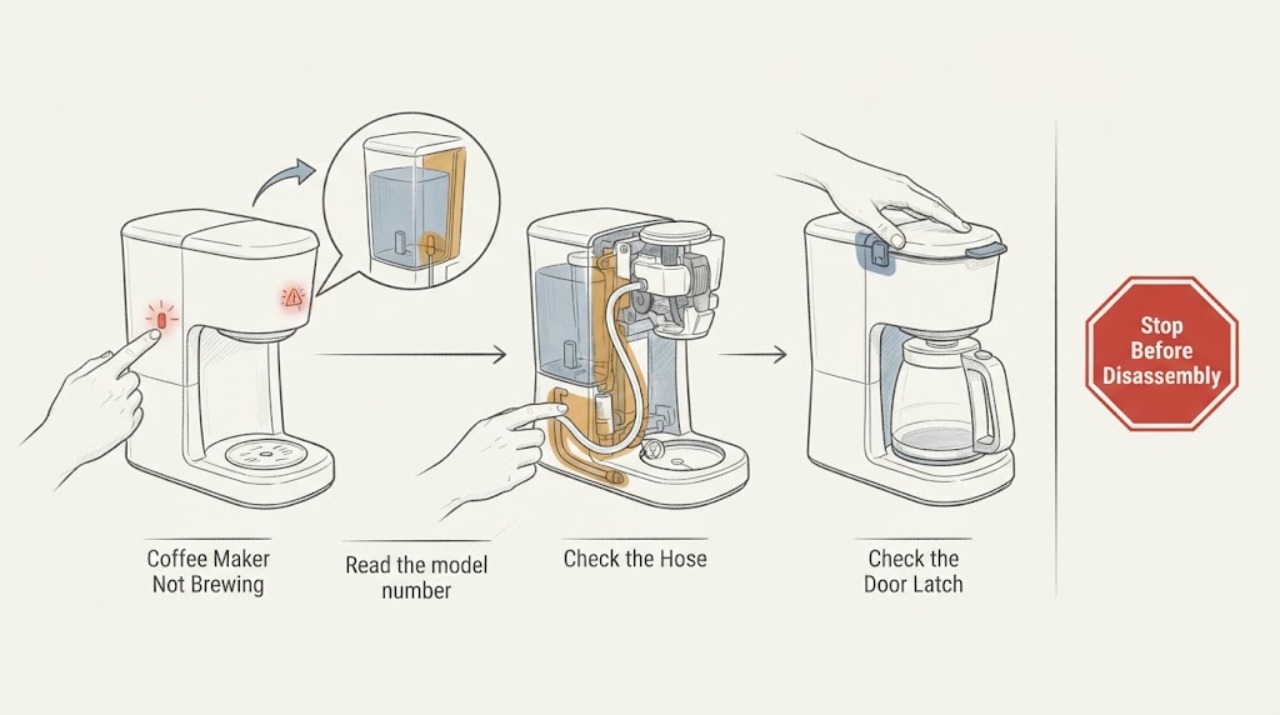
Read the model number from the brewer or its Use & Care guide and copy the exact water-warning wording or light pattern. Do not assume that a blinking cup-size light, a brew-light count, and a red ON/OFF light have the same meaning.
Expected result: The brewer matches a documented family such as FlexBrew 49968/49979 or Scoop 49987, or the model and indicator cannot be identified.
Next step: Use the matching branch below if the model is confirmed. If it is not confirmed, limit the remaining work to visible water, seating, power, and safety checks and do not apply a model-specific flash count.
Why this matters
Why: Hamilton Beach assigns different water-related indications to different models; the brand does not provide one universal water-detection code in the opened documents.
-
Check 2
With the brewer unplugged and cool, fill the reservoir only with the water amount and type stated for the confirmed model, then reseat the reservoir and its lid. For the FlexBrew 49968 instructions, the reservoir must be at least 15 oz and no more than 40 oz; do not copy those limits to an unidentified model.
Expected result: The reservoir was empty, below the model's minimum, overfilled, or not fully seated; or the water warning remains even though the documented level and seating are correct.
Next step: Correct the visible fill or seating issue and try one supervised brew. If the warning persists, continue with the exact model branch or arrange service rather than opening the housing.
Why this matters
Why: A missing or incorrectly positioned water supply can prevent brewing. A persistent warning with the correct visible setup is not proof of a failed sensor, pump, or board.
-
Check 3
Check the accessible brew path while the machine is unplugged and cool: close and latch the lid, reseat the removable brew basket or pod holder, and place the cup, travel mug, or carafe as the model requires. On a FlexBrew 49968, inspect the removable needle holder only as described by Hamilton Beach and do not handle the sharp needle until the unit is unplugged and cool.
Expected result: The lid or receiving vessel was mis-seated, the pod or basket path is visibly blocked, or the water indication and no-brew symptom continue with the path correctly assembled.
Next step: Correct only the visible setup issue and retry once. For a confirmed FlexBrew model, follow its official needle-cleaning procedure if the needle is visibly clogged; otherwise stop and use model-specific service guidance.
Why this matters
Why: The official FlexBrew guidance separates lid, needle, mineral-buildup, and water conditions; a no-brew result does not identify which internal component is at fault.
-
Check 4
If the confirmed FlexBrew 49968 shows all cup-size indicators flashing after a stopped or interrupted brew, place a mug of at least the documented size on the cup rest and use the model's purge/clear-water procedure. Do not use this three-second purge sequence on an unidentified Hamilton Beach model.
Expected result: The indicators stop flashing after the purge and a clean-water test brew completes, or the warning remains and the brewer still will not dispense water.
Next step: If the model-specific purge clears the condition, complete a clean-water rinse before coffee. If it does not, stop repeating cycles and contact Hamilton Beach or qualified service for the confirmed model.
Why this matters
Why: Hamilton Beach defines the all-flashing FlexBrew 49968 pattern as retained water after an interrupted brew, not as a general empty-reservoir code.
Use your observations
Decision map
Find the observation that best matches what you see, then follow the next safe action.
-
PATH 01Next step
What you see
A confirmed FlexBrew 49968 has one cup-size indicator illuminated while the reservoir is empty or below the documented level.
Do this next
Add the documented cold-water amount, reseat the reservoir, and supervise one brew cycle; if the indication remains with correct water and seating, stop and seek model-specific service.
Why this path and its safety boundary
Why it matters: Hamilton Beach's 49968 guidance assigns that illuminated indicator to adding water to the reservoir.
-
PATH 02Next step
What you see
A confirmed FlexBrew 49968 has all cup-size indicators flashing after the brew was stopped or interrupted.
Do this next
Use the 49968 purge procedure with a large mug, then run a clean-water test; do not transfer this branch to another Hamilton Beach family.
Why this path and its safety boundary
Why it matters: The official page says water remains in the unit and must be purged before the next cup.
-
PATH 03Next step
What you see
A confirmed FlexBrew 49979 has a nine-flash brew indicator and too little water is present.
Do this next
Add water to that model's reservoir and retry once. If the warning persists with the correct level, use the 49979 manual or arrange service; do not call it a failed sensor without further model evidence.
Why this path and its safety boundary
Why it matters: The 49979 Use & Care guide assigns nine flashes to not enough water.
-
PATH 04Next step
What you see
A confirmed Scoop 49987 has a blinking red ON/OFF button and its water reservoir is empty.
Do this next
Add water and press the ON/OFF button to start brewing. If it continues blinking with the documented water level, stop and use the exact model support path.
Why this path and its safety boundary
Why it matters: The 49987 guide says the unit will not brew until water is added.
-
PATH 05Next step
What you see
The model is unknown, the water warning persists after visible fill and seating checks, or hot water, smoke, burning odor, damaged wiring, or an uncontrolled leak is present.
Do this next
Stop using the brewer, disconnect power only when safe, keep away from hot liquid and sharp needles, and contact Hamilton Beach or a qualified appliance technician with the model number and indicator behavior.
Why this path and its safety boundary
Why it matters: The opened official documents do not support a universal Hamilton Beach sensor diagnosis, and hazardous or internal electrical work is outside safe external troubleshooting.
Helpful context
Understand the symptom
Hamilton Beach uses different water and brew indicators across its coffee-maker families. The FlexBrew 49968 support page documents cup-size indicators, a purge condition after an interrupted brew, and a separate brew-light pattern; the 49979 Use & Care guide documents a nine-flash not-enough-water condition; and the Scoop 49987 guide documents a blinking red ON/OFF button when its reservoir is empty. Treat the wording or light pattern on the appliance as a model clue, not as a universal Hamilton Beach error code.
These checks stay outside the housing. Hamilton Beach's FlexBrew guidance calls for unplugging and cooling before cleaning, warns about hot water and sharp piercing needles, and says repairs to a damaged cord or a malfunctioning unit should be handled by the manufacturer, service agent, or similarly qualified personnel.
When checks do not resolve it
Need a professional?
The model cannot be identified or the water warning does not match the exact model guide., The warning persists after the documented reservoir, lid, brew-path, and model-specific purge checks., Stop immediately for damaged electrical parts, burning odor, smoke, uncontrolled hot-water leakage, or any need to open the housing or bypass a water-sensing control.
Common questions
FAQ
Is Hamilton Beach water detection error a universal code?
No. The opened Hamilton Beach documents use different signals: FlexBrew 49968 documents illuminated or flashing cup-size indicators, FlexBrew 49979 lists nine flashes for not enough water, and Scoop 49987 documents a blinking red ON/OFF button with an empty reservoir. Confirm the model before interpreting the light.
What should I check first when a Hamilton Beach coffee maker will not brew?
Identify the model, verify the documented water level, reseat the reservoir and lid, and check the visible basket, pod holder, and cup or carafe position. A model-specific manual is needed before using a flash-count or purge sequence.
Can I keep trying brew cycles if the water warning stays on?
Do not keep repeating cycles when the warning remains with the correct visible water level, or when hot water, smoke, burning odor, leakage, or damaged wiring is present. Unplug and cool the brewer before cleaning, then use Hamilton Beach support or qualified service for the confirmed model.
Read the exact guide
Official sources
- Hamilton Beach The Scoop ADC with Removable Reservoir (49987) - Use & CareHamilton Beach · Opened the official 24-page Use & Care PDF and verified its brewing and troubleshooting sections are for The Scoop 49987. It documents the empty-reservoir blink behavior and external water/cleaning steps.
- FlexBrew® Coffee Maker (49968)Hamilton Beach · Opened the official Hamilton Beach product/support page for model 49968. It documents water-level and indicator behavior, reservoir placement, purge after interruption, cleaning, needle caution, and service boundaries for this model.
- HB $39 FlexBrew Single Serve Coffee Maker (49979) - Use & CareHamilton Beach · Opened the official 28-page Use & Care PDF and verified its troubleshooting section is for the 49979 FlexBrew model. It documents not-enough-water indication, accessible cleaning, and the service/safety boundary.
Community feedback
Share a repair observation
Share a plain-text repair observation. Accepted observations are published automatically; this page may take a moment to update.