
On this page
Start here
Quick answer
A thin layer of frost on a Hisense dehumidifier coil can be temporary when the unit's automatic de-icing cycle turns the compressor off and lets the fan run. Low room temperature can also cause some freezing. Turn the unit off, disconnect power before cleaning, let any ice thaw naturally, and check that the air filter is clean, installed, and not blocking airflow. Confirm the room is within the exact model's operating range and that the selected humidity mode is actually calling for dehumidification. If frost returns after a complete thaw and a clean filter, or if the fan does not run, water is leaking, a display code remains, or the unit has an electrical or burning odor, keep it unplugged and arrange qualified service. Do not chip ice, apply a heat source, open the cabinet, or diagnose sealed refrigeration parts at home.
Before you begin
Safety first
- The owner may turn the unit off, disconnect power, let frost thaw naturally, clean and dry the model-approved air filter, restore documented clearance, and empty and reseat the bucket. Qualified personnel must handle cabinet removal, live electrical diagnosis, fan or sensor replacement, compressor or sealed-system work, refrigerant, and internal wiring.
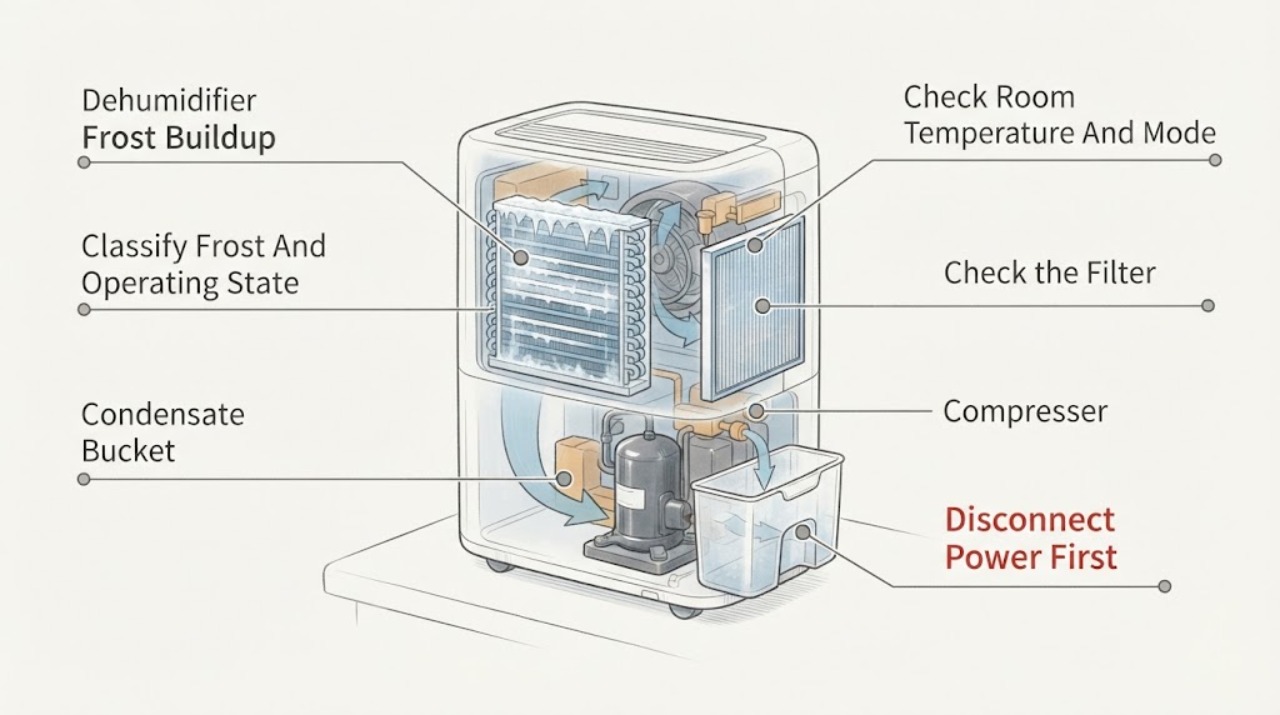
Work through in order
Diagnostic checks
Use only checks that match the exact appliance or system and its official guide.
-
Check 1
Turn the dehumidifier off and record where the frost is visible, how thick or extensive it is, the room temperature, whether the fan is moving air, and whether the compressor stopped while the frost was present. Do not power the unit again just to reproduce the condition.
Expected result: Frost is a light patch at low room temperature and the fan continues; the entire coil is encased; frost remains after a complete thaw; or the fan is silent and no air moves.
Next step: Disconnect power and allow the ice to thaw naturally, then continue with the filter, clearance, bucket, and mode checks. If the fan never operates or the frost immediately returns, stop owner diagnosis and arrange service.
Stop if: Stop for smoke, sparks, a burning or electrical odor, a hot or damaged cord or plug, water reaching electrical parts, or any need to open the cabinet.
Why this matters
Why: A light low-temperature patch with fan operation fits the automatic de-icing behavior described by Hisense. A coil that stays encased or a fan that cannot move air makes restricted airflow or an internal fault more likely than a normal defrost pause.
-
Check 2
After the frost has melted and power remains disconnected, check the room conditions and the control-panel mode against the exact Hisense manual. In Manual Set, compare the displayed room humidity with the selected target; also check for a timer, sleep, or automatic mode that changes compressor operation.
Expected result: The room is near or below the model's low-temperature limit; humidity is already at or below the target; the unit is in a mode with automatic humidity control; or the room is within range and the compressor should be called to run.
Next step: Move the appliance only to a dry, indoor location within the manual's stated range, close sources of outdoor moisture, and select a documented dehumidifying mode. Do not invent a temperature threshold for an unidentified model.
Stop if: Do not operate the unit in standing water, outdoors, or with a damaged power cord; stop if water approaches the outlet or controls.
Why this matters
Why: Low temperature can trigger de-icing or freezing, and a satisfied humidity target can legitimately stop the compressor. If conditions call for dehumidification but frost returns, the temperature or airflow branch becomes less likely and a fault becomes more likely.
-
Check 3
With the unit off and unplugged, remove the air filter only as the exact model guide shows. Vacuum or wash it by the documented method, let it dry completely if washed, reinstall it, and confirm that the louvers and the model-required clearance around the cabinet are not blocked.
Expected result: The filter is coated with dust or lint; the filter is wet, missing, or damaged; louvers are blocked or the unit is pressed against a wall; or the filter and airflow path are clean and open.
Next step: Correct the filter and clearance issue, allow the coil to thaw fully, and observe one normal cycle. Replace a damaged filter only after confirming the exact model; arrange service if frost returns with clean airflow.
Stop if: Do not run the appliance without its filter, wash the filter in a dishwasher or with an unapproved chemical, or reach into a moving fan.
Why this matters
Why: Hisense lists a dirty or obstructed filter as a cause of running without dehumidifying, and the guide warns not to operate without a filter. Poor airflow can make coil icing more likely, while a clean open path shifts concern toward temperature sensing, fan operation, or the sealed system.
-
Check 4
With power disconnected, empty the bucket if full and slide it fully into place. Check that the bucket, float, and any installed drain hose match the exact model instructions; do not assume that every Hisense dehumidifier has a pump or continuous-drain feature.
Expected result: The empty-bucket light is on; the bucket is full or misaligned; the float is not seated; a hose is kinked or incorrectly fitted; or the bucket and documented drain arrangement are correct.
Next step: Reinstall the bucket and any model-approved hose exactly as documented, then observe whether the unit resumes after its normal compressor delay. If the indicator stays on or water leaks, keep the unit off and arrange service.
Stop if: Stop for a cracked bucket, active leak near electrical parts, a damaged hose connection, or any need to remove a panel or alter the pump or drain assembly.
Why this matters
Why: Hisense says an empty-bucket light stops the fan and compressor, and the bucket must fit all the way into the cabinet. A stop caused by the bucket can leave existing frost to melt and can be mistaken for a compressor failure; a correct bucket with recurring frost points elsewhere.
-
Check 5
After a complete natural thaw, a clean and dry filter, clear louvers, a seated bucket, and a documented operating mode, observe one ordinary cycle without touching the coil. Note whether the fan starts, whether the compressor eventually runs, whether moisture collects, and whether a display code or unusual odor appears.
Expected result: The frost does not return and water collection resumes; light frost appears only during a low-temperature de-icing pause; frost quickly covers the coil again; the fan runs but the compressor never returns; or a code, leak, smoke, or burning odor appears.
Next step: Keep the unit in service only when it completes normal cycles without abnormal frost or hazard. Otherwise disconnect power and provide the exact model, room conditions, mode, filter state, bucket status, timing, and display information to qualified Hisense service.
Stop if: Do not repeatedly restart a unit with recurring frost, smoke, sparks, an electrical or burning odor, a hot cord, a leak near electrical parts, or a persistent error code.
Why this matters
Why: Recovery after thaw supports a temporary de-icing or airflow condition. Rapid recurring ice, no compressor recovery when humidity calls for it, or a persistent code indicates a possible fan, sensor, control, or sealed-system problem that cannot be identified safely from frost appearance alone.
Use your observations
Decision map
Find the observation that best matches what you see, then follow the next safe action.
-
PATH 01Safety boundary
What you see
The frost is light or intermittent, the room is cold, the fan continues during the pause, and the compressor returns after the coil warms.
Do this next
Keep the unit within the exact model's indoor operating range, maintain clean airflow, and monitor one normal cycle without scraping the coil. If the pattern becomes continuous, use the recurrence branch.
Why this path and its safety boundary
Why it matters: Automatic de-icing or low-temperature operation is more likely than a failed sealed system.
Safety stop: Stop for smoke, sparks, burning odor, water near electrical parts, or a damaged cord or plug.
-
PATH 02Safety boundary
What you see
The filter is dirty or wet, louvers are blocked, clearance is inadequate, or the fan cannot move normal air, and frost improves after thaw and airflow correction.
Do this next
Unplug, clean and fully dry the model-approved filter, restore the required clearance, and observe one cycle. Do not operate without the filter or reach into a fan.
Why this path and its safety boundary
Why it matters: Restricted or incorrect airflow is more likely than a part-specific refrigeration fault.
Safety stop: Arrange service if the fan remains inoperative, the filter is damaged, or ice returns despite clean, open airflow.
-
PATH 03Safety boundary
What you see
The humidity is already at the target, a mode controls the target automatically, or the empty-bucket light is on because the bucket is full, misaligned, or the float is not seated.
Do this next
Use the exact manual to select a dehumidifying mode, empty and reseat the bucket, and allow the model's restart delay. Do not assign a failed compressor until those conditions are corrected.
Why this path and its safety boundary
Why it matters: A deliberate control or bucket interlock stop can explain why the compressor is not running while old frost melts.
Safety stop: Stop for a persistent bucket indicator, a leak, or a damaged bucket or float that cannot be corrected without opening the cabinet.
-
PATH 04Safety boundary
What you see
The coil quickly becomes encased again after a complete thaw, the filter and clearance are correct, the room and mode call for dehumidification, or the compressor or fan behavior does not match the manual.
Do this next
Leave the dehumidifier unplugged and arrange model-specific qualified service. Give the technician the exact model, room temperature, humidity setting, frost timing, fan and compressor observations, and filter and bucket checks.
Why this path and its safety boundary
Why it matters: A fan, temperature sensor, control, compressor, or sealed-system issue becomes more likely; frost alone cannot identify which component is at fault.
Safety stop: Do not open the cabinet, make live measurements, add refrigerant, bypass controls, or keep cycling the unit to force it to defrost.
-
PATH 05Safety boundary
What you see
Frost is accompanied by a burning or electrical odor, smoke, sparks, a hot cord, water near electrical parts, an active leak, or a display code that remains after the documented reset or power check.
Do this next
Disconnect power only when it is safe to do so, keep the unit out of service, and arrange qualified appliance or electrical assessment. Do not attempt to interpret an unidentified code from another Hisense model.
Why this path and its safety boundary
Why it matters: The condition is a safety or service fault, not a user defrosting task.
Safety stop: Do not reconnect, scrape the coil, remove covers, or run another cycle while a hazard or persistent code remains.
Helpful context
Understand the symptom
First decide whether the frost is in a normal de-icing pause
Hisense's dehumidifier guide describes automatic de-icing: when a low-temperature condition is detected, the compressor stops while the fan can continue, then the compressor cycles back after the unit senses a suitable operating temperature. A small amount of frost at low room temperature is therefore not, by itself, proof of a failed compressor. Frost that remains after the unit has had time to thaw, covers the coil repeatedly, or is accompanied by weak airflow needs a different branch.
Airflow and room temperature matter
A blocked or dirty filter reduces the air passing over the cold coil and is specifically listed in the Hisense troubleshooting guidance when the unit runs without removing moisture. Turn the unit off and unplug it before removing the filter; clean it by the model-approved method and let a washed filter dry fully before reinstalling it. Also check the exact model's permitted room range. The opened guide states that water can freeze inside at or below 38°F, but the task has no model number, so do not apply that threshold to a different regional model without its manual.
A setpoint or bucket stop can look like a frost problem
In the opened Hisense guide, Manual Set mode runs the compressor only when room humidity is above the selected target; at or below the target, the compressor and fan can stop. The empty-bucket light also stops both the fan and compressor until the bucket is emptied and seated correctly. Check those conditions before deciding that a silent unit has a refrigeration failure. Mode names and indicators vary, so use the matching model guide for the panel in front of you.
Do not force or heat the ice
Unplug the dehumidifier and let frost melt without scraping, prying, or directing a heat gun, hair dryer, or other strong heat at the coil or plastic cabinet. Keep water away from the controls and outlet while it thaws. Do not remove covers or attempt a refrigerant, compressor, fan-motor, sensor, or live electrical diagnosis. Hisense's guide requires a grounded three-prong outlet and says not to use an adapter or extension cord; those electrical and internal checks belong to qualified service.
Safety boundary
Stop conditions
- Disconnect power and stop use for smoke, sparks, a burning or electrical odor, a hot or damaged cord or plug, or water near electrical parts.
- Do not chip, pry, or heat the frost with a heat gun, hair dryer, or other strong heat; let it thaw naturally with power disconnected.
- Do not operate without the air filter, with blocked louvers, in standing water, outdoors, or with a damaged bucket, hose, cord, or plug.
- Do not open the cabinet, perform live electrical tests, bypass controls or the bucket interlock, or work on the compressor or sealed refrigeration system.
- Do not apply an error code, temperature limit, pump feature, or control procedure from another Hisense model; use the exact model manual or qualified service.
When checks do not resolve it
Need a professional?
Arrange qualified Hisense appliance service when frost returns quickly after a complete natural thaw and clean airflow, when the fan or compressor does not behave as the exact manual describes, when a bucket or float indicator will not clear, or when a display code persists. Stop immediately for smoke, sparks, a burning or electrical odor, a hot or damaged cord or plug, water near electrical parts, or an active leak. Provide the exact model and serial information, room temperature and humidity, selected mode and target, frost location and timing, filter and clearance condition, bucket and drain arrangement, fan and compressor observations, and any display message. Internal fan, sensor, control, compressor, and sealed-system work requires qualified service.
Safety scope: The owner may turn the unit off, disconnect power, let frost thaw naturally, clean and dry the model-approved air filter, restore documented clearance, and empty and reseat the bucket. Qualified personnel must handle cabinet removal, live electrical diagnosis, fan or sensor replacement, compressor or sealed-system work, refrigerant, and internal wiring.
Common questions
FAQ
Is frost on a Hisense dehumidifier coil always a failure?
No. The opened Hisense guide says automatic de-icing can turn the compressor off during a low-temperature condition and that some freezing is normal at low temperatures. Frost that remains, rapidly returns after a complete thaw, or appears with weak airflow or abnormal electrical symptoms needs service diagnosis.
Can I scrape or heat the ice off the coil?
No. Turn the dehumidifier off, disconnect power, and let the ice thaw naturally. Scraping, prying, strong heat, cabinet removal, and sealed-system work can damage the coil or create an electrical hazard; follow the exact model manual or use qualified service.
What should I check before calling for service?
After the unit is unplugged and thawed, check the exact model's room-temperature range and mode, clean and fully dry the filter, restore louver clearance, and empty and reseat the bucket. If frost returns with clean airflow, or a fan, compressor, bucket indicator, display code, leak, odor, or power symptom remains abnormal, stop testing and provide those observations to qualified service.
Read the exact guide
Official sources
- Dehumidifier Use & Care GuideHisense USA · Opened Hisense USA dehumidifier guide; the PDF states that symbols may differ among models, and exact model controls and pump features must be confirmed before applying a procedure.
- Dehumidifiers FAQHisense USA · Hisense USA's official dehumidifier support FAQ, used to establish the brand product category and the need to use the matching model support information.
- 25-Pint Capacity, 1500 sq. ft. Coverage, DehumidifierHisense USA · A specific Hisense dehumidifier support page; it is evidence that model-level documentation exists, not a claim that DH2526K1W controls apply to every Hisense unit.
Community feedback
Share a repair observation
Share a plain-text repair observation. Accepted observations are published automatically; this page may take a moment to update.