
On this page
Start here
Quick answer
First note the exact Hisense model, the displayed time or code, the phase where the cycle stops, whether the door was opened, and whether water remains in the tub. A changing timer is not by itself proof of a fault: a Hisense manual says remaining time can update after heating and vary with inlet temperature, load, and ambient conditions. If the display shows a door-interruption indication such as STR on a model that uses it, follow that model's resume or cancel sequence rather than repeatedly pressing Start. With the machine off and cool, check that the door can close, racks and dishes do not obstruct the latch or spray arms, and the accessible filters and drain hose are not visibly blocked or kinked. Use only the error-code table for the exact model; Hisense manuals use different codes for outlet, inlet, heater, level, circulation, and overflow conditions. Stop for a leak, overfill, burning smell, smoke, sparking, repeated breaker trips, or water near electrical parts, and arrange qualified Hisense or appliance service for persistent stops, internal pump/heater/sensor faults, or any code that calls for service.
Before you begin
Safety first
- This article covers model identification, timing and display observation, door and rack checks, safe external power and water-supply observations, and owner-accessible filter or hose checks after cooling and isolation. Internal pump, heater, sensor, valve, latch, control, wiring, leak-protection, and live electrical work require qualified service.
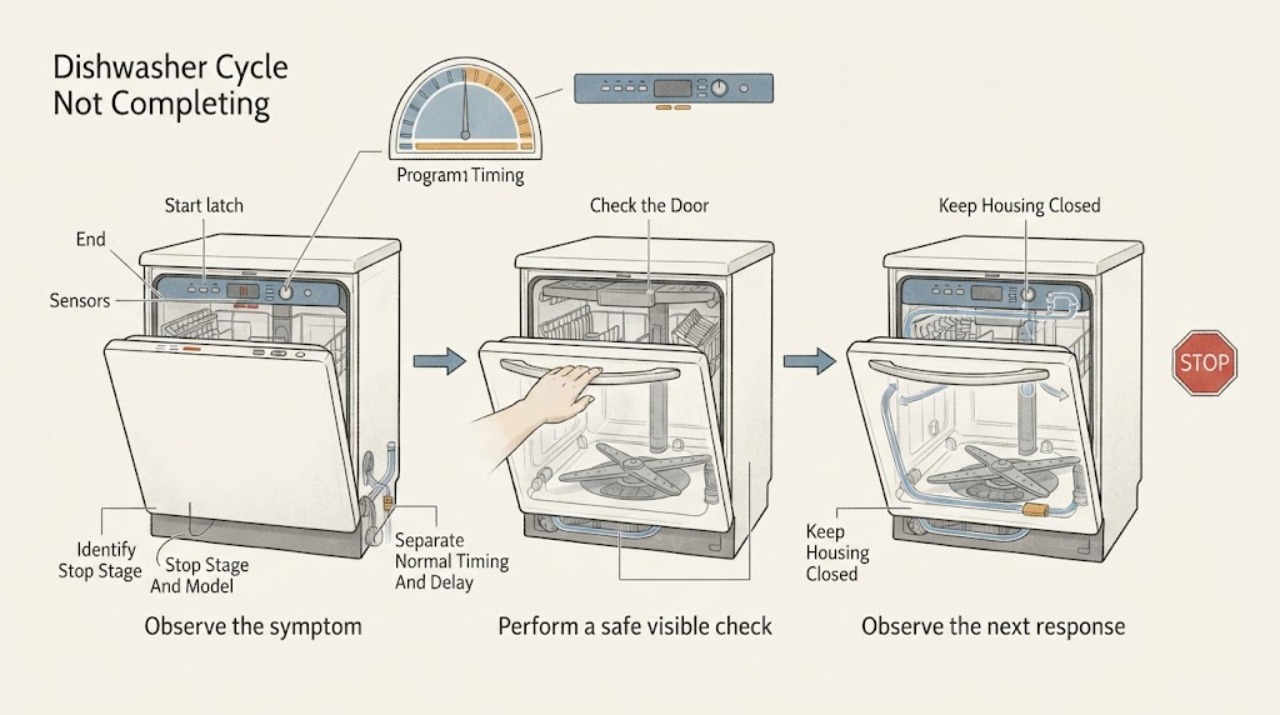
Work through in order
Diagnostic checks
Use only checks that match the exact appliance or system and its official guide.
-
Check 1
Record the complete model number, program and options, displayed time or code, whether the display is still active, and the point at which the cycle stops: before filling, during washing, during heating, during draining, or during drying. Note whether water remains in the tub and whether the door was opened or power was interrupted.
Expected result: The timer is changing slowly, the display is frozen or blank, a code is shown, the door was opened, water remains above the filters, or the machine stops at a repeatable phase.
Next step: Use the matching timing, door, drain, inlet, code, or service branch below and the exact Hisense manual. Do not apply a code or button sequence from another model.
Stop if: Stop immediately for leaking or overflowing water, smoke, burning odor, sparking, a hot or damaged cord, repeated breaker trips, or water near electrical parts.
Why this matters
Why: Hisense timing and controls vary by model. A time estimate that changes after heating is not the same as a fixed stop; water left in the tub points toward the drain path, while a repeatable heat or circulation phase needs model-specific service diagnosis.
-
Check 2
Check the exact manual for the selected program, options, and any delay or enhanced-drying feature. Observe whether the timer continues to change, the machine makes normal fill, spray, heat, drain, or drying sounds, and whether an End indication appears after the expected phases.
Expected result: The display is counting down a delay, the remaining time changes after heating, a selected option adds a phase, or the display and activity remain unchanged for an unusually long period.
Next step: Allow a documented phase to complete if there is no hazard. If delay was selected unintentionally, cancel it only with the exact model's documented control sequence; if the display remains frozen, continue to the door, power, and error checks.
Stop if: Do not repeatedly cancel and restart a hot cycle, open the door during a sanitation program unless the manual permits it, or keep operating when the appliance smells burnt or overheats.
Why this matters
Why: Hisense manuals state that time remaining can be recalculated after water is heated and that delay settings can postpone starting. A moving timer or a documented drying phase may be normal; an unchanged display with no phase progress is not explained by a moving estimate alone.
-
Check 3
When the dishwasher is safe to access, check that the racks and dishes are not blocking the door, that the door closes squarely, and that the latch engages without force. If the display shows a door-interruption message or flashing program control, follow only the exact model's resume or cancel instructions.
Expected result: The door does not latch, a dish or rack interferes, a door-open indication is shown, the program resumes after the model-approved close-and-resume step, or the symptom returns with a clear door.
Next step: Reposition only an obviously obstructing dish or rack and close the door as the manual specifies. If the latch will not engage or the cycle repeatedly stops after a proper close, leave the machine off and arrange service.
Stop if: Do not force the latch, defeat the door switch, remove the inner door panel, or reach into a moving or hot dishwasher.
Why this matters
Why: A dishwasher can stop or wait when the door is not closed or when a program was interrupted. The HUI6220XCUS manual uses STR after an in-cycle door opening and specifies a limited resume window; a repeated stop with a properly latched door makes a latch, wiring, or control fault more likely.
-
Check 4
From a dry, safe position, check whether the labeled household circuit is on and whether the water-supply valve is open. Look only for an obvious external kink in the visible supply or drain hose and note whether the display returns after a confirmed power interruption. Do not pull out a built-in dishwasher or remove electrical covers.
Expected result: The display is blank, a breaker is tripped, the breaker trips again, the water valve is closed, the machine stopped during filling, or external power and water appear normal.
Next step: Restore a clearly tripped breaker only once when the area is dry and there is no odor, heat, or visible damage. Open a clearly closed water valve only if there is no leak. If the breaker trips again, filling fails, or the display stays dead, stop and call qualified service.
Stop if: Do not reset repeatedly, substitute a fuse, use an extension cord, measure live voltage, move a hardwired appliance, or work around wet electrical connections.
Why this matters
Why: A power interruption can interrupt a program, and Hisense manuals distinguish inlet and outlet faults from internal faults. A repeat breaker trip or a dishwasher that has power but will not proceed is not an invitation to perform live testing.
-
Check 5
If the cycle stopped with standing water, cancel or isolate the dishwasher using the exact manual, allow hot water and parts to cool, and then inspect only the owner-accessible filter area. Check that filters are seated and locked, remove loose visible food debris without reaching into moving parts, and inspect an accessible drain hose for kinks or sharp bends.
Expected result: Water is above the filters, filters are dirty or not locked, the drain-pump area has loose visible debris, the drain hose is kinked, or the accessible drain path is clear but water remains.
Next step: Correct only an obvious filter seating issue or visible hose kink using the model manual, then run one supervised short or rinse test if there is no leak or electrical hazard. If water remains, a drain pump or internal path needs qualified diagnosis.
Stop if: Do not dismantle the pump, remove the base, reach through guards, tip the built-in dishwasher, use chemical drain opener, or test a pump with power applied.
Why this matters
Why: The opened HUI6220XCUS manual connects remaining water with blocked or incorrectly fitted filters, drain-pump debris, a missing pump stop, or a kinked or blocked drain hose. A clear owner-accessible path with repeated incomplete draining makes a pump, valve, installation, or control fault more likely.
-
Check 6
Compare any displayed code or warning with the exact model manual and document the phase, water level, door state, and recent power or installation changes. Treat the HUI6220XCUS examples F11, F12, F41, F54, and F56 only as that manual's meanings, not as a universal Hisense table.
Expected result: The exact manual identifies an inlet, outlet, heater, water-level, overflow, circulation, sensor, or communication fault; the code is absent from the manual; or the cycle still stops without a code after safe external checks.
Next step: Arrange Hisense-authorized or qualified appliance service and provide the model, code, program, stop phase, water level, and checks already made. Isolate water, power, or the appliance only when safe and follow the exact manual's emergency instruction for an overflow or leak.
Stop if: Do not bypass a door or overflow sensor, reset a fault repeatedly, open the base or control panel, test a heater or pump live, or continue using a leaking, smoking, sparking, or repeatedly tripping machine.
Why this matters
Why: Some incomplete cycles are caused by an internal pump, heater, sensor, valve, leak-detection, latch, or control problem. Hisense's model support pages and manuals are needed to select the correct service path and avoid an incorrect part or reset.
Use your observations
Decision map
Find the observation that best matches what you see, then follow the next safe action.
-
PATH 01Safety boundary
What you see
The timer changes, the dishwasher is audibly moving through a documented phase, or a delay or drying option is active, with no code, leak, smoke, or abnormal heat.
Do this next
Allow the exact program to finish and compare its final display with the model manual. If the timer freezes or the machine never reaches End, use the door, power, drain, and code branches.
Why this path and its safety boundary
Why it matters: A time estimate can be recalculated after heating and a delay can postpone the wash; this pattern does not by itself prove that the cycle is stuck.
Safety stop: Stop for a burning smell, smoke, sparking, leaking, abnormal heat, or a repeated breaker trip.
-
PATH 02Safety boundary
What you see
The door was opened, a door-interruption indication appears, the latch does not click, or a rack or dish prevents a square close.
Do this next
Remove only an obvious obstruction and use the exact manual's resume or cancel sequence once. Arrange service if the latch will not engage or the cycle stops again with the door correctly closed.
Why this path and its safety boundary
Why it matters: The program may be waiting for a valid door closure or may have entered the model's interruption state; a recurring stop after a proper close points toward the latch or control system.
Safety stop: Do not force, wedge, or bypass the latch or door switch.
-
PATH 03Safety boundary
What you see
The dishwasher stops near the drain phase, leaves water above the filters, or the exact manual identifies an outlet or drain fault.
Do this next
After cooling and isolating the appliance as the manual permits, inspect the owner-accessible filter and visible hose only. If the path is clear but water remains, stop and arrange drain-system service.
Why this path and its safety boundary
Why it matters: Blocked or incorrectly seated filters, debris at the drain pump, a missing pump stop, a kinked hose, or an internal drain fault can prevent cycle completion.
Safety stop: Do not dismantle the pump, tip a built-in unit, use drain chemicals, or perform a powered pump test.
-
PATH 04Safety boundary
What you see
The cycle stops during filling, an inlet or water-level code appears, the water valve is closed, or an overflow/leak indication is present.
Do this next
Check only an obvious closed water valve or accessible hose issue when dry and safe. For an overflow or leak, close the supply valve if safe, keep the appliance off, and arrange qualified service.
Why this path and its safety boundary
Why it matters: The inlet supply, hose, water-level sensing, inlet valve, or leak/overflow protection may be involved; the opened manual directs specific service or water shutoff for several such codes.
Safety stop: Do not continue a filling appliance that is overflowing, remove the base, defeat leak protection, or disconnect pressurized plumbing.
-
PATH 05Safety boundary
What you see
The exact manual reports heater, NTC/sensor, circulation, communication, or other internal fault, or the dishwasher repeatedly stops at the same phase after the door, power, water, and accessible drain checks are normal.
Do this next
Leave the dishwasher off and arrange model-specific Hisense or qualified appliance service. Provide the exact code, program, stop phase, water level, and any recent outage, installation, or leak observation.
Why this path and its safety boundary
Why it matters: A heater, sensor, circulation pump, valve, wiring, latch, or electronic control may be failing. These mechanisms cannot be distinguished safely by a generic brand-wide reset or code table.
Safety stop: Do not open electrical panels, test live wiring, bypass sensors or interlocks, replace an internal part by guesswork, or keep using the machine if it overheats or trips power.
Helpful context
Understand the symptom
A long timer is different from a stopped cycle
Record the program, options, displayed time, and when the appliance last made progress. In the opened HUI6220XCUS manual, the displayed remaining time is updated after the final-rinse water has been heated and can vary with water-supply temperature, load, and ambient temperature. A delay setting can also count down before the wash begins. Do not cancel a cycle solely because the estimate changes; treat an unchanged display, no activity, an error, or water left at the end as a different symptom.
Door openings can pause or invalidate a program
A top-control Hisense dishwasher may not respond until the door is properly closed. The HUI6220XCUS manual says a door opened during a program can show STR and gives a model-specific way to continue or cancel; it also says the door must be closed within the specified start window. Use the exact manual for your model, make sure racks and dishes are not preventing the latch from engaging, and never force the door or latch.
The stage and remaining water narrow the safe diagnosis
If the dishwasher stops with water above the filters, an outlet or drain-path problem becomes more likely; if it stops during filling, an inlet or water-level condition is more relevant. In the opened manual, the owner checks are limited to properly seated filters, debris at the drain pump, the drain-pump stop, and a drain hose without kinks or sharp bends. A persistent heater, sensor, circulation, leak, or overflow condition is a service problem, not a reason to open the base or test wiring.
Codes are examples, not a brand-wide table
Hisense publishes manuals and downloads by product or model. The HUI6220XCUS manual's F11, F12, F41, F54, and F56 meanings are useful only for that documented model family; another Hisense dishwasher may use different labels or button sequences. Photograph the display and quote the exact model before ordering a part or following a reset instruction.
Safety boundary
Stop conditions
- Stop the dishwasher for a leak, overflow, smoke, burning odor, sparking, damaged cord, hot plug, repeated breaker trip, or water near electrical parts.
- For an overflow or leak, close the water-supply valve and disconnect power only if this can be done from a dry, safe position; otherwise leave the area and arrange qualified help.
- Do not bypass the door latch, door switch, overflow protection, heater sensor, or any other safety interlock.
- Do not open the base, control panel, pump, heater, or wiring compartment, and do not perform live electrical or component tests.
- Do not generalize a Hisense error code, reset sequence, timing, or part fit from another model; use the exact model manual.
When checks do not resolve it
Need a professional?
Arrange qualified Hisense or appliance service when the exact-model door, timing, external power, water-supply, and owner-accessible drain checks do not restore a complete cycle; when a code identifies heater, sensor, circulation, water-level, overflow, or communication trouble; or when the appliance repeatedly stops at the same phase. Stop immediately for a leak, overflow, smoke, burning odor, sparking, damaged cord, hot plug, repeated breaker trip, or water near electrical parts.
Safety scope: This article covers model identification, timing and display observation, door and rack checks, safe external power and water-supply observations, and owner-accessible filter or hose checks after cooling and isolation. Internal pump, heater, sensor, valve, latch, control, wiring, leak-protection, and live electrical work require qualified service.
Common questions
FAQ
Why does my Hisense dishwasher timer stay on one minute or change unexpectedly?
A changing estimate is not automatically a fault: the opened HUI6220XCUS manual says remaining time can update after the final-rinse water is heated and vary with supply temperature, load, and ambient conditions. If the display is frozen, the machine makes no progress, a code appears, or water remains, identify the stop phase and use the exact model manual.
What should I do if I opened the door during a Hisense dishwasher cycle?
Close the door correctly and follow the exact model's resume or cancel procedure. The HUI6220XCUS manual says an in-cycle door opening can show STR and specifies a short window to press the flashing program control and close the door; other Hisense models may differ. Do not force or bypass the latch.
Why does the dishwasher stop with water in the bottom?
After the dishwasher is off and cool, check only the owner-accessible filters, their locking position, visible debris, and an accessible drain hose for kinks, following your model manual. Hisense documentation connects remaining water with blocked or incorrectly fitted filters, drain-pump debris, a pump-stop issue, or a blocked or kinked drain hose. Persistent standing water needs service.
Can I use a Hisense dishwasher error-code list from another model?
No. Hisense provides model-specific product support and manuals. In the opened HUI6220XCUS manual, F11, F12, F41, F54, and F56 refer to specific outlet, inlet, heater, overfill, and circulation conditions; another model can use different codes or controls. Photograph the display and confirm the complete model first.
What if my Hisense dishwasher stops during heating or drying?
Record the exact program, option, time, and code. Heating can change the remaining-time estimate, but a repeatable stop with a heater, temperature-sensor, or circulation code is not a generic reset issue. Do not open the base or test the heater; arrange model-specific service, especially for overheating, burning odor, smoke, or a breaker trip.
When should I stop using a Hisense dishwasher instead of trying another cycle?
Stop for a leak or overflow, smoke, burning odor, sparking, a hot or damaged cord, repeated breaker trips, or water near electrical parts. For an overflow, close the water valve and isolate power only from a dry, safe position; then arrange qualified service. Do not bypass door, level, heater, or leak-protection controls.
Read the exact guide
Official sources
- UntitledHisense USA · Official HUI6220XCUS owner manual; timing, display labels, error codes, and button sequences are examples for this documented model family and must not be generalized to an unidentified Hisense model.
- Hisense 24" Top control Built-in Dishwasher Support - Guides & ManualsHisense USA · Official support page for the named HUI66360XCUS model; use the reader's exact model rather than assuming its documents apply to all Hisense dishwashers.
- Hisense 24" Top control Built-in DishwasherHisense USA · Official product page for the HUI66360XCUS 24-inch top-control built-in dishwasher; it establishes the brand/product family but does not make every control or code universal.
Community feedback
Share a repair observation
Share a plain-text repair observation. Accepted observations are published automatically; this page may take a moment to update.