
On this page
Start here
Quick answer
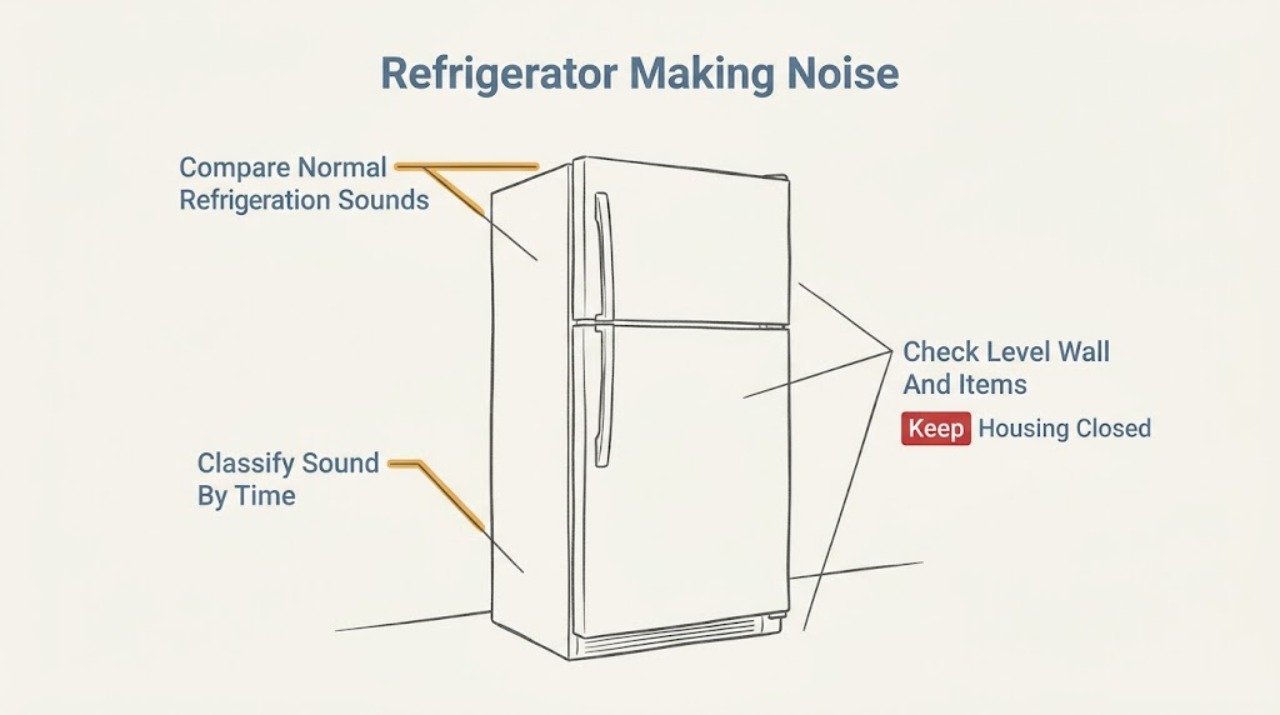
First record where the sound comes from and when it occurs: at compressor start/stop, continuously while cooling, when a fan runs, during automatic defrost, when a door opens, or only when the cabinet or stored items vibrate. Hisense manuals describe refrigerant or defrost-water flow, compressor/fan hum or buzz, expansion clicks, and defrost popping as normal operating sounds; a refrigerator that is not level can make humming or buzzing louder, and a cabinet that is not resting firmly can rattle. From outside the appliance, level the unit only as the exact manual permits, keep it from touching the wall, and make sure bottles or shelves are not vibrating against one another. Do not remove covers or put hands/tools near a fan, compressor, refrigerant tubing, or wiring. Stop using the refrigerator and arrange qualified service for scraping or grinding, a hot-plastic or burning smell, smoke, arcing, a damaged cord, repeated breaker trips, oil or refrigerant evidence, a loud sound that suddenly changes, or noise paired with loss of cooling. A sound that matches the manual's normal pattern and does not affect operation can be monitored, but do not diagnose a specific internal part from sound alone.
Before you begin
Safety first
- Do not remove panels, reach toward fans or the compressor, puncture refrigerant tubing, add refrigerant, force a defrost, perform live electrical tests, or continue operating after smoke, burning odor, arcing, damaged power, repeated trips, or loss of cooling.
Work through in order
Diagnostic checks
Use only checks that match the exact appliance or system and its official guide.
-
Check 1
From outside the refrigerator, record the sound's character, apparent location, duration, and trigger: compressor start/stop, fan operation, automatic defrost, door opening, water dispensing if fitted, or cabinet movement. Record the exact model from the product label; do not remove covers or use a tool as a listening probe.
Expected result: The sound is a short click/pop, water-like gurgle, steady hum/buzz, rattling vibration, or scraping/grinding; it is normal-patterned or new and rapidly worsening.
Next step: Follow the matching branch below. Monitor only a stable, manual-consistent sound with no safety or cooling symptom; arrange service for a new, harsh, or paired fault.
Stop if: Stop immediately for smoke, burning odor, arcing, exposed wiring, a hot/damaged cord, oil/refrigerant evidence, or loss of cooling.
Why this matters
Why: Sound category and timing separate documented refrigeration/defrost sounds from cabinet vibration and from potentially abnormal mechanical or electrical noise. A sound description alone cannot identify a failed component.
-
Check 2
Without touching internal components, listen during one normal cooling interval and note whether the sound is a water-flow/gurgle around compressor cycling, a hum/buzz while the compressor or fan runs, or a brief click/pop associated with temperature change or defrost. Do not force a defrost or repeatedly cycle the power.
Expected result: The sound matches one of the manual's normal categories and ends or changes with the relevant cycle, or it is continuous, harsh, scraping, or unrelated to any cooling/defrost event.
Next step: Monitor a matched normal pattern. Escalate a persistent abnormal sound, especially with temperature change, fan failure, vibration, odor, or electrical symptoms.
Stop if: Do not remove panels, insert objects through vents, touch a fan, or work on the compressor or sealed refrigerant circuit.
Why this matters
Why: A cycle-linked refrigerant, defrost-water, compressor, fan, expansion, or defrost sound is less concerning when operation and cooling are normal. A continuous or harsh sound outside those patterns is not cleared by the normal-sound list.
-
Check 3
From a safe standing position, check whether the cabinet is stable and level, whether the rear or side touches a wall or furniture, and whether bottles, shelves, bins, or items are contacting one another. Make only the small external clearance or leveling adjustment described by the exact manual; use two people for any necessary movement of a heavy unit.
Expected result: The noise changes when the cabinet is gently steadied from the outside, the unit rocks or is not level, a wall/object is touching it, or stored items are rattling; alternatively, the cabinet is stable and clear.
Next step: Correct only an obvious external contact or level condition and monitor. If the sound persists, worsens, or comes with cooling loss, stop use and arrange qualified service.
Stop if: Do not push a heavy refrigerator across the floor, move it alone, remove casters or panels, or reach behind it near wiring/tubing.
Why this matters
Why: A change with external stability or contact supports transmitted vibration rather than a confirmed compressor fault. A stable, clear cabinet with a sound that remains harsh or localized internally needs service evaluation.
-
Check 4
Note whether the sound appears only while a compartment is cooling, when a door opens or closes, or when airflow changes. Check from the outside that doors close normally and that food is not pressing against visible interior air outlets; do not remove an interior fan cover or probe an opening.
Expected result: The sound follows fan operation or airflow, changes with door state, or remains present regardless of cooling and door activity.
Next step: Remove only an obvious storage obstruction and keep vents clear as the manual directs. Escalate a persistent fan-like scrape, stalled airflow, or cooling change to service.
Stop if: Do not touch the fan, dismantle a cover, insert a utensil, or use heat to clear ice near wiring.
Why this matters
Why: Air movement and fans are documented sound sources, while a door or airflow-related change can transmit vibration or reveal an obstruction. A sound independent of those events, especially scraping, cannot be cleared as normal fan noise.
-
Check 5
Record safe operating context: whether the refrigerator was newly installed, recently loaded with warm food, in a hot room, moved or tilted, or operating after a power interruption. Compare the sound and cooling result with the exact manual; do not repeatedly unplug/replug the appliance to see whether the sound returns.
Expected result: The sound began after installation or moving, during a long cooling run, after a large warm load, or after an outage; or it is unrelated to those events and is getting worse.
Next step: Allow normal operating conditions only if the sound matches the manual and there is no hazard. Otherwise keep the unit operating only as necessary for food safety and arrange service; do not move or open it to investigate.
Stop if: Stop for smoke, odor, heat, arcing, damaged cord, oil/refrigerant evidence, or loss of cooling; do not force cooling by changing sealed-system controls.
Why this matters
Why: Hisense manuals note that compressors may run longer during initial cooling, warm-load recovery, hot weather, or frequent openings, which can make normal compressor/fan sounds more noticeable. A new harsh noise after movement or a sound with cooling loss still needs inspection.
-
Check 6
After the external checks, classify the remaining sound without opening the refrigerator: manual-consistent and stable, or new/harsh/continuous and paired with vibration, cooling loss, odor, heat, or electrical symptoms. Save the model, recording time, and symptom sequence for service.
Expected result: The sound is stable and matches a documented normal category with normal cooling, or it is abnormal, worsening, localized inside/behind the cabinet, or paired with another fault.
Next step: For the normal pattern, keep the unit level and clear and monitor. For an abnormal or paired symptom, stop use when safe and arrange qualified appliance service with the exact model and sound timing.
Stop if: Do not continue if there is smoke, burning odor, arcing, damaged power, cooling failure, oil/refrigerant evidence, or a risk from an exposed component.
Why this matters
Why: A documented cycle-linked sound can be monitored, while a changed or paired symptom suggests a fan, compressor, mounting, defrost, sealed-system, control, or electrical issue that sound alone cannot diagnose.
Use your observations
Decision map
Find the observation that best matches what you see, then follow the next safe action.
-
PATH 01Safety boundary
What you see
A short water-flow/gurgling sound follows compressor start/stop or defrost, or a pop/click occurs with temperature change, while cooling and safety are normal.
Do this next
Keep the refrigerator level and monitor for a change. Arrange service if the sound becomes harsh/continuous or cooling declines.
Why this path and its safety boundary
Why it matters: Refrigerant movement, defrost water, or thermal expansion is more likely than a confirmed failed part.
Safety stop: Do not puncture tubing, force defrost, or remove covers to hear the source more closely.
-
PATH 02Safety boundary
What you see
A hum or buzz occurs while the compressor or fan runs, is consistent with cooling demand, and the cabinet is level and stable.
Do this next
Check only external stability, wall clearance, and item contact. Monitor if cooling is normal; escalate a sudden increase, scrape, odor, or temperature problem.
Why this path and its safety boundary
Why it matters: Compressor or fan operation is a documented normal sound source; louder sound with an unlevel unit can be transmitted vibration.
Safety stop: Do not reach toward a fan or compressor or use live testing to distinguish them.
-
PATH 03Safety boundary
What you see
Rattling or vibration changes when the cabinet is steadied externally, a wall/object is touching it, or bottles/shelves are contacting each other.
Do this next
Correct the obvious external contact or storage contact and confirm the unit rests firmly. Use service if vibration remains severe or cooling changes.
Why this path and its safety boundary
Why it matters: Transmitted cabinet or stored-item vibration is more likely than a confirmed internal motor failure.
Safety stop: Do not move a heavy unit alone, remove rear parts, or push it across a wet floor.
-
PATH 04Safety boundary
What you see
The noise is scraping, grinding, harsh, continuous, suddenly louder, or not tied to a documented cooling/defrost event.
Do this next
Do not open the cabinet or restart repeatedly. Arrange qualified service and provide the sound recording, location, timing, model, and cooling result.
Why this path and its safety boundary
Why it matters: A fan, mounting, compressor, ice/contact, or another mechanical issue remains possible; the normal-sound list does not identify the cause.
Safety stop: Stop immediately for odor, smoke, heat, arcing, damaged power, exposed wiring, or loss of cooling.
-
PATH 05Safety boundary
What you see
Noise is accompanied by loss of cooling, repeated breaker trips, burning/hot-plastic odor, smoke, arcing, oil/refrigerant evidence, or a damaged/wet electrical connection.
Do this next
Stop use when safe, disconnect power only from a dry accessible point if appropriate, keep clear, and arrange qualified appliance/electrical service.
Why this path and its safety boundary
Why it matters: This is an appliance safety or operating fault, not a normal-sound classification problem.
Safety stop: Do not touch wet equipment, bypass protection, open panels, handle refrigerant, or restore power to reproduce the sound.
Helpful context
Understand the symptom
Describe the sound before naming a part
Write down whether the sound is a hum, buzz, click, pop, hiss, gurgle, rattle, scrape, or grind, then note its location and whether it follows compressor start, fan operation, a door opening, or defrost. The same word—such as clicking—can describe normal thermal movement or an abnormal repeated mechanical event. Do not put your hand inside the cabinet or behind a cover to locate it.
Some water-like sounds are part of cooling
Hisense manuals explain that refrigerant moving through lines and defrost water can sound like water flowing. Compressor and fan humming or buzzing can also be normal, particularly when the sound follows cooling demand. Normal does not mean every loud sound is harmless: a sudden change, scraping, odor, or cooling loss moves the issue to service.
Rule out vibration without opening the refrigerator
Hisense troubleshooting guidance links vibration or rattling to a cabinet that is not resting firmly on the floor, and its support guidance says to check level and wall clearance. From the outside, check that the refrigerator is stable, not touching a wall or nearby object, and not transmitting vibration through bottles or shelves. Do not move a heavy refrigerator alone or pull it across a wet floor.
Noise plus heat, odor, or cooling loss is not a sound-only problem
Stop using the refrigerator for smoke, burning or hot-plastic odor, arcing, a damaged cord, repeated breaker trips, exposed wiring, oil or refrigerant evidence, or a noise paired with loss of cooling. Do not remove rear panels, reach toward fans or the compressor, puncture tubing, add refrigerant, or perform live electrical tests. Qualified appliance service must handle internal electrical, sealed-system, fan, and compressor diagnosis.
Only after diagnosis
Potential parts
Only if the exact manual or technician confirms that cabinet instability or a failed mount is causing the vibration.
Only after qualified diagnosis confirms an abnormal appliance-linked sound and identifies the exact model part.
When checks do not resolve it
Need a professional?
Call qualified appliance service for scraping, grinding, a sudden or worsening noise, persistent vibration after safe external leveling/contact checks, or noise paired with cooling loss, repeated breaker trips, heat, odor, smoke, arcing, damaged power, or oil/refrigerant evidence. Do not open the cabinet or work on fans, compressors, wiring, or the sealed system yourself.
Safety scope: Do not remove panels, reach toward fans or the compressor, puncture refrigerant tubing, add refrigerant, force a defrost, perform live electrical tests, or continue operating after smoke, burning odor, arcing, damaged power, repeated trips, or loss of cooling.
Have this ready
- Provide the exact model and serial information, sound description and recording if safe, location, cycle/door/defrost timing, cabinet level and wall-clearance result, stored-item contact, cooling temperature change, and any odor, heat, smoke, arcing, breaker, water, or oil evidence.
Common questions
FAQ
Is a humming or buzzing Hisense refrigerator normal?
Often, yes. Hisense manuals identify the compressor and cold-air fans as sources of humming or buzzing and note that an unlevel refrigerator can sound louder. Check only the external level, stability, wall clearance, and stored-item contact. A sudden, harsh, scraping sound or cooling loss needs service.
Why does my Hisense refrigerator sound like water is running?
Hisense says refrigerant flowing in the lines and defrosted water can create a water-flow sound when the compressor starts or stops or during automatic defrost. If the sound is new, continuous, harsh, or accompanied by poor cooling, keep the unit closed and arrange service rather than opening it.
What causes a Hisense refrigerator to rattle?
Hisense troubleshooting guidance points to a cabinet that is not resting firmly or is not level. Bottles, shelves, or contact with a wall can also transmit vibration. Correct only obvious external contact or leveling conditions as the model manual allows; persistent or severe rattling needs service.
Are clicking and popping noises from a Hisense refrigerator normal?
Brief clicks can come from interior parts contracting or expanding as temperatures change, and popping may occur during automatic defrost according to Hisense manuals. Repeated hard clicks, scraping, a burning smell, or cooling loss should not be treated as normal without service diagnosis.
When should I stop using a noisy Hisense refrigerator?
Stop for smoke, burning or hot-plastic odor, arcing, a hot or damaged cord, repeated breaker trips, water near electrical parts, oil or refrigerant evidence, or noise paired with loss of cooling. Keep clear and arrange qualified appliance or electrical service; do not remove panels or live-test the refrigerator.
Read the exact guide
Official sources
- Support CoolingHisense UK · Official Hisense UK support page; regional model availability and instructions may vary, so use the exact local manual.
- HRFD635SW-UM.pdfHisense · Official Hisense manual for HRFD635SW; use the exact model manual for model-specific controls and clearances.
- Product Support | 14.7 cu.ft. Bottom Mount Refrigerator Titanium Series (RB15A2CSE)Hisense Canada · Official Hisense Canada support record for RB15A2CSE; used only to reinforce model-specific support routing, not to assign its hardware to every Hisense refrigerator.
- HRCD586TBWB-UM.pdfHisense · Official Hisense manual for HRCD586TBWB; cited to corroborate sound categories and not to claim identical hardware across Hisense models.
Community feedback
Share a repair observation
Share a plain-text repair observation. Accepted observations are published automatically; this page may take a moment to update.