
On this page
Start here
Quick answer
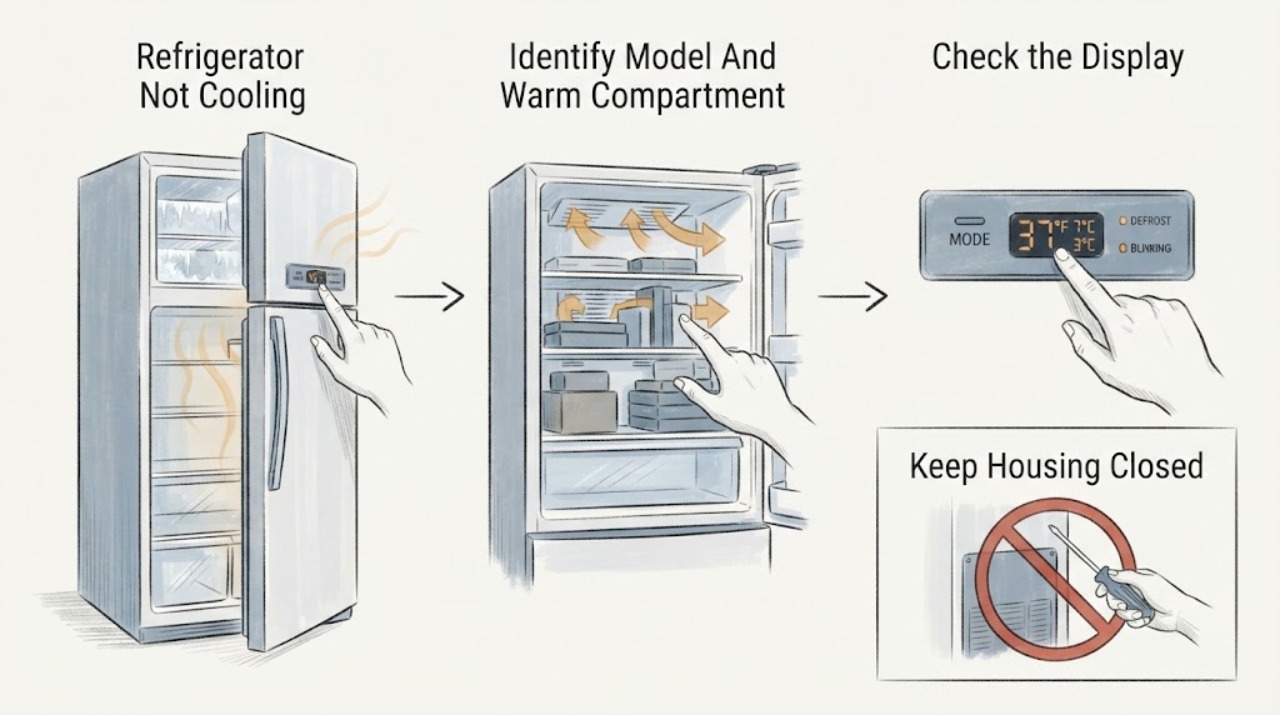
First identify the full model and whether the problem affects the refrigerator compartment, freezer, or both. Check the grounded outlet and household breaker from a dry, safe position, then confirm the temperature control is not off and that a model-specific Cooling Off, Demo, Vacation, or energy-saving mode is not stopping cooling. Keep doors closed, move food away from rear walls and vents, confirm the door gasket closes evenly, and leave clearance around the back. A newly installed unit or one loaded with warm food may need up to 24 hours to cool according to a Hisense manual; a defrost cycle can also pause cooling temporarily. If the compressor never starts after safe external checks, one compartment is warm with heavy frost, a fan or control needs access, or the unit has a damaged cord, burning odor, smoke, or refrigerant-tubing damage, stop and arrange qualified Hisense service. Do not open panels, puncture tubing, handle refrigerant, or perform live electrical tests.
Before you begin
Safety first
- This article covers model identification, dry external power/control checks, accessible airflow and gasket observation, and model-manual settings or waiting periods only. Do not move the refrigerator, open panels, perform live tests, clear internal frost with heat, puncture tubing, or handle refrigerant.
Work through in order
Diagnostic checks
Use only checks that match the exact appliance or system and its official guide.
-
Check 1
Read the full model number without moving the refrigerator. Record whether the fresh-food compartment, freezer, or both are warm; whether the light/display works; whether the compressor or fan is audible; and whether the unit was recently installed, moved, or loaded with warm food.
Expected result: The model is compact with a thermostat, full-size electronic bottom-freezer, another architecture, or unknown; one compartment or both are warm; the unit is silent or running.
Next step: Use the matching branch and exact model manual. Protect perishable food if the internal temperature is unsafe and avoid repeated door opening.
Stop if: Stop for smoke, burning odor, a hot or damaged cord, sparking, damaged cabinet/tubing, or water near electrical parts.
Why this matters
Why: Hisense features and controls vary by model. One warm compartment can be an airflow or frost problem, while a silent whole unit first requires an external power/control check.
-
Check 2
From a dry, safe position, confirm the plug is fully seated in the grounded outlet and check the labeled household breaker or fuse. Confirm the thermostat or electronic temperature control is on and not set to an off/cooling-disabled state; use only the exact manual for a mode or lock indication.
Expected result: The outlet or breaker is off, the control is off or warm, a model-specific Cooling Off/Demo/Vacation or energy mode is shown, the display is dark, or external power and settings appear normal.
Next step: Restore only an obviously interrupted household supply once from a dry, safe position and apply only a clearly identified model-manual setting. If power is normal but cooling does not start, stop external troubleshooting and arrange service.
Stop if: Do not open the control area, reset a repeatedly tripping breaker, use an adapter/extension cord, enter service diagnostics, or test live voltage.
Why this matters
Why: Hisense lists unplugged power, breaker/fuse, defrost mode, and temperature setting among possible causes, but a compact knob and a digital control panel use different procedures.
-
Check 3
Keep the doors closed while checking. Move food away from the rear wall and visible vents, confirm no package prevents a door from closing, inspect the gasket for a gap or tear, and check that the rear of the appliance is not pressed against the wall. Do not move a heavy or built-in unit.
Expected result: Food blocks a vent, the gasket is uneven, a door is left ajar, rear clearance is inadequate, or these conditions are normal.
Next step: Reposition only accessible food, clean and dry a sound gasket, and restore only the model's documented clearance if it can be done without moving the unit. Allow the manual's stated adjustment period before judging temperature again.
Stop if: Do not pull the unit, remove panels, bend the gasket, or reach behind it near wiring or refrigerant tubing.
Why this matters
Why: Hisense lists blocked airflow, frequent or open doors, insufficient rear space, and door/level conditions as warm-refrigerator causes. Correcting a visible obstruction can restore circulation, but a clear path does not rule out an internal fault.
-
Check 4
Note whether the unit is in an automatic defrost cycle, was just plugged in or moved, or received a large warm-food load. Without opening panels, look for heavy visible frost blocking an air vent and record the compartment affected. Wait for a documented defrost cycle to end and allow the model's recovery period when applicable.
Expected result: Cooling returns after defrost or recovery, the unit remains warm after 24 hours, one compartment has heavy frost, or no frost and no cooling are present.
Next step: Keep doors closed, move food away from vents, and reassess after the model-appropriate period. If heavy frost returns or cooling remains absent, arrange service rather than manually defrosting with heat.
Stop if: Do not chip ice, use a heat gun or hair dryer near plastic/wiring, pour water into the cabinet, or remove an evaporator cover.
Why this matters
Why: The Hisense manual says defrost can pause cooling, a new unit may need about 24 hours, and blocked vents or frost can impair airflow. Persistent warmth after those conditions points beyond a normal delay.
-
Check 5
On the exact model's external controls, confirm the refrigerator and freezer settings are active and not in a model-specific cooling-off, demo, vacation, or energy-saving state. Make at most one manual-approved adjustment and record whether the display changes and whether cool air returns; do not copy a control sequence from another Hisense model.
Expected result: The setting was incorrect, a documented mode was active, the display responds but the cabinet stays warm, or the display is unresponsive/dark with external power present.
Next step: If a clear model-manual correction restores cooling, monitor it. Otherwise leave the controls alone and provide the model, mode/display state, and compartment temperatures to a technician.
Stop if: Do not repeatedly cycle power, bypass a cooling lock, open controls, or diagnose a compressor or refrigerant circuit by sound alone.
Why this matters
Why: A control state can stop cooling while lights or display remain normal, but the exact mode names and exit sequence differ. A responsive control with no cooling after a proper wait makes an internal fan, sensor, compressor, control, or sealed-system issue more likely.
-
Check 6
After safe power, setting, airflow, door, clearance, defrost, and recovery checks, document whether the compressor/fan runs, whether one or both compartments are warm, whether frost is localized, and whether any alarm or damage is present. Do not deliberately reproduce a hazardous symptom.
Expected result: Cooling returns, the compressor runs continuously without reaching temperature, one compartment remains warm, frost returns, the unit is silent with normal external power, or smoke/odor/damage is present.
Next step: Arrange qualified Hisense appliance service; use qualified electrical service for supply problems and do not continue operating a unit with a damaged cord, fire signs, or refrigerant-tubing damage.
Stop if: Do not remove covers, perform live tests, puncture tubing, handle refrigerant, bypass safety controls, or replace internal parts from the symptom alone.
Why this matters
Why: Persistent no-cooling can involve a fan, evaporator or condenser restriction, sensor, control, compressor, wiring, or sealed refrigerant system. External symptoms cannot identify which part safely.
Use your observations
Decision map
Find the observation that best matches what you see, then follow the next safe action.
-
PATH 01Safety boundary
What you see
The light and display are dark, the plug is loose, or the breaker/fuse is off.
Do this next
Check the grounded outlet connection and labeled breaker once from a dry safe position. If power is present but the appliance remains dark, arrange service.
Why this path and its safety boundary
Why it matters: An external power or control-supply issue is more likely than an airflow or sealed-system diagnosis.
Safety stop: Do not reset a repeatedly tripping breaker, use an adapter or extension cord, or open the electrical compartment.
-
PATH 02Safety boundary
What you see
The freezer is cold but the refrigerator is warm, or the refrigerator is cold but the freezer is warm.
Do this next
Move food away from vents, check door closure and gasket, and observe for heavy frost without removing panels. Arrange service if the pattern persists.
Why this path and its safety boundary
Why it matters: Blocked vents, frost, door sealing, or a compartment-specific airflow/control problem is more likely than a total loss of cooling.
Safety stop: Do not chip frost or dismantle an evaporator or fan cover.
-
PATH 03Safety boundary
What you see
The refrigerator was just installed, moved, or loaded with a large amount of warm food and the compressor is running.
Do this next
Keep the doors closed and allow the model's recovery period. If it remains warm afterward, continue to service.
Why this path and its safety boundary
Why it matters: A normal pull-down period is plausible; Hisense states a new unit may need about 24 hours to cool and warm loads take time.
Safety stop: Do not set an unknown control repeatedly colder or move a heavy appliance while powered.
-
PATH 04Safety boundary
What you see
The exact model shows cooling-off/demo/vacation/energy mode or its thermostat is off or set warm, while lights or display still work.
Do this next
Use only the exact manual's external control correction and reassess after the documented interval. Escalate if cooling does not return.
Why this path and its safety boundary
Why it matters: A control state is more likely than a failed compressor, but the mode name and exit sequence are model-specific.
Safety stop: Do not copy another model's button sequence, bypass a lock, or enter diagnostics.
-
PATH 05Safety boundary
What you see
External power, settings, airflow, door, clearance, and recovery checks are normal but one or both compartments remain warm, frost returns, or the compressor/fan behavior is abnormal.
Do this next
Leave the appliance operating only if there is no hazard and arrange qualified Hisense service; move perishables to safe storage.
Why this path and its safety boundary
Why it matters: An internal fan, sensor, control, compressor, wiring, or sealed refrigerant-system fault is possible; the symptom does not select a part.
Safety stop: Do not open panels, live-test, puncture refrigerant tubing, handle refrigerant, or continue with smoke, burning odor, a hot cord, or damaged tubing.
Helpful context
Understand the symptom
Confirm what is actually warm
Check whether the fresh-food section, freezer, or both are warm, and whether the interior light or display works. A dark appliance suggests power or control access; a running compressor with one warm compartment suggests airflow, frost, door-seal, or model-specific control issues. A newly installed unit or a large load of warm food can take time to pull down, so do not judge cooling immediately after those events.
Controls and modes are not interchangeable
Hisense sells compact refrigerators with an adjustable thermostat as well as full-size bottom-freezer models with electronic features such as Super Cool and Super Freeze. A knob set to an off or warm position, or a model-specific Cooling Off/Demo/Vacation mode, can leave lights and display working without normal cooling. Read the exact model manual before using a button sequence; do not copy one model's mode exit onto another.
Airflow, door closure, and clearance are first-line checks
Hisense's troubleshooting table directs the owner to move food away from the back wall and vents, limit door openings, check that an item is not blocking closure, level the refrigerator, and leave space behind it. These observations can explain a warm compartment without proving a compressor or refrigerant failure. Correct only an obvious obstruction and keep the gasket clean and dry.
Frost pattern changes the next step
A little frost can occur during normal operation, but a thick, localized ice sheet or a blocked freezer vent can interrupt air transfer to the refrigerator compartment. Do not chip ice or dismantle an evaporator cover. If a defrost cycle is active, the Hisense manual says to wait for it to end and for cooling to restart; repeated frost or a compartment that stays warm needs service diagnosis.
Power and sealed-system work stop the owner path
Check only the plug, household breaker, and external controls from a dry, safe position. Hisense warns against adapters and extension cords and warns not to puncture refrigerant tubing. A failed fan, compressor, sensor, control board, wiring, or refrigerant circuit cannot be safely selected from temperature symptoms alone.
Safety boundary
Stop conditions
- Stop using the refrigerator for smoke, burning odor, sparks, a hot or damaged cord, damaged wiring, refrigerant-tubing damage, or water near electrical parts.
- Do not use an adapter or extension cord, reset a repeatedly tripping breaker, or perform live voltage tests.
- Do not remove electrical, evaporator, fan, or control panels; puncture refrigerant tubing; handle refrigerant; or bypass a safety control.
- Do not chip frost or use a heat gun, hair dryer, boiling water, or chemicals inside the cabinet to force a defrost.
Only after diagnosis
Potential parts
- model-specific door gasket
Consider only when the exact model gasket is visibly torn, deformed, or confirmed unable to seal after door and loading checks.
Compact, bottom-freezer, French-door, and other Hisense door seals differ; do not order by brand alone. - model-specific evaporator/condenser fan or sensor
Consider only after a qualified technician confirms abnormal airflow or sensor behavior and rules out blocked vents or frost.
Fan connectors, sensors, and control logic vary by model; no cooling symptom does not identify one part. - model-specific control, compressor, or sealed-system component
Consider only after qualified diagnosis confirms an internal control, compressor, wiring, or sealed-system fault.
Do not handle refrigerant or order high-cost internal parts from temperature symptoms alone.
When checks do not resolve it
Need a professional?
Arrange qualified Hisense appliance service when safe external power, exact-model controls, airflow, door/gasket, clearance, defrost, and recovery checks do not restore cooling; when one compartment remains warm, heavy frost returns, or the compressor/fan behavior is abnormal; or when internal access is needed. Use qualified electrical service for a supply fault and treat smoke, sparks, burning odor, a hot/damaged cord, refrigerant-tubing damage, or water near power as immediate stop-use conditions.
Safety scope: This article covers model identification, dry external power/control checks, accessible airflow and gasket observation, and model-manual settings or waiting periods only. Do not move the refrigerator, open panels, perform live tests, clear internal frost with heat, puncture tubing, or handle refrigerant.
Common questions
FAQ
How long should a Hisense refrigerator take to cool after installation?
The HRFD635SW Hisense manual says to allow about 24 hours for a newly plugged-in refrigerator to cool. The exact recovery behavior depends on model, room conditions, and food load; keep the doors closed and use the model manual.
Why are the lights on but my Hisense refrigerator is not cooling?
A model-specific Cooling Off, Demo, Vacation, or other control state can leave display or lights working, but control names and exit steps differ. Confirm the exact model and use only its manual; if cooling does not return, arrange service.
What should I check when only the Hisense refrigerator compartment is warm?
Check that food is not against rear walls or vents, the door closes and the gasket seals, and heavy frost is not blocking airflow. Do not remove panels or chip ice; persistent one-compartment warmth needs qualified diagnosis.
Can I add refrigerant or open the back to fix a Hisense refrigerator?
No. Hisense warns not to puncture refrigerant tubing, and internal compressor, fan, wiring, and sealed-system work belongs to qualified service. Do not live-test the appliance.
Read the exact guide
Official sources
- Hisense HRFD635SW Refrigerator Use and Care GuideHisense · Exact HRFD635SW manual; troubleshooting details are model-family evidence and must be confirmed against another model's manual.
- Hisense 1.6 cu.ft. Compact Refrigerator (Black)Hisense USA · Exact WMS017M6XBE compact model; its thermostat and compact architecture should not be generalized to full-size digital models.
- Hisense 17.2-cu ft Counter-Depth Bottom-Freezer RefrigeratorHisense USA · Exact HRB171N6ABE product page; configuration and feature evidence is not universal to all Hisense refrigerators.
Community feedback
Share a repair observation
Share a plain-text repair observation. Accepted observations are published automatically; this page may take a moment to update.