
On this page
Start here
Quick answer
A Hoover dryer that leaves clothes damp most often has restricted airflow, a blocked filter or condenser, an unsuitable load or programme, or (on heat-pump models) an unsuitable room temperature. First stop the cycle and disconnect the mains before examining the appliance. Check the load and care label, clean the door fluff filter and any model-specific condensing filter, and inspect a vent hose and exterior grille if your dryer is vented. If a sensor programme is being used for one light item, use the model-approved timed programme instead. If the dryer still produces no useful heat or airflow, shows a recurring fault, overheats, smells of burning, trips the electrical supply, or makes an abnormal noise, stop using it and arrange qualified Hoover service.
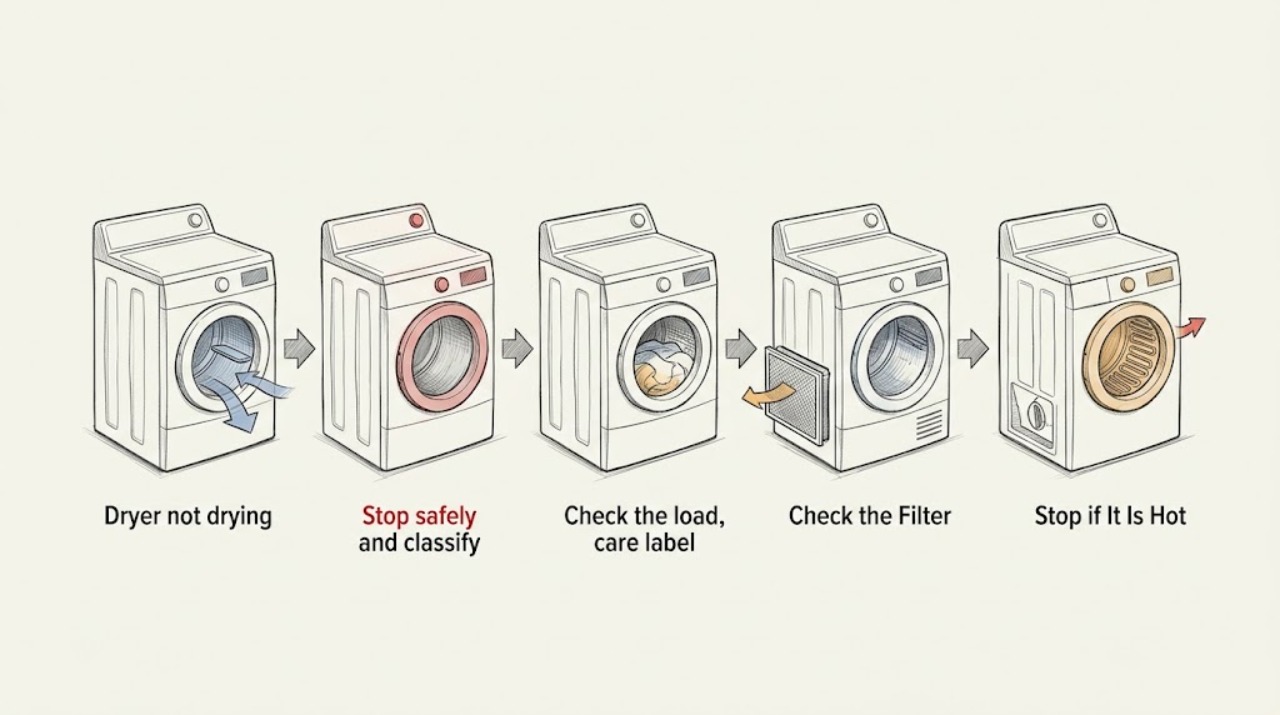
Work through in order
Diagnostic checks
Use only checks that match the exact appliance or system and its official guide.
-
Stop safely and classify the symptom
Cancel the cycle, switch the dryer off, and disconnect it from the mains before opening the door, removing a filter, pulling out a vent hose, or examining the outside of the appliance. Note whether the drum turns, whether clothes are merely damp or dripping, whether air feels warm during a permitted supervised cycle, and whether a warning light or error is present. If you notice smoke, a burning or melting smell, a hot plug or cord, an electrical trip, or an abnormal loud noise, do not restart it.
Expected result: The drum may turn normally with damp clothes, the cycle may stop early, the dryer may have little or no airflow or warmth, or an abnormal electrical, thermal, or mechanical symptom may be present.
Next step: For a safety symptom, leave the appliance disconnected and use qualified service. Otherwise continue with the load and programme check while keeping the appliance disconnected until the next safe inspection.
Why this matters
Why: A normal-looking drum does not prove that moisture is leaving the machine. Smoke, overheating, electrical damage, repeated trips, or abnormal noise changes this from a routine maintenance check to a stop-and-service situation.
-
Check the load, care label, and programme
Separate a test load that is suitable for tumble drying, avoid packing the drum beyond the model's stated capacity, and make sure the washer has spun the clothes sufficiently before drying. Check that a low-heat or delicate option was not unintentionally left selected. If the load is only one item or very light, compare the model-approved timed programme with the sensor programme rather than judging the sensor cycle from that single item.
Expected result: A very small load may finish early or appear not to dry on a sensor cycle; an overloaded or very wet load may remain damp; and a fabric-care or low-heat setting may intentionally produce less heat. A correctly sized, well-spun, suitable load can still remain damp.
Next step: Use an appropriate programme for the load and repeat only after the maintenance checks below. Do not exceed the model's capacity or tumble items whose care label prohibits it.
Why this matters
Why: The first outcomes point to a load or programme mismatch, not necessarily a failed component. Damp clothes after a suitable test load keep airflow, filter, room conditions, and heating as live possibilities.
-
Clean the door fluff filter and applicable condenser filter
With the dryer cool and disconnected, remove the door-opening fluff filter and clear the lint. If the model has a condensing filter behind a lower cover, follow the exact Hoover manual or the model-specific access instructions to remove it; clean the filter materials as directed and refit every part fully. Do not run the dryer with a missing filter or with a washed component still wet when the manual requires it to be dry.
Expected result: A mat of lint or fluff, a dirty mesh, or a restricted condenser indicates that the air and moisture path was being narrowed. A filter that is already clean and correctly fitted does not rule out a blocked hose, room condition, or internal fault.
Next step: Refit the filters and proceed to the vent or room-condition check that matches the dryer type. If a filter is damaged, missing, impossible to refit, or the warning returns immediately, stop and obtain model-specific service advice.
Why this matters
Why: Filters are routine user-maintenance items, and Hoover links a clean filter and condenser with efficient drying. Cleaning them can restore flow, but it cannot prove that a heater, fan, sensor, or control board is healthy.
-
Restore the correct airflow or room conditions
For a vented Hoover dryer, while it remains disconnected, inspect the rear corrugated hose for a kink, crushing, or fluff and check that the outside flap or grille is not clogged. Do not disconnect a hose if doing so would make the appliance unstable or expose you to a hazard. For a condenser or heat-pump model, do not invent a vent-hose check; instead verify from the manual that its air inlets, filters, and water path are clear and that the room is within the model's specified operating range. Keep the dryer away from blocked air inlets and heavy obstruction.
Expected result: A kinked hose, lint-filled hose, or blocked outside grille restricts warm-air discharge. A clear vented path, or a heat-pump dryer in a cold or poorly suitable room, may explain why the drum does not become warm enough. No improvement after correct airflow and room conditions points beyond routine ventilation.
Next step: Correct only the external restriction or room condition that the manual permits you to correct, refit any hose securely, and continue to one supervised retest. If airflow is still weak or there is no useful heat, stop instead of opening panels.
Why this matters
Why: Hoover states that vent restrictions reduce efficiency and that heat-pump dryers need a suitable room temperature to warm the drum. These checks are type-specific; a condenser or heat-pump dryer must not be treated as a vented model.
-
Run one controlled retest, then stop at the service boundary
After the filters and any applicable hose are correctly refitted, use one suitable load and the model-approved programme. Stay nearby without touching hot surfaces or moving the appliance, and note whether the drum rotates, air moves, moisture collects as expected for the dryer type, and the clothes become progressively drier. Stop immediately for smoke, burning smell, overheating, an electrical trip, abnormal noise, a repeated error, or a damaged cord or plug.
Expected result: The test may dry normally after the maintenance correction, may improve but remain incomplete, or may show no useful warmth or airflow or repeat the original fault.
Next step: If the problem persists or any stop condition occurs, leave the dryer disconnected and arrange qualified Hoover or appliance service. Give the technician the model code and the observations you recorded; do not remove the cabinet, measure live voltage, bypass a safety device, or continue repeated cycles.
Why this matters
Why: A successful controlled test supports a load, filter, airflow, or room-condition cause. Persistent no-dry performance after the safe checks is not evidence that a user should replace a heater, thermal limiter, fan, moisture sensor, or control board; those faults require model-specific diagnosis.
Use your observations
Decision map
Find the observation that best matches what you see, then follow the next safe action.
-
PATH 01Next step
What you see
The sensor programme is being used for one item or a very light load and the cycle ends early.
Do this next
Use a model-approved timed programme or a suitable larger load, while respecting care labels and capacity. If normal loads still remain damp, continue with the filter and airflow checks.
-
PATH 02Next step
What you see
The load is overloaded, dripping wet, unsuitable for tumble drying, or being run on an unintended low-heat or delicate setting.
Do this next
Reduce and sort the load, spin it thoroughly in the washer, verify the care label, and select the correct model-approved programme. Do not use extra heat to compensate for a prohibited fabric.
-
PATH 03Next step
What you see
The door filter or applicable condensing filter is visibly blocked, dirty, missing, or not seated correctly.
Do this next
Disconnect and cool the appliance, clean or refit the filter exactly as the model instructions allow, and perform only one controlled retest. A recurring filter warning or damaged filter needs service advice.
-
PATH 04Next step
What you see
A vented model has a kinked or fluff-blocked hose or outside grille, or a heat-pump model is being used outside the room conditions specified in its manual.
Do this next
Correct the accessible external restriction or place the heat-pump dryer in a suitable environment as permitted by the manual. If the air path is clear and drying remains poor, stop and arrange qualified diagnosis.
-
PATH 05Safety boundary
What you see
There is smoke, a burning or melting smell, overheating, a hot or damaged cord or plug, an electrical trip, abnormal noise, repeated error, or no useful heat after the safe checks.
Do this next
Stop the cycle, disconnect the appliance only if it is safe to do so, keep it out of use, and arrange qualified Hoover or appliance service. Do not open panels, bypass a limiter, or test live wiring.
Why this path and its safety boundary
Safety stop: True
Helpful context
Understand the symptom
Start with the kind of failure you can observe
A dryer that tumbles but leaves a full load damp points toward moisture removal, airflow, programme selection, or heating conditions. A machine that stops after a short time with one light item may be responding to its sensor programme rather than failing. If there is smoke, a burning smell, a hot plug or cord, an electrical trip, or an unusually loud mechanical sound, do not continue the test: disconnect it if safe and use the service path. Hoover's guidance says to disconnect the appliance before examining it.
Use the model instructions for features that differ
Hoover sells vented, condenser, and heat-pump dryers, so not every check applies to every model. A vented dryer has a rear hose and an outside outlet; a condenser or heat-pump model may have a condenser filter and water container instead. Do not remove covers or test live electrical parts just because a generic check list mentions a component. Use the product code and exact manual when a control, warning light, or filter arrangement is different.
What a technician needs to know
Record the programme, approximate load, whether the clothes entered the dryer thoroughly spin-dried, whether the drum turns, whether air feels warm, which indicators are lit, and whether the problem began after moving or installing the machine. This information helps a qualified technician distinguish a blocked air path or programme issue from a heater, sensor, fan, control, or other internal fault without asking you to open the cabinet.
Only after diagnosis
Potential parts
- fluff or condensing filter
Consider a replacement only if the exact model's filter is damaged, missing, or cannot be cleaned and seated correctly; a blocked filter alone does not prove it needs replacement.
Confirm the complete Hoover product code and the manufacturer's fit information before ordering any filter. - airflow or heating component
A heater, thermal protector, fan, sensor, or control component is conditional on qualified testing after load, filter, vent, and room checks show no external cause.
Do not select an internal component from the symptom alone; a qualified technician must identify the failed component and verify model compatibility.
When checks do not resolve it
Need a professional?
Call qualified Hoover or appliance service when safe external maintenance and one appropriate retest do not restore drying, or immediately for smoke, burning or melting odor, overheating, electrical trips, damaged power parts, abnormal noise, recurring errors, or no useful heat or airflow.
Common questions
FAQ
Why does my Hoover dryer run but leave clothes damp?
Start with load size and spin moisture, then clean the door filter and any model-specific condenser filter and inspect a vented dryer's hose and outside grille. A heat-pump dryer can also perform poorly if the room is outside the model's specified conditions. Persistent no-dry performance after these checks needs qualified service.
Why does my Hoover dryer stop after a few minutes with one item?
Hoover says sensor-dry cycles are designed for larger loads and may stop early with a very light load or one item. Use the model-approved timed programme or a suitable load, while following the care label and capacity guidance.
Which Hoover dryer filter should I clean?
All models have a model-specific lint or fluff-filter arrangement, and some condenser models also have a condensing filter behind a lower cover. With the appliance cool and disconnected, follow the exact Hoover manual for access, cleaning, drying, and refitting; never run the dryer with a missing filter.
Can I replace the heater or sensor because my Hoover dryer is not drying?
Not from the symptom alone. First complete the safe external checks. If the dryer still has no useful heat or airflow, or shows a safety symptom, leave it disconnected and have a qualified technician diagnose the internal heating, fan, sensor, wiring, or control fault and confirm the exact model fit.
Read the exact guide
Official sources
- Hoover Tumble Dryer VisionTech VTV 590NC Instruction Manual - Product Code 31100696Hoover Advice Centre · Hoover model-manual guidance illustrating load, programme, filter, venting, safety, and service boundaries; exact model instructions take precedence.
- Not drying the clothes - Hoover Advice CentreHoover Advice Centre · Hoover's model-applicable checks for filters, condenser, vent tube, room temperature, and sensor programmes.
- What to do if your Hoover dryer is not drying effectivelyHoover Advice Centre · External vent-hose and outlet restrictions that reduce drying efficiency.
- Tumble Dryer Appliance Advice CentreHoover Advice Centre · Hoover's troubleshooting index for tumble-dryer drying, filter, sensor-cycle, cold-room, and safety symptoms.
Community feedback
Share a repair observation
Share a plain-text repair observation. Accepted observations are published automatically; this page may take a moment to update.