
On this page
Start here
Quick answer
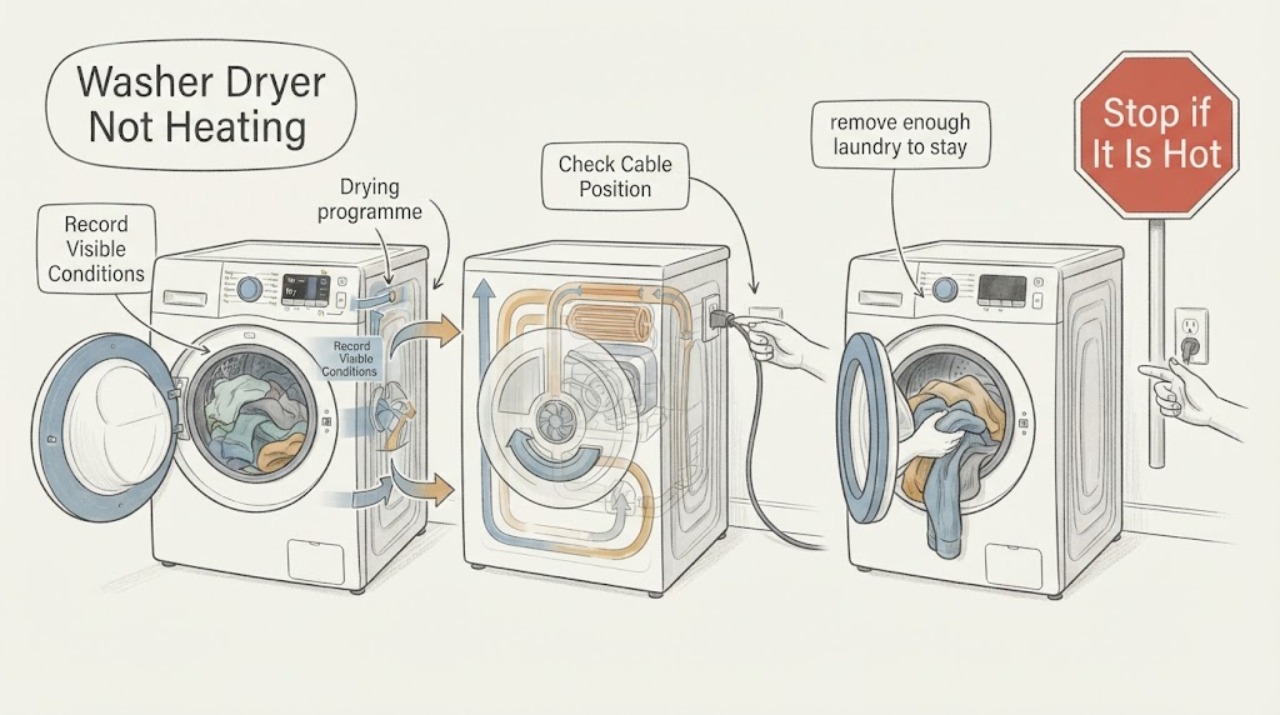
If a Hoover washer-dryer is not heating, first confirm that the problem is in the drying phase rather than the wash-water temperature, and select an actual drying or dry-only programme with the heat level your model provides. Remove part of the wash load because Hoover says a washer-dryer's drying capacity is lower than its wash capacity, then check whether the laundry was spun and whether the programme is appropriate for the fabric. Some Hoover heat-pump dryers feel only mildly warm and can take time to warm, so a cool drum early in a cycle is not by itself proof of heater failure. Hoover's washer-dryer guidance also says these appliances do not have a fluff filter; follow the exact manual for any user-cleanable drain or condenser filter. If a correctly selected, reduced-load drying cycle stays cold, stops, shows a fault, or the appliance has a burning smell, smoke, damaged cord, water near electrics, or repeated breaker trips, stop and arrange qualified appliance service.
Work through in order
Diagnostic checks
Use only checks that match the exact appliance or system and its official guide.
-
Check 1
Run one controlled observation and note whether the wash phase is cold, the drying phase is cold, or both. Record the selected programme, whether a dry-only indicator is lit, the heat or fabric setting, the display time, and whether the drum turns and air moves.
Expected result: A wash-only temperature complaint is not the same as a drying-heater complaint. If the drum tumbles but clothes stay cold and wet, the drying selection, load, moisture level, airflow, or heater path needs consideration; if the machine does not enter drying at all, start with programme selection and controls.
Next step: Continue with the dry-only and heat-setting check if drying is selected but cold. If drying is not selected or the controls are unresponsive, use the model manual for the correct programme and service boundary.
Why this matters
Why: The phase and programme determine which checks apply. A washer-dryer can complete a wash while never receiving a valid dry command, so assuming the heater failed from a cold load alone can misdiagnose the problem.
-
Check 2
Select a dry-only programme when the model provides one, choose the heat level intended for the fabric, and press Start/Pause after the drying option is illuminated. For applicable Hoover washer-dryers, use high heat only for fabrics the manual permits and low heat for delicates or synthetics; do not infer a setting from another model.
Expected result: If the dryer starts and the selected heat setting matches the fabric, the previous complaint may have been a missing or incompatible drying selection. If the display counts down but the drum remains cold throughout a correctly selected cycle, the fault is beyond the programme choice.
Next step: Run one supervised, correctly configured drying test. If the cycle will not start, repeatedly cancels, or stays cold with the correct setting, record the indicators and proceed to load and moisture checks, then service if unresolved.
Why this matters
Why: Hoover says washer-dryers commonly offer separate high- and low-heat drying choices, while some wash programmes cannot be followed automatically by drying. A correct dry command must reach the drying system before a heater fault can be considered.
-
Check 3
After the wash phase, remove enough laundry to stay within the model's maximum dry load, and separate bulky or absorbent items from lighter fabrics. Do not judge the dry capacity by the maximum wash load.
Expected result: Hoover says the drying capacity is lower than the washing capacity and that an unchanged full load may dry very slowly or not at all. If a smaller, well-spaced load dries normally, the earlier cold or damp result was consistent with overloading rather than proof of a failed heater.
Next step: Test one reduced load on the appropriate heat programme. If it remains cold, stops, or shows a fault, do not add more heat or repeatedly restart; arrange service after the accessible checks.
Why this matters
Why: Crowding reduces space for the drying process and can make a working system look ineffective. A reduced load that remains cold and wet shifts the decision toward airflow, sensor, or heating-system diagnosis.
-
Check 4
Check whether the wash phase removed enough water before drying. If the clothes are dripping wet or water remains in the drum, use the model's permitted spin or drain programme and check only the accessible drain-pump filter or hose as described by the manual; never open a locked door or reach into a moving drum.
Expected result: Hoover's washer-dryer manual says excess water after an incomplete spin or an out-of-balance load can prevent clothes from drying within the available time. The washer-dryer guide also directs users to the drain pump filter for drain-related symptoms.
Next step: Correct only an accessible drain or spin condition and perform one dry-only test. If water remains, the drain warning returns, or the machine cannot spin or drain, stop and arrange qualified appliance service.
Why this matters
Why: Very wet laundry can be a drain or spin problem masquerading as no heat. If the machine drains and spins correctly but the reduced load remains cold, the diagnosis moves to the drying airflow or heating path.
-
Check 5
Do not search for or remove a separate tumble-dryer fluff filter on a Hoover washer-dryer. Instead, identify whether your exact model has a user-cleanable drain or condenser component and follow only that manual's unplugged cleaning procedure; keep any accessible air openings clear.
Expected result: Hoover's washer-dryer advice centre states that washer dryers do not have a fluff filter. A model-specific maintenance instruction may still identify another accessible filter or drain area, but a missing lint filter is not evidence that a component has been removed.
Next step: Use the model manual to complete only the listed accessible maintenance, then run one reduced-load drying test. If no user-cleanable restriction is listed and the unit remains cold, stop and arrange service.
Why this matters
Why: Applying a standalone tumble-dryer filter procedure to a washer-dryer can damage seals or expose users to electrical and water hazards. The correct maintenance path depends on the model and drying technology.
-
Check 6
If the washer-dryer is a model-specific heat-pump design, allow the selected cycle enough time to establish its normal temperature before judging it; if it is not a heat-pump model, use the manual's expected drying behavior. Do not open the door repeatedly or use a hotter setting than the fabric and manual allow.
Expected result: Hoover explains that heat-pump dryers may not feel very hot and can take up to about 30 minutes to feel warm inside the drum. A complete cycle that leaves clothes damp, a machine that reports a fault, or a drum that never warms in a model that should heat is not resolved by waiting.
Next step: Monitor one correctly selected cycle. If the result remains cold or damp, or if smoke, burning odor, unusual heat, or an electrical warning appears, unplug the machine when safe and arrange qualified service.
Why this matters
Why: Low perceived heat can be normal for some technologies, while persistent cold or poor drying after a correct reduced-load test is a genuine service symptom. Technology must be confirmed from the model, not guessed from the brand name.
-
Check 7
Inspect only the visible plug, cord, outlet, door seal, and control area for scorch marks, moisture, smoke, a burning odor, or repeated breaker trips. Do not remove panels to test the heating element, thermostat, thermal protector, motor, or wiring.
Expected result: A physical or electrical warning makes continued drying unsafe. If the appliance is intact but remains cold after the programme, load, moisture, and model-specific maintenance checks, an internal heating or control fault remains possible.
Next step: Unplug or isolate the machine when safe and arrange qualified appliance or electrical service. Provide the model, programme, load size, display state, and the exact checks completed.
Why this matters
Why: The presence of a safety sign changes the task from troubleshooting to isolation and service. The absence of a visible warning does not make internal live testing appropriate.
Use your observations
Decision map
Find the observation that best matches what you see, then follow the next safe action.
-
PATH 01Next step
What you see
The wash phase is cold but the drying phase is not being tested, or no drying programme is selected.
Do this next
Use the exact model manual to separate wash-temperature and drying controls, select a permitted dry-only or wash-and-dry programme, and test once.
-
PATH 02Next step
What you see
A correct dry-only programme works after the heat setting is changed to match the fabric.
Do this next
Treat the earlier symptom as a programme or heat-selection issue and use the model's fabric-care guidance; do not select high heat for garments that require low heat.
-
PATH 03Next step
What you see
The drying load is larger than the model's dry capacity or contains bulky, absorbent items.
Do this next
Remove part of the load and run one correctly selected test. If the reduced load remains cold or damp, continue to the service boundary.
-
PATH 04Next step
What you see
Laundry is dripping wet, the drum retains water, or a drain or pump warning is present.
Do this next
Use only the model's accessible drain or spin procedure. If the machine cannot drain or spin normally, arrange qualified appliance service before evaluating the heater.
-
PATH 05Next step
What you see
The model is a heat-pump design and feels only mildly warm early in the cycle, with no fault or safety sign.
Do this next
Allow one complete correctly selected cycle and judge the final laundry result. Escalate if it remains damp, never warms as expected, or displays a fault.
-
PATH 06Next step
What you see
The correct reduced-load cycle stays cold, a fault returns, or smoke, burning odor, unusual heat, moisture near electrics, cord damage, or a repeated breaker trip is present.
Do this next
Stop using the washer-dryer, unplug or isolate it when safe, and arrange qualified appliance or electrical service. Do not remove panels or bridge a thermal device.
Helpful context
Understand the symptom
Confirm which part is cold
A washer-dryer has separate wash and dry decisions. If the washing phase uses cold water, that may be a wash-heating or programme issue; if the clothes finish the drying phase cold and wet, inspect the drying selection, load size, spin result, and airflow path first. A low-heat or delicate programme can feel different from a high-heat cotton programme. Heat-pump variants can also feel only mildly warm and take time to warm, so judge the complete programme and the laundry result, not a brief touch of the door.
Keep the electrical and heat boundary clear
Unplug the washer-dryer before cleaning an accessible filter or drain area, and keep the floor dry. Do not remove the cabinet, test the heater or thermostat, bridge a thermal protector, or reach near moving or hot parts. Do not use the appliance when there is smoke, a burning odor, a damaged cord, water near electrical components, or a breaker that opens again. A persistent no-heat symptom needs qualified service rather than a guessed element replacement.
When checks do not resolve it
Need a professional?
Professional diagnosis is appropriate for persistent no heat after programme, load, moisture, and model-specific maintenance checks, for repeated safety or fault indications, or whenever an internal heating, control, motor, or thermal component would need access.
Common questions
FAQ
Why is my Hoover washer-dryer not heating during drying?
First confirm that a drying programme and a permitted heat level are selected, then reduce the load below the wash capacity and check that the laundry was spun and drained. If a reduced-load cycle remains cold, arrange service rather than opening the cabinet.
Can an overloaded Hoover washer-dryer seem like it is not heating?
Yes. Hoover says the drying capacity is lower than the washing capacity, so a full wash load may take too long to dry or may not dry at all. Remove part of the load and test the correct drying programme once.
Which heat setting should I use on a Hoover washer-dryer?
On applicable Hoover models, dry-only guidance provides high heat for cottons and low heat for delicates or synthetics. Use the exact model manual and garment care label because programmes and heat options vary.
Does a Hoover washer-dryer have a fluff filter?
Hoover's washer-dryer advice centre says washer dryers do not have a separate fluff filter. Follow the exact model manual for any drain or condenser maintenance instead of applying a standalone tumble-dryer procedure.
Is mild warmth normal on a Hoover heat-pump dryer?
Hoover says heat-pump dryers do not need to feel very hot and can take time to feel warm. Confirm that your washer-dryer actually uses heat-pump technology; if the final load stays cold or damp, or a fault appears, arrange service.
When should I stop using a Hoover washer-dryer that is not heating?
Stop for smoke, a burning odor, unusual heat, a damaged cord, water near electrical parts, or a breaker that trips again. Unplug or isolate it when safe and arrange qualified appliance or electrical service.
Read the exact guide
Official sources
- YesHoover · Hoover guidance that applicable washer dryers provide dry-only settings, including high heat for cottons and low heat for delicates.
- Washer Dryer TroubleshootingHoover · Hoover's washer-dryer advice centre for correct cycles, drying load, drain-pump filter, dry-only operation, drying time, and the absence of a separate fluff filter on washer dryers.
- Hoover Washer Dryer VisionHD 6+5 VHW 656D-80 Instruction ManualHoover · An official Hoover washer-dryer manual illustrating model-specific dry-load reduction, high/low heat selection, spin and drain effects, and safe cool-down; do not assume its programmes or limits apply to another model.
- Not heating upHoover · Hoover's model-specific dryer guidance for lint or condenser restrictions and the fact that heat-pump dryers may feel only mildly warm or take time to warm; apply the technology-specific portions only when the washer-dryer manual confirms them.
- Won't dryHoover · Hoover's explanation that the drying load is smaller than the washing load and that an unchanged full load can take too long or fail to dry.
Community feedback
Share a repair observation
Share a plain-text repair observation. Accepted observations are published automatically; this page may take a moment to update.