
On this page
Start here
Quick answer
Do not open the dishwasher during a hot programme or touch the water to test its temperature. First record whether the machine fills, washes, drains, and completes, or whether it stops before heating. With the appliance cool and power safely isolated, check only the model-approved basics: the selected programme, visible filter blockage, water supply/fill hose, and waste hose/drain path. Hotpoint identifies F10 as a heating-element fault on applicable dishwashers and F08 as a temperature-timeout fault on some models; a code, cold water, or repeated pause does not justify opening the base or testing the heater. Disconnect mains power before any part replacement, and send heating element, thermostat/temperature sensor, pump, wiring, relay, and control-board work to a qualified appliance engineer. [Source-backed: Hotpoint's official error-code guidance routes F10 heating-element faults and temperature-timeout conditions to professional service.]
Before you begin
Safety first
- The owner may wait for the tub to cool, record the programme and code, inspect accessible tap/fill hose/filter/waste hose conditions, and follow exact manual cleaning instructions with power safely isolated. Heating elements, temperature sensors, pumps, wiring, relays, control boards, internal plumbing, and mains diagnostics require qualified Hotpoint service.
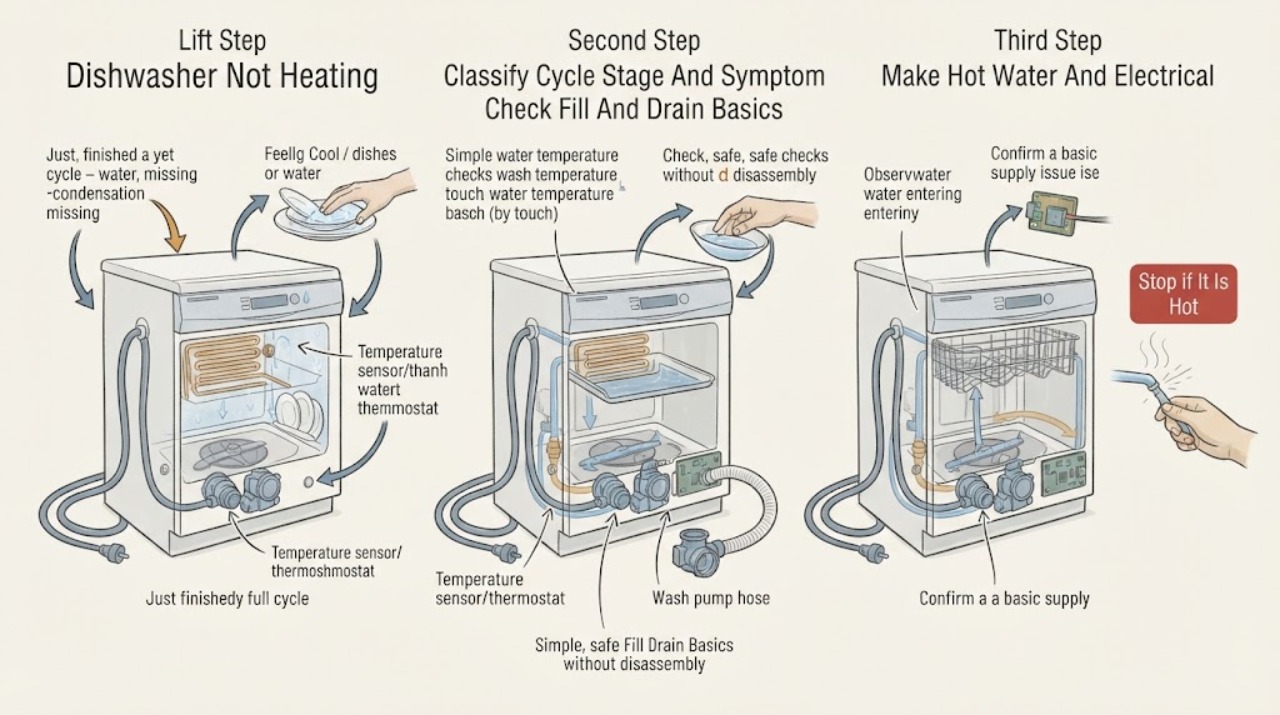
Work through in order
Diagnostic checks
Use only checks that match the exact appliance or system and its official guide.
-
Check 1
Do not open the door during a hot programme or reach into the tub to feel the water. If the dishwasher has smoke, a burning or melting smell, sparks, a hot cord or plug, water near electrical parts, or an affected model under a Hotpoint safety notice, stop using it and isolate power from a dry, safe point; otherwise wait until the cycle and tub are cool before any inspection.
Expected result: The cycle is still running or hot; the tub is cool; an electrical/fire warning is present; or there is no visible hazard.
Next step: Keep the dishwasher isolated for any hazard and arrange qualified appliance/electrical service. If safe and cool, record the programme stage, error display, and whether water remained before proceeding.
Stop if: Do not touch hot water, remove covers, reset a safety notice by trial, or reconnect a wet or damaged appliance.
Why this matters
Why: A mid-cycle temperature check creates a scalding risk and cannot diagnose the heater. Smoke, odor, sparks, wet electrical parts, or a safety-notice model changes the problem from routine troubleshooting to immediate service. A cool, hazard-free dishwasher permits only the external and manual-approved checks below.
-
Check 2
From the completed or interrupted cycle, record what actually happened: did the dishwasher power on, fill, circulate water, drain, pause, finish, or show flashing LEDs/an error? Note whether the complaint is cold wash water, poor drying, a programme that stops, or no water/no drain. Do not run another hot cycle solely to reproduce the fault.
Expected result: The machine never fills; water remains; the programme pauses before completion; it completes but dishes are cold or wet; or an F10/F08 or another code is displayed.
Next step: Follow the matching fill/drain or heating-code branch and retrieve the exact model manual. Give the technician the code and failed stage rather than a generic statement that it did not heat.
Stop if: Do not force a programme, repeatedly clear an alarm by cycling power, or interpret another Hotpoint family's LED pattern as yours.
Why this matters
Why: A fill or drain failure is a stage problem that can prevent normal heating. A completed but cold cycle keeps heating, sensing, circulation, and programme-selection causes in scope. F10 and F08 have Hotpoint meanings only on applicable model families; an unknown code must not be guessed.
-
Check 3
With the dishwasher cool and power isolated, check only the visible water tap and fill hose for being turned on, kinked, or squashed. Inspect the accessible base filter for food or debris and the visible waste hose for a kink or obvious installation problem, following the exact manual for removal and refitting. Do not disconnect hoses, open the pump, or reach into wiring.
Expected result: The tap is closed; the fill hose is restricted; the base filter is blocked; the waste hose is kinked or the dishwasher cannot drain; or these accessible paths are clear.
Next step: Correct an accessible tap, hose-position, or filter issue, then allow the appliance to remain off until it is correctly reassembled. If the machine still stops before heating, retains water, or shows a heating code, arrange service.
Stop if: Do not disconnect a pressurized supply, open the pump or sump, probe the heater, or operate with a loose filter or leaking hose.
Why this matters
Why: Hotpoint identifies restricted fill and drain conditions as causes of dishwasher operation problems. If the dishwasher cannot fill, circulate, or empty correctly, a heating complaint may be secondary to the failed stage. Clear accessible debris only as the manual permits; a clear path does not prove the heater is sound.
-
Check 4
Find the exact Hotpoint model and product information from the label or existing records, then use the matching manual or Hotpoint support page to interpret the selected programme and any F-code or LED pattern. Check that the intended programme was selected and started normally; do not infer a heating code from a different standard, slimline, or integrated interface.
Expected result: The exact model and manual are available; the selected programme was not the intended one; the code is F10, F08, or another known model-specific indication; or the model/code cannot be identified.
Next step: Use the exact manual's consumer checks and arrange a qualified engineer for F10, F08, an unknown code, or a repeated pause. Provide the model, product code, LED pattern, programme, and failed stage.
Stop if: Do not dismantle the control panel, change firmware/settings blindly, or replace a heater, thermostat, sensor, relay, or board from the code alone.
Why this matters
Why: Hotpoint's error tables are architecture and interface dependent. F10 is listed as a heating-element fault, while F08 is a temperature-timeout indication on an applicable slimline family. An unidentified code or wrong programme cannot safely be mapped to a heater or sensor.
-
Check 5
After accessible fill, drain, filter, and programme checks, do not open the dishwasher base or perform a continuity/voltage test. Record whether the appliance completes, whether water is cold, whether drying is also poor, and whether the fault returns. If a heater, temperature sensor, pump, relay, wiring, or board is suspected, keep power isolated for service.
Expected result: The dishwasher still completes with cold water; F10/F08 or a temperature timeout returns; the programme stops; drying is poor but washing completes; or the machine now operates normally.
Next step: Arrange qualified Hotpoint dishwasher service for persistent or recurring symptoms and provide the complete sequence. If it operates normally, monitor without repeated hot-cycle testing and retain the model manual.
Stop if: Do not access the heater terminals, pump, thermostat/NTC, relay, control board, wiring, or live mains connections.
Why this matters
Why: Persistent cold water or a heating/temperature code keeps the heater circuit, sensor, circulation, wiring, and control in scope. Poor drying alone may be a different model-specific drying or programme issue and should not be used to condemn the wash heater. Normal operation after a permitted external correction does not justify replacing a part.
Use your observations
Decision map
Find the observation that best matches what you see, then follow the next safe action.
-
PATH 01Safety boundary
What you see
The dishwasher never fills, cannot circulate normally, or finishes with water remaining before the user can observe a heating stage.
Do this next
Check only the accessible water tap, kinked hose, base filter, and waste hose as the exact manual permits; arrange service if the stage still fails or water remains.
Why this path and its safety boundary
Why it matters: The failure is currently a fill or drain-stage problem, not a confirmed heater fault. Hotpoint links filling with prior draining and directs owners to visible taps, hoses, filters, and waste plumbing.
Safety stop: Do not open the pump or sump, disconnect plumbing under pressure, or run a hot cycle with standing water.
-
PATH 02Safety boundary
What you see
An applicable Hotpoint model displays F10 or a temperature-timeout/F08 indication, or the programme pauses with cold water after filling and washing.
Do this next
Stop repeated testing, keep the appliance safely isolated, and arrange a qualified Hotpoint dishwasher engineer with the exact model and code.
Why this path and its safety boundary
Why it matters: Hotpoint routes F10 to a heating-element fault; on an applicable slimline family, F08 indicates that the temperature was not established within the allowed interval. Heater, sensor, wiring, circulation, limescale, suds, and control causes require model-specific professional diagnosis.
Safety stop: Do not remove the base, test the heating element live, bridge a sensor or relay, or order a heater from the code alone.
-
PATH 03Safety boundary
What you see
The programme completes without a heating code, but dishes or the tub seem cold, or drying performance is poor.
Do this next
Confirm the exact programme and manual guidance, check accessible fill/drain/filter conditions, and arrange service if cold-water or poor-cleaning symptoms persist. Do not open the door mid-cycle to feel the water.
Why this path and its safety boundary
Why it matters: This does not distinguish a wash-water heater problem from a drying/programme, circulation, sensor, loading, or model-specific behavior. A temperature impression made after opening the door is not a safe diagnostic measurement.
Safety stop: Do not run repeated hot cycles, add improvised heat, or open internal covers to measure temperature.
-
PATH 04Safety boundary
What you see
Smoke, burning or melting odor, sparks, a hot/damaged plug or cord, water near electrical parts, or an exact model that the Hotpoint dishwasher safety notice identifies as affected is present.
Do this next
Keep the dishwasher off, isolate power from a dry safe point if possible, and arrange qualified appliance/electrical service. Preserve the exact model and serial information for the safety check.
Why this path and its safety boundary
Why it matters: This is an immediate electrical/fire-risk branch. Hotpoint states that affected safety-notice models should not be used until repaired; the cause cannot be safely narrowed to a heater, relay, wiring, or another component by an owner.
Safety stop: Do not reconnect it, reset it to test, open the base, or touch wet or overheated electrical parts.
-
PATH 05Safety boundary
What you see
The LED pattern/code is not in the exact manual, the programme pauses repeatedly, or the dishwasher remains cold after accessible fill, drain, filter, and programme checks.
Do this next
Keep the machine off and arrange qualified service with the model/product code, LED sequence, programme, water state, and timing of the pause.
Why this path and its safety boundary
Why it matters: The appliance may have a model-specific sensor, heating circuit, circulation, control, or communication fault. Borrowing an error meaning from another Hotpoint interface can lead to the wrong repair.
Safety stop: Do not guess an error code, repeatedly reset the programme, or perform live electrical tests.
Helpful context
Understand the symptom
Cold dishes do not always prove a failed heater
A dishwasher can appear not to heat because it did not fill, could not drain, paused before its temperature stage, or completed with a drying symptom rather than a wash-water heating failure. A programme that stops with an F10 or applicable temperature-timeout indication is a different branch from a cycle that completes normally but leaves dishes wet. Do not open the door mid-cycle to feel the water; record the stage and inspect only after the tub is cool.
Resolve fill and drain symptoms before the heating diagnosis
Hotpoint's dishwasher guidance says the appliance must drain before it fills, and points owners to the water tap, kinked or squashed pipes, base filter, and waste hose. A machine that cannot complete those stages may never reach normal heating. These checks are external or user-accessible only when the exact manual permits them; they do not authorize access to the heater, pump wiring, pressure switch, or control board.
Heating codes are model-specific service clues
Hotpoint lists F10 as a heating-element fault and, on an applicable slimline family, F08 as a temperature timeout. The underlying possibilities can include a heater circuit, temperature sensor, wiring, control relay, water circulation, excessive suds, or limescale, but the code does not identify a part that is safe to replace without the exact model and qualified testing. Treat visible smoke, burning smell, sparking, water at electrical parts, or an affected safety-notice model as an immediate stop-use condition.
Safety boundary
Stop conditions
- Do not open the door during a hot programme or touch wash water to test temperature; wait until the tub is cool.
- Stop immediately for smoke, sparks, burning or melting odor, a hot/damaged cord or plug, water near electrical parts, or an exact model identified by Hotpoint's dishwasher safety notice.
- Do not remove the base, access the heater, pump, thermostat/NTC, relay, control board, wiring, or perform live voltage/continuity tests; internal heating and electrical work require qualified service.
- Do not repeatedly reset a heating code, force a programme, disconnect pressurized plumbing, or infer an LED/error meaning from another Hotpoint model or dishwasher family.
Only after diagnosis
Potential parts
- heating element, temperature sensor/thermostat, or heater wiring
Consider only after the exact model's code and qualified diagnosis identify the heating or sensing circuit; cold dishes alone are insufficient.
Heating and sensor parts vary by Hotpoint dishwasher family. Do not open the base, test live, or replace a part from F10/F08 without model fitment and qualified isolation. - wash pump, control board/relay, pressure or circulation component
Relevant only if qualified service confirms that fill, circulation, sensing, or control—not the heater alone—is preventing temperature establishment.
Pump, relay, board, pressure, and circulation components are model-specific and involve internal water/electrical access; do not order from a symptom or borrowed error-code meaning.
When checks do not resolve it
Need a professional?
Arrange qualified Hotpoint dishwasher service for F10, an applicable F08/temperature-timeout indication, persistent cold water, repeated pauses, poor cleaning with a completed cycle, or any symptom that remains after the exact model's accessible fill, drain, filter, and programme checks. Stop immediately and seek qualified electrical help for smoke, sparks, burning odor, overheated or damaged power parts, water near electricity, or a safety-notice model. Provide the exact model/product code and serial information, dishwasher type, programme, LED/error pattern, fill/drain state, cycle stage, and whether the complaint is cold wash water, poor drying, or both.
Safety scope: The owner may wait for the tub to cool, record the programme and code, inspect accessible tap/fill hose/filter/waste hose conditions, and follow exact manual cleaning instructions with power safely isolated. Heating elements, temperature sensors, pumps, wiring, relays, control boards, internal plumbing, and mains diagnostics require qualified Hotpoint service.
Common questions
FAQ
What does F10 mean on a Hotpoint dishwasher?
On the applicable Hotpoint dishwasher families, F10 is listed as a heating-element fault. The LED pattern and repair path are model-specific, so record the exact model and code and arrange qualified service rather than opening the dishwasher or testing the heater yourself.
What does F08 mean when a Hotpoint dishwasher is not heating?
On the opened Hotpoint slimline error guide, F08 is a temperature-timeout fault: the appliance did not establish temperature within the allowed interval. The guide routes it to an engineer; do not apply that meaning to a different interface without the exact manual.
Could a blocked filter or drain cause a Hotpoint dishwasher not to heat?
A blocked filter, kinked waste hose, or fill problem can prevent the dishwasher from completing normal operating stages, so it should be checked before condemning a heater. Hotpoint's public guidance says the appliance must drain before filling and points to the base filter, water tap, fill hose, and waste hose. Internal heating diagnosis still requires service.
Can I test the Hotpoint dishwasher heater with a multimeter?
Not as an owner-level step in this guide. Hotpoint says to disconnect mains power when replacing a part, and the heater, sensor, wiring, pump, relay, and control board are internal components. Arrange qualified appliance service, especially for an F10/F08 indication or any electrical warning.
Read the exact guide
Official sources
- Hotpoint Slimline Dishwasher Error CodesHotpoint UK · Applies to the opened slimline dishwasher family only; its one-hour timeout and LED patterns are not generalized to standard or integrated models.
- Hotpoint Dishwasher Error CodesHotpoint UK · Official Hotpoint UK error-code guide; code meanings and LED patterns are applicable only to matching model families/interfaces.
- Hotpoint Dishwashers Safety NoticeHotpoint UK · A model/serial checker is required; the notice concerns a small number of affected dishwashers and must not be generalized to every Hotpoint model.
- Hotpoint Service Dishwasher RepairHotpoint UK · Official Hotpoint UK dishwasher service guidance; F10 and LED details are retained as applicable-model examples rather than universal codes.
- Dishwasher Troubleshooting & Repair ServiceHotpoint UK · Official Hotpoint UK troubleshooting page; visible checks are kept conditional on the exact dishwasher manual and installation.
Community feedback
Share a repair observation
Share a plain-text repair observation. Accepted observations are published automatically; this page may take a moment to update.