
On this page
Start here
Quick answer
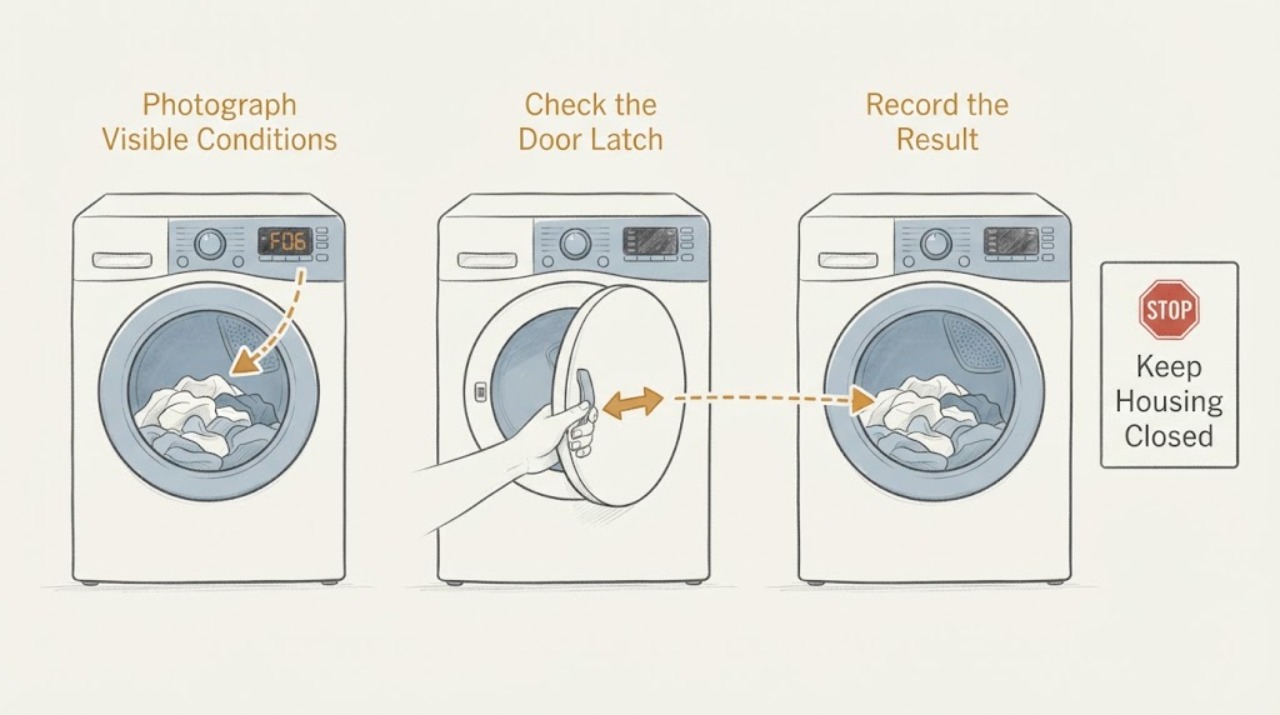
On a Hotpoint TDWSF 83B EP, do not treat F06 as proof that the heater or thermostat has failed. Hotpoint UK's tumble-dryer error guide identifies F06 as a door-lock fault: the door may not close or the programme may not start. That conflicts with the separate symptom of no heat, so record the complete display and light pattern, check only for a visible obstruction at the door and latch, and note whether the drum starts before F06 returns. A matching exact-model Reddit report describes the dryer running for a few seconds and then showing F06, but it is not an official repair procedure. Do not open the rear cover, reset a thermostat, bypass the interlock, or keep restarting the dryer. If F06 remains when the door closes normally, or the appliance has smoke, burning smell, sparks, a hot connection, or a damaged cord, stop and arrange qualified appliance service.
Work through in order
Diagnostic checks
Use only checks that match the exact appliance or system and its official guide.
-
Check 1
From a dry, safe position, photograph the complete display and note every character, flashing light, and the point in the programme where F06 appears. Record the full rating-label model and whether the dryer powers on, accepts a programme, starts the drum, and stops after a few seconds. Do not restart it if there is smoke, a burning smell, sparking, a hot plug or outlet, or a damaged cord.
Expected result: F06 is stable; only a light sequence is present; the drum starts and then stops; the programme will not start at all; or there is a separate no-code no-heat symptom.
Next step: Keep the recorded pattern for the exact Hotpoint manual or service request. If the panel is dark or the supply is abnormal, stop the appliance checks and use qualified electrical help.
Stop if: Do not erase the evidence by repeatedly resetting the machine, and do not remove a cover to look for the cause.
Why this matters
Why: The code and timing separate a door/interlock decision from a general heating complaint. A short run followed by F06 is a reported exact-model pattern, but it does not prove that the heater or thermostat is defective.
-
Check 2
With the dryer off, inspect only the visible door opening and latch area. Remove clothing, lint, or another obstruction only if it is loose and clearly accessible; close the door normally without slamming, lifting, or forcing it. Do not insert tools into the latch or bypass the door switch.
Expected result: The door cannot close, will not stay closed, the latch looks damaged, the door closes normally, or the door closes but F06 returns when Start is pressed.
Next step: If a loose obstruction was removed, make one controlled start attempt only when the appliance is otherwise safe. If the latch is damaged or F06 remains with a normally closed door, stop and arrange qualified Hotpoint or appliance service.
Stop if: Do not wedge the door shut, defeat the interlock, or remove the door or front panel.
Why this matters
Why: A visible obstruction can prevent the interlock from registering, while a normal-looking closed door with a returning F06 leaves the latch, switch, wiring, or control circuit unresolved. The code does not identify which internal component has failed.
-
Check 3
Only if the door closes normally and there is no electrical or heat hazard, make one supervised attempt to start a normal programme while standing clear of the exhaust and door. Note whether the drum rotates, whether any warmth is produced, and whether F06 appears immediately or after the same short interval. Stop the cycle if the appliance smells hot, smokes, sparks, or makes an abnormal noise.
Expected result: The dryer never starts; the drum runs briefly and F06 returns; the drum runs with no F06 but remains cold; or the cycle runs without the reported fault.
Next step: For any returning F06, stop user testing and provide the technician with the model, full light pattern, start/stop timing, and door-latch result. If F06 is absent and the dryer remains cold, use only the external filter and water-container checks below before requesting a heating diagnosis.
Stop if: Do not repeat the cycle to see whether the error clears, and do not test live wiring, thermostats, heater terminals, or control boards.
Why this matters
Why: No start with F06 remains consistent with the official door-lock branch. A brief run followed by F06 matches the exact-model report but still does not justify a heater reset. A cold drum without F06 is a different symptom path from the assigned F06 problem.
-
Check 4
If the dryer has no smoke, smell, leak, or returning F06 during the single observation, clean the user-accessible fluff filter at the door opening as Hotpoint describes and empty/refit the water container if this TDWSF model uses one. Do this with the appliance stopped and dry; do not open the cabinet or dismantle the condenser path.
Expected result: The filter is heavily blocked, the container is full or not seated, the accessible path is clear, or F06 remains after the external check.
Next step: Refit the user-accessible parts and do not continue if F06 returns. If the path is clear but the dryer is cold without F06, request service for a heating/temperature diagnosis rather than ordering a part from the symptom alone.
Stop if: Do not remove rear panels, reset a thermal cut-out, or run the dryer with filters, covers, or water protection incorrectly fitted.
Why this matters
Why: Hotpoint says a full water container can cause a dryer not to heat and recommends cleaning the accessible filter, but those maintenance conditions do not convert an F06 door-lock code into a heater diagnosis.
Use your observations
Decision map
Find the observation that best matches what you see, then follow the next safe action.
-
PATH 01Next step
What you see
F06 appears and the door cannot close, will not stay closed, or visibly has an obstruction at the latch.
Do this next
Remove only the loose visible obstruction, if safe, and try one normal start. If the latch or error persists, keep the dryer out of use and arrange qualified service.
Why this path and its safety boundary
Why it matters: This matches Hotpoint's published F06 door-lock symptom more closely than a heater fault.
-
PATH 02Next step
What you see
The door closes normally but the drum runs briefly and then F06 returns, as in the exact TDWSF 83B EP community report.
Do this next
Stop repeated testing, do not open the heater cover or bypass the interlock, and give service the exact model, code, light pattern, and run duration.
Why this path and its safety boundary
Why it matters: The timing is useful evidence but does not prove a failed thermostat, heater, or board; the official F06 meaning remains the door-lock branch.
-
PATH 03Next step
What you see
The dryer stays cold but no F06 is displayed after the single safe observation, and the accessible filter or water container is blocked or incorrectly seated.
Do this next
Clean/refit only the user-accessible item according to the exact manual. If the no-heat symptom remains, arrange service rather than choosing a heater or sensor from the symptom alone.
Why this path and its safety boundary
Why it matters: An external airflow or water-container condition can reduce or prevent heating on applicable Hotpoint dryers, but it is a separate path from F06.
-
PATH 04Next step
What you see
Smoke, burning odor, sparks, flooding, water near electrical parts, or a hot or damaged plug, cord, or outlet is present.
Do this next
Stop using the dryer, disconnect it only if this can be done without contact with a hazard, keep clear, and seek qualified electrical or appliance help. Do not restart it.
Why this path and its safety boundary
Why it matters: This is an immediate electrical, fire, or water hazard and cannot be safely triaged by the F06 code.
Helpful context
Understand the symptom
The important distinction on this Hotpoint TDWSF 83B EP is between the user's symptom and the displayed code. Hotpoint's official tumble-dryer list assigns F06 to a door-lock fault and describes the related symptom as a door that cannot open or close, or a programme that will not start. The same list uses other codes for temperature sensing or heater faults. Therefore, a dryer that feels cold is not enough reason to open the heater housing when F06 is on the display.
An exact-model Reddit post reports a TDWSF 83B EP that ran for a few seconds and then displayed F06. The post also describes the owner removing panels and touching the heater area, but it does not establish a safe or successful repair method. Treat that sequence as a useful observation to report to a technician, not as permission to reset a thermostat or test exposed parts.
Hotpoint identifies the TDWSF83BEPUK model family in its own parts system and directs owners to model-specific support and manuals. Confirm the full rating-label identity before using any manual or parts information; a similar-looking Hotpoint or Indesit dryer is not evidence that its code map or door hardware is the same.
Only after diagnosis
Potential parts
- door latch or door interlock
Only after a qualified diagnosis confirms that the door mechanism or interlock circuit is the cause of the returning F06; the code alone is not a parts-ordering proof.
When checks do not resolve it
Need a professional?
Arrange qualified Hotpoint or appliance service when F06 returns after the visible door/latch check, the door closes but the programme will not start, the drum runs briefly and stops with F06, the latch is damaged, or the code and light pattern do not match the exact model guidance. For a separate no-heat symptom without F06, request a heating or temperature diagnosis after the user-accessible filter and water-container checks. Do not open panels, reset a thermostat, test live wiring, bypass the interlock, or order a heater, sensor, latch, or control board solely from this code.
Common questions
FAQ
Does F06 mean the heater has failed on a Hotpoint TDWSF 83B EP?
Not on the Hotpoint UK tumble-dryer guide: it identifies F06 as a door-lock fault. The guide assigns temperature-sensing and heater problems to other codes. Because an exact-model report describes a short run followed by F06, preserve that timing for service instead of opening the heater housing or resetting a thermostat.
What can I safely check when F06 appears?
Record the complete display and light sequence, confirm the full model identity, and inspect the visible door opening and latch for a loose obstruction. Do not force the door, bypass the interlock, remove panels, or test live wiring. If F06 returns with a normally closed door, arrange qualified service.
Could a full water container explain the no-heat symptom?
Hotpoint says that failing to empty the water container can result in a dryer not heating, and it recommends cleaning the accessible fluff filter. Check those user-accessible items only when there is no hazard and no returning F06; they do not prove that a heater or thermostat is the cause of F06.
Read the exact guide
Official sources
- Spare parts for Hotpoint model TDWSF83BEPUKHotpoint UK · The opened Hotpoint parts page identifies TDWSF83BEPUK as a Hotpoint tumble-dryer model and warns that model number fit must be verified. It corroborates the model family but does not establish the F06 meaning or authorize a user repair.
- Hotpoint Appliance ManualsHotpoint UK · The opened official manual portal says to search by the first five model characters or 12NC and to use the matching manual for product-specific guidance. The linked TDWSF83BEPUK PDF could not be fetched in this research session, so this source does not prove an internal F06 repair sequence.
- Hotpoint TDWSF 83B EP (UK) Error code F06Reddit r/appliancerepair · The opened exact-model post reports that a Hotpoint TDWSF 83B EP (UK) dryer ran for a few seconds and then displayed F06. It also describes the poster removing panels and cleaning around the heater; it does not verify a repair or provide an official safe procedure.
- Hotpoint Tumble Dryer Error CodesHotpoint UK · The opened official page lists F06 as a door-lock fault, with the door unable to open or close or the programme unable to start; it lists F03 as a temperature-sensing fault and F08 as a heater fault. It is the primary code source, but it does not publish a TDWSF 83B EP-specific internal repair procedure.
- Hotpoint Service Tumble Dryer RepairHotpoint UK · The opened Hotpoint service page describes cleaning the door-opening fluff filter and emptying/refitting the water container, notes that a full container can result in no heating, and repeats F06 as a door-lock fault. It supports external checks only, not cabinet or heater work.
Community feedback
Share a repair observation
Share a plain-text repair observation. Accepted observations are published automatically; this page may take a moment to update.