
On this page
Start here
Quick answer
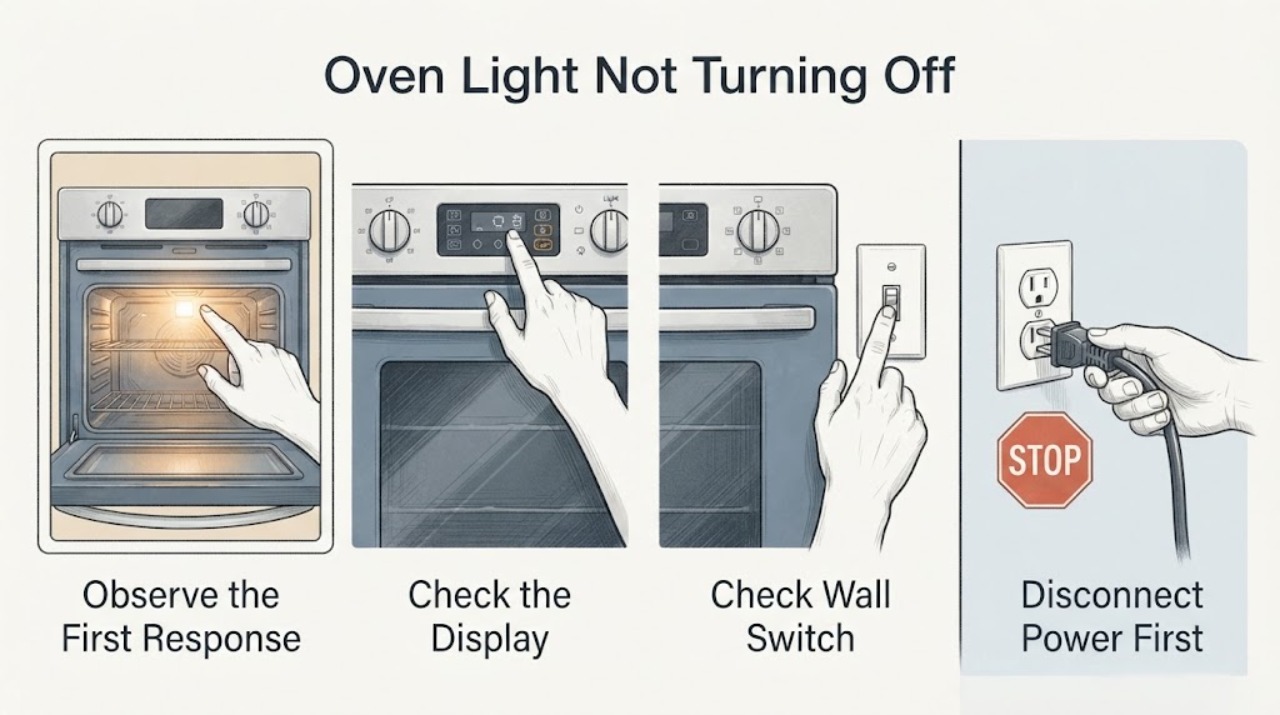
First identify which light is staying on. A light inside the oven cavity is different from an OVEN ON, PREHEATED, CLEAN, or other panel indicator. Official Hotpoint and GE Appliances materials show that oven-light operation varies by model: some ovens use a control-panel light switch or OVEN LIGHT button, while others turn the cavity light on when the door opens; Hotpoint models can also have a separate OVEN ON indicator. With the oven cool, turn every cooking, timer, and clean control fully off, close the door, and set the model's interior-light control to OFF if it has one. If the cavity lamp still glows with the door closed and controls off, or a panel indicator remains lit after the manual's shutdown sequence, stop using the oven and arrange model-specific service rather than opening the control area or replacing a guessed part.
Before you begin
Safety first
- Keep the oven off and cool before external checks. Do not open the cabinet, remove the control panel or lamp cover, test live wiring, bypass a door switch, or continue operation with unexpected heat, smoke, sparks, burning odor, or door damage. Hotpoint says to unplug before replacing an appliance part.
Work through in order
Diagnostic checks
Use only checks that match the exact appliance or system and its official guide.
-
Check 1
With the oven switched off and cool enough to view safely, identify whether the light is inside the oven cavity or on the control panel. Read the marking beside the panel light, such as OVEN ON, PREHEATED, CLEAN, or TIMER, without removing any trim.
Expected result: The glow is in the cavity, or the glow is a labeled panel indicator.
Next step: Use the cavity-light checks if the glow is inside the oven. Use the control-state checks if the glow is on the panel; do not diagnose a lamp or door switch from a panel indicator.
Why this matters
Why: These are different circuits and operating states. Hotpoint product information lists an interior oven light separately from an OVEN ON light, and an official Hotpoint manual ties the OVEN ON indicator to heating and timed operation.
-
Check 2
After the oven has cooled, turn the temperature/function control to OFF, cancel any timed-bake or delayed program, and exit a clean cycle only as the matching Owner's Manual describes. Do not force a hot or locked door.
Expected result: The panel indicator goes out after the controls and timer are fully cancelled, or it remains on despite the documented shutdown state.
Next step: If the indicator remains on, stop using the oven and arrange service with the model number. Do not repeatedly start and cancel heating or cleaning to test it.
Why this matters
Why: An indicator that goes out was reporting an active or latched operating state; a light that remains on after the model's shutdown sequence is outside the normal behavior documented for that state.
-
Check 3
If the glow is inside the cavity, close the oven door and, only if the appliance visibly has one, set the backsplash/control-panel light switch or OVEN LIGHT button to OFF. Do not press a button repeatedly or remove the lamp cover.
Expected result: The cavity lamp turns off with the documented manual control, turns off when the door closes, or remains on with the door closed and the control set to OFF.
Next step: If it turns off, use the model's normal light control. If it remains on, record the exact model and arrange service rather than testing the door switch, control board, or wiring yourself.
Why this matters
Why: Official GE Appliances guidance says some models have a manual switch or OVEN LIGHT button while other models turn the lamp on when the door opens. The result is therefore model-dependent; a persistent glow after the correct control state is not proof of a bulb type or switch part.
-
Check 4
Locate the complete Hotpoint model number or 12NC from the appliance label and retrieve the matching Owner's Manual through Hotpoint's manual tool. Compare the manual's light symbols, door behavior, timer/clean-cycle instructions, and any model-specific indicator meanings with what you observed.
Expected result: The manual confirms a manual lamp switch, a door-operated lamp, a separate panel indicator, or no matching behavior for the observed light.
Next step: Follow only the matching manual's external control instructions. If the document does not explain the symptom or the model cannot be identified, stop at observation and contact Hotpoint service.
Why this matters
Why: Hotpoint's manual service uses the model or 12NC to select the correct document, and official support shows that light operation can change between models or production versions.
-
Check 5
Stop using the oven and arrange qualified Hotpoint service if the cavity light stays on while the door is closed and controls are off, a panel indicator stays on with heating/cleaning cancelled, the oven remains hot unexpectedly, there is a burning smell, or the door/control area is damaged. Give the technician the model, light location, control state, and whether the oven was recently used or self-cleaned.
Expected result: The unwanted light or indicator persists after the safe, model-authorized control checks, or the symptom is accompanied by heat, odor, smoke, arcing, or damage.
Next step: Keep the oven off. If safe for the installation, isolate power at the accessible isolator/breaker; do not open the appliance, bypass a switch, or continue operating it while hot, smoking, sparking, or smelling of burning.
Why this matters
Why: The observable symptom no longer identifies a user setting. It may involve model-specific switching, control, door, or wiring that cannot be safely diagnosed from the outside, and the official Hotpoint repair path directs unresolved problems to service.
Use your observations
Decision map
Find the observation that best matches what you see, then follow the next safe action.
-
PATH 01Next step
What you see
The glow is inside the oven cavity, the model has an OVEN LIGHT switch or button, and the lamp turns off when that control is set to OFF.
Do this next
Leave the control OFF when the light is not needed and keep the model manual with the appliance. Do not substitute a bulb or switch based only on appearance.
Why this path and its safety boundary
Why it matters: The lamp is responding to the documented manual control; the original complaint may have been an enabled light setting rather than a component fault.
-
PATH 02Next step
What you see
The glow is inside the cavity, the model uses door operation, and it goes out when the door is fully closed.
Do this next
Use the oven only with the door closing normally. If the lamp remains on with the door closed, stop and arrange model-specific service; do not press or bypass the door switch.
Why this path and its safety boundary
Why it matters: This matches the documented behavior for models whose interior lamp is controlled by the door rather than a dedicated button.
-
PATH 03Next step
What you see
The glow is beside OVEN ON, PREHEATED, CLEAN, or a timer symbol rather than inside the cavity.
Do this next
Cancel the active program and turn the temperature/function control OFF as the exact manual directs. If the indicator remains on after that state is cleared, stop using the oven and schedule service.
Why this path and its safety boundary
Why it matters: The light may be reporting heating, a timed operation, preheat, or clean-cycle state. Hotpoint's official range manual gives different meanings for these indicators and says a timed operation can leave OVEN ON flashing until the temperature control is turned OFF.
-
PATH 04Next step
What you see
The cavity lamp or panel indicator remains on after the correct controls are OFF, or the oven is unexpectedly hot, smells of burning, smokes, sparks, or has a damaged door/control area.
Do this next
Keep the oven off and arrange qualified service. Isolate power only from a safe accessible point if needed; do not open the cabinet, remove a control panel, test live wiring, or bypass a door switch.
Why this path and its safety boundary
Why it matters: The symptom cannot be safely narrowed to a user setting without the exact model and internal diagnosis. Continuing to run the oven could add heat or electrical risk.
Helpful context
Understand the symptom
Separate the cavity lamp from a control-panel indicator
Look through the door without opening or touching a hot oven. A glow inside the cavity is the interior lamp. A small light by OVEN ON, PREHEATED, CLEAN, or a timer is a control indicator and may be governed by a cooking or cleaning state instead. Hotpoint product information lists an interior oven light and a cycling OVEN ON light as separate features on at least some ranges, while an official Hotpoint range manual describes the OVEN ON light as tied to heating and timed-operation controls. Do not use a panel-light explanation to justify a cavity lamp that remains on.
Use the model's documented light behavior
Some GE/Hotpoint-family ovens have a manual interior-light switch or OVEN LIGHT button; others turn the light on when the door opens. The official JGB700 support article documents a production change within one series, which is why a generic Hotpoint instruction cannot establish whether a particular oven should have a panel button or door-operated lamp. Find the full model and use its Owner's Manual before treating the behavior as a failed switch or control.
Keep hot surfaces and electrical work out of the user checks
Leave the oven off and let the cavity, door, lamp cover, and surrounding trim cool before checking the controls. Hotpoint's repair guidance says the appliance must be unplugged before replacing a part and directs unresolved oven problems to service. This page does not instruct you to remove the lamp cover, reach behind the control panel, test wiring, bypass a door switch, or work on a gas or mains circuit.
When checks do not resolve it
Need a professional?
Arrange qualified service when the cavity lamp stays on with the door closed and its documented control OFF, a panel indicator stays on after heating/timer/cleaning is cancelled, the model manual does not explain the behavior, or any unexpected heat, burning odor, smoke, sparks, or door/control damage is present. Keep the oven off and do not open or bypass internal parts.
Safety scope: Keep the oven off and cool before external checks. Do not open the cabinet, remove the control panel or lamp cover, test live wiring, bypass a door switch, or continue operation with unexpected heat, smoke, sparks, burning odor, or door damage. Hotpoint says to unplug before replacing an appliance part.
Have this ready
- Provide the full model or 12NC, whether the glow is in the cavity or on the panel, the labels beside the light, door-open/closed behavior, control and timer state, recent self-cleaning or cooking, and any heat, odor, smoke, or damage.
Common questions
FAQ
Is an oven light that stays on the same as an OVEN ON light?
No. Hotpoint product information lists an interior oven light separately from an OVEN ON indicator, and an official Hotpoint manual ties the OVEN ON light to heating and timed-operation states. Identify where the glow is before choosing a check.
Why does the exact Hotpoint model matter if the light is simply on?
Hotpoint and GE Appliances support documents show that some models use a panel or backsplash light switch, while others turn the cavity light on when the door opens. Hotpoint's manual tool uses the model or 12NC to retrieve the correct document, and even one documented series changed its light control between production versions.
Can I remove the oven light cover or test the switch to make it turn off?
Do not use this page to open the appliance or test live wiring. Leave the oven off, let it cool, follow only the matching manual's user-level control instructions, and arrange qualified service if the light remains on. Hotpoint says the appliance must be unplugged before replacing a part.
Read the exact guide
Official sources
- Hotpoint RB757BCWH Hotpoint 30 in Free-Standing Electric RangeGE Appliances / Hotpoint · Opened official Hotpoint product specification for model RB757BCWH. It lists an Interior Oven Light and separately lists an Oven ON Light Cycling, demonstrating the distinction used here; the model is not asserted as the user's unspecified oven.
- Hotpoint Range Owner's Manual (PDF)GE Appliances / Hotpoint · Opened official Hotpoint range PDF. It is used only for the explicitly scoped legacy-manual behavior: OVEN ON and timed-operation indicators, turning the temperature knob OFF after timed baking, and the control-panel oven-light switch. It is not presented as the manual for the user's unknown model.
- Range & Wall Oven - Oven Interior Warm When Not In UseGE Appliances · Opened official GE Appliances support content. It says an interior lamp left on can warm the cavity and advises checking the model's light switch; it also notes that a door-open lamp can warm the cavity. It supports the distinction between a lamp setting and residual heat, not a universal Hotpoint diagnosis.
- Range & Wall Oven - Oven Light OperationGE Appliances · Opened official GE Appliances support content. It states that some ovens use a manual interior-light switch or OVEN LIGHT button and that the control may be on the panel or above the door; it also documents door-operated light behavior on some models. It is used for model-variation boundaries, not as a claim that every Hotpoint oven shares one design.
- Gas Range - Oven Light on JGB700GE Appliances · Opened official support content for the JGB700 gas-range series. It documents that initial production models used door opening for the oven light while later production added an OVEN LIGHT pad. This is evidence that the exact model/version must be checked, not a transfer of JGB700 details to an unspecified Hotpoint oven.
- Hotpoint Appliance ManualsHotpoint UK Appliances Limited · Opened official Hotpoint manual portal. It says to enter the first five model-number digits or 12NC to locate the correct oven manual and related technical documents; no universal model-specific light behavior is inferred from the portal.
- Hotpoint Service Oven RepairHotpoint UK Appliances Limited · Opened official Hotpoint oven repair page. It says to unplug the appliance before replacing a part and to contact Hotpoint support when self-help does not resolve the oven issue. It also identifies gas-safe service coverage for gas ovens.
Community feedback
Share a repair observation
Share a plain-text repair observation. Accepted observations are published automatically; this page may take a moment to update.