
On this page
Start here
Quick answer
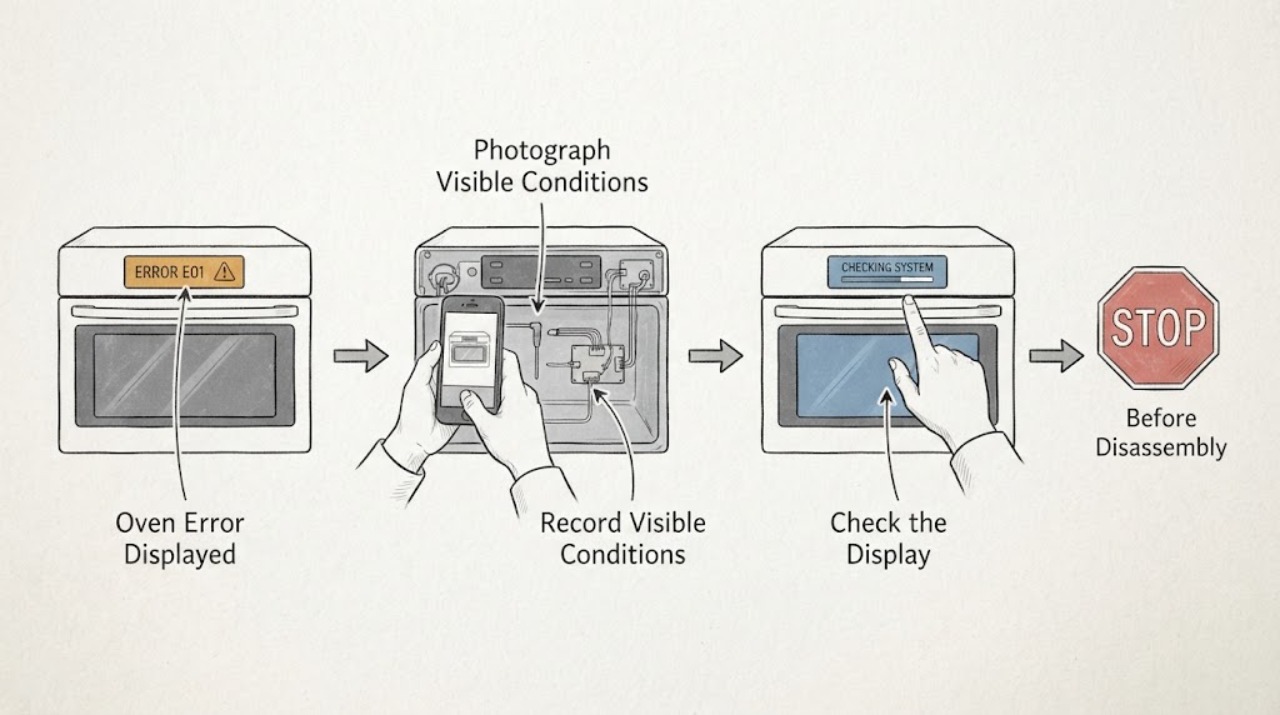
Do not guess a Hotpoint oven code from a partial display. Photograph the complete message or alternating sequence, record the exact model and whether the oven is electric or gas, and check that model's Hotpoint manual or support page. Some controls use common states such as LOC, ERR, OFF, or an F-number, but the meaning and reset procedure vary by model. With the oven cool and no gas smell, smoke, arcing, abnormal heat, or tripped breaker, you can cancel the entry or perform one model-appropriate power reset. If the code returns, the oven is unsafe to use, or the display shows a temperature, door-lock, wiring, or internal-control fault, stop and arrange qualified appliance service.
Work through in order
Diagnostic checks
Use only checks that match the exact appliance or system and its official guide.
-
Check 1
Stop cooking and record the complete display exactly as shown, including every letter, number, symbol, colon, dash, and alternating message; take a photo before clearing it.
Expected result: The display is stable and legible, or it alternates between a code and another message or temperature.
Next step: Keep the photo and note the cycle, whether self-clean was active, and when the code appeared. If the display is unreadable, do not guess—continue by identifying the model and request support.
Why this matters
Why: The complete sequence is the evidence needed to match the correct Hotpoint manual or support entry; a partial F-number or a remembered code can identify the wrong circuit.
-
Check 2
Read the model and serial label from the oven frame or documentation and record whether the appliance is gas, electric, or dual-fuel before looking up the code.
Expected result: The exact model and appliance type are known, or the label is missing or unreadable.
Next step: Use the exact model in Hotpoint's manual or support search. If the identity cannot be confirmed, stop at general safety checks and arrange support rather than applying a code meaning from another model.
Why this matters
Why: Hotpoint's manuals and support paths are model-specific, and gas and electric controls can have different safety and service boundaries.
-
Check 3
With the oven cool and the controls off, check for immediate hazards: gas odor, smoke, scorching, arcing, a door that is locked unexpectedly, a control that stays active, or a breaker that has tripped.
Expected result: Any gas smell, smoke, arcing, scorching, abnormal heat, uncontrolled heating, repeat trip, or unsafe door-lock behavior is present.
Next step: Do not restart the oven. For gas odor, do not operate switches or flames; leave the area and call the gas supplier or emergency service from outside. For electrical or fire symptoms, isolate the appliance only if it is safe and arrange qualified service.
Why this matters
Why: The code is secondary to a gas, fire, electrical, heat, or door-lock safety condition and ordinary troubleshooting must stop.
-
Check 4
Compare the recorded message with the exact Hotpoint manual or official support result for that model, and classify it as a control entry, lockout, temperature or sensor fault, door-lock fault, or unknown code.
Expected result: The model documentation gives a matching explanation, or the code is absent, ambiguous, or different from the documented display.
Next step: Follow only the documented user step. If no exact match exists, preserve the photo and call service with the model, code, cycle, and behavior; do not substitute a code from a different Hotpoint or GE-family oven.
Why this matters
Why: A matching official entry can support a limited user reset or settings correction. An unmatched display cannot safely be assigned a failed part or temperature value.
-
Check 5
If the display is LOC or a documented control lockout, use the exact manual's unlock command once and observe whether the controls respond without a new fault.
Expected result: The lockout clears and the display accepts normal settings, or LOC remains or returns.
Next step: If it clears, set the clock and verify a normal low-risk function according to the manual. If it persists, do not force the door or repeatedly press keys; stop and request model-specific service.
Why this matters
Why: A control lockout can prevent operation without proving a hardware failure, but a persistent lockout may indicate an input or control problem or an active self-clean door state.
-
Check 6
If the manual permits clearing an invalid entry or a transient fault, press the documented cancel or clear control once, then wait for the oven to return to an idle display.
Expected result: ERR or the prompt clears and the oven returns to idle, or the same message remains or a different fault appears.
Next step: If the display returns to idle, re-enter one simple documented setting. If the fault remains or the oven behaves unexpectedly, leave it off and arrange service.
Why this matters
Why: ERR may represent an invalid control entry, while a persistent or changing code needs diagnosis rather than repeated key presses.
-
Check 7
Only when the oven is cool, hazard-free, and the manual does not require another procedure, perform one power reset by switching off the oven's breaker or fuse for the interval specified by the model instructions, then restore power once.
Expected result: The display clears and the oven remains idle, or the same code returns immediately or during the next selection.
Next step: If the exact manual allows it and the oven is normal, set the clock and make one supervised test. If the code returns, stop resetting and request qualified service; do not open the control panel.
Why this matters
Why: A reset can clear a transient control state, but recurrence shows that the underlying condition was not resolved; it does not identify a replaceable part.
-
Check 8
After a documented reset or setting correction, observe one short, supervised operation from outside the oven for heating that will not stop, a locked door, unusual fan behavior beyond the model guidance, smoke, arcing, or another code.
Expected result: The oven performs the selected function normally with no new display or safety symptom, or any abnormal behavior recurs.
Next step: Use the oven only if it behaves normally and the model manual permits it. Stop immediately for any recurrence or hazard and give the technician the saved code photo and sequence.
Why this matters
Why: A single clean test supports a transient entry or state issue. Recurrence under heat or operation points to a control, sensor, lock, wiring, or other model-specific fault.
Use your observations
Decision map
Find the observation that best matches what you see, then follow the next safe action.
-
PATH 01Next step
What you see
Gas odor, smoke, arcing, scorching, abnormal heat, uncontrolled heating, or repeated breaker trip is present
Do this next
Stop immediately, leave the appliance area as appropriate, and use the applicable gas, fire, or electrical emergency path from a safe location.
-
PATH 02Next step
What you see
The code is unreadable, incomplete, or not shown in the exact model documentation
Do this next
Do not infer its meaning. Preserve a photo and request support with the exact model, code sequence, cycle, and behavior.
-
PATH 03Next step
What you see
The model manual identifies LOC as a control lockout and the documented unlock command works
Do this next
Set the clock if required and run only the manual's normal functional check; persistent LOC needs service.
-
PATH 04Next step
What you see
ERR clears with the manual's documented cancel or clear control
Do this next
Re-enter one simple documented setting. A repeat message is a service case, not a reason to keep pressing controls.
-
PATH 05Next step
What you see
A documented power reset clears the display and no abnormal symptom returns
Do this next
Make one supervised test and keep the code photo in case the problem recurs.
-
PATH 06Next step
What you see
The code returns after one permitted reset or during the supervised test
Do this next
Stop using the oven and arrange qualified service; supply the exact display, model, appliance type, cycle and timing.
-
PATH 07Next step
What you see
The display is OFF after self-clean or the oven remains hot
Do this next
Allow the oven to cool as the model guidance requires; do not force the door or start another cycle while the state is active.
-
PATH 08Next step
What you see
A cooling fan continues after the oven is switched off and no fault or hazard is present
Do this next
This can be normal control cooling; compare with the model guidance and escalate only if it is accompanied by a fault or abnormal heat.
Helpful context
Understand the symptom
Why the exact display matters
An error that looks like a letter can be a number, and some ovens alternate a code with a temperature, clock, or prompt. The same-looking F-number is not proof of the same failed part across Hotpoint generations. Write down every character in order, photograph the display before switching anything off, and note what the oven was doing when it appeared, such as preheating, baking, self-cleaning, or recovering from a power interruption.
What the common states can—and cannot—tell you
On electronic range and wall-oven controls, an F0 or F1 commonly points to a keypanel problem; F2 or F20 indicates that the oven temperature exceeded a preset threshold; F3 or F4 commonly points to the oven sensor; and F9 or FC points to a door-lock circuit. LOC is commonly a control lockout, ERR an invalid control entry, and OFF can appear when the oven is still too hot for a requested self-clean or cooking function. These are model-family clues, not a license to replace a board or sensor without the exact manual and diagnosis.
Normal sounds are not necessarily error codes
Hotpoint says a cooling fan may continue after an oven is switched off to protect the controls, and its oven guidance notes that fan operation can be normal. A fan by itself is different from a flashing code, an oven that will not stop heating, or a new fault message. Treat the display and the oven's behavior together when deciding whether to continue.
Regional and model differences are important
Hotpoint support is organized by appliance and model, and Hotpoint's cooking guidance covers both gas and electric cookers. A code table from another regional support system can be useful only as a cross-reference when the model and control family match. If the model cannot be identified, do not infer a part, wiring arrangement, temperature limit, or reset sequence from a different oven.
Safety overrides troubleshooting
Do not continue testing when there is a gas smell, smoke, arcing, burning odor, abnormal heat, a damaged control, a door that will not behave normally, or a breaker that trips again. For suspected gas, avoid flames and electrical switches, leave the area, and contact the gas supplier or emergency service from a safe location. Hotpoint's safety notices also advise checking the model against current notices and refraining from use when a safety action applies.
Only after diagnosis
Potential parts
- oven electronic control or keypanel
Only consider this part after the exact model documentation and a qualified diagnosis link a persistent F0, F1, F5, F8, FF, or similar control symptom to the control assembly.
Confirm the full model and manufacturer's fit information; a generic code does not prove part compatibility. - oven temperature sensor
Only consider this part when the exact model documentation and service diagnosis identify a sensor fault such as a matching F3 or F4 family code.
Verify model-specific fit and safe testing requirements with Hotpoint or a qualified technician. - oven door-lock component
Only consider this part after a qualified diagnosis confirms a persistent door-lock or self-clean lock fault for the exact model.
Do not force or bypass the door lock; confirm model fitment and repair procedure before ordering.
When checks do not resolve it
Need a professional?
Arrange Hotpoint or qualified appliance service when the code is not an exact match for the model, returns after one documented reset, is accompanied by a door-lock, sensor, over-temperature, wiring, or control symptom, or prevents safe operation. Stop immediately for gas odor, smoke, arcing, scorching, abnormal heat, uncontrolled heating, damaged wiring, or a breaker that trips again. Do not open the control panel, replace a board or sensor based only on a generic code, bypass a lock, or repeatedly reset the oven.
Common questions
FAQ
What should I do first when my Hotpoint oven displays an error?
Photograph the complete display or alternating sequence, record the exact model and fuel type, and check the model-specific Hotpoint manual before attempting a reset.
Are Hotpoint oven error codes the same on every model?
No. Code meanings and reset steps vary by model and control family. Treat generic F-number tables as cross-reference information only when the exact model supports the match.
What does LOC mean on an oven?
On many electronic oven controls, LOC indicates a control lockout. Use only the exact model's documented unlock command; a persistent LOC needs service.
What does ERR mean on an oven display?
ERR can indicate an invalid control entry on some electronic ovens. Clear it only as the model manual directs; a repeat message should be diagnosed.
Can I reset a Hotpoint oven error by turning off the breaker?
Only if the exact manual permits it and the oven is cool and hazard-free. Perform one documented reset; if the code returns, stop resetting and arrange service.
Is a fan running after a Hotpoint oven is turned off an error?
Hotpoint says a cooling fan can continue after shutdown to protect controls. Escalate if fan operation is accompanied by a fault display, abnormal heat, smoke, or uncontrolled heating.
When is a Hotpoint oven error an emergency?
Stop immediately for gas odor, smoke, arcing, scorching, abnormal heat, uncontrolled heating, damaged wiring, or a breaker that trips again. Leave gas-related danger and contact the gas supplier or emergency service from a safe location.
Read the exact guide
Official sources
- Hotpoint Service Gas & Electric Cooker RepairHotpoint UK Appliances Limited · Hotpoint gas and electric cooker/oven manuals, safety and repair boundary
- FAQs | Ranges & OvensGE Appliances · GE range and wall-oven model-specific support, fault-code lookup and normal fan behavior
- Gas Range - Gas OdorsGE Appliances · Gas range odor distinction and immediate gas-safety actions
- Range & Wall Oven - No PowerGE Appliances · GE range and wall-oven breaker/fuse checks and service boundary
- Range & Wall Oven - Oven Error, Fault or Function CodesGE Appliances · GE electronic range and wall-oven common fault-code cross-reference; not a universal code list
- Hotpoint Appliances Safety NoticesHotpoint UK Appliances Limited · Hotpoint appliance safety notices, model checks and stop-use instructions
- Hotpoint Oven Troubleshooting & RepairHotpoint UK Appliances Limited · Hotpoint oven troubleshooting, cooling-fan behavior and escalation
- Hotpoint Service Oven RepairHotpoint UK Appliances Limited · Hotpoint ovens, model manuals, troubleshooting and professional repair support
Community feedback
Share a repair observation
Share a plain-text repair observation. Accepted observations are published automatically; this page may take a moment to update.