
On this page
Start here
Quick answer
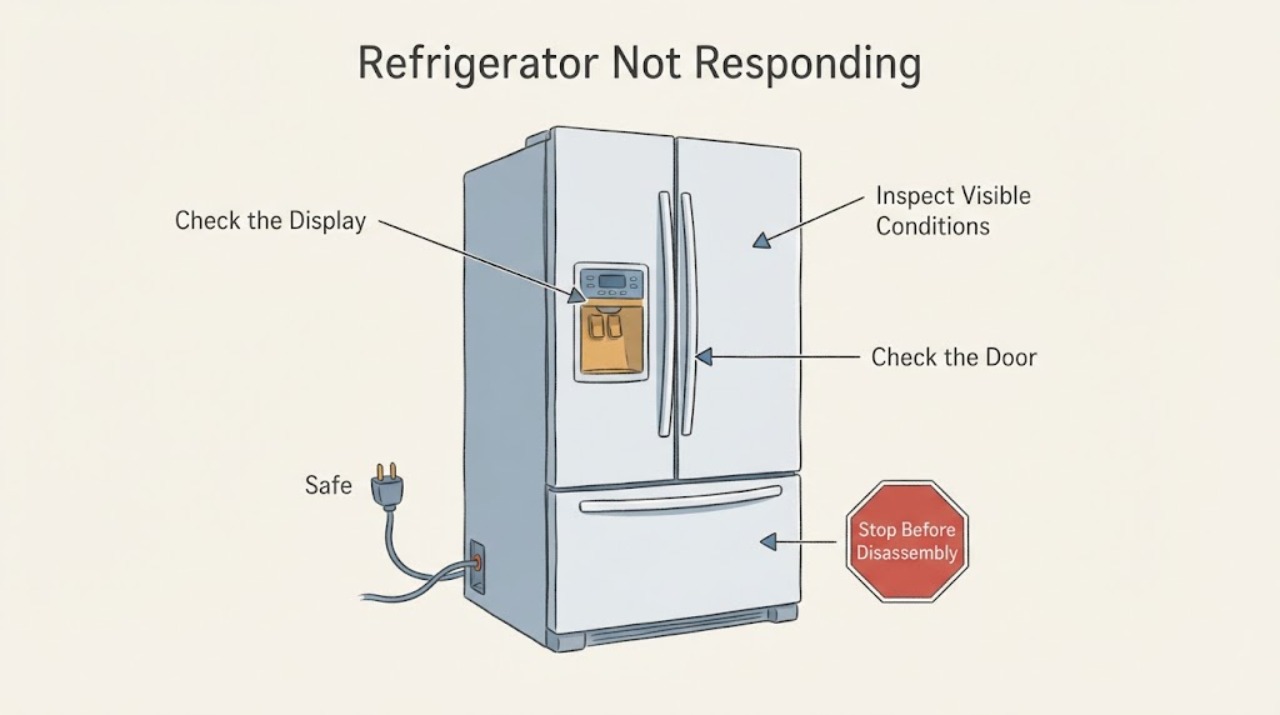
First identify what is not responding. If the interior light and the refrigerator are both dead, check from a safe position that the temperature control is not OFF, the power cord is seated, and the outlet has power; do not open the cabinet or perform live electrical tests. If only a dispenser control panel is unresponsive, check the model-specific lock state and use the exact manual before trying a brief power reset. On many Hotpoint side-by-side refrigerators, an external temperature display fades into sleep mode and wakes when a temperature pad is touched. Because “not responding” does not identify the failed function or model, do not infer a control board, wiring, compressor, or dispenser part; persistent or unsafe symptoms need model-matched service.
Work through in order
Diagnostic checks
Use only checks that match the exact appliance or system and its official guide.
-
Check 1
From a safe position, identify which function fails: interior light and all cooling, the dispenser controls only, an external temperature display, or cooling while lights and controls still work. Note whether the refrigerator makes its normal operating sounds and whether a breaker has tripped, without opening panels or touching wiring.
Expected result: The interior light is also dead; only the dispenser panel ignores input; the display wakes after a touch; or the light and controls work while food is warming.
Next step: Continue only with the matching external branch below and record the exact model from the rating label for any model-specific instruction. Do not diagnose an internal part from the description alone.
Why this matters
Why: These are different problem branches. “Not responding” alone does not identify an electrical supply fault, lock state, sleep display, or cooling-system failure.
-
Check 2
If the interior light and refrigerator appear completely dead, look at the temperature control without removing covers, make sure it is not set to OFF, confirm the cord is fully seated, and check the receptacle with another appliance only if the area is dry and safe.
Expected result: The control was OFF, the cord was loose, the receptacle is dead, or the refrigerator still has no response after those external checks.
Next step: Correct only an obvious OFF setting or loose plug. If the outlet or house circuit is abnormal, use a qualified electrician; if the outlet is powered and the refrigerator remains dead, stop and arrange model-matched service. Do not remove the plug ground, bypass protection, or open the appliance.
Why this matters
Why: The official Hotpoint refrigerator guide lists an OFF control, an unplugged cord, no outlet power, or a house fuse as possible reasons a refrigerator does not run; these checks do not establish an internal component failure.
-
Check 3
If the dispenser control panel is the only unresponsive area, check whether the panel is locked using the exact Owner’s Manual; for a new installation, also verify that a removed-door harness was reconnected by the installer and that the dispenser water shutoff is open when the symptom includes no water or ice.
Expected result: A lock indicator is active, the problem began after installation or door removal, or the panel remains unresponsive with no visible installation issue.
Next step: Use only the model-specific unlock procedure in the Owner’s Manual. If the panel remains unresponsive, continue to the brief reset branch or request service; do not remove the door, panel, or wiring yourself.
Why this matters
Why: The official control-panel guidance lists lockout, a door wiring harness after installation, and water supply for dispenser symptoms; it does not authorize a user to access the harness or infer a failed board.
-
Check 4
If the refrigerator has an external temperature display, touch the relevant temperature pad once and observe whether the display returns; do not treat a dark display alone as a fault before checking whether it is a supported sleep behavior.
Expected result: The display illuminates when a pad is touched, or it never illuminates and the controls also fail.
Next step: If it wakes normally, use the exact manual for temperature adjustment. If it never wakes, preserve the model and symptom details for service rather than opening the control housing.
Why this matters
Why: The official Hotpoint/GE guidance says external temperature displays on most Hotpoint side-by-side models fade after a short period and are not meant to remain lit continuously. A display that never responds is outside that documented sleep behavior.
-
Check 5
Only when there is no smoke, burning odor, water at electrical areas, damaged cord, unusual heat, or repeated breaker action, use the model-specific control-panel reset guidance: briefly unplug the refrigerator or switch it off at the breaker for 30 seconds, then restore power once.
Expected result: The affected control returns after the single reset, or the refrigerator remains unresponsive or a safety sign appears.
Next step: If the symptom persists, stop resetting and arrange qualified service with the exact model. For any electrical danger sign, isolate power only from a safe position and seek qualified help; do not open the cabinet or perform live tests.
Why this matters
Why: The official panel article presents a 30-second power reset for a non-responsive dispenser control, but a reset is not a diagnosis and is not a reason to keep cycling an unsafe appliance.
Use your observations
Decision map
Find the observation that best matches what you see, then follow the next safe action.
-
PATH 01Next step
What you see
The interior light is off and the refrigerator appears completely dead.
Do this next
Check only the OFF setting, seated plug, and safe outlet condition described in the Hotpoint guide; use an electrician for a circuit problem and qualified appliance service if the outlet is powered.
Why this path and its safety boundary
Why it matters: The assigned symptom is consistent with a power/control-state branch, but the task does not prove which one.
-
PATH 02Next step
What you see
The interior light and cooling operate, but the dispenser control panel does not accept input.
Do this next
Check the exact manual for lockout, then use one brief 30-second power reset only if the appliance is otherwise safe; arrange service if it remains unresponsive.
Why this path and its safety boundary
Why it matters: This is the panel-specific branch in the official GE support guidance, with model-dependent lock and installation checks.
-
PATH 03Next step
What you see
An external temperature display is dark but wakes when a temperature pad is touched.
Do this next
Treat it as normal display behavior and use the exact model manual for settings; if it never wakes, escalate with the model and symptom.
Why this path and its safety boundary
Why it matters: On most Hotpoint side-by-side refrigerators with this display style, fading into sleep mode is documented behavior.
-
PATH 04Next step
What you see
There is smoke, burning smell, unusual heat, water near electrical areas, cord damage, a repeated breaker trip, or the symptom remains after the applicable external checks.
Do this next
Stop using the refrigerator, isolate power only from a safe position, protect food as appropriate, and arrange qualified service. Do not open panels, bypass protection, or repeatedly reset the appliance.
Why this path and its safety boundary
Why it matters: The condition cannot be safely narrowed to a user-accessible cause from the task identity.
Helpful context
Understand the symptom
Define what is not responding first
A refrigerator can appear unresponsive because the whole appliance has lost power, a dispenser panel is locked, an external display is asleep, or a separate cooling problem is present. Use only the external checks that match the observed symptom and stop if there is heat, smoke, a burning smell, water at electrical areas, cord damage, or a tripped breaker.
When checks do not resolve it
Need a professional?
Stop and arrange qualified service for smoke, burning odor, unusual heat, water near electrical parts, cord damage, repeated breaker action, or a refrigerator that remains dead after a safe outlet/control check. For a persistent panel or display problem, provide the complete Hotpoint model and the exact function that failed. Do not open the cabinet, remove a door or control panel, probe live wiring, bypass protection, or infer a failed component from “not responding.”
Common questions
FAQ
Does “not responding” mean the Hotpoint refrigerator control board has failed?
No. The symptom could be an OFF control, loss of outlet power, a locked dispenser panel, a display asleep, or a separate cooling problem. The exact model and affected function are required before any part diagnosis.
Why is the Hotpoint refrigerator display dark?
On most Hotpoint side-by-side refrigerators with external temperature controls, the display fades into sleep mode and lights when a temperature pad is pressed. If it never wakes, use the exact model manual and request service rather than opening the control housing.
Can I keep resetting a refrigerator that does not respond?
The official dispenser-panel guidance describes one brief 30-second power reset for a non-responsive panel, but repeated resets are not a diagnosis. Stop if the symptom persists or any smoke, burning smell, heat, water near electrical parts, cord damage, or breaker action is present.
Read the exact guide
Official sources
- Refrigerator - Dispenser Control Panel Not WorkingGE Appliances · Official control-panel guidance reached through Hotpoint’s GE support route; supports lock-state, installation-context, water-supply, and one 30-second reset checks, but does not establish compatibility with every Hotpoint model.
- Side-by-Side Refrigerator - External Temperature ControlsGE Appliances · The opened official article explicitly includes most Hotpoint side-by-side refrigerators and explains display sleep behavior and control adjustment; it does not cover every Hotpoint refrigerator or prove a fault for an unidentified model.
- Hotpoint Refrigerator Owner Guide and Self-Service CheckHotpoint / GE Appliances · Official Hotpoint refrigerator PDF hosted by GE Appliances; its external stopped-operation checks are used as family-era guidance only, not as a model-specific procedure for an unidentified refrigerator.
- Appliance Support - HotpointHotpoint · Official Hotpoint support page for household appliances; it states that Hotpoint appliances are registered with GE Appliances, appliance questions are directed to GE Appliances, and Hotpoint appliances are serviced by Bodewell.
Community feedback
Share a repair observation
Share a plain-text repair observation. Accepted observations are published automatically; this page may take a moment to update.