
On this page
Start here
Quick answer
Do not pull, pry, or defeat the door lock on a Hotpoint WMAL641GUK just because the door feels like it is not interlocked. After setting a wash programme, a locked door can be normal while the drum is moving, water is present, or the machine is still hot. Use the normal Start/Pause or programme-end control, wait for the drum and water to become safe, and check the lock indicator through the door. If water remains, the programme will not finish, or the lock stays on, follow only the WMAL641GUK handbook's documented drain or release procedure; do not guess a button combination or improvise a release. A visible loose garment may be removed only without tools or force. If the door remains locked after safe conditions, or the glass, seal, handle, latch, cord, or surrounding area is damaged or wet, leave the washer off and arrange qualified Hotpoint service.
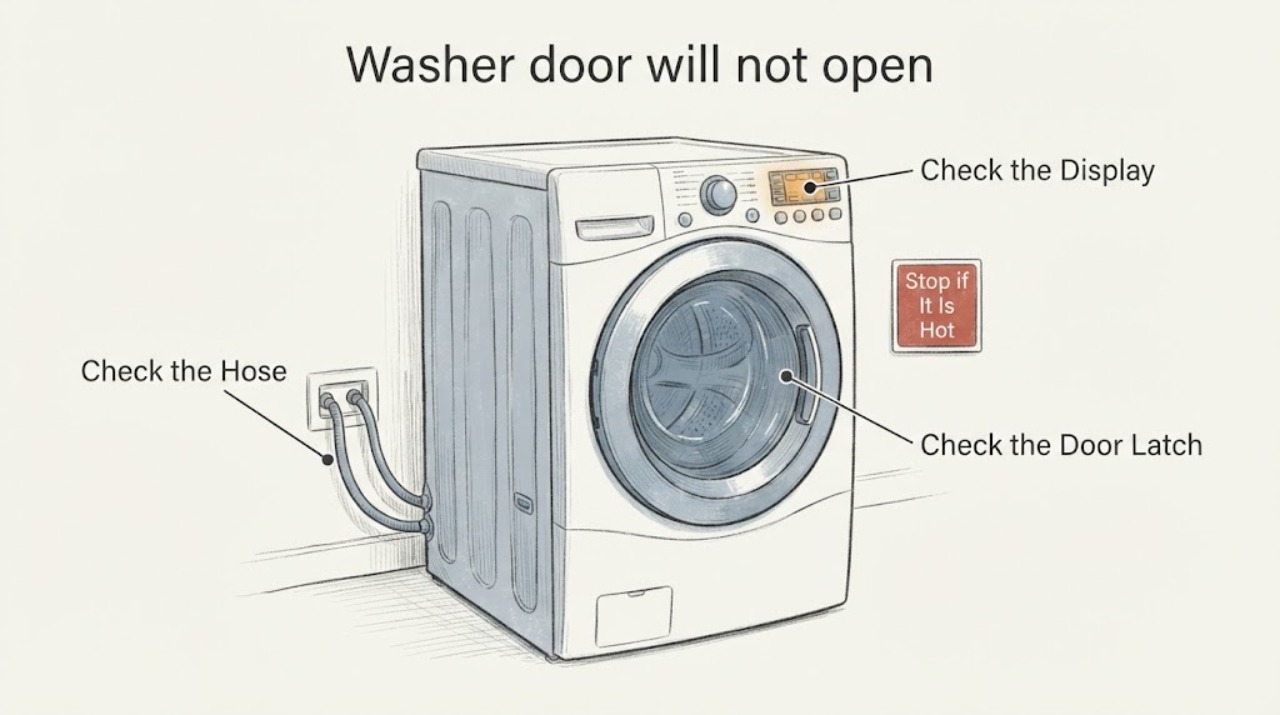
Work through in order
Diagnostic checks
Use only checks that match the exact appliance or system and its official guide.
-
Check 1
Press the normal Start/Pause, Stop, or programme-end control for the WMAL641GUK, then wait without pulling the handle. Look through the door and listen only from outside for the drum to stop; note whether the lock indicator clears after the programme ends.
Expected result: The drum is still moving, the programme is active, the door or water is hot, or the lock clears once the safe end state is reached; alternatively, the cycle has ended but the lock remains on.
Next step: Open the door normally only after the lock indicator clears. If it remains locked, continue to the water-state and visible-obstruction checks without forcing it.
Stop if: Stop immediately for smoke, burning smell, sparks, a hot or damaged door, a leaking seal, wet electrical equipment, or a need to force the handle.
Why this matters
Why: A lock during motion, heat, or an active programme may be normal. A persistent lock after a completed, cool, and empty-looking drum moves the concern toward retained water, control state, latch/interlock, or another fault.
-
Check 2
Look through the glass for standing water and inspect only the visible floor and drain-hose route without moving the washer. Record whether the drum is empty-looking, water-filled, or obscured, and whether a drain hose is visibly kinked, displaced, or backing up at the household connection.
Expected result: Water remains in the drum or the machine failed during drain-out, the visible drain route has an obvious safe external issue, or no water is visible.
Next step: If water is present, keep the washer off and use only the handbook's safe drain procedure. Check an owner-accessible filter or hose only when power is isolated, the machine is cool and stable, and spillage cannot reach electrics; otherwise arrange service.
Stop if: Do not open a filter or hose containing hot or standing water, reach beneath the cabinet, tip the machine, or touch water near the cord or outlet.
Why this matters
Why: Retained water can keep the door locked; Hotpoint associates its F05 branch with a waste-pipe blockage or pump issue. A clear visible hose does not prove the internal pump or drain path is sound, and no visible water does not authorize a forced opening.
-
Check 3
With the door closed and the washer cool, stable, and dry, inspect the visible door seal, latch opening, hook area, and door edge for a loose garment or debris. Remove only material that is plainly reachable by hand without tools, pulling, bending, or disturbing the seal.
Expected result: A loose item is visibly trapped and comes away easily, the glass/seal/latch appears damaged or misaligned, or the visible opening is clear.
Next step: Close the door normally and try the documented unlock once only after removing a safe loose obstruction. If the lock remains on or any door part is damaged, keep the washer off and arrange service.
Stop if: Do not insert a card, knife, screwdriver, wire, cord, or other tool; do not bend the hook, pull the gasket off, or pry the door.
Why this matters
Why: A loose obstruction may prevent normal latch movement, but removing it does not prove the interlock is healthy. Damage or misalignment makes a latch or door-system fault more likely and makes further operation unsafe.
-
Check 4
Record every display message, flashing-light pattern, key or lock symbol, selected programme, and whether the controls respond. Use the exact WMAL641GUK handbook to check for a child/control-lock state, a delayed programme, an F05 drain indication, or an F06 door-lock indication.
Expected result: The manual identifies a control state or code, the display is absent or unclear, or the controls appear normal while the door stays locked.
Next step: Follow only the WMAL641GUK handbook's documented control or fault procedure. If the exact manual does not identify the state or the door remains locked, stop user troubleshooting and provide the record to service.
Stop if: Do not guess button combinations, repeatedly reset the machine, open the console, or bypass the door interlock.
Why this matters
Why: A control-lock state can ignore ordinary commands, while retained water and door-lock faults require different next steps. Hotpoint's public guidance warns that models vary, so an F-code or symbol from another machine cannot be transferred safely.
-
Check 5
Only when the drum is confirmed still, cool, and free of standing water, there is no leak or electrical hazard, and the WMAL641GUK handbook explicitly allows it, disconnect power for the handbook's stated interval. Use an emergency door release only if that handbook identifies one and states the required safe conditions.
Expected result: The documented reset or release clears the lock, the handbook provides no emergency release, or the lock remains engaged after the documented procedure.
Next step: Leave the washer disconnected and arrange qualified Hotpoint service when the lock remains, the release is not documented, or water/temperature cannot be confirmed safe.
Stop if: Never pull the door, bypass the lock, remove panels, touch wiring, or attempt a release around hot water, moving parts, standing water, or damaged glass.
Why this matters
Why: A documented reset may clear a transient control state. A persistent lock or an undocumented release path points toward a drain, latch/interlock, control, or mechanical fault that cannot be diagnosed by forcing the door.
-
Check 6
Prepare a service record if the door remains locked: include WMAL641GUK and 12NC or serial information, the programme and elapsed time, lock symbol or code, drum water and temperature observations, drain findings, visible seal/latch condition, and which handbook-approved step changed the lock state, if any.
Expected result: The door opens normally after a documented safe condition, or it remains locked after safe checks and the exact manual path.
Next step: Use the washer only when the door opens and closes normally without damage. Otherwise keep it off and arrange qualified Hotpoint service with the complete record.
Stop if: End owner troubleshooting for water near electrics, smoke, burning smell, exposed wiring, repeated trips, structural door damage, a loose machine, or any urge to pry or bypass the lock.
Why this matters
Why: A one-time normal safety lock differs from a recurring locked-door fault. Persistence after safe checks is consistent with a drain, door interlock, latch, control, or sensor problem, not proof that the door should be pried open.
Use your observations
Decision map
Find the observation that best matches what you see, then follow the next safe action.
-
PATH 01Next step
What you see
The drum is moving or hot, the programme is still active, or the lock clears after the normal programme-end wait.
Do this next
Wait for the indicator to clear and open normally; do not interrupt the lock with a tool or force.
Why this path and its safety boundary
Why it matters: The interlock is behaving consistently with a normal safety state, not a proven damaged latch.
-
PATH 02Next step
What you see
The programme ended but water remains in the drum, or the machine stopped during drain-out and shows the applicable drain indication.
Do this next
Keep the water supply and washer controlled, follow only the exact handbook's safe drain/filter procedure, and arrange service if water remains or the fault returns.
Why this path and its safety boundary
Why it matters: Retained water is a stronger explanation for the locked door than a simple handle problem; Hotpoint's F05 guidance points to waste-pipe blockage or pump trouble.
-
PATH 03Next step
What you see
The drum is cool and empty-looking, the visible latch/seal area is clear, the documented control state is correct, but the door remains locked or the applicable door-lock fault appears.
Do this next
Leave the washer off and arrange qualified Hotpoint service with the complete display, water state, door observations, and model information.
Why this path and its safety boundary
Why it matters: A latch/interlock, wiring, control, or hidden condition is more likely than an accessible obstruction. The public guidance does not justify a user-side bypass or component choice.
-
PATH 04Next step
What you see
Water is spreading or near electrical equipment, the seal/glass/door is damaged, smoke or burning smell is present, the breaker trips, or access requires force, tipping, or panel removal.
Do this next
Stop the appliance, keep clear of wet electrical parts, isolate water or power only from a dry and safely reachable position, and arrange qualified appliance or electrical service.
Why this path and its safety boundary
Why it matters: The situation has crossed a water, electrical, burn, glass, or mechanical-safety boundary and is no longer a user door-release task.
Helpful context
Understand the symptom
The phrase 'not interlocked' is not enough to justify opening the door. The lock may be active because a wash programme is running, the drum or water is hot, or water has not drained. Hotpoint's UK help page specifically links a door that will not open with water remaining to its waste-pipe or pump guidance, while its troubleshooting page says error meanings and instructions vary by model. Treat the lock as a safety state until the exact machine is stopped, cool, and confirmed free of standing water.
Because this is an older UK model, use the complete WMAL641GUK model label and the matching Hotpoint handbook before attempting any model-specific release. A manual release, if this model provides one, is only considered after power, motion, heat, and water hazards are controlled and the handbook explicitly identifies the location and method.
When checks do not resolve it
Need a professional?
Arrange service when the lock remains after the WMAL641GUK is stopped, cool, and safely drained, when F05/F06 or another fault returns, when a release is not documented, or when any glass, seal, latch, water, heat, or electrical problem is present.
Have this ready
- Provide the full WMAL641GUK model and 12NC or serial details, programme and timing, complete display or light pattern, lock-symbol state, water level and temperature, drain observations, visible latch/seal condition, and the exact handbook steps attempted.
Common questions
FAQ
Can I force open the Hotpoint WMAL641GUK door if it says it is not interlocked?
No. The description does not prove that the drum is still, the water is gone, or the safety lock is inactive. Wait for the normal unlock state and use an emergency release only if the exact handbook documents it and its safe conditions.
Why can water keep the washing-machine door locked?
A machine may retain the lock when water has not drained. Hotpoint's F05 guidance directs owners to the applicable pump-filter, waste-hose, and household-drain checks in the handbook, with service if the fault remains; do not open a water-filled filter unsafely.
When is it safe to use the washer again?
Only when the door opens and closes normally, the seal and glass are intact, no water or electrical hazard is present, and the exact documented fault path has cleared. A recurring lock, visible damage, retained water, or any smell, smoke, heat, or tripping requires service first.
Read the exact guide
Official sources
- Washing Machine Troubleshooting - Quick fixes & Tips - HotpointHotpoint UK · Official Hotpoint UK general troubleshooting page says model instructions vary, points owners to the manual for error meanings, and covers safe external drain/door observations and service escalation.
- Get Hotpoint Appliance Manuals - Quick & Easy Downloads - HotpointHotpoint UK · Official Hotpoint UK manuals page says to search using the first five model digits or 12NC; use it to identify the exact WMAL641GUK handbook before any model-specific door release.
- Hotpoint Service Help and Advice - HotpointHotpoint UK · Official Hotpoint UK help page applies broadly to washing machines and states that a door that will not open with water inside should follow the handbook's pump-filter, waste-hose, and plumbing checks; it is not a substitute for the exact WMAL641GUK handbook.
Community feedback
Share a repair observation
Share a plain-text repair observation. Accepted observations are published automatically; this page may take a moment to update.