
On this page
Start here
Quick answer
Do not treat F09 as a universal Hotpoint code across countries or product platforms. Hotpoint's opened UK washing-machine guide labels F09 a software fault when the washer is not operating, multiple lights or displays are active, or a programme cannot be selected, and it directs the owner to service. That is a UK guide, not proof of the meaning on an unidentified US or other-market machine. Photograph the complete display or the full flashing-light pattern, record the rating-label model and region, programme stage, door-lock state, water level, and whether the controls respond. If the door is locked with water inside, do not force it; if there is a leak, water near electrics, smoke, burning odor, sparks, a hot plug, or a repeated breaker trip, stop and isolate power only from a safe dry position. Perform one ordinary reset only when the exact model manual authorizes it; the opened UK F09 guidance itself does not publish a user reset and recommends qualified service if the fault remains.
Before you begin
Safety first
- Owner checks are limited to recording the complete display and model, noting programme stage and door or water status, observing the external power state without live probing, and performing one reset only when the exact model-and-market manual authorizes it. The opened UK F09 guide itself directs service and does not publish a F09 reset. Do not open the cabinet, enter service mode, bypass the door lock, force a door, handle standing water, or choose a control part from F09 alone.
Work through in order
Diagnostic checks
Use only checks that match the exact appliance or system and its official guide.
-
Check 1
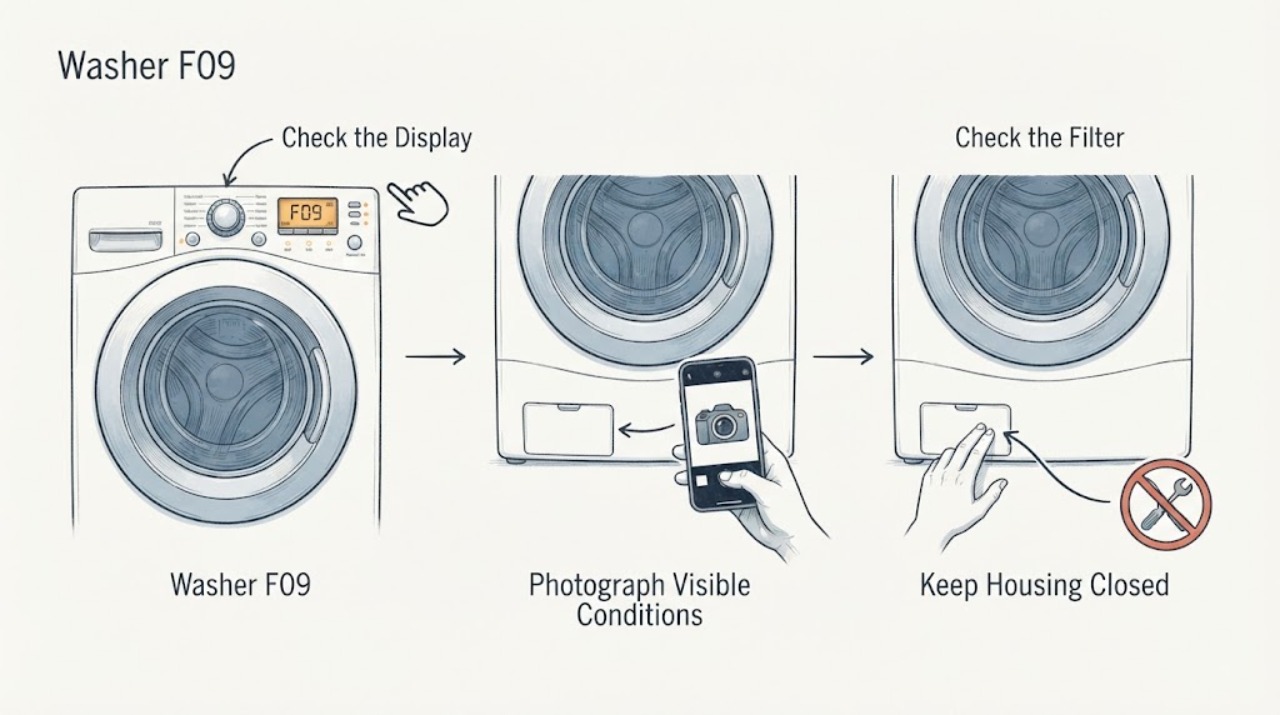
Stop the programme using the normal control if it responds, wait for all drum motion to stop, and photograph the complete F09 display or the full repeating light sequence. Record every letter, number, dash, illuminated indicator, the rating-label model, country or market, appliance type, programme and stage, and whether the door is locked or water remains.
Expected result: The display clearly says F09, a light pattern can be counted, the display is partial or different, the model or market is unknown, or the washer is a washer-dryer rather than a washer only.
Next step: Use the exact manual for the recorded model and market. If the identity or code remains uncertain, leave the machine off and provide the photo and rating-label information to Hotpoint or qualified service.
Stop if: Stop immediately for smoke, burning odor, sparks, exposed wiring, water near the plug or controls, severe movement, an uncontrolled leak, or a repeated breaker trip.
Why this matters
Why: Hotpoint publishes separate model and product-line code lists, and its UK guide's F09 description is tied to a particular control behavior. A single lamp, a remembered code, or a different regional platform cannot safely establish the same meaning.
-
Check 2
Compare the complete code and visible behavior only with the exact model-and-market documentation. As a UK-scope reference, check whether F09 is accompanied by multiple flashing lights or displays and an inability to select a programme; do not use that reference to relabel a US or other-market code.
Expected result: The exact documentation confirms F09 with the same control symptoms, the machine has a different market or platform, the controls still select programmes, or the code is accompanied by a drain, door, heating, or motor symptom.
Next step: Follow only the exact manual's safe external instructions. If no exact match exists or the symptom conflicts with F09, stop interpreting the code and arrange qualified diagnosis.
Stop if: Do not enter service mode, remove panels, bridge a door or sensor, or infer an electronic part from the F09 label.
Why this matters
Why: A UK-style F09 match supports a software/control-service path. A market mismatch or a physical symptom that points elsewhere means the code meaning is unresolved; F05/F11, F06, or another exact code may be the applicable branch on that platform.
-
Check 3
With the washer quiet and dry, check only the visible door and water status: note whether the door closes normally, whether the door is locked, whether water is visible in the drum, and whether any leak is present around the appliance or accessible hose connections. Do not force the door or open a flooded filter.
Expected result: The door is unlocked and the drum is empty, the door is locked with water inside, the washer is leaking, or there is no water but the controls remain unavailable.
Next step: Keep a locked or water-filled washer off and arrange service. If the area is dry and the door and water status are normal, continue only with the documented identity and reset boundary.
Stop if: Do not force a locked door, reach into standing water, remove a filter while flooded, disconnect a hose, or continue after a leak or water near electrical equipment.
Why this matters
Why: A locked door with retained water is a separate water and interlock safety problem, not evidence that F09 itself identifies the latch or pump. A dry machine whose controls cannot select a programme is closer to the UK F09 behavior, but the internal cause remains unproven.
-
Check 4
Check the external power state without opening an electrical panel: note whether the display is completely dead, whether the plug or outlet is hot or damaged, whether a breaker has tripped, and whether other appliance functions respond. Do not repeatedly reset a breaker or test the outlet with exposed probes.
Expected result: The display is dead, the controls are lit but do not accept a programme, the plug or outlet is hot or damaged, or the breaker trips again.
Next step: For a safe, dry, intact external supply with controls available, use the exact manual's instructions. For a dead machine with a normal-looking supply, or any unsafe supply symptom, arrange qualified appliance or electrical service.
Stop if: Stop for a hot plug, scorch mark, smoke, sparks, exposed wiring, wet outlet, or repeated breaker trip; isolate power only from a safe dry position.
Why this matters
Why: A completely dead machine or unsafe supply is not the same observable state as the UK F09 guide's multiple displays and unavailable programme selection. A hot connection or repeated trip is an electrical hazard, not a software-reset opportunity.
-
Check 5
Use one limited reset only if the exact model-and-market manual explicitly authorizes it and the washer is dry, cool, intact, empty or safely unlocked, and free of electrical or water hazards. Follow that manual's normal off/on or power-disconnect duration once, then record whether F09 returns; do not apply the UK F01/F18 reset wording to F09.
Expected result: The exact manual authorizes a reset and the code clears, the code returns, the manual gives no F09 reset, or the machine remains locked, full, dead, or unsafe.
Next step: If F09 returns, no exact reset is documented, or the machine remains unavailable, leave it off and arrange qualified service with the full code, model, region, stage, and reset result.
Stop if: Do not reset a wet or damaged machine, repeatedly cycle a breaker, force a door, run service diagnostics, or open the control cabinet.
Why this matters
Why: The opened UK F09 entry directs the owner to service and does not publish the two-minute reset it publishes for F01 and F18. A model-specific reset may exist elsewhere, but an unbounded or cross-market reset is not evidence of a software repair.
Use your observations
Decision map
Find the observation that best matches what you see, then follow the next safe action.
-
PATH 01Next step
What you see
A UK Hotpoint washer manual or the opened UK guide matches F09, and the machine shows multiple flashing lights or displays and will not accept a programme.
Do this next
Record the exact model and behavior and arrange Hotpoint or qualified appliance service; use only a model manual reset if it explicitly provides one.
Why this path and its safety boundary
Why it matters: This is the one supported code-specific pattern found in the research: Hotpoint UK labels F09 a software fault. The code still does not identify a user-replaceable board or internal component.
-
PATH 02Next step
What you see
The washer is in an unknown market, the model is missing, the display is partial, or the controls and physical symptoms do not match the UK F09 description.
Do this next
Keep the machine off if it is not operating normally, obtain the full rating-label identity and code recording, and use the exact manual or qualified service rather than guessing a meaning or part.
Why this path and its safety boundary
Why it matters: F09 cannot safely be transferred across Hotpoint regions or platforms from the available evidence. A different code or product-line guide may be required.
-
PATH 03Next step
What you see
The washer is locked with water inside, a leak is visible, or the drain or door symptom is more prominent than the F09 display.
Do this next
Leave the washer off, keep clear of standing water near electricity, and arrange qualified appliance service; address household plumbing only from a safe dry position if the visible evidence points there.
Why this path and its safety boundary
Why it matters: This is a water or interlock branch that F09 alone cannot resolve. Forcing the door or opening a flooded filter can cause injury or a spill.
-
PATH 04Next step
What you see
The display is dead, the plug or outlet is hot or damaged, smoke or burning odor is present, sparks occur, or a breaker trips again.
Do this next
Stop using the washer and isolate power only from a safe, dry position. Obtain qualified electrical or appliance service and do not re-energize it to reproduce the code.
Why this path and its safety boundary
Why it matters: This is an immediate electrical or fire-safety event and is not a normal F09 reset decision.
Helpful context
Understand the symptom
F09 is a platform-bound code. The opened Hotpoint UK washer guide calls it a software fault and describes a washer that will not operate, shows multiple flashing lights or displays, or will not accept a programme. Because this task has no model or market, that UK classification is useful as a boundary, not as permission to transfer the meaning to another Hotpoint platform.
Keep the washer off for water or electrical danger. Do not open the cabinet, bypass the door lock, reach into a machine holding water, test live wiring, or choose a control board or other part from F09 alone. A returning code, an unknown market, or a symptom that does not match the UK description belongs with qualified service.
When checks do not resolve it
Need a professional?
Contact Hotpoint or qualified appliance service for a returning or unmatched F09, multiple flashing displays with no programme selection, a locked or water-filled washer, or any internal control, motor, sensor, or wiring diagnosis. Contact qualified electrical service for a dead or unsafe supply.
Safety scope: Owner checks are limited to recording the complete display and model, noting programme stage and door or water status, observing the external power state without live probing, and performing one reset only when the exact model-and-market manual authorizes it. The opened UK F09 guide itself directs service and does not publish a F09 reset. Do not open the cabinet, enter service mode, bypass the door lock, force a door, handle standing water, or choose a control part from F09 alone.
Have this ready
- Provide the complete rating-label model, country or market, full F09 display or flash count, appliance type, programme and stage, whether controls respond, door-lock state, water level, external power observations, any leak or electrical hazard, and the result of the one documented reset if one was authorized.
Common questions
FAQ
What does F09 mean on a Hotpoint washing machine?
Hotpoint's opened UK washing-machine guide labels F09 a software fault when the washer is not operating, multiple lights or displays are active, or a programme cannot be selected. Because no model or market is supplied here, do not transfer that meaning to another Hotpoint platform without the exact manual.
Can I reset Hotpoint F09?
Only if the exact model-and-market manual explicitly authorizes a reset. The opened UK F09 guidance directs service and does not publish a user reset for F09; do not reuse the separate F01 or F18 reset instructions or repeat power cycles without limit.
Could F09 be a drain or door-lock problem?
The UK guide lists F05 for waste-pipe or pump symptoms and F06 for a door-lock fault, while F09 is described as a software fault. If water remains or the door is locked, treat that as a separate safety condition and do not force the door or open a flooded filter.
Does F09 identify a control board that I can replace?
No. The code name does not establish a compatible part or distinguish software, programming, control, wiring, or another platform-specific cause. Record the full identity and arrange qualified diagnosis rather than opening the cabinet or ordering a board from F09 alone.
Read the exact guide
Official sources
- Washing Machine Error Codes Troubleshooting GuideHotpoint UK · Opened the official Hotpoint UK washing-machine error-code guide. It lists F09 as a software fault when the washing machine is not operating, multiple lights or displays are present, or a programme cannot be selected, and directs persistent F09 to service. The guide is UK scope and does not establish another market's implementation.
- Hotpoint Washer-Dryer Error Codes - Quick Troubleshooting GuideHotpoint UK · Opened the official Hotpoint UK washer-dryer error-code guide. It separately lists F09 for washer-dryers and describes software-fault symptoms and service direction; it is included to show that product-line and market identity must be confirmed, not to transfer washer-dryer details to an unidentified washer.
Community feedback
Share a repair observation
Share a plain-text repair observation. Accepted observations are published automatically; this page may take a moment to update.