
On this page
Start here
Quick answer
Do not diagnose a Hotpoint washing-machine error from the code alone. Photograph the complete code or flashing-light sequence, record the exact model, programme stage, water level, and whether the door is locked, then use the manual for that model and region. Hotpoint's published UK guide maps examples such as F01 to an electronic circuit fault, F02 to a motor circuit fault, F03 to temperature sensing, F05 or F11 to drain or pump paths, F06 to the door lock, F07/F08/F15 to heating-related faults, and F12/F18 to control or data faults; model coverage can differ. Check only safe external causes such as a closed door, water supply, kinked drain hose, accessible filter guidance, or an unbalanced load. A single documented reset is appropriate only where Hotpoint's model-specific guidance allows it. Stop for leaking water near electrics, a hot plug, burning smell, smoke, sparks, severe vibration, a jammed door with water inside, or a repeated breaker trip, and arrange qualified service.
Before you begin
Safety first
- Do not force the door, reach into standing water, open the cabinet, handle live wiring, bypass a lock or sensor, dismantle a pump or heater, run with leaking or damaged hoses, or continue after smoke, burning smell, sparks, severe vibration, hot connections, or a repeated trip.
Work through in order
Diagnostic checks
Use only checks that match the exact appliance or system and its official guide.
-
Stop safely and capture the exact code
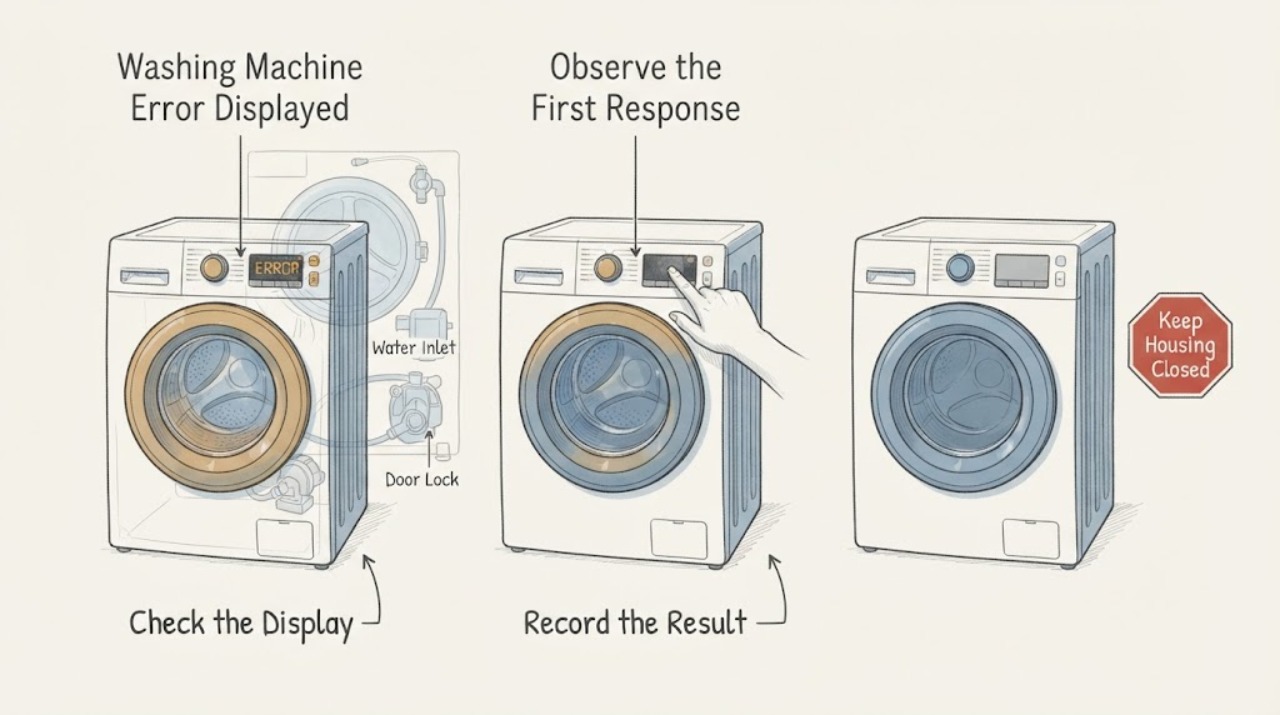
Stop the programme from the controls if they respond, keep the machine still, and photograph the complete display or the full flashing-light sequence. Record the model, programme and stage, whether the drum is empty or holding water, whether the door is locked, and what happened immediately before the error. Do not keep restarting the machine to make the code reappear.
Expected result: The code is stable and the machine is dry and quiet; or there is a leak, water near the plug, smoke, burning smell, sparks, hot connection, severe movement, a jammed door with water inside, or a repeated breaker trip.
Next step: If no hazard is present, continue with the model and code checks. If a hazard is present, stop using the washer, keep clear of water or smoke, isolate power only from a safe dry position, and arrange appropriate qualified service.
Stop if: Stop immediately for leaking water near electrics, smoke, sparks, burning smell, a hot plug, severe vibration or impact, exposed wiring, a jammed door with water inside, or a repeated breaker trip.
Why this matters
Why: The exact code and stage select the correct Hotpoint branch; an unsafe physical symptom overrides ordinary code interpretation and requires isolation and service.
-
Match the code to the exact model and interface
Use the model number from the rating label and the owner's manual to determine whether the machine is a front loader, top loader, or washer-dryer and whether the indication is an F-code, a tap symbol, or a flashing-light sequence. Write the code exactly, including leading zeroes and every illuminated indicator; do not infer a code from one flashing lamp or borrow a sequence from another Hotpoint model.
Expected result: The model manual confirms the code and appliance type; the code is incomplete or ambiguous; or the machine is a washer-dryer and the fault could belong to its drying side.
Next step: Use the exact manual for the confirmed identity. If the code cannot be read or the manual does not cover it, do not guess; provide a photo and model to Hotpoint or qualified service.
Stop if: Do not remove panels to find a label, bypass a door lock, or continue operating an unidentified machine after a leak, burning smell, smoke, spark, severe vibration, or electrical trip.
Why this matters
Why: Hotpoint states that models vary and its published list includes model-specific conditions such as F13 for washer-dryer temperature sensing and F16 for top-loading drum position. A wrong identity can send the check to the wrong component.
-
Use the code to choose a symptom branch, not a part
Compare the exact code with Hotpoint's official guide and note the associated symptom: F01 or F09/F12/F18 for control or software behavior, F02 for motor or drum rotation, F03 for temperature sensing, F05 or F11 for water remaining or pump/drain behavior, F06 for the door lock, F07/F08/F15 for heating or heater control, and F16 for a top-loader drum-position fault. Treat these as routing clues, not confirmation of a failed component.
Expected result: The code matches the machine's visible symptom, the code and symptom disagree, or the code is absent and only a flashing-light pattern is shown.
Next step: Follow only the matching external branch below and record the result. If no branch matches or the code indicates an internal electronic, motor, heater, or sensor fault, stop after the safe external checks and book qualified service.
Stop if: Do not test internal components, bridge a lock or sensor, run with a damaged hose, or continue after water, smoke, odor, sparks, severe vibration, or a repeated trip.
Why this matters
Why: Hotpoint's code descriptions change the next safe check: water and drain paths for F05/F11, door closure for F06, motor rotation for F02, temperature or heating service for F03/F07/F08/F15, and control service for persistent F01/F09/F12/F18. A disagreement suggests a model-specific interpretation or a second fault.
-
Check the safe external door, supply, and drain path
For F05/F11, a tap symbol, a fill or drain symptom, or F06, inspect only the visible door seal and latch area, water-supply taps and hoses, drain hose, and accessible plumbing. Confirm the door is not obstructed, supply taps are open, hoses are not kinked, and the drain path is installed as the model manual requires. If water remains, do not force the door or open a filter until the manual's safe draining procedure and power-isolation steps are available.
Expected result: The door is obstructed or not closing, a supply hose is closed or kinked, the drain hose is blocked or incorrectly positioned, water remains in the drum, or all visible paths are clear.
Next step: Correct only a plainly visible external obstruction or hose position when the area is dry and safe. If water remains, the lock stays closed, or the code returns, leave the machine off and arrange service rather than forcing the door or dismantling the pump.
Stop if: Do not force a locked door, reach into standing water, remove a pressurized filter, loosen hoses while flooded, or continue after a leak, wet plug, burning smell, smoke, spark, or repeated trip.
Why this matters
Why: Hotpoint links F05 to waste-pipe blockage or pump issues and F06 to the door lock; its troubleshooting guidance also links fill indicators to supply hoses and drain failures to hose or filter blockages. Water remaining changes the safety boundary and may explain why the door stays locked.
-
Check load balance and drum behavior for motor or spin codes
For F02, a spin-light indication, or a machine that stops while spinning, wait for the drum to stop and then check whether the load is tightly bunched, excessive, or made of one heavy item. Redistribute or remove laundry only when the door is safely unlocked and no water is trapped. Look for obvious foreign objects at the door seal and drum opening; do not reach behind the drum or run the washer with a scraping or impact noise.
Expected result: The load is unbalanced or excessive, the drum does not rotate freely by the normal external movement permitted by the manual, the drum makes a scrape or hard knock, or the load and visible drum area are normal.
Next step: Redistribute a safe unlocked load and use the model's normal programme once only if no warning symptom exists. If rotation remains absent, noise is harsh, or F02 returns, leave the washer off and arrange qualified service.
Stop if: Do not run with severe vibration, a scraping or impact sound, a loose door seal, exposed metal, smoke, burning smell, sparks, or a repeated breaker trip. Do not open the cabinet or handle the motor.
Why this matters
Why: Hotpoint says an unbalanced load can abort a spin cycle to reduce vibration, while F02 is described as a motor circuit fault with intermittent or absent drum rotation. An unchanged fault with a balanced load needs motor or control service, not repeated high-speed cycles.
-
Use one model-approved reset only for eligible control codes
Only when the washer is dry, cool, intact, not holding unsafe water, and free of smoke, odor, sparks, severe vibration, or an electrical trip, follow the exact Hotpoint guide for an eligible code. Hotpoint's published instructions for F01 and F18 say to disconnect the appliance from the mains for at least two minutes, reconnect it, wait 30 seconds, and try starting again; use the model manual if its procedure differs. Do not use a reset as a way to retest a mechanical, water, heating, or door-lock fault.
Expected result: The code clears and the machine operates normally, the same code returns, a different code appears, the machine remains locked or full of water, or the breaker opens again.
Next step: If the fault returns or the machine remains unavailable, stop using it and arrange qualified service with the exact code, model, programme stage, and reset result. Do not repeat the reset cycle.
Stop if: Do not reset a wet or damaged machine, reset a tripped breaker repeatedly, operate after smoke, sparks, burning smell, severe vibration, a hot plug, or force a locked door.
Why this matters
Why: A reset can clear a temporary electronic or data state only for the codes and models that Hotpoint documents. A returning code or a physical symptom indicates an unresolved fault and may make further operation unsafe.
-
Escalate internal, heating, and persistent faults
Before arranging service, record the exact code, model, programme and stage, water level, door state, supply and drain observations, load condition, display behavior, and whether a single permitted reset changed anything. Do not remove the cabinet or attempt to access the control board, motor, heater, temperature sensor, pump, pressure system, or door-lock wiring.
Expected result: The code returns, the code indicates an electronic, motor, heater, temperature, or pump fault, no safe external cause is found, or the washer has an electrical, water, heat, odor, smoke, or vibration hazard.
Next step: Leave the machine off and request qualified appliance service. Use qualified electrical service for the outlet, cord, breaker, or supply and provide the technician with the full code and observations.
Stop if: Do not continue operating, open panels, handle live wiring, bypass a lock or sensor, dismantle a pump, or retry a heating or motor fault after smoke, sparks, burning smell, water near electrics, severe vibration, or repeated trip.
Why this matters
Why: Hotpoint directs persistent or internal faults to its service team, and its guide distinguishes user-checkable supply or blockage paths from faults needing an engineer. Internal testing requires appropriate isolation, tools, and model-specific procedures.
Use your observations
Decision map
Find the observation that best matches what you see, then follow the next safe action.
-
PATH 01Next step
What you see
Leak or standing water near electrics, smoke, burning smell, sparks, hot plug, exposed wiring, severe vibration or impact, or repeated breaker trip
Do this next
Stop using the washer, avoid wet electrical areas, isolate power only from a safe dry position, and arrange appropriate emergency, electrical, or appliance service.
-
PATH 02Next step
What you see
The complete code or flashing-light sequence, model, appliance type, or programme stage is unknown
Do this next
Do not infer the meaning from one lamp or another model. Photograph the display, locate the model label without opening the cabinet, consult the exact manual, or arrange service.
-
PATH 03Next step
What you see
F05/F11, water remains, the door will not open, or the machine shows a drain or pump symptom
Do this next
Check only the safe visible hose, plumbing, door-obstruction, and model-approved filter paths. Do not force the door or open a flooded filter; persistent water or code needs service.
-
PATH 04Next step
What you see
F06 or the door does not close, lock, or permit a programme to start
Do this next
Clear only an obvious external obstruction and close the door normally. Do not bypass the lock; if F06 returns or water is present, leave the washer off and arrange service.
-
PATH 05Next step
What you see
A tap symbol or fill symptom appears, or the programme stops while waiting for water
Do this next
Check that the visible supply taps are on and hoses are not kinked or leaking. If the indication returns, stop and arrange service rather than opening the inlet system.
-
PATH 06Next step
What you see
F02, a spin indication, absent drum rotation, or an unbalanced-load symptom appears
Do this next
Redistribute a safe unlocked load once if no hazard exists. Persistent absent rotation, scraping, or severe vibration needs qualified appliance service.
-
PATH 07Next step
What you see
F01/F03/F07/F08/F09/F12/F15/F18, a heating or sensing symptom, or a code returns after the permitted reset
Do this next
Do not test internal electronics, heater, motor, or sensor. Leave the washer off and provide the exact code and stage to qualified appliance service.
Helpful context
Understand the symptom
The complete code and programme stage matter
Hotpoint uses both displayed F-codes and flashing-light patterns, and the same-looking symptom can lead to a different path on a different model. Record the exact characters, every flashing indicator in order, model number, programme, whether the drum contains water, and whether the door is locked. Do not replace a part because a generic list associates a code with one component.
Keep water and electricity separate
Before any external inspection, stop the programme and make the appliance safe only if the floor and plug area are dry and undamaged. Never reach into a water-filled drum, remove a pump filter under pressure, handle a wet plug, or open the cabinet while power is connected. A leak, burning smell, smoke, spark, severe vibration, or repeated trip is a stop-use event rather than a code-clearing exercise.
When checks do not resolve it
Need a professional?
Use the exact Hotpoint manual for the recorded code and perform only its safe external checks. Request qualified appliance service for any persistent, internal, water-filled, lock, motor, heating, sensing, or control fault; use qualified electrical service for outlet, cord, breaker, or supply concerns.
Safety scope: Do not force the door, reach into standing water, open the cabinet, handle live wiring, bypass a lock or sensor, dismantle a pump or heater, run with leaking or damaged hoses, or continue after smoke, burning smell, sparks, severe vibration, hot connections, or a repeated trip.
Have this ready
- Provide the exact Hotpoint model, complete code or flashing-light sequence, programme and stage, water level, door state, supply and drain observations, load condition, display behavior, breaker behavior, visible damage, and the result of any single documented reset.
Common questions
FAQ
Does every Hotpoint washing-machine error code mean the same thing?
No. Hotpoint's official guide assigns different meanings to codes such as F01, F02, F03, F05, F06, F07, F08, F09, F11, F12, F15, F16, and F18, and the interface and model type matter. Record the complete code and model before choosing a check.
What does F05 mean on a Hotpoint washing machine?
Hotpoint describes F05 as a waste-pipe blockage or pump issue and notes that the door may stay locked or water may remain in the drum. Check only the model-approved visible drain, hose, plumbing, and filter path. Do not force the door or open a flooded filter; a returning code needs service.
What does F06 mean on a Hotpoint washing machine?
Hotpoint associates F06 with a door-lock fault: the door may not open or close, or the programme may not start. Check for an obvious door-lock obstruction and close the door normally. Do not bypass the lock; if the fault remains or water is inside, leave the machine off and arrange service.
Can I reset a Hotpoint washing machine error code?
Only for codes and models where Hotpoint documents a reset. Its published F01 and F18 guidance says to disconnect the appliance for at least two minutes, reconnect it, wait 30 seconds, and try starting again. Do this only when the appliance is dry and safe, and do not repeat it when a code, leak, odor, smoke, spark, severe vibration, or trip returns.
Why is the Hotpoint error still displayed after the reset?
A returning code means the underlying fault remains or the reset does not apply to that model or code. Photograph the full indication, record the programme stage and water or door state, stop using the machine, and arrange qualified service rather than trying a different code sequence or replacing a part by guesswork.
Read the exact guide
Official sources
- Washing Machine Error Codes Troubleshooting Guide - HotpointHotpoint · Hotpoint washing machines in the published UK support range; confirm the exact model and region
- Hotpoint Service Washing Machine RepairHotpoint · Hotpoint washing machines and selected washer-dryer guidance; confirm the exact model
- Washing Machine Troubleshooting - Quick fixes & Tips - HotpointHotpoint · Hotpoint washing machines; controls and indicator meanings vary by model
Community feedback
Share a repair observation
Share a plain-text repair observation. Accepted observations are published automatically; this page may take a moment to update.