
On this page
Start here
Quick answer
If an Insignia freezer is not making ice, first confirm that the exact freezer model actually has an installed or supported ice maker and that it is switched on. Then check that the freezer is cold enough for the model's ice-maker instructions, the door closes fully, vents are not blocked, and any model-provided water line is open and free of kinks. A high-temperature, out-of-range, defrost-sensor, or door-open alert changes the priority to restoring freezer conditions before judging the ice maker. If the freezer is cold and the ice maker still does not fill, cycle, harvest, or respond, or if there is a leak, damaged water connection, burning smell, or electrical hazard, stop using the water feature and arrange qualified Insignia service. Do not force an ice-maker arm or open sealed panels.
Work through in order
Diagnostic checks
Use only checks that match the exact appliance or system and its official guide.
-
Check 1
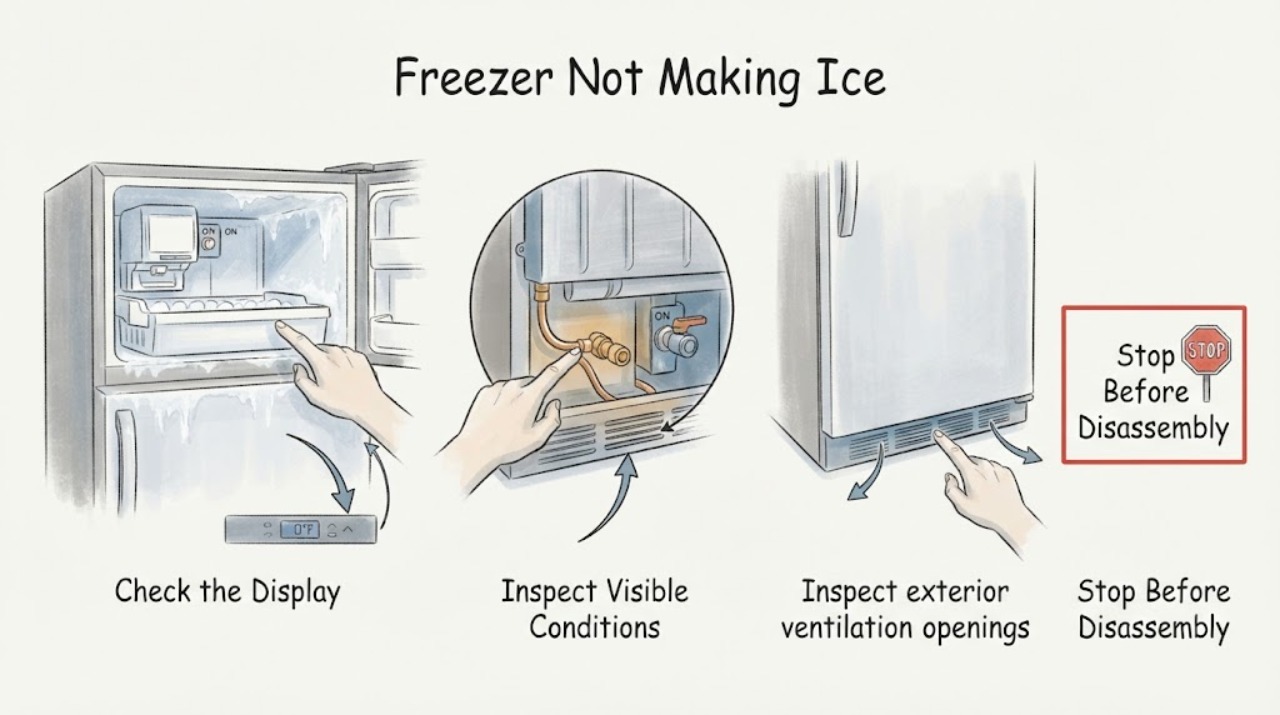
Check the exact model documentation and the freezer interior for an installed ice maker, fill tube, ice tray, or ice-maker control. Confirm that the feature is enabled only through the model's normal control or arm; do not force a stuck arm or install an unapproved kit.
Expected result: The freezer has no ice-maker hardware, has a supported but disabled feature, or has an installed ice maker that is enabled and still empty.
Next step: For absent hardware, follow the exact model's accessory boundary. For an installed ice maker, continue with temperature, door, frost, and water checks.
Why this matters
Why: An absent or unsupported feature is not an ice-maker failure; an enabled installed feature requires freezer-condition and water-supply checks.
-
Check 2
Observe the freezer's temperature display or indicators and look for high-temperature, out-of-range, door-open, or defrost-sensor alerts. Check that the door or lid closes without a package obstruction and that the gasket has no obvious gap; do not pry ice from the seal.
Expected result: An alert is present, the door cannot close or seal, the cabinet is heavily frosted, or the freezer reports normal conditions with an empty ice maker.
Next step: Correct only a safe door obstruction and follow the model's instructions for alerts or defrost. If the alert persists, cooling is weak, or frost returns, arrange service before pursuing the ice maker.
Why this matters
Why: Poor temperature control or warm-air entry can prevent ice production; normal freezer conditions make the ice-maker control or water path more likely.
-
Check 3
Inspect exterior ventilation openings and the visible water line or connection only if the exact model uses one. Confirm vents are not blocked or dusty and the water shutoff is open; do not disconnect a pressurized line, remove panels, or touch a wet electrical connection.
Expected result: Ventilation is blocked, the visible line is kinked or shut off, a connection is leaking, or the external path appears clear.
Next step: Clear only an external obstruction or restore a safe visible valve position as the manual permits. For a leak, stop the water feature and arrange service; for a clear path, continue with the model's ice-maker test.
Why this matters
Why: Restricted ventilation can impair freezing, and a closed or kinked water path can prevent filling on a water-connected design. A leak or clear path requires a different decision.
-
Check 4
Run only the ice-maker test, reset, or harvest procedure explicitly provided for the exact Insignia model, with the freezer stable and the door closed. Listen and observe whether the ice maker cycles, fills, or remains silent; do not force the tray or arm and do not use a generic jumper test.
Expected result: The ice maker cycles and fills, cycles without water, remains silent, or produces an error or leak.
Next step: Allow the model's documented harvest interval when applicable. If it remains silent, does not fill, leaks, or reports an error, stop repeated tests and request qualified service.
Why this matters
Why: A cycle with water points toward normal recovery; a cycle without water points toward the model's water path; silence or an error after normal freezer conditions points toward an ice-maker control, sensor, or wiring fault.
-
Check 5
Record the complete model number, freezer or convertible mode, temperature and alert state, ice-maker hardware and control state, water-line result, frost pattern, door-seal result, and whether any test produced water or ice. Move food to safe cold storage if the freezer is warming.
Expected result: The freezer is cold and sealed but the ice maker remains inactive, the feature repeatedly fails, or any leak, damaged connection, hot smell, smoke, or electrical symptom is present.
Next step: Stop using the ice-maker water feature for leaks or hazards and arrange qualified Insignia service. Do not order a component or open sealed refrigeration parts from the symptom alone.
Why this matters
Why: A repeatable ice-maker failure after external checks needs model-specific diagnosis; a leak or electrical symptom is an immediate safety boundary.
Use your observations
Decision map
Find the observation that best matches what you see, then follow the next safe action.
-
PATH 01Next step
What you see
The exact Insignia freezer has no installed or supported ice maker.
Do this next
Follow the model's approved accessory boundary or use a freezer model with an ice-making feature. Do not add an unverified water line or kit.
Why this path and its safety boundary
Why it matters: There is no ice-maker fault to repair on that configuration.
-
PATH 02Next step
What you see
The freezer has a high-temperature, out-of-range, door-open, or defrost-sensor alert, heavy frost, blocked ventilation, or a visible door-seal gap.
Do this next
Restore safe door closure and external airflow, and follow the exact model's alert or defrost guidance. Arrange service if temperature control or alerts do not recover.
Why this path and its safety boundary
Why it matters: Freezer conditions can prevent normal ice production.
-
PATH 03Next step
What you see
The ice maker cycles but no water arrives, while the freezer is cold and the visible water connection is open and undamaged.
Do this next
Stop repeated tests and request qualified service. Do not remove panels or disconnect a pressurized line to search for the restriction.
Why this path and its safety boundary
Why it matters: A hidden water restriction, inlet component, or model-specific control issue is possible.
-
PATH 04Next step
What you see
The ice maker remains silent or fails its exact model test after normal freezer conditions and water access are confirmed.
Do this next
Leave the feature out of service and arrange qualified Insignia service. Do not force the mechanism or bypass its safety control.
Why this path and its safety boundary
Why it matters: An ice-maker assembly, sensor, control, or wiring fault needs model-specific diagnosis.
-
PATH 05Next step
What you see
There is a water leak, liquid near the outlet or controls, smoke, sparking, a burning smell, or food is warming rapidly.
Do this next
Stop the ice-maker water supply if safe, isolate power only when safe, move food to safe cold storage, and obtain qualified service. Do not touch wet electrical connections or continue operating the appliance.
Why this path and its safety boundary
Why it matters: This is a water, electrical, and food-safety stop.
Helpful context
Understand the symptom
Confirm the freezer is supposed to make ice
Not every Insignia freezer has a built-in ice maker, and some models support an optional or model-specific kit while others do not. Check the exact model's manual, product specifications, or installed hardware before treating an empty ice bin as a failure. If there is no ice maker, the correct next step is to use an approved accessory or a different model, not to add an unverified water connection.
Fix freezer conditions before the ice maker
An ice maker needs stable freezer operation. Insignia's upright and chest freezer support lists blocked ventilation, heavy frost, door-seal gaps, an open or obstructed door, and temperature alerts as conditions that can affect temperature control. Clear only safe external obstructions and restore the door seal according to the exact model guide; do not chip ice around the ice maker or evaporator.
Keep water and electricity separate
If the model has a water-connected ice maker, inspect only the visible supply connection for a kink, shutoff, or leak. Keep water away from the plug, outlet, controls, and compressor area. Do not remove panels, probe wiring, bypass an ice-maker safety, or continue operating a leaking or electrically unsafe freezer.
Only after diagnosis
Potential parts
- ice-maker assembly
Consider this category only if the exact model has an installed ice maker that fails its documented cycle after normal freezer temperature and water conditions are confirmed.
Confirm the complete Insignia model and manufacturer's fit information before ordering; an empty bin alone does not identify the assembly. - water inlet valve or supply component
Consider this category only if the ice maker cycles but a qualified diagnosis confirms that water is not reaching it through an otherwise correct model-specific supply path.
Verify the exact model and water-system configuration before ordering. Do not disconnect a pressurized line or work near live wiring. - temperature sensor or ice-maker control
Consider this category only if the freezer is maintaining normal conditions but a qualified diagnosis links the repeatable no-cycle symptom to a sensor or control.
Use model-specific service diagnosis and fitment information; do not open sealed refrigeration components.
When checks do not resolve it
Need a professional?
Call qualified Insignia appliance service when an installed ice maker remains inactive after the exact model's hardware, control, temperature, door, ventilation, and visible water checks; when a sensor or control alert persists; or when internal access is required. Stop immediately for a water leak, liquid near electricity, smoke, sparking, burning smell, damaged water connection, or rapid food-temperature loss.
Common questions
FAQ
Does every Insignia freezer have an ice maker?
No configuration should be assumed. Check the exact model documentation and interior hardware for an installed or supported ice maker before troubleshooting an empty bin.
Can a warm or frosted Insignia freezer stop making ice?
Yes. High-temperature conditions, heavy frost, blocked ventilation, and a door-seal gap can prevent normal ice production. Resolve those conditions according to the model guide first.
What if the Insignia ice maker cycles but does not fill?
If the freezer is cold and the visible water connection is open and undamaged, stop repeated tests and request service for a model-specific water-path or control diagnosis. Do not disconnect a pressurized line or open panels.
Read the exact guide
Official sources
- Chest Freezer FAQsInsignia · Insignia chest freezer door, frost, ventilation, temperature, and power checks relevant to an installed ice-maker feature
- FAQsInsignia · Insignia freezer type selection and model-specific documentation boundary
- Upright Freezer FAQsInsignia · Insignia upright freezer door, level, frost, ventilation, temperature alerts, and model-specific support boundary
Community feedback
Share a repair observation
Share a plain-text repair observation. Accepted observations are published automatically; this page may take a moment to update.