
On this page
Start here
Quick answer
A homeowner generally cannot confirm an Insignia freezer's overload protector failure from the outside. The protector is part of the compressor-start circuit, and a repeated click-off or a warm cabinet does not distinguish a protector, start device, compressor, control, power-supply, or sealed-system problem. First record the complete model, check the outlet and breaker without repeated resets, keep the door closed, and watch the temperature trend and compressor behavior only from a safe external position. Do not remove the compressor cover, touch the protector, test live terminals, or order a protector by appearance. If the compressor repeatedly attempts to start and stops, the freezer warms, food is thawing, or there is smoke, burning odor, a hot/damaged cord, or a tripping breaker, protect the food and arrange qualified Insignia appliance or electrical service.
Before you begin
Safety first
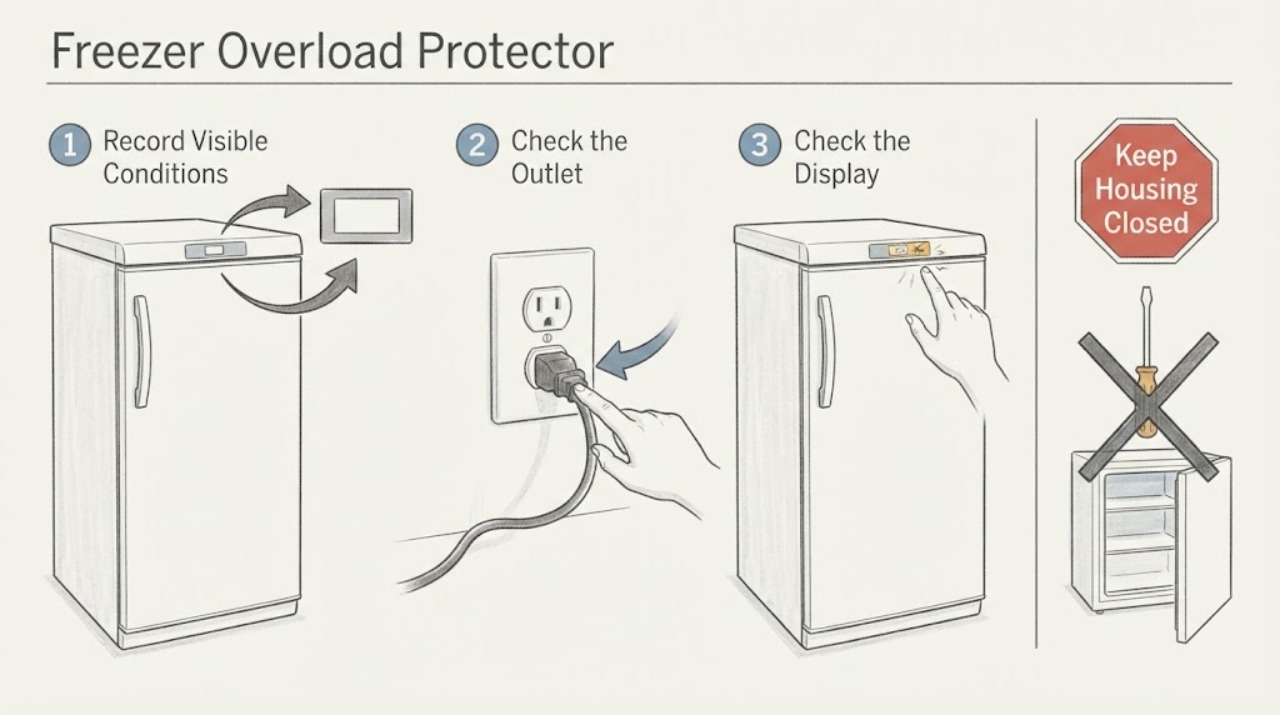
- Owner checks are limited to reading the model, checking the external outlet/breaker once, confirming mode, door seal, airflow, frost, and temperature trend, and observing the freezer from outside. Do not remove the compressor cover, touch the overload protector or terminals, test live or de-energized compressor circuits, bypass a thermal device, use an extension cord, or open the sealed system.
Work through in order
Diagnostic checks
Use only checks that match the exact appliance or system and its official guide.
-
Check 1
Read the complete model and serial label and record whether the freezer is upright, chest, or convertible, the selected mode, the setpoint, and the current temperature if the model displays one. Write down whether the compressor is silent, running, or making a repeated start-and-stop or click pattern; do not remove any cover to inspect the protector.
Expected result: The identity and mode are clear; only a partial Insignia name is known; the compressor runs normally; or it repeatedly attempts to start and stops.
Next step: Use the exact model guide for the safe external checks and give the complete identity to service. If the model is unknown or the start/stop pattern repeats, protect food and do not enter the compressor compartment.
Stop if: Do not pull the freezer away from the wall, remove the rear cover, or touch compressor wiring while it is energized or still hot.
Why this matters
Why: Insignia freezer platforms differ in controls, modes, alerts, and compressor behavior. A repeated click is a symptom of a start or cooling problem, not proof that the overload protector itself has failed.
-
Check 2
Check the external power path once from a dry, safe position: confirm the plug is fully seated in a suitable grounded outlet and inspect only the accessible cord and plug for cuts, discoloration, looseness, or abnormal heat. Check the labeled household breaker or fuse once; do not use an extension cord or a power strip.
Expected result: The outlet or breaker is off; the freezer powers normally; the cord, plug, or outlet is hot or damaged; or the breaker trips again when the freezer is connected.
Next step: Restore only an obvious external power condition once when there is no damage or hazard. For a hot/damaged connection or repeat trip, keep the freezer disconnected and obtain qualified electrical or appliance service.
Stop if: Do not reset a tripping breaker repeatedly, change the plug, use an adapter or extension lead, or touch a wet or overheated connection.
Why this matters
Why: A supply problem can mimic a compressor-start or overload problem. A hot, damaged, or repeatedly tripping circuit is an electrical safety issue and cannot be separated from appliance failure by repeated resets.
-
Check 3
With the door closed, monitor the freezer from outside for one normal cooling interval allowed by the exact model: note whether the cabinet cools, the compressor runs continuously or cycles normally, the display or alert changes, and food remains hard frozen. Do not repeatedly unplug and reconnect the freezer to force a start.
Expected result: The temperature recovers and the compressor cycles normally; the compressor repeatedly clicks or stops; the cabinet warms; or the high-temperature/out-of-range alert remains.
Next step: Keep the door closed and move vulnerable food to a safe cold location if the temperature continues rising. Arrange qualified service for repeated clicking, no cooling, or a returning alert; do not diagnose the protector by sound alone.
Stop if: Do not touch the compressor compartment, place a thermometer probe through a seal, or run repeated restart tests.
Why this matters
Why: Recovery with normal cycling makes an overload-protector failure less likely, although it does not prove the start circuit is healthy. Repeated start attempts, continued warming, or an alert despite normal external power indicates a cooling/start fault that requires diagnosis.
-
Check 4
Inspect only user-accessible operating conditions: confirm the freezer is in freezer mode if it is convertible, that the door closes evenly, the gasket has no visible gap, vents are not blocked or dusty, and heavy frost is not preventing airflow or closure. Do not chip ice, apply heat, or disassemble the cabinet.
Expected result: The freezer was in the wrong mode, the door or gasket has a gap, ventilation is blocked, heavy frost is present, or these external conditions are normal.
Next step: Correct only a safe external mode or obstruction issue and follow the exact manual's defrost procedure when permitted. If the freezer still warms or repeatedly cycles after the external condition is corrected, arrange service.
Stop if: Do not use a knife, hair dryer, heat gun, or other heat source near the liner, wiring, compressor, or refrigerant system.
Why this matters
Why: Insignia's official FAQs identify mode, door sealing, blocked or dusty ventilation, frost, and room conditions as causes of temperature problems. Correcting one of these can restore cooling without proving anything about the overload protector.
-
Check 5
Record any abnormal external warning without opening the appliance: note smoke, burning odor, a flash, a hot cabinet area, melted plastic, oil-like residue, water near electrical parts, or repeated breaker operation. If none is present, record the temperature trend, click timing, and whether the freezer resumes after a normal cooling pause.
Expected result: There is no safety warning and the freezer is recovering; the compressor repeatedly starts and stops; the cabinet becomes abnormally hot; or smoke, odor, sparks, water, or electrical damage is present.
Next step: For repeated cycling or continued warming, keep the freezer out of service and arrange qualified appliance service. For fire, smoke, sparks, or immediate electrical danger, leave the area and contact emergency or qualified electrical help from a safe location.
Stop if: Do not remove the protector, test continuity or resistance on the appliance, bypass a thermal device, substitute a fuse, or power the freezer again after smoke or arcing.
Why this matters
Why: A normal external recovery does not require a protector diagnosis. Repeated start/stop behavior is compatible with a start-circuit or compressor fault but cannot identify the protector. Smoke, heat, water, or electrical damage is a stop-use condition regardless of the suspected part.
Use your observations
Decision map
Find the observation that best matches what you see, then follow the next safe action.
-
PATH 01Next step
What you see
The exact model has normal power, the freezer is in the correct mode, the door and airflow are normal, the temperature recovers, and the compressor cycles without repeated clicks.
Do this next
Continue normal monitoring with the door closed and follow the model guide. Escalate if the alert returns, food softens, or the start pattern changes.
Why this path and its safety boundary
Why it matters: There is no user-level evidence of an overload-protector failure. A protector is not confirmed merely because the freezer once failed to start or the cabinet was warm.
-
PATH 02Next step
What you see
The compressor repeatedly attempts to start and clicks off, the freezer does not cool, or the temperature continues rising after external power, mode, door, airflow, and frost checks are normal.
Do this next
Protect food, keep the freezer out of service, and arrange qualified Insignia appliance service. Give the technician the complete model, click timing, temperature trend, and power-check result; do not order a protector by symptom.
Why this path and its safety boundary
Why it matters: A compressor-start or cooling fault is likely, but an overload protector, start device, compressor, control, or sealed-system cause cannot be distinguished safely from the outside.
-
PATH 03Next step
What you see
The outlet is dead, the breaker trips again, the cord or plug is hot/damaged, or there is smoke, burning odor, a flash, water near electrical parts, or abnormal heat.
Do this next
Stop using the freezer and isolate power only from a safe dry position if possible. Obtain qualified electrical or appliance service and use emergency procedures for active smoke or fire.
Why this path and its safety boundary
Why it matters: This is an electrical or fire-safety path, not a safe overload-protector confirmation.
-
PATH 04Next step
What you see
A door gap, wrong convertible mode, blocked ventilation, heavy frost, or an abnormal room condition is found and the temperature improves after the safe external correction.
Do this next
Keep the freezer in the documented mode, maintain the door seal and airflow, and monitor temperature. Arrange service if the condition returns or cooling does not recover.
Why this path and its safety boundary
Why it matters: The external operating condition explains the immediate cooling symptom better than a confirmed protector failure.
-
PATH 05Next step
What you see
The model is unknown, the freezer type or mode is unclear, or the suspected protector is accessible only after removing a cover or testing internal terminals.
Do this next
Recover the complete model and request qualified service. Keep the freezer closed and protect food while waiting; do not remove the cover or make electrical measurements.
Why this path and its safety boundary
Why it matters: The identity or safety boundary is insufficient for a user diagnosis. Internal compressor-start work is professional work even when the suspected part is inexpensive.
Helpful context
Understand the symptom
An overload protector can be one explanation for a compressor that tries to start and drops out, but the same observation can come from the start device, compressor, control, supply, or a sealed-system problem. Insignia's public freezer guidance is user-level: establish the exact model, power, mode, door seal, airflow, frost, and temperature behavior. It does not authorize opening the compressor compartment or selecting a protector from a symptom.
The safe decision is therefore not 'test the protector' versus 'replace it.' It is 'is the freezer safely powered and maintaining temperature, or is there a repeated start/cooling failure that needs qualified diagnosis?' Protect food promptly when the temperature is rising and stop for electrical or fire signs.
Only after diagnosis
Potential parts
- compressor-start overload protector or start device
Consider only after qualified service confirms the exact model's compressor-start diagnosis and rules out supply, control, compressor, and wiring causes.
Do not choose a protector by appearance, continuity result, or brand alone; match the complete model and the technician's measured diagnosis. - compressor, control, fan, or sealed-system component
Consider only when a qualified technician identifies a cooling or start fault beyond the external power, mode, door, airflow, and frost checks.
Compressor and sealed-system work is not a user repair; verify the exact model and service documentation before any replacement decision.
When checks do not resolve it
Need a professional?
Contact qualified Insignia or appliance service for repeated start-and-stop clicking, no cooling, a returning temperature alert, a suspected overload or start-device issue, or any need to access the compressor compartment. Contact an electrician for a hot/damaged cord, outlet, or recurring breaker trip.
Safety scope: Owner checks are limited to reading the model, checking the external outlet/breaker once, confirming mode, door seal, airflow, frost, and temperature trend, and observing the freezer from outside. Do not remove the compressor cover, touch the overload protector or terminals, test live or de-energized compressor circuits, bypass a thermal device, use an extension cord, or open the sealed system.
Have this ready
- Provide the complete model and serial, freezer type and mode, setpoint and temperature trend, food-temperature concern, outlet and breaker observations, click timing, door/vent/frost checks, and any smoke, odor, heat, water, or spark history.
Common questions
FAQ
Can I tell from clicking that the Insignia freezer overload protector has failed?
No. Repeated clicking can occur when a compressor-start circuit drops out, but it does not distinguish the overload protector from the start device, compressor, control, supply, or another cooling fault. Observe only from outside and arrange qualified service if the pattern repeats or the freezer warms.
Should I remove the rear cover and test the protector with a multimeter?
No. The compressor compartment contains electrical and refrigeration hazards, and a continuity or resistance result does not by itself prove the protector is the cause. Keep the cabinet closed and use qualified appliance service for the start circuit or compressor diagnosis.
What can I safely check before calling service?
Record the full model, confirm the freezer mode, check the outlet and breaker once, inspect the visible cord and plug, confirm the door seals, clear only safe external ventilation obstructions, note frost, and monitor the temperature trend. Do not repeatedly restart, touch the compressor area, or bypass a protective device.
When should I move the food out of the freezer?
Move vulnerable food to a safe cold location when the freezer is not cooling, the temperature keeps rising, food is softening, or repeated compressor start attempts continue. Keep the door closed as much as possible while arranging service.
Does a hot freezer cabinet prove the overload protector failed?
No. A warm exterior can have several causes, and the public Insignia guidance does not provide a homeowner test for the protector. Treat abnormal heat, burning odor, smoke, sparks, a hot cord or outlet, or repeated breaker trips as a stop-use electrical or appliance hazard.
Read the exact guide
Official sources
- Upright Freezer FAQsInsignia Products · Opened the official Insignia Products upright-freezer FAQ result. It provides user-level outlet and breaker checks, freezer/fridge mode guidance, door and high-temperature alert causes, ventilation/frost/seal checks, and a documented compressor pause during factory reset; it does not provide a user test for an overload protector.
- Chest Freezer FAQsInsignia Products · Opened the official Insignia Products chest-freezer FAQ result. It gives model-family-scoped checks for outlet/breaker, freezer/fridge mode, door/temperature alerts, ventilation, frost, and a five-minute compressor pause during factory reset; it does not identify or test an overload protector.
- Insignia Upright Freezer compressor not turning onReddit r/appliancerepair · Opened the exact Reddit post. The author identifies an Insignia NS-UZ17WH0, reports a compressor start attempt followed by clicking, and says the overload protector became hot after internal access. The thread has no confirmed repair outcome and is used only to show why this pattern needs professional diagnosis.
Community feedback
Share a repair observation
Share a plain-text repair observation. Accepted observations are published automatically; this page may take a moment to update.