
On this page
Start here
Quick answer
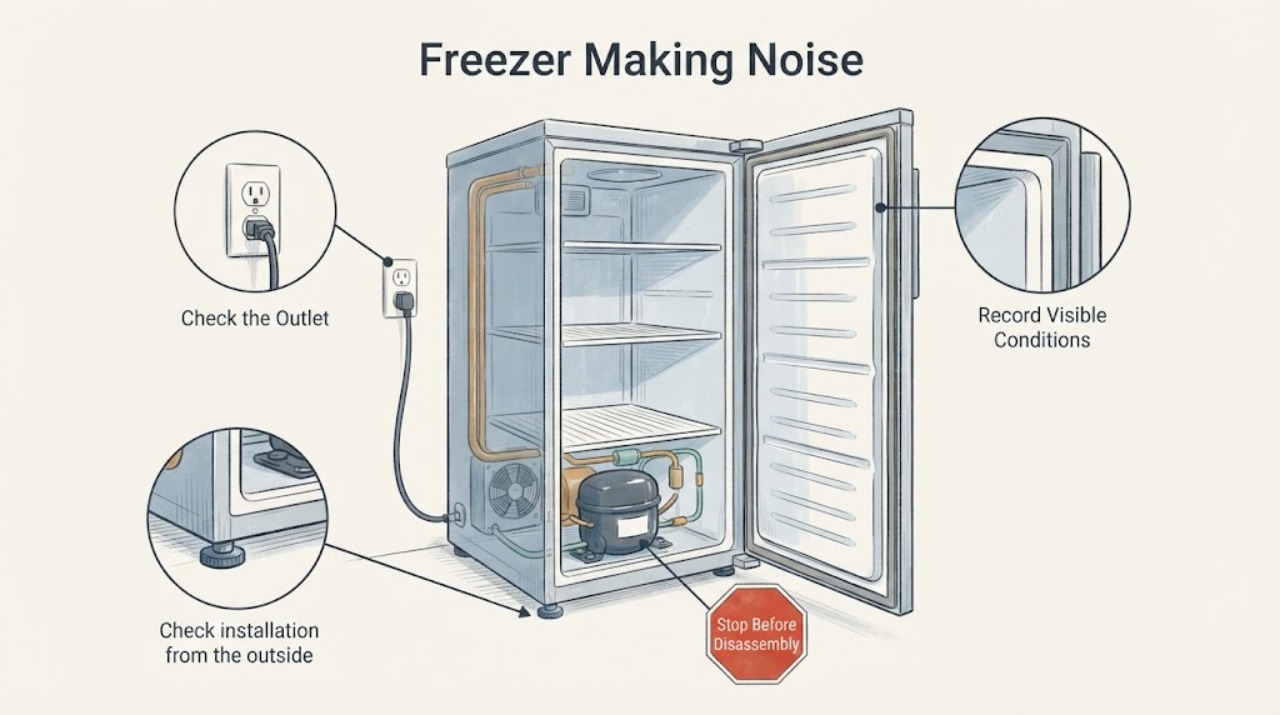
An Insignia freezer may make a brief hum, click, or refrigerant-flow sound as it cools, and metal parts can expand or contract. A new grinding, scraping, rattling, or loud vibration is more concerning, especially with weak cooling, frost, a door that does not seal, or a cabinet touching a wall. From the outside, check that the freezer is level, clear of nearby contact, free of items vibrating on top, and that shelves and the door gasket are seated. Keep food cold, do not open the sealed cooling system, chip ice, or use heat near the appliance. Stop for smoke, a burning smell, a damaged cord, water near electrical parts, loss of cooling, or a noise that persists after safe external checks, and arrange qualified service.
Work through in order
Diagnostic checks
Use only checks that match the exact appliance or system and its official guide.
-
Check 1
Make the freezer safe before listening closely. From outside, check for smoke, a burning or electrical smell, a damaged plug or cord, water near the outlet or base, a hot connection, or loss of cooling. Keep the door closed and do not touch wet electrical parts or move a loaded appliance.
Expected result: A fire, water, electrical, or food-safety hazard is present, or the freezer is dry, stable, and still maintaining cold conditions.
Next step: If a hazard is present, stop using the freezer and isolate power only if safe without touching water or damaged parts; arrange qualified appliance or electrical service and protect food through a safe cold-storage plan. If no hazard is present, continue from outside.
Why this matters
Why: A safety or food-storage emergency is more urgent than classifying a sound. Reconnecting or moving a damaged freezer can worsen the condition and expose someone to electricity or refrigerant-related hazards.
-
Check 2
Listen from a safe distance and note whether the sound is a brief hum, click, bubbling or refrigerant-flow sound, fan-like airflow, vibration, rattling, scraping, or grinding. Record whether it starts when cooling begins, changes when the door is opened, or continues independently of a cooling cycle. Do not remove the rear cover to locate it.
Expected result: The sound is brief and repeatable with cooling, or it is harsh, continuous, worsening, or paired with weak cooling, frost, or an alarm.
Next step: For a brief sound with normal cooling, monitor its pattern. For harsh or symptom-linked noise, continue to the stability, contact, gasket, and visible frost checks; do not assume a compressor or fan has failed.
Why this matters
Why: Insignia's guide describes refrigerant circulation and metal expansion or contraction as possible normal sounds. A persistent mechanical character or a cooling symptom needs the installation and ice checks, then service if unresolved.
-
Check 3
Check installation from the outside: confirm the freezer stands level and stable, is not touching a wall or cabinet, and has no loose object on top that could amplify vibration. Do not pull a loaded or built-in appliance; if leveling requires unsafe lifting, use qualified help.
Expected result: The cabinet rocks, a foot is not planted, a wall or object is touching it, or the freezer is stable and clear.
Next step: Correct only a safe external contact or use the model's leveling-foot procedure. If the freezer cannot be stabilized without moving heavy equipment, arrange help; otherwise continue to the shelf and interior check.
Why this matters
Why: An unlevel cabinet or nearby contact can turn normal compressor or fan vibration into a loud rattle. If the cabinet is stable and clear, the next likely causes are load, shelves, door seal, frost, or an internal fault.
-
Check 4
With the door open and the freezer safe to inspect, check that shelves, baskets, and stored packages are seated and not touching the liner or door. Look for a dirty or visibly damaged gasket, a door that does not close evenly, or frost near a fan or air outlet. Do not scrape ice, touch hidden fan blades, or use a heater.
Expected result: A shelf, package, or gasket contact changes the sound when safely corrected, or frost, a poor seal, or no visible contact is found.
Next step: Reseat visible shelves and packages and clean and dry the gasket according to the guide. If frost contacts a fan, follow the exact model's defrost instructions; if safe defrost is unavailable or the noise persists, stop and arrange service.
Why this matters
Why: Loose interior items can rattle, while a poor gasket seal can allow frost or moisture that may interfere with airflow or a fan on applicable models. Hidden ice or fan faults require a model-directed procedure or service.
-
Check 5
Check the visible ventilation openings and the area around the cabinet for dust or blockage without removing panels. Confirm the freezer is not pressed against a heat source and that its location matches the model instructions. Do not put hands into vents or attempt to clean an internal fan while powered.
Expected result: A ventilation opening is blocked or the cabinet is near a heat source, or ventilation is clear and the location is suitable.
Next step: Clear only safe, accessible external obstructions and correct the location according to the model guide. If the freezer is not cooling or the noise remains severe, keep the door closed and request service.
Why this matters
Why: Blocked airflow or heat can make the compressor run harder and can change both cooling behavior and operating noise. A clear installation does not rule out a fan, compressor, or sealed-system issue when noise persists.
-
Check 6
After the safe checks, monitor one normal cooling cycle without repeatedly unplugging the freezer. Note whether the noise changes with cooling, whether the cabinet remains stable, whether the door gasket stays sealed, and whether the food remains properly frozen. If you disconnect the freezer for a model-directed maintenance step, follow its restart instructions and do not perform live electrical work.
Expected result: The sound is brief and repeatable with normal cooling, or it remains harsh or continuous, worsens, and is accompanied by weak cooling, frost, an alarm, or water.
Next step: If normal, continue monitoring and keep the installation clear. If the noise or symptom persists, stop using the freezer when safe, keep food protected, and arrange qualified service with the model and observations.
Why this matters
Why: Stable cooling with a repeatable operating sound supports monitoring. Persistent noise plus a cooling or safety symptom may involve a fan, compressor, control, or sealed system and cannot be assigned to a part by sound alone.
Use your observations
Decision map
Find the observation that best matches what you see, then follow the next safe action.
-
PATH 01Next step
What you see
The freezer makes a brief hum, click, or refrigerant-flow sound while cooling normally
Do this next
Monitor the timing and cooling performance. Arrange service if the sound becomes harsh, continuous, or is joined by weak cooling or an alarm.
-
PATH 02Next step
What you see
Vibration changes after the freezer is leveled or moved away from a wall or loose object
Do this next
Keep the cabinet level and clear of contact, and secure shelves and items on top. Do not move a loaded appliance unsafely.
-
PATH 03Next step
What you see
Rattling is caused by a loose shelf, basket, package, or visible external contact
Do this next
Reseat or remove only the accessible item and observe the next normal cycle. If the rattling remains without a visible cause, arrange service.
-
PATH 04Next step
What you see
Scraping occurs with visible frost, a poor gasket seal, or an obstructed air path
Do this next
Clean and reseat the gasket and follow the exact model's complete defrost procedure if applicable. Do not chip ice, use heat, or touch a fan.
-
PATH 05Next step
What you see
Cooling is weak, an alarm persists, food is thawing, or smoke, burning smell, water near electrics, or damaged power parts are present
Do this next
Stop using the freezer, keep the door closed, isolate power only if safe, protect the food, and arrange qualified appliance or electrical service.
-
PATH 06Next step
What you see
Noise is harsh or continuous after level, contact, shelf, gasket, frost, and ventilation checks
Do this next
Stop repeated testing and request qualified service. Provide the model, sound pattern and location, cooling behavior, frost and gasket observations, and the changes made.
Helpful context
Understand the symptom
Listen for timing and character
A low hum or a short change in sound tied to a cooling cycle can be normal. Scraping, grinding, repeated rattling, or a cabinet that vibrates continuously deserves a closer check. The sound's timing, location, cooling performance, and whether it changes when a safe external contact is removed are more useful than guessing a part from the sound alone.
Protect food and electrical safety
Keep the door closed while diagnosing so frozen food stays cold. Do not handle the plug with wet hands, use an extension cord or ungrounded adapter, block ventilation, open the refrigerant circuit, or remove covers. Do not chip ice or use a heat source to clear a fan or liner. If the appliance is wet, damaged, smoking, or not cooling, stop and use qualified help.
When a noise needs service
If the freezer is level and clear, the shelves are secure, the gasket seals, and the noise remains harsh or worsening, the cause may involve a fan, compressor, mounting, control, or sealed cooling system. Those parts cannot be diagnosed safely by sound alone. Record the model identity, noise pattern, cooling condition, and checks already completed for the service call.
Only after diagnosis
Potential parts
- evaporator or circulation fan assembly
Consider this category only after qualified service confirms fan noise or ice-contact damage after installation, frost, and gasket checks.
Fan assemblies vary by Insignia model and cabinet design. Confirm the full model identity and diagnosis before selecting any part. - compressor or sealed-system component
Consider this category only after qualified service confirms abnormal compressor operation or a cooling fault; a hum alone does not prove compressor failure.
Sealed-system work requires qualified service and exact model information. Do not open the refrigerant circuit. - door gasket or leveling hardware
Consider this category only when the gasket cannot seal or the cabinet cannot remain level after safe cleaning and model-directed adjustment.
Gaskets and leveling hardware are model-specific. Verify the exact product identity and cause before replacement.
When checks do not resolve it
Need a professional?
Stop and seek professional help for smoke, burning smell, damaged cord or plug, water near electrics, loss of cooling, persistent alarm, severe vibration, scraping without visible ice, or a harsh noise that remains after safe external checks.
Have this ready
- Provide the full model identity, sound type and location, when it starts and stops, cooling and alarm behavior, frost and gasket condition, level and wall-contact result, shelf check, ventilation result, and what changed after each safe check. Do not remove covers or open the cooling system.
Common questions
FAQ
Is a humming sound from an Insignia freezer normal?
A brief hum or a sound tied to refrigerant circulation can be normal while cooling. Monitor the pattern and food temperature; arrange service if it becomes harsh, continuous, or is paired with weak cooling or an alarm.
Why is my Insignia freezer rattling or vibrating?
Check that the freezer is level, not touching a wall, and free of loose items on top or shelves. If the cabinet is stable and the noise remains, keep it out of service as appropriate and request a diagnosis.
Can frost make an Insignia freezer noisy?
Frost can interfere with airflow or a fan on applicable models, especially if the door gasket is not sealing. Follow the exact model's defrost instructions and never chip ice, use heat, or touch hidden fan parts.
When should I stop troubleshooting an Insignia freezer noise?
Stop for smoke, burning smell, damaged power parts, water near electrics, weak cooling, persistent alarm, severe vibration, or scraping and grinding that persists after safe level, contact, shelf, gasket, frost, and ventilation checks. Arrange qualified service.
Read the exact guide
Official sources
- Insignia 17 or 21 Cu. Ft. Upright Convertible Freezer/Refrigerator User GuideInsignia Products · Insignia upright convertible freezer/refrigerator; normal operating sounds, leveling, wall contact, shelves, door seal, ventilation, and service safety
Community feedback
Share a repair observation
Share a plain-text repair observation. Accepted observations are published automatically; this page may take a moment to update.