
On this page
Start here
Quick answer
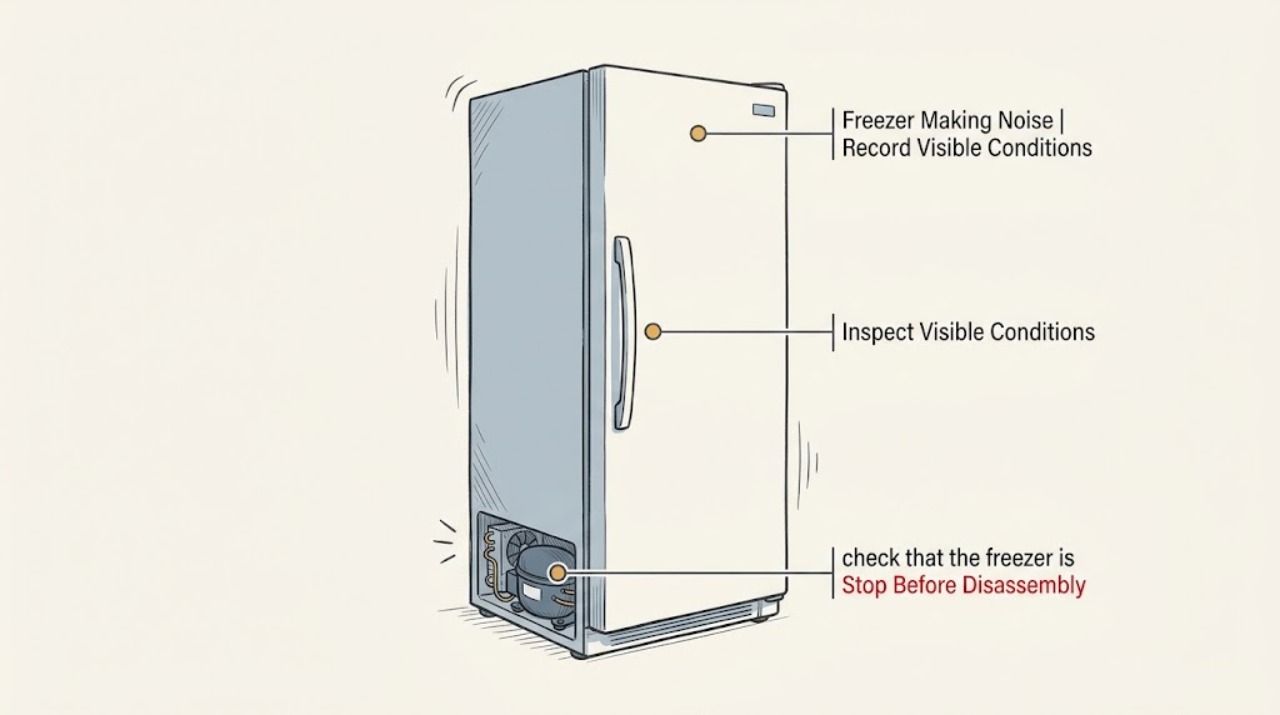
A freezer can hum, click, gurgle, pop, crackle, hiss, or make a brief water or ice-maker sound during normal cooling, defrost, and temperature regulation. The useful distinction is whether the sound is new or getting louder, where it comes from, whether it changes when a door opens, and whether the freezer is still holding temperature. First record the sound and check that the cabinet is level, clear of the wall, not touching nearby objects, and not overfilled around internal air paths. If an ice maker is enabled without a water supply, its valve may buzz or chatter; use the manual to turn that feature off. Do not remove panels or touch electrical or sealed refrigeration parts. Stop and arrange qualified service for grinding, repeated hard impact, a fan striking ice, a sudden changed noise with warming food, water leakage, burning odor, smoke, arcing, or a tripped breaker.
Work through in order
Diagnostic checks
Use only checks that match the exact appliance or system and its official guide.
-
Check 1
Describe and record the sound from a safe standing position: hum, buzz, click, rattle, vibration, gurgle, hiss, pop, crackle, grinding, scraping, knocking, or water/ice-maker sound. Note when it occurs, how long it lasts, and whether it is new or louder than before.
Expected result: A brief hum, click, gurgle, pop, crackle, or water sound that follows cooling, defrost, or ice-making may be a normal operating event. A new continuous grind, repeated hard knock, or sound that is worsening needs a different path.
Next step: Continue with the location and cooling checks only if there is no burning odor, smoke, water near electrics, arcing, or loss of safe operation. Otherwise stop and arrange qualified service.
Why this matters
Why: Sound type and timing narrow the likely source, but they do not prove a compressor, fan, valve, or other part has failed. A changed sound is more important than a familiar label such as buzzing.
-
Check 2
Locate the sound without moving a heavy freezer: compare the front, sides, top, rear clearance, inside cabinet, and ice-maker area. Open the door or lid only normally and observe whether the sound changes, without touching a fan or removing an interior panel.
Expected result: A sound that changes when a door opens can involve an internal fan or airflow; a rear or lower hum can involve the compressor or condenser area; a sound during an ice fill points toward the water valve; cabinet-wide rattling points toward contact or leveling.
Next step: Use the matching branch below. If the sound is inside a panel, becomes scraping or grinding, or returns with warming, leave the freezer closed and request service.
Why this matters
Why: Location and door response are useful observations, not a permission to access concealed components. Fans may be hidden and the same freezer design differs by model.
-
Check 3
With the cabinet stable, check that the freezer is level, not touching a wall or cabinet, and not resting against an unstable or flexible surface. Remove loose objects from the top and reposition containers that visibly touch the inside walls or each other.
Expected result: The sound decreases when contact is removed or the unit is stabilized; or it remains unchanged even though the cabinet and contents are clear.
Next step: Make only the external adjustment permitted by the installation instructions. Do not tip or pull a heavy freezer by yourself; if the noise persists, continue to the cooling and fan checks.
Why this matters
Why: Vibration can be amplified by the floor, wall, cabinet, or loose packaging. If clearing contact does not change an internal mechanical sound, it is less likely to be a simple rattle.
-
Check 4
Check the freezer's cooling performance and visible frost from the outside and through the normal door opening. Note whether food remains solid, the temperature display or alarm is normal, frost is blocking an air path, or the compressor appears to run continuously.
Expected result: Noise with stable cooling and no abnormal frost is more consistent with an operating sound or vibration. Noise with warming food, a temperature alarm, heavy frost, water, or continuous strained running is not a normal-sound-only problem.
Next step: Protect food and arrange service if temperature is rising, frost is extensive, water is leaking, or the noise is worsening. Do not dismantle the evaporator or sealed system.
Why this matters
Why: Performance changes raise the priority because a fan, defrost, airflow, compressor, or sealed-system issue may be involved. A sound cannot be cleared as normal solely because the freezer still feels cold at one moment.
-
Check 5
If the noise is a buzz or chatter that occurs only while an ice maker fills, check whether the ice maker has a connected and open water supply. If the freezer has no water connection, use the owner's manual to turn the ice maker off; do not access the inlet valve.
Expected result: The sound stops when the ice maker is disabled on an unconnected unit, or it occurs during a normal fill with a connected line. A kinked line, leak, repeated chatter, or sound outside the fill event is abnormal.
Next step: Follow the model manual for the ice-maker setting and water-line checks. If the valve continues to buzz, leaks, or the line is not safely accessible, stop and request service.
Why this matters
Why: An ice-maker valve can buzz or click when it attempts to fill without water, while a restricted line or filter can make fill noise louder. This branch applies only to models equipped with an ice maker and water system.
-
Check 6
If the sound seems to come from an internal fan, inspect only for visible ice or packaging blocking an air opening. Do not remove an evaporator cover, reach behind a panel, chip ice, or hold a fan blade; follow the manual only if it provides a safe, complete defrost procedure.
Expected result: Visible frost or a package near an air path can correlate with a fan-related noise. A scraping sound with no accessible obstruction, recurring frost, or a noise that returns after a safe defrost points toward a fan, defrost, or control fault.
Next step: Remove only a loose package when the freezer is safe to access. For persistent scraping, recurring frost, or any required panel removal, leave the unit off or operating only as food safety permits and arrange qualified service.
Why this matters
Why: Manufacturer guidance identifies ice buildup, overfilling, and fan operation as possible noise causes, but the concealed fan and defrost system are not owner-repair targets.
-
Check 7
Check accessible ventilation and condenser conditions only as the owner's manual allows. Keep external vents clear and, if the model explicitly permits user cleaning, isolate power before gentle cleaning; do not remove a rear panel or reach toward a live fan.
Expected result: Dust, blocked ventilation, or a cramped installation may coincide with louder or longer compressor and fan operation. Clear ventilation with no improvement shifts the issue toward an internal mechanical or refrigeration diagnosis.
Next step: Restore only the clearances and cleaning steps specified by the manual. If the compressor is unusually hot, the freezer is warming, or the sound remains harsh, stop troubleshooting and request service.
Why this matters
Why: Restricted airflow can increase cooling demand and noise, but condenser access and cleaning instructions are model-specific. The sound does not justify opening the cabinet.
-
Check 8
Before calling for service, record the model number, sound description, source location, door or ice-maker timing, cooling and frost condition, recent relocation or loading, visible water, and any electrical or burning symptom. Do not order a part from the sound name alone.
Expected result: A concise recording and symptom log shows whether the sound is normal cycling, vibration, ice-maker fill, fan contact, compressor operation, or a changed noise with performance loss.
Next step: Give the record to the manufacturer or a qualified refrigeration technician and follow the model's food-safety guidance while waiting.
Why this matters
Why: Model-specific manuals and service procedures are needed for concealed fans, compressors, defrost systems, and water valves. A generic freezer noise label cannot establish compatibility or cause.
Use your observations
Decision map
Find the observation that best matches what you see, then follow the next safe action.
-
PATH 01Next step
What you see
Do this next
Compare it with the model manual and monitor it. Keep ventilation and clearance normal; request service if the sound becomes new, louder, continuous, or is joined by a performance change.
Why this path and its safety boundary
Why it matters: The sound is a brief hum, gurgle, gentle airflow, click, pop, or crackle and cooling remains stable.
-
PATH 02Next step
What you see
Do this next
Level the unit and clear items from the top, wall, and interior contact points using the installation instructions. If it still rattles, arrange service rather than loosening panels.
Why this path and its safety boundary
Why it matters: The cabinet or contents rattle, or the sound changes when the freezer is stabilized or moved away from contact.
-
PATH 03Next step
What you see
Do this next
Turn the ice maker off using the manual if there is no water supply. If the line is connected, check only accessible supply conditions; leaks, repeated chatter, or a kinked line require service.
Why this path and its safety boundary
Why it matters: Buzzing or clicking occurs during ice-maker fill, especially when no water line is connected.
-
PATH 04Next step
What you see
Do this next
Do not remove the panel or chip ice. Follow only a complete model-approved defrost procedure; otherwise protect food and arrange qualified service for the fan, defrost, or control system.
Why this path and its safety boundary
Why it matters: Scraping or grinding comes from behind the freezer panel, changes with the door, or returns with visible frost.
-
PATH 05Next step
What you see
Do this next
Treat it as a performance fault, protect food, and request service promptly. Do not assume that a familiar hum is normal when temperature or frost behavior has changed.
Why this path and its safety boundary
Why it matters: The noise is louder or new and the freezer is warming, alarming, leaking, or running unusually hard.
-
PATH 06Next step
What you see
Do this next
Stop using the freezer. From a safe dry position isolate power if possible, leave for smoke or fire, and seek emergency or qualified electrical/refrigeration help. Do not open panels or touch sealed components.
Why this path and its safety boundary
Why it matters: Burning odor, smoke, arcing, a hot cord or outlet, repeated breaker trips, or refrigerant or sealed-system damage is suspected.
Helpful context
Understand the symptom
Noise alone does not identify a failed part. A steady hum may be a compressor or fan, a soft gurgle can be refrigerant or defrost water, and a click can occur when a control or compressor changes state. A freezer with an ice maker can also make a short valve, fill, or ice-drop sound. The decision changes when the sound is sudden, harsh, repetitive, or accompanied by warming food, visible frost, water, or an electrical or burning symptom.
Start from outside the appliance. Record a short description from the front, sides, and rear without moving a heavy unit or removing a cover. Check stability, clearances, items on top, and whether packaging or shelves are touching the cabinet. Use the owner's manual for the model's ventilation, leveling, ice-maker, and defrost instructions.
Normal sound versus a changed sound
Manufacturers commonly list compressor and fan hum, refrigerant gurgling, defrost sizzling or crackling, thermostat or relay clicks, and some water or ice-maker sounds as normal. That does not mean every loud sound is harmless. A sound that starts suddenly, grows louder, becomes a grinding or repeated impact, or coincides with loss of cooling should be treated as a service symptom.
Do not turn a noise check into a refrigeration repair
Do not remove an evaporator cover, reach toward a fan, pierce ice, open the sealed system, handle refrigerant, or probe live wiring. If a safe manual defrost is indicated, follow the exact manual and protect food; do not use sharp tools or uncontrolled heat. A technician should handle fan motors, compressors, electrical faults, refrigerant, and persistent ice buildup.
Safety boundary
Stop conditions
- Stop immediately for smoke, burning odor, arcing, a hot or damaged cord or outlet, repeated breaker trips, a refrigerant or sealed-system concern, or a freezer that is warming while making a harsh or changing noise.
- Do not remove covers, reach toward fans, chip ice, pierce tubing, open a sealed refrigeration system, handle refrigerant, or test live wiring. Do not move a heavy freezer alone.
- For water leaks near electrical parts, isolate power only from a safe dry position and arrange qualified service. Protect frozen food according to local food-safety guidance while the appliance is off.
Only after diagnosis
Potential parts
- evaporator or condenser fan assembly
Consider this category only after a qualified diagnosis links a persistent internal fan sound or ice-contact fault to the fan assembly.
Fan assemblies vary by model and compartment. Do not remove a panel or order a fan from sound alone; verify the exact model and service diagnosis. - ice-maker inlet valve or water-line component
Consider this category only when a model with an ice maker has a repeated fill buzz, restricted flow, or confirmed valve fault after accessible supply checks.
Apply only to models with the relevant water system. Confirm model fit and water-safety procedure; do not dismantle a valve or pressurized line. - defrost or temperature-control component
Consider this category only when recurring frost, warming, or a diagnostic result supports a defrost or control fault rather than normal defrost sounds.
The correct component and test depend on the freezer design. A qualified technician should confirm the fault and compatibility before replacement. - compressor or sealed-system service
Consider this service category only when a qualified refrigeration technician links a changed compressor sound with poor cooling or a sealed-system diagnosis.
Sealed-system work and refrigerant handling are professional tasks. Do not open the system or infer compressor failure from a hum alone.
When checks do not resolve it
Need a professional?
Arrange qualified appliance or refrigeration service when a noise is new, louder, continuous, grinding, scraping, or accompanied by warming food, heavy frost, water, an alarm, or repeated cycling. Call electrical or emergency help for smoke, fire, arcing, hot wiring, or a repeated breaker trip.
Have this ready
- Provide the model number, a sound recording if safe, sound type and location, door or ice-maker timing, temperature and frost behavior, recent relocation or loading, and any water, odor, smoke, heat, or breaker symptom.
Common questions
FAQ
Is a humming freezer normal?
Often, yes: compressors and fans can hum while maintaining temperature. Treat it as a service symptom if the hum is suddenly louder, becomes harsh, or occurs with warming food, heavy frost, water, smoke, or an electrical smell.
Why does the freezer make a gurgling or popping sound?
Refrigerant movement, defrost water, and expansion or contraction can create gurgling, dripping, popping, or crackling. Check the manual and monitor the pattern; a new or worsening sound with poor cooling needs service.
Why does my freezer buzz when the ice maker is not connected?
On models with an ice maker, the water valve may buzz or click while trying to fill without a water supply. Use the owner's manual to turn the ice maker off; do not access the valve or water line.
What if the freezer fan sounds like it is hitting ice?
Do not remove the panel or chip the ice. Check only for a visible obstruction and follow a complete model-approved defrost procedure if one is provided. Persistent scraping, recurring frost, or warming food requires qualified service.
When should I stop using a noisy freezer?
Stop for burning odor, smoke, arcing, a hot cord or outlet, repeated breaker trips, water near electrics, a harsh changing noise, or noise with warming food or severe frost. Isolate power only from a safe position and seek qualified or emergency help as appropriate.
Read the exact guide
Official sources
- Sub Zero Refrigerator or Freezer Noises | How to GuideSub-Zero Group, Inc. · Supports conditional fan-versus-nonfan observation, ice buildup and overfilling checks, normal defrost sound context, and service escalation; adapt to other designs only at the general decision level.
- Buzzing Noise - Refrigerator - Product Help | WhirlpoolWhirlpool Corporation · Supports the conditional ice-maker branch: a valve can buzz when an ice maker lacks water, and leveling is a model-specific external check.
- Strange noises from freezerElectrolux · Supports sound examples for refrigerant, compressor, defrost, thermostat, vibration, and ventilation, plus service for a sudden or changed noise.
- Haier - Chest and Upright Freezer Normal SoundsHaier Appliances · Supports the limited general point that refrigerant gurgling or bubbling and temperature-control clicks can be normal; do not transfer Haier model details to another freezer.
- Is it normal for my freezer to make vibrating or rattling sounds?Frigidaire · Supports generic low-risk checks for level, floor support, wall contact, objects on top, and vibrating contents; it is not a model-specific repair procedure.
- Refrigerator Normal Sounds and Noises - Product Help | WhirlpoolWhirlpool Corporation · Supports generic sound classification for compressor, fans, refrigerant, defrost, water line, ice maker, and cabinet vibration; exact model behavior varies.
- Refrigerator Noise - Buzzing - Product Help | WhirlpoolWhirlpool Corporation · Supports external checks for compressor, condenser and evaporator fan, level, clearances, temperature demand, and ice-maker water-supply buzz.
Community feedback
Share a repair observation
Share a plain-text repair observation. Accepted observations are published automatically; this page may take a moment to update.