
On this page
Start here
Quick answer
When a JennAir oven will not turn on, first decide whether the display is dark, the controls are locked, or a cooking mode was selected but never started. Record the exact model and whether it is electric, gas, or dual fuel. Check the accessible breaker or fuse, normal power connection, control lock, clock, mode, Start and delayed-start settings, and door closure. On a gas or dual-fuel range, confirm only the documented accessible gas shutoff state and stop at the first gas odor, abnormal flame, repeated clicking, or delayed ignition; do not open the gas path or keep trying to light it. On an electric model, a dark display, repeated breaker trip, sparking, smoke, hot connection, or damaged wiring requires qualified help. Use one model-appropriate power reset only when the connection is dry and safe; if the oven still will not operate, arrange qualified JennAir service.
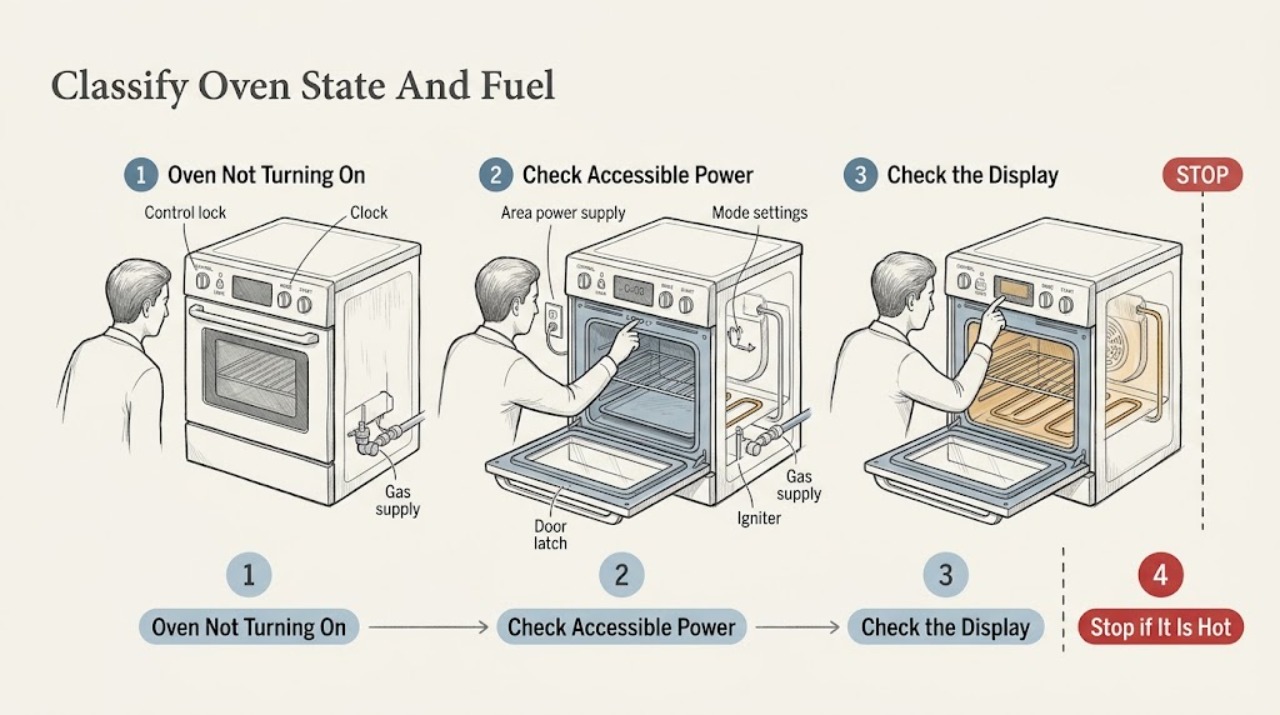
Work through in order
Diagnostic checks
Use only checks that match the exact appliance or system and its official guide.
-
Check 1
From a dry, stable position, record the complete JennAir model and serial information, whether the oven is electric, gas, or dual fuel, whether the display and interior light work, whether the clock is present, and whether any lock, mode, error, or service message appears.
Expected result: The display is dark, the display is lit but ignores commands, the clock is blank or flashing, the control shows a lock or demo message, the oven door is locked, or the controls respond but no cooking cycle starts.
Next step: Keep the oven off and continue only with normal, accessible checks that match the fuel type and model. If the display is damaged, a message returns, food or the oven is unsafe, or a hazard is present, stop and arrange qualified help.
Stop if: Stop for gas odor, smoke, burning odor, sparking outside normal ignition, exposed wiring, water near electricity, a hot connection, repeated breaker operation, or a door that cannot be safely controlled.
Why this matters
Why: A dark display points toward supply or control evidence; a lit but unresponsive panel points toward lock or mode; a flashing clock can follow an outage; and a responsive control with no heat or ignition requires a fuel-type-specific path. The exact model determines the safe control sequence.
-
Check 2
Check the accessible breaker or fuse and the oven's accessible power connection only if dry, cool, and undamaged. For a new installation, do not open the terminal area; compare the installation paperwork and rating plate with the supply arrangement, and use a qualified electrician if the connection or circuit is uncertain.
Expected result: A breaker or fuse is open, the display returns after one safe reset, the display stays dark with apparent supply, the breaker opens again, or a cord, outlet, connection, or wall switch is hot or damaged.
Next step: Correct only an obvious accessible supply state when safe and make at most one model-appropriate reset. If the breaker trips again, the connection is abnormal, or the display remains dark, keep the oven off and contact a qualified electrician or JennAir service.
Stop if: Stop for a repeated trip, hot or wet connection, damaged cord, exposed wiring, smoke, burning odor, or any need to remove a cover or test live circuits.
Why this matters
Why: A tripped protective device or interrupted supply can explain a dark oven, but a repeated trip or abnormal connection indicates an electrical fault. An apparent supply with a dark display or a lit display with no operation needs qualified diagnosis rather than repeated resets.
-
Check 3
With the oven off, look for a lock symbol or a locked message and use only the documented normal unlock control for the exact model. On models covered by JennAir's support guidance, holding the relevant Start or Start/Enter control for the documented interval may unlock the panel; do not force the door latch or use a hidden service sequence.
Expected result: The lock clears and controls respond, the display wakes when the door is opened, the lock remains, or the panel remains dark or partially lit.
Next step: If the panel responds, proceed to clock, mode, Start, delayed-start, and door checks. If the control will not unlock using the exact manual procedure, stop and arrange service.
Stop if: Stop for a damaged display, hot or wet control, smoke, electrical odor, repeated trip, or a latch that would require force or disassembly.
Why this matters
Why: Control Lock intentionally disables ordinary keypads and can persist through a power interruption on some models. A display that wakes after the door is opened may have been idle rather than unpowered. A lock that will not clear or a partial display that remains abnormal needs model-specific service.
-
Check 4
Using the exact owner's manual, confirm the clock or time entry is complete, the desired oven cavity is selected on a double oven, the normal Bake or other mode is selected, the temperature is entered, and Start has been pressed. Cancel any unintended Delayed Start or timer state and check for Demo Mode, Showroom Mode, or Sabbath behavior without changing hidden settings at random.
Expected result: The clock is flashing, the wrong cavity or mode is selected, Start was not pressed, Delayed Start is active, Demo Mode is shown, or the normal cycle begins.
Next step: Cancel only an obvious delayed or demonstration state through the model instructions, then make one ordinary start attempt. If the oven still does not begin or the mode cannot be exited, keep it off and arrange service.
Stop if: Stop for smoke, gas odor, sparking, an unresponsive control, a returning error, a locked door that will not reset safely, or any request to bypass a mode or control.
Why this matters
Why: JennAir documents that a delayed start waits for the programmed start time and that Demo Mode can show product features without normal oven operation. A completed normal start with no response shifts attention to the door, fuel, heating, ignition, control, or sensor system.
-
Check 5
Inspect the accessible door edge, frame, rack position, and latch area for a pan, rack, liner, debris, or obstruction that prevents normal closure. Close the door without force and observe whether the model recognizes it; do not remove the latch, hinge, door glass, or control panel.
Expected result: The door was not fully closed, an item blocked it, the latch is locked after a cleaning cycle, the door is misaligned or damaged, or closure appears normal but the oven still will not start.
Next step: Remove only an accessible obstruction and use the model's normal Cancel/Off and cooling or latch instructions if the door was locked. If the door will not close, remains locked, or needs force, stop and arrange service.
Stop if: Stop for a hot or locked door, damaged hinge or glass, a bent latch, a self-clean cycle that has not cooled, or any need to force or dismantle hardware.
Why this matters
Why: JennAir notes that some oven functions depend on a fully closed door and provides a separate latch-reset path for a locked door. A damaged or misaligned door can prevent a safe cycle; normal closure with no operation points toward controls, fuel, ignition, or heating components.
-
Check 6
For an electric JennAir oven, verify only the accessible model-required supply state and observe whether a selected cycle produces a normal control response; do not touch elements or wiring. For a gas or dual-fuel range, from a safe position confirm only the documented accessible main gas valve state and, where the exact model instructs it, the regulator shutoff state; do not open the gas path or keep attempting ignition.
Expected result: The electric supply appears normal but the oven remains inactive, a gas model has no normal ignition response, surface burners work but the oven does not, the gas valve state is uncertain, or ignition is delayed, abnormal, or accompanied by odor.
Next step: For an electric unit with normal supply but no operation, arrange appliance service for controls, elements, sensors, or wiring. For a gas or dual-fuel unit, stop ignition attempts and arrange qualified gas-appliance service if the documented external checks do not restore safe operation.
Stop if: Stop immediately for gas odor, delayed ignition, repeated clicking, abnormal flame, smoke, sparking outside normal ignition, hot connection, exposed wiring, or any need to access the gas train, igniter, element, or terminal block.
Why this matters
Why: JennAir separates electric supply and control checks from gas supply and ignition checks. On some gas ranges, surface burners can work while the oven's regulator shutoff or ignition path is not correct. Uncertain gas state, delayed ignition, repeated clicking, abnormal flame, or odor is not a user repair diagnosis.
-
Check 7
Arrange qualified JennAir service when the oven remains inactive after one safe power check, unlock attempt, normal start sequence, door check, and applicable electric or gas external check, or when any warning or hazardous symptom appears. Provide the complete model, fuel type, display text, control sequence, door state, breaker history, and whether any gas or ignition symptom occurred.
Expected result: The display remains dark or partial, the controls respond but no cycle starts, the breaker trips again, an error or lock returns, the gas oven clicks or fails to ignite, or the door remains locked or damaged.
Next step: Keep the oven off, leave gas controls in the safe off state, disconnect electrical power only when safe, and use model-based JennAir support or a qualified technician. Do not repeatedly reset, bypass a safety device, or continue ignition tests.
Stop if: Do not continue after gas odor, smoke, burning odor, abnormal flame, sparking, repeated breaker operation, exposed wiring, hot connection, unsafe door hardware, or any need to open the cabinet.
Why this matters
Why: Remaining causes can include a control, sensor, latch, element, igniter, regulator, wiring, or supply fault. The symptom alone cannot establish a compatible component or justify opening the oven.
Use your observations
Decision map
Find the observation that best matches what you see, then follow the next safe action.
-
PATH 01Next step
What you see
Gas odor, delayed ignition, abnormal flame, smoke, burning odor, sparking outside normal ignition, exposed wiring, a hot or wet connection, or repeated breaker operation is present.
Do this next
Arrange qualified service and follow the exact model guidance.
Why this path and its safety boundary
Why it matters: Stop using the oven and do not relight, reset, or test it. Move away from the hazard; only disconnect power or close an accessible supply from a safe, dry position, and contact the appropriate emergency, gas, electrical, or qualified appliance service from a safe location.
-
PATH 02Next step
What you see
The display and controls are dark, partial, or do not respond.
Do this next
Arrange qualified service and follow the exact model guidance.
Why this path and its safety boundary
Why it matters: Check the accessible breaker or fuse and safe power connection once. If the display remains abnormal, the supply appears normal, or the protective device opens again, stop and arrange qualified electrical or JennAir service.
-
PATH 03Next step
What you see
A lock symbol, locked message, Demo Mode, Showroom Mode, Sabbath behavior, or an idle display is present.
Do this next
Arrange qualified service and follow the exact model guidance.
Why this path and its safety boundary
Why it matters: Use the exact model's normal unlock or mode-exit procedure, then perform one ordinary start sequence. If the state will not clear, do not bypass it; arrange service.
-
PATH 04Next step
What you see
The clock is incomplete, the wrong cavity or mode is selected, Start was not pressed, or Delayed Start is waiting.
Do this next
Arrange qualified service and follow the exact model guidance.
Why this path and its safety boundary
Why it matters: Complete the clock and normal mode sequence from the exact manual, cancel an obvious delayed start, enter the temperature, and press Start once. Persistent non-operation needs service.
-
PATH 05Next step
What you see
The door is open, blocked, misaligned, locked after cleaning, or not recognized as closed.
Do this next
Arrange qualified service and follow the exact model guidance.
Why this path and its safety boundary
Why it matters: Remove only an accessible obstruction and use the model's normal Cancel/Off, cooling, or latch instructions. Do not force the door or dismantle its latch; damaged or persistently locked hardware needs service.
-
PATH 06Next step
What you see
An electric oven has apparent normal supply but no cycle, or a new installation has uncertain circuit or terminal details.
Do this next
Arrange qualified service and follow the exact model guidance.
Why this path and its safety boundary
Why it matters: Do not open the terminal area or test live circuits. Compare the rating and installation requirements only from a safe external position and arrange a qualified electrician or JennAir technician.
-
PATH 07Next step
What you see
A gas or dual-fuel oven has no ignition, clicks without safe ignition, has an uncertain valve state, or has surface-burner operation but no oven operation.
Do this next
Arrange qualified service and follow the exact model guidance.
Why this path and its safety boundary
Why it matters: Stop ignition attempts. Confirm only the documented external valve state if there is no odor or other hazard; otherwise keep the appliance off and arrange qualified gas-appliance service for the supply, regulator, igniter, or control path.
Helpful context
Understand the symptom
Classify the symptom before touching a control
A dark display is a power or control-state problem until proven otherwise. A lit display that ignores commands can be locked, in a model-specific mode, waiting for Start, or affected by a door or latch state. A gas oven that clicks without a safe ignition path is different from an electric oven whose elements never energize. Record the model, fuel type, display text, lights, clock, and any recent outage, installation, cleaning cycle, or move.
Use JennAir's model-specific controls
JennAir support pages cover both wall ovens and ranges, and their control-lock, delayed-start, demo-mode, door, and power procedures vary by model and interface. Follow the owner's manual for the exact model. Do not guess at hidden settings, bridge a terminal, bypass a latch, or open the control area.
Gas and electric boundaries are different
An electric oven needs its correct supply and may still have a failed control, element, sensor, or wiring fault. A gas or dual-fuel oven also needs a safe ground path for ignition, an available gas supply, and model-specific ignition components. User checks stop at accessible controls, outlet or breaker evidence, and the documented external valve state. Never disassemble a gas train or continue ignition attempts after a gas odor, delayed ignition, abnormal flame, smoke, or sparking.
Stop when the symptom is hazardous
If there is gas odor, a flame that is not stable or normal for the model, smoke, burning odor, arc or spark outside normal ignition, a hot connection, exposed wiring, water near electricity, repeated breaker operation, or an oven that cannot be safely shut down, stop and leave the appliance off. Move away from the hazard and contact the appropriate emergency, gas, electrical, or qualified appliance service from a safe location.
Safety boundary
Stop conditions
- Gas odor, delayed ignition, repeated clicking, abnormal flame, smoke, burning odor, or sparking outside the model's normal ignition behavior.
- A breaker or fuse opens again, the cord, outlet, switch, or connection is hot or wet, or wiring is exposed or damaged.
- A door, latch, hinge, glass panel, or control is hot, damaged, locked, or requires force or disassembly.
- Water is near electricity, the oven is unstable, a safety device appears bypassed, or food or people would be unsafe.
- Any need to open a gas train, terminal block, control panel, igniter, heating element, live circuit, or other internal area.
- The oven remains inactive after one safe external check or a warning, lock, or fault returns.
Only after diagnosis
Potential parts
- oven door latch or switch
Consider this category only when the exact model and qualified testing link a persistent door-recognition or latch fault to the part after accessible closure checks.
Confirm the complete JennAir model, cavity position, latch design, and manufacturer fit information before any repair. - oven control or temperature sensor
Consider this category only after qualified testing connects a returning control symptom or sensor fault to the exact model.
Confirm the complete model, control revision, connector, and manufacturer fit information; a dark display or no-start symptom alone does not identify this part. - oven igniter or heating element
Consider this category only after qualified diagnosis confirms an igniter fault on a gas model or an element fault on an electric model, with supply and controls verified.
Confirm fuel type, cavity, complete model, electrical or gas requirements, and approved service method; do not access or test the component while energized.
When checks do not resolve it
Need a professional?
The display remains dark or partial with an apparently normal supply, or a breaker or fuse opens again., The control lock, Demo Mode, Delayed Start, or door-latch state cannot be cleared using the exact owner's manual., An electric oven has normal external settings but no cycle, or a new installation has uncertain circuit or connection details., A gas or dual-fuel oven has no ignition, abnormal clicking or flame, an uncertain valve state, or surface burners work while the oven does not., Gas odor, smoke, burning odor, sparking, exposed wiring, hot or wet connections, abnormal heat, or unsafe door or food conditions are present.
Common questions
FAQ
Why is my JennAir oven not turning on but the display is lit?
Check Control Lock, Demo or Showroom Mode, clock completion, the selected cavity and cooking mode, Delayed Start, Start, and door closure. If the normal sequence is complete but the oven remains inactive, stop changing settings and arrange model-specific service.
Can a JennAir Control Lock prevent the oven from starting?
Yes. JennAir says the lock can disable the control pads. Use the exact model's normal unlock procedure, often involving a documented hold on a Start control, and do not force the door or open the control area if it will not clear.
Why does my JennAir oven show a display but not start heating?
A delayed start, Demo Mode, an incomplete clock or Start sequence, an open door, an incorrect fuel-supply state, or a control, ignition, element, or sensor fault can look similar. Identify the model and fuel type, perform one normal safe sequence, and stop if the result is unchanged or hazardous.
What should I check on a JennAir gas oven that will not turn on?
From a safe position, identify the model, check the accessible electrical supply, and confirm only the documented external gas-valve state. If the unit clicks without a safe ignition, has delayed ignition, an abnormal flame, or any gas odor, stop all attempts and arrange qualified gas-appliance service.
When should I stop troubleshooting a JennAir oven?
Stop for gas odor, smoke, burning odor, abnormal flame, sparking, repeated breaker operation, exposed wiring, hot or wet connections, a damaged or locked door, or any need to access the gas train, terminal block, igniter, element, control, or live circuit. Keep the appliance off and seek qualified help from a safe location.
Read the exact guide
Official sources
- Oven Not Working - Gas - Product Help | JennAirJennAir Product Help · JennAir gas range outlet grounding, gas-line, and main-valve guidance
- Oven is Locked - What to Do - Product Help | JennAirJennAir Product Help · JennAir oven door latch reset, cooling, and power-reset guidance
- Locked, Lock or Loc - Range - Product Help | JennAirJennAir Product Help · JennAir range control lock, unlock, power reset, and service guidance
- Nothing Is Working - No Power - Wall Oven - Product Help | JennAirJennAir Product Help · JennAir wall-oven power, control lock, circuit, rating, and reset guidance
- Oven Not Working - Cooktop Working - Clicking - Product Help | JennAirJennAir Product Help · JennAir gas range door, gas supply, regulator shutoff, drawer obstruction, and burner-air guidance
- Nothing is Working - Gas - Product Help | JennAirJennAir Product Help · JennAir gas range breaker, main valve, control lock, delayed-start, and Demo Mode guidance
- Owner's ManualJennAir · JennAir model-specific oven controls, Control Lock, Sabbath Mode, and operating behavior
- No or Partial Display - Wall Oven - Product Help | JennAirJennAir Product Help · JennAir wall-oven display wake, control lock, and power-reset guidance
- Oven Not Heating - Powering On - Electric - Product Help | JennAirJennAir Product Help · JennAir electric oven door, electrical connection, control lock, Demo Mode, and delayed-start guidance
Community feedback
Share a repair observation
Share a plain-text repair observation. Accepted observations are published automatically; this page may take a moment to update.