
On this page
Start here
Quick answer
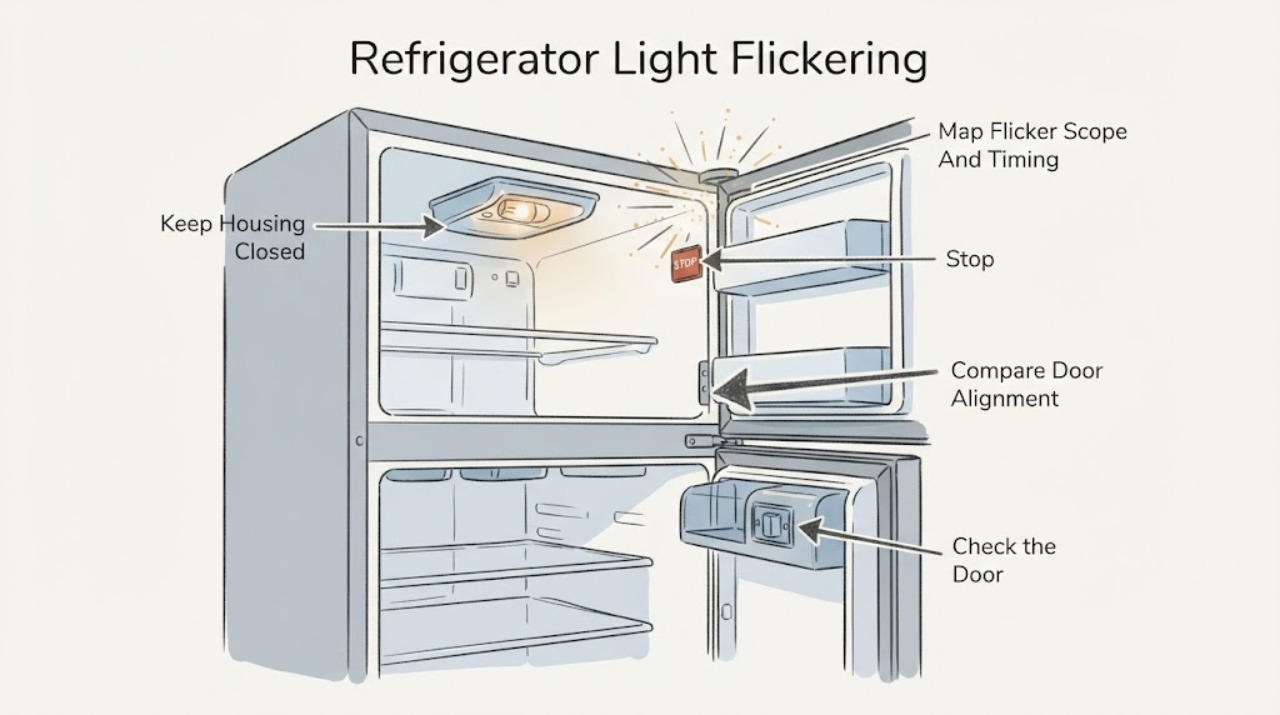
First observe whether one light flickers or all interior lights and the control display flicker together. JennAir says interior lights are controlled by the door switch, whose position varies by model, and recommends checking that the refrigerator is level, doors are aligned, and magnets or electronic devices are not close to the switch. Open and close the door normally without pressing or bypassing the switch; if the flicker follows door movement, door alignment or switch contact is more likely. If your model uses a traditional removable bulb, disconnect power before checking that it is seated and replace it only with the exact manual's size, shape, and wattage. Many newer JennAir refrigerators use LED modules that are not user-replaceable. If all lights, the display, or cooling also cut out, or the flicker persists after a safe one-minute power cycle, arrange service. Do not tape, hold, or bypass the door switch, expose wiring, or work on an LED module while energized.
Before you begin
Safety first
- This article covers natural door observation, removal of nearby accessories, model-permitted checks of a removable bulb with power disconnected, and one bounded power cycle. Qualified personnel must handle the door switch, LED module or driver, wiring harness, socket, control board, hinges, and household or appliance electrical diagnosis.
Work through in order
Diagnostic checks
Use only checks that match the exact appliance or system and its official guide.
-
Check 1
From outside the refrigerator, observe whether the flicker affects one lamp, one compartment, all interior lights, the display, fans, or cooling, and whether it occurs only while a door is moving, when the door is fully open, or during a normal cooling cycle.
Expected result: Only one light flickers; the flicker follows door movement; every interior light flickers together; or the display, fans, or cooling also restart.
Next step: Use the localized-light, door-switch, or whole-appliance branch. Do not reproduce the symptom by holding the door switch closed.
Stop if: Stop for smoke, burning odor, sparking, a hot plug or cord, water near electrical parts, or a repeated breaker or GFCI trip.
Why this matters
Why: A localized symptom points toward a bulb, socket, lens, or LED module. Door-timed flicker points toward switch contact or alignment. A whole-appliance interruption makes power or control service more likely.
-
Check 2
Open and close each refrigerator door normally and inspect from the front for sagging, uneven gaps, failure to close, or a door that does not meet the cabinet as designed. Remove magnets or electronic accessories located near the model's door-switch area, without touching or pressing the switch.
Expected result: The flicker occurs at one door position; the door is misaligned or not level; a nearby magnet or device is present; or door movement and surrounding space appear normal.
Next step: Clear the nearby accessory and close the door gently. Follow only the exact Owner's Manual for leveling or alignment; arrange service for a sagging door, hinge adjustment, or persistent flicker.
Stop if: Do not tape, wedge, manually hold, or bypass the door switch; do not remove hinges, wiring, or door trim.
Why this matters
Why: JennAir identifies door-switch engagement, level, alignment, and nearby magnets or electronics as relevant to interior-light behavior. A normal door with a persistent flicker makes a light module, wiring, or control issue more likely.
-
Check 3
If the doors were open for an extended period, close every refrigerator and freezer door fully and leave them closed for the model's documented recovery period. Then open a door normally and observe whether the light is steady.
Expected result: The light returns to steady operation after the doors remain closed; it stays dark or flickers; or the display shows a model-specific mode or warning.
Next step: Use the exact manual for any Sabbath, showroom, lighting, or alarm mode. If the light remains unstable, continue to the bulb or LED branch and record the model.
Stop if: Do not change hidden settings by guesswork or leave doors open repeatedly to test the light.
Why this matters
Why: JennAir documents automatic interior-light shutoff after prolonged door opening on supported built-in models. Recovery after the doors close points to that protective state, while a recurring flicker is not explained by it alone.
-
Check 4
With the refrigerator disconnected from power and the light cool, identify from the exact Owner's Manual whether the affected light is a removable appliance bulb or a sealed LED module. For a clearly removable bulb, inspect only that it is seated and intact; do not open a wired module or remove a harness.
Expected result: The bulb is loose, damaged, or the wrong type; the light is a sealed LED module with wires; the lens or socket is damaged; or the model's lighting type is unclear.
Next step: Reseat or replace a traditional bulb only as the exact manual specifies, matching size, shape, and wattage. Arrange service for an LED module, wiring, socket, lens, or uncertain design.
Stop if: Do not work while energized, use an improvised bulb or LED, touch exposed conductors, or force a lens or module apart.
Why this matters
Why: A loose or incorrect traditional bulb can create a localized intermittent light. A sealed LED module, damaged socket, or unclear construction requires model-matched service rather than a generic replacement.
-
Check 5
If the display, fans, cooling, and interior lights flicker together and no hazard is present, check the accessible outlet and household breaker or GFCI once. Then, if the exact guide permits, disconnect refrigerator power for one minute, reconnect it, and monitor the light and controls.
Expected result: Only the light flickers; the whole appliance restarts; the outlet or protection was abnormal; the symptom disappears after the one-minute cycle; or the flicker returns.
Next step: Stop repeated operation and provide the model, light location, door timing, display or cooling behavior, and reset result to JennAir or a qualified refrigerator technician.
Stop if: Do not repeatedly reset a breaker, use an extension cord, open the control or junction area, or perform energized electrical checks.
Why this matters
Why: A whole-appliance interruption is more consistent with supply, control, or wiring than with one bulb. A returning symptom after a bounded reset needs professional diagnosis.
Use your observations
Decision map
Find the observation that best matches what you see, then follow the next safe action.
-
PATH 01Safety boundary
What you see
The light flickers as one door moves or rests near a particular position, especially with a sagging, uneven, or poorly aligned door or a nearby magnet or electronic accessory.
Do this next
Clear the nearby accessory and use the exact manual for any permitted alignment check. Arrange service for a sagging door, hinge, switch, or persistent flicker.
Why this path and its safety boundary
Why it matters: Door-switch engagement or alignment is more likely than a failed bulb. JennAir says switch position varies by model and recommends level, aligned doors and clearance around the switch.
Safety stop: Do not manually depress, tape, wedge, or bypass the switch or remove door hardware.
-
PATH 02Safety boundary
What you see
Only one lamp or compartment flickers while the display, cooling, and other lights remain normal.
Do this next
With power disconnected, identify the light type in the exact manual. Reseat or model-match a removable bulb only when explicitly permitted; send a sealed LED, socket, lens, or wiring issue to service.
Why this path and its safety boundary
Why it matters: A loose or failing traditional bulb, socket, lens, or LED module is more likely than a household power interruption.
Safety stop: Do not substitute an unknown bulb, open a sealed module, or touch a wired assembly.
-
PATH 03Safety boundary
What you see
The light went out or behaves differently after a door was left open for an extended period and returns after all doors remain closed.
Do this next
Let the refrigerator recover with doors closed as the applicable guide directs. If flicker returns during ordinary use, continue with the door and lighting-type branches.
Why this path and its safety boundary
Why it matters: JennAir documents automatic light shutoff after more than 10 minutes on supported built-in models; this can be a normal protective state rather than a failed lamp.
Safety stop: Do not keep doors open to force a repeat or assume this explanation applies to every JennAir layout.
-
PATH 04Safety boundary
What you see
Interior lights, display, fans, or cooling restart or flicker together, or the outlet, breaker, or GFCI is abnormal.
Do this next
Make only one safe accessible supply check and use one bounded power cycle if permitted. Arrange appliance or electrical service if the symptom returns or protection trips again.
Why this path and its safety boundary
Why it matters: A supply, control, or wiring interruption is more likely than a single light failure, and repeated trips can indicate an electrical hazard.
Safety stop: Do not use an extension cord, repeatedly reset protection, open wiring, or continue with a hot connection or water near electrics.
-
PATH 05Safety boundary
What you see
The door is aligned, no nearby interference is present, the model's bulb or LED type is understood, and the flicker persists after a safe one-minute power cycle.
Do this next
Arrange qualified JennAir service with the model, affected compartment, timing, photos or video if safe, and the results of the external checks.
Why this path and its safety boundary
Why it matters: A door switch, LED driver, harness, socket, control, or model-specific light circuit needs diagnosis; external observation cannot identify the failed part.
Safety stop: Do not bypass the door control, open an LED module, expose wiring, or perform an energized test.
Helpful context
Understand the symptom
Classify the flicker before touching anything
Watch the light from a safe position while opening and closing the door normally. Note whether one lamp, one compartment, all interior lights, the display, or the cooling system changes together. A brief change tied to door travel points toward door-switch contact or alignment; one localized lamp points toward that bulb, socket, lens, or LED module; a whole-appliance interruption points toward supply or control service.
Door position controls the light
JennAir says the door switch location varies by model and that level, aligned doors and clear space near the switch help it engage correctly. Check for a door that sags, fails to close evenly, or has a magnet or electronic accessory close to the switch. Do not manually depress, tape, wedge, or otherwise defeat the switch to reproduce the flicker; use the door's natural movement only.
Bulb and LED systems are not interchangeable
JennAir's guidance distinguishes traditional screw-in bulbs from sealed LED modules. With power disconnected and the area cool, a model that clearly has a removable bulb may allow a visual seating check or a model-specified replacement. A sealed LED module, a module with wires, or a light that requires removing a trim or harness is a service job. Do not install a bulb by appearance alone or substitute an unapproved LED in a damp refrigerator compartment.
A whole-appliance flicker changes the priority
If the interior lights, display, fans, or cooling all blink or restart together, treat the symptom as a supply or control interruption rather than a single light problem. JennAir's no-operation guidance supports checking the accessible grounded outlet, household protection, and control state for the applicable refrigerator family. Do not use an extension cord, open the junction or control area, or keep resetting a breaker that trips.
Use one bounded power cycle, then escalate
If there is no smoke, burning odor, water near electrics, hot connection, or repeated trip, JennAir's flickering-light page permits disconnecting power, waiting one minute, reconnecting, and monitoring. If the flicker returns, changes with cooling or door movement, or affects more than the light, the next decision is model-specific service for the switch, LED driver, harness, control, or supply. Do not continue testing by bypassing the door control.
Safety boundary
Stop conditions
- Stop and disconnect power only from a safe accessible point for smoke, sparks, burning odor, a hot or damaged connection, water near electrical parts, or a repeated breaker or GFCI trip.
- Do not tape, wedge, manually hold, or bypass the refrigerator door switch to test the light.
- Do not open a sealed LED module, expose wiring, remove a harness or hinge, or work while the refrigerator is energized.
- Do not use an extension cord or keep resetting household protection after a trip.
- If the flicker persists after safe external checks and one bounded power cycle, arrange qualified service instead of guessing at a light or control part.
When checks do not resolve it
Need a professional?
Arrange qualified JennAir refrigerator service when a light flickers after door alignment and nearby-accessory checks, when a sealed LED module, socket, lens, harness, or door switch is involved, or when a one-minute power cycle does not restore steady operation. Treat a simultaneous display or cooling interruption as a supply or control concern. Stop immediately for smoke, sparks, burning odor, a hot or damaged cord or connection, water near electrical parts, a repeated breaker or GFCI trip, exposed wiring, or a door that cannot align safely. The user may observe the light and door naturally, remove nearby magnets or electronics, follow the exact manual for a removable bulb, and perform one model-appropriate power cycle. Do not bypass the door switch, open an LED module, remove wiring or hinges, or perform energized electrical work.
Safety scope: This article covers natural door observation, removal of nearby accessories, model-permitted checks of a removable bulb with power disconnected, and one bounded power cycle. Qualified personnel must handle the door switch, LED module or driver, wiring harness, socket, control board, hinges, and household or appliance electrical diagnosis.
Common questions
FAQ
Why does my JennAir refrigerator light flicker when I open the door?
JennAir says the interior light is controlled by a door switch whose contact depends on the model, door alignment, and level. Observe the door naturally, clear nearby magnets or electronic accessories, and arrange service if the door is sagging or the flicker persists. Do not hold or bypass the switch.
Is a flickering JennAir refrigerator light a loose bulb?
It can be if your exact model uses a traditional removable bulb, but JennAir says many newer models use LED lighting or sealed modules. Disconnect power before checking a permitted bulb, match the exact size, shape, and wattage, and send a wired LED module or damaged socket to service.
Why do all the JennAir refrigerator lights and the display flicker together?
A whole-appliance interruption is more consistent with household supply, control, or wiring than with one lamp. Check the accessible outlet and breaker or GFCI once, then use one model-appropriate power cycle; repeated trips or a returning symptom needs qualified service.
Can I tape the JennAir refrigerator door switch down to test the light?
No. Do not tape, wedge, press, or bypass the door switch. It communicates door status to the refrigerator and may affect more than the light. Observe normal door operation and use the exact manual or a technician for switch diagnosis.
What should I do if my JennAir refrigerator has a sealed LED light module?
Disconnect power if there is a safe reason to do so and arrange qualified service. JennAir's lighting guidance says a sealed LED module with wires is not a traditional bulb replacement; do not open the module or expose its wiring.
Read the exact guide
Official sources
- Interior Lights Flickering - Refrigerator - Product Help | JennAirJennAir Product Help · JennAir Product Help article for the French-door bottom-freezer refrigerator family; other JennAir layouts can use different switch and lighting arrangements.
- Changing the Light Bulb - Product Help | JennAirJennAir Product Help · JennAir Product Help lighting guidance for full-size refrigerator families; the Owner's Manual controls which models have a removable bulb or sealed LED module.
- No Operation - Will Not Turn On - Refrigerator - Product Help | JennAirJennAir Product Help · JennAir Product Help page for a French-door bottom-freezer refrigerator family; use the exact model instructions for other layouts and installations.
- Lights Not Illuminating - Refrigerator Section - Built-In Refrigerator - Product Help | JennAirJennAir Product Help · JennAir Product Help guidance for built-in refrigerator-section lighting; the ten-minute shutoff and recovery behavior should not be generalized to every model.
- How to Test if the Door Switch is Activated - Product Help | JennAirJennAir Product Help · JennAir Product Help overview covering multiple refrigerator layouts; this article uses its door-switch relationship but deliberately does not instruct bypass testing.
Community feedback
Share a repair observation
Share a plain-text repair observation. Accepted observations are published automatically; this page may take a moment to update.