
On this page
Start here
Quick answer
Treat “not working” as a symptom router, not a single repair diagnosis. First decide whether the refrigerator has no lights or display, has power but cooling is intentionally off or the controls do not respond, or has power and is running but the compartments are too warm. JennAir’s official material separates no-operation, control-panel, no-power, temperature, and configuration-specific topics. If the outlet or breaker is the problem, use the not-turning-on route; if the panel has power but cooling is off, a mode is active, or commands are ignored, use the not-starting route; if lights and cooling run but temperatures are wrong, use the not-cooling route. JennAir’s opened guidance supports checking the grounded outlet, breaker or GFCI, controls, recent installation, automatic defrost, showroom or demo mode, and Sabbath mode only as applicable to the exact model. A one-time model-documented reset can be useful for an unresponsive control, but it is not a repair. Stop for smoke, burning odor, abnormal heat, a hot or damaged cord, water near electrical parts, exposed wiring, or repeated breaker trips, and arrange qualified service.
Before you begin
Safety first
- The user may identify the model and configuration, check a visible outlet and breaker, read a control mode, clear external door or loading obstruction, and perform one exact-manual reset when safe. Qualified personnel must handle internal power, control, fan, compressor, defrost, sealed-system, wiring, live tests, refrigerant tubing, and built-in appliance movement.
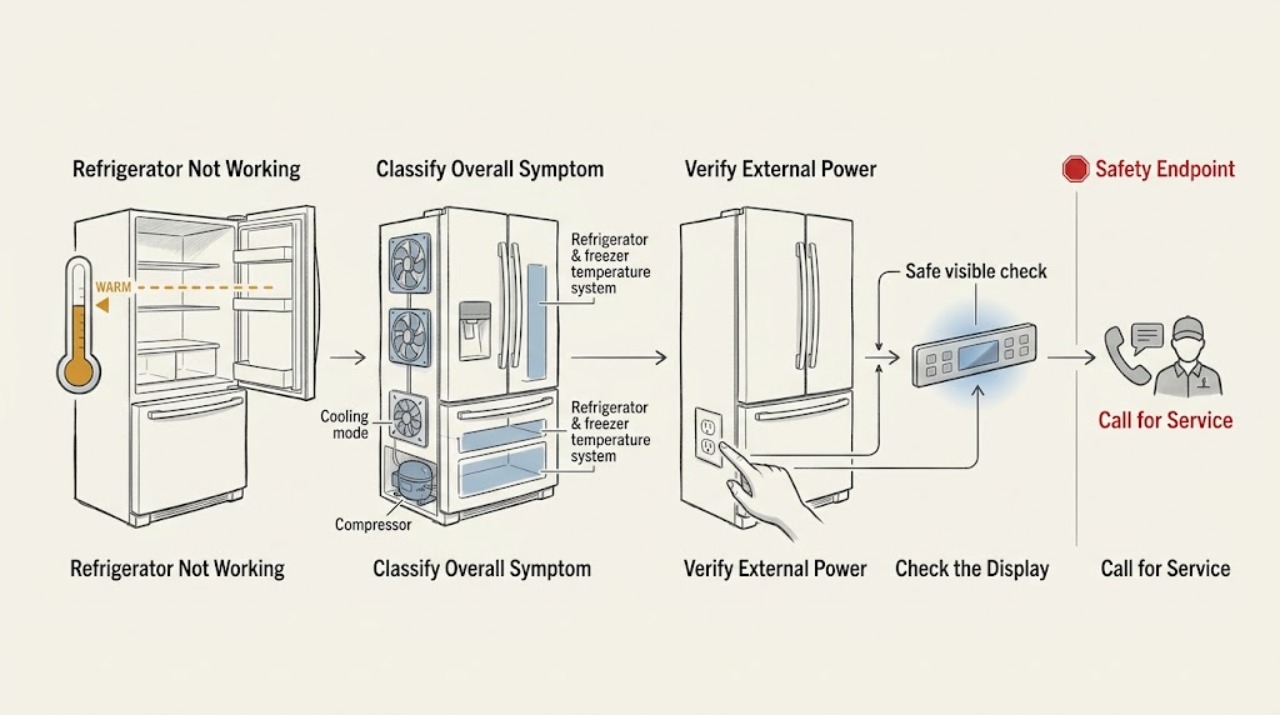
Work through in order
Diagnostic checks
Use only checks that match the exact appliance or system and its official guide.
-
Check 1
Record the exact JennAir model and configuration, then note whether interior lights and the display work, whether controls respond, whether the compressor or fans appear to run, and whether the refrigerator, freezer, or both compartments are warm. Do not move a built-in unit to reach its rear connections.
Expected result: Everything is dark; lights work but controls do not respond; the display shows a mode or outage indication; the unit runs but is warm; or only one compartment has a temperature problem.
Next step: Use the matching branch below: no lights goes to the not-turning-on route, powered controls that do not begin cooling goes to not-starting, and a running but warm unit goes to not-cooling.
Stop if: Stop and disconnect power when safe for smoke, sparks, burning odor, abnormal heat, exposed wiring, water near electrical parts, a hot cord, or repeated breaker trips.
Why this matters
Why: This separates the no-power, control or start, and cooling symptom families. JennAir publishes configuration-specific paths, so a broad complaint cannot safely select a component or reset sequence.
-
Check 2
If the refrigerator is dark, inspect the plug and cord from the outside and check the outlet with a lamp or other suitable small appliance. Check the associated breaker or GFCI and restore only an ordinary trip when there is no hazard; do not use an extension cord, adapter, or removed ground pin as a test.
Expected result: The outlet is dead; a breaker or GFCI has tripped; the cord or plug is hot or damaged; the breaker trips again; or the outlet works but the refrigerator remains dark.
Next step: Use the not-turning-on route for an external supply issue. If the outlet works but the refrigerator stays dark, unplug when safe and arrange qualified refrigerator or electrical service.
Stop if: Do not open the rear cover, replace an internal fuse, probe live wiring, or keep resetting a breaker after a hot cord, odor, smoke, water, or repeated trip.
Why this matters
Why: A dead outlet or one-time trip points outside the refrigerator. A working outlet with no lights makes an internal power, control, or wiring fault possible, but an external check cannot identify which one.
-
Check 3
If lights or the display work but cooling does not begin or the panel ignores commands, look for a model-documented Cool Off, Showroom or demo, Sabbath, power-outage, or other control indication. Use the exact Owner’s Manual to exit that state; do not repeatedly press unknown key combinations.
Expected result: A model-specific mode or outage indication is present; the controls respond after the documented procedure; the panel remains unresponsive; or the controls appear normal but the refrigerator is simply warm.
Next step: Follow the matching not-starting or not-cooling route. If the exact manual permits a reset, perform it once only after confirming no leak, heat, odor, or electrical hazard.
Stop if: Do not force controls, remove the display, bypass a door or temperature safety, or continue after smoke, heat, burning odor, water, or exposed wiring.
Why this matters
Why: A mode or acknowledged power event can suppress cooling or commands on some models. A persistent unresponsive panel points to the not-starting or control-service path, while normal controls with warm compartments point to not-cooling rather than not-working.
-
Check 4
If the refrigerator has power and is running, note whether it was recently installed, heavily loaded with warm food, left open, or observed during an automatic defrost cycle. Check only visible loading and door closure from the outside; do not remove an evaporator cover or test a compressor, fan, heater, or sealed system.
Expected result: The condition follows a new installation, large load, open door, or temporary defrost; both compartments are gradually recovering; or the refrigerator remains warm, has uneven temperatures, or shows abnormal fan or compressor behavior.
Next step: Allow the exact manual’s recovery guidance when food safety permits and continue with the dedicated not-cooling page for temperature and airflow diagnosis. Arrange service if cooling does not recover or the unit is abnormal.
Stop if: Do not keep perishable food in an unsafe compartment, remove sealed-system panels, use unapproved heat, or operate with smoke, odor, abnormal heat, or electrical symptoms.
Why this matters
Why: A documented temporary operating condition can resemble failure. Persistent warmth or abnormal operation after those conditions end belongs to the not-cooling route, not a generalized power reset.
-
Check 5
Only when the exact JennAir support page or Owner’s Manual allows it and there is no hazard, record the symptom and perform one documented control or power reset. Restore power or cooling as instructed, then observe whether the panel responds and whether the refrigerator enters a normal operating state.
Expected result: The unit resumes normally; the mode or indication returns; the panel is still unresponsive; or the refrigerator runs but remains warm.
Next step: Do not repeat resets. Route no-power symptoms to not-turning-on, powered no-start or control symptoms to not-starting, and powered but warm symptoms to not-cooling; arrange qualified service for a recurring fault.
Stop if: Stop for a leak, water near electrics, smoke, burning odor, abnormal heat, damaged cord, exposed wiring, or repeated breaker trips; do not restart to test.
Why this matters
Why: One-time recovery can clear a temporary control state but does not prove the cause is fixed. A returning mode, unresponsive panel, or warm running refrigerator belongs to the corresponding dedicated route or service diagnosis.
Use your observations
Decision map
Find the observation that best matches what you see, then follow the next safe action.
-
PATH 01Safety boundary
What you see
The interior lights and display are dark, and the external outlet or breaker check finds no power, a tripped breaker or GFCI, a hot or damaged cord, or a repeat trip.
Do this next
Follow the dedicated not-turning-on route. Restore only a plainly tripped protection device once when safe; use electrical or appliance service for a dead outlet, damaged cord, working outlet with a dark unit, or repeat trip.
Why this path and its safety boundary
Why it matters: The symptom is an external or internal power problem, not a cooling diagnosis. JennAir’s no-operation guidance explicitly starts with the outlet, breaker or GFCI, and controls.
Safety stop: Do not open the refrigerator, replace internal fuses, use an extension cord, probe live wiring, or continue after heat, odor, smoke, water, or repeated trips.
-
PATH 02Safety boundary
What you see
Lights or the display work, but cooling is off, the panel ignores commands, a model-specific mode or outage indication is present, or controls do not begin operation.
Do this next
Follow the dedicated not-starting or control-panel route with the exact Owner’s Manual. Apply one model-documented reset only if safe; arrange service if the panel remains unresponsive or the state returns.
Why this path and its safety boundary
Why it matters: A control state, recent power event, showroom or demo mode, Sabbath mode, or control-panel fault is more likely than a dead supply. JennAir says these states and exit sequences vary by model.
Safety stop: Do not guess key sequences, remove the display, bypass a safety, or continue after smoke, burning odor, abnormal heat, water near electrics, or exposed wiring.
-
PATH 03Safety boundary
What you see
Lights and controls work, the refrigerator appears to run, but one or both compartments remain too warm or recover poorly after a normal installation, load, door, or defrost interval.
Do this next
Use the dedicated not-cooling route and record compartment temperatures, door and airflow observations, and model settings. Arrange qualified service if cooling does not recover or internal diagnosis is required.
Why this path and its safety boundary
Why it matters: This is a cooling or temperature symptom rather than an all-function no-working symptom. Airflow, doors, temperature settings, fans, compressor operation, defrost, and sealed-system conditions need a separate route.
Safety stop: Do not remove evaporator or compressor covers, handle refrigerant tubing, perform live tests, or leave perishable food in an unsafe temperature.
-
PATH 04Safety boundary
What you see
The refrigerator was newly installed, recently powered back on, loaded with warm food, left open, or observed during a documented automatic defrost interval, and temperatures are gradually recovering without a hazard.
Do this next
Keep doors closed, follow the exact manual, protect perishable food, and monitor recovery only for the model-appropriate period. Route persistent warmth to not-cooling rather than repeatedly cycling power.
Why this path and its safety boundary
Why it matters: A temporary operating condition is more likely than an immediate component failure. JennAir’s owner material warns that new installations need recovery time and that automatic defrost changes operation temporarily.
Safety stop: Do not wait through smoke, odor, unusual heat, water, exposed wiring, a damaged cord, or a repeated breaker trip.
-
PATH 05Safety boundary
What you see
The symptom returns after one model-documented reset, the unit remains dark with a working outlet, the panel remains unresponsive, cooling does not recover, or there is smoke, burning odor, abnormal heat, water near electrics, exposed wiring, cord damage, or a repeated trip.
Do this next
Disconnect power when safe, close a water supply if a leak is present, and arrange qualified JennAir or appliance service using the appropriate not-turning-on, not-starting, or not-cooling route and the recorded model and observations.
Why this path and its safety boundary
Why it matters: An internal electrical, control, cooling, defrost, fan, compressor, or sealed-system fault is possible, or there is a safety hazard. The broad symptom does not safely identify a repair part.
Safety stop: Do not restart to test, open panels, perform live tests, handle refrigerant tubing, bypass controls, or continue operating a hot, wet, smoking, or electrically abnormal unit.
Helpful context
Understand the symptom
Use the symptom boundary before troubleshooting
“Not working” can mean no display, no compressor sound, no response to controls, no cooling, or a refrigerator that is intentionally in a mode with cooling disabled. JennAir’s official operation index lists no-power and no-operation separately from temperature concerns, while different product families have their own support paths. Record the exact model, configuration, whether lights work, whether the panel responds, and whether either compartment is actually warm before choosing a next step.
Route a dead unit to the power path
If the interior lights and display are both dead, the first useful check is external: confirm the grounded outlet with a small appliance, check a tripped breaker or GFCI, and inspect the cord without moving or opening the refrigerator. JennAir warns against extension-cord workarounds and directs owners to an electrician when a supply problem continues. A working outlet with a dark refrigerator is no longer a broad “not working” diagnosis; it belongs on the dedicated no-power or not-turning-on route for qualified service.
Route powered controls to the start or mode path
If lights or a display work but the controls do not start cooling, check only the modes that the exact model has. JennAir’s official control guidance identifies Showroom or demo mode and Sabbath mode on some built-in models; the exit sequence varies by model. A recent power outage can also leave a power-outage indication or disable some controls until it is acknowledged. Use the exact manual, not a key sequence borrowed from another JennAir refrigerator. If the panel remains unresponsive after the model-documented reset, use the not-starting or control-service route.
Route a running but warm refrigerator to cooling
If lights and controls work and fans or compressor operation are present but food is too warm, this page should stop at triage. A new installation, large warm load, open doors, an automatic defrost cycle, blocked airflow, or a cooling-system fault can look similar at first. JennAir’s operation index separates temperature concerns from no-power concerns. Use the not-cooling route for temperature measurements, airflow and door-seal checks, and model-specific cooling diagnosis instead of repeating power resets here.
Safety boundary
Stop conditions
- Stop and disconnect power when safe for smoke, sparks, flame, burning odor, abnormal heat, exposed wiring, water near electrical parts, a hot or damaged cord, or repeated breaker trips.
- Close the refrigerator water supply for a leak and do not restart until water and electrical safety have been assessed.
- Do not use an extension cord or adapter, remove the ground pin, open panels, replace internal fuses, or perform live electrical tests.
- Do not move a built-in refrigerator while loaded or handle sealed refrigerant tubing, compressor, fan, defrost, or control components.
- Do not keep resetting a refrigerator that remains dark, will not start, stays warm, or returns the same symptom; use the dedicated route and arrange service.
Only after diagnosis
Potential parts
- model-matched power cord, control interface, control board, or mode-control component
Consider only after qualified diagnosis confirms an internal power or control fault following a working outlet and exact-model mode or reset check; “not working” alone does not identify a part.
JennAir full-size, built-in, column, drawer, and undercounter configurations use different controls and power arrangements. Confirm exact model fitment before ordering. - model-matched fan, compressor, defrost, temperature-sensor, or sealed-system component
Consider only after the symptom has been routed to not-cooling and qualified diagnosis confirms a specific cooling, defrost, airflow, or sensor fault; a broad no-working complaint is insufficient.
Cooling and defrost assemblies vary by JennAir configuration and require internal or sealed-system service. Confirm exact model and qualified installation.
When checks do not resolve it
Need a professional?
Use this page only for triage and route selection. Follow the dedicated not-turning-on route for no lights or display after an external power check, the not-starting route for powered controls that will not begin cooling or remain in a mode, and the not-cooling route for a powered refrigerator that runs but stays warm. Arrange JennAir or qualified service when a model-documented reset does not restore the correct route, the symptom returns, or internal controls, fans, compressor, defrost, wiring, or sealed-system work is indicated. Stop immediately for smoke, sparks, burning odor, abnormal heat, water near electrical parts, exposed wiring, a hot or damaged cord, or repeated breaker trips; disconnect power and close a water supply when safe. The user may identify the model, check a visible outlet and breaker, read the controls, clear an external door obstruction, and follow one exact-manual reset. Internal panels, live tests, refrigerant work, compressor or fan service, control replacement, and loaded built-in movement belong to qualified personnel.
Safety scope: The user may identify the model and configuration, check a visible outlet and breaker, read a control mode, clear external door or loading obstruction, and perform one exact-manual reset when safe. Qualified personnel must handle internal power, control, fan, compressor, defrost, sealed-system, wiring, live tests, refrigerant tubing, and built-in appliance movement.
Common questions
FAQ
What does JennAir refrigerator not working mean?
It can mean no power, powered controls that do not start cooling, or a refrigerator that runs but remains warm. Check lights, display, control response, and compartment temperature first, then use the dedicated not-turning-on, not-starting, or not-cooling route.
Why is my JennAir refrigerator dark?
Check the visible plug, outlet, breaker or GFCI, and cord from the outside. If the outlet works but the refrigerator remains dark, stop at external checks and arrange qualified service through the not-turning-on route.
Why does my JennAir refrigerator have power but not start cooling?
Some models can have a cooling-off, Showroom or demo, Sabbath, or power-outage state that affects controls or cooling. Use the exact Owner’s Manual; if the panel remains unresponsive, follow the not-starting or control-service route rather than repeatedly cycling power.
What if my JennAir refrigerator runs but is warm?
That is a cooling symptom, not simply an all-function power failure. Consider recent installation, warm food, open doors, defrost, airflow, and model settings only as the exact manual allows, then use the dedicated not-cooling route for temperature and internal diagnosis.
When should I stop using a JennAir refrigerator?
Stop for smoke, sparks, burning odor, abnormal heat, water near electrical parts, exposed wiring, a hot or damaged cord, or repeated breaker trips. Disconnect power and close a water supply when safe, then arrange qualified service.
Read the exact guide
Official sources
- No Operation - Will Not Turn On - RefrigeratorJennAir Product Help · Official JennAir Product Help page for a French-door bottom-freezer family; the external power checks generalize as triage, but control details and installation vary by model.
- Owner's ManualJennAir Brand Home Appliances · Official JennAir owner manual for a specific refrigerator model family; exact controls and timings must be confirmed against the user’s model.
- Operation - Product Help | JennAirJennAir Product Help · Official JennAir operation index for a full-size French-door bottom-freezer family; it supports navigation and symptom separation, not universal model repair instructions.
- Control Panel or Interface Not Working - Built-In RefrigeratorJennAir Product Help · Official JennAir built-in refrigerator guidance; modes and exit sequences are present only on some models and vary by exact Owner’s Manual.
Community feedback
Share a repair observation
Share a plain-text repair observation. Accepted observations are published automatically; this page may take a moment to update.