
On this page
Start here
Quick answer
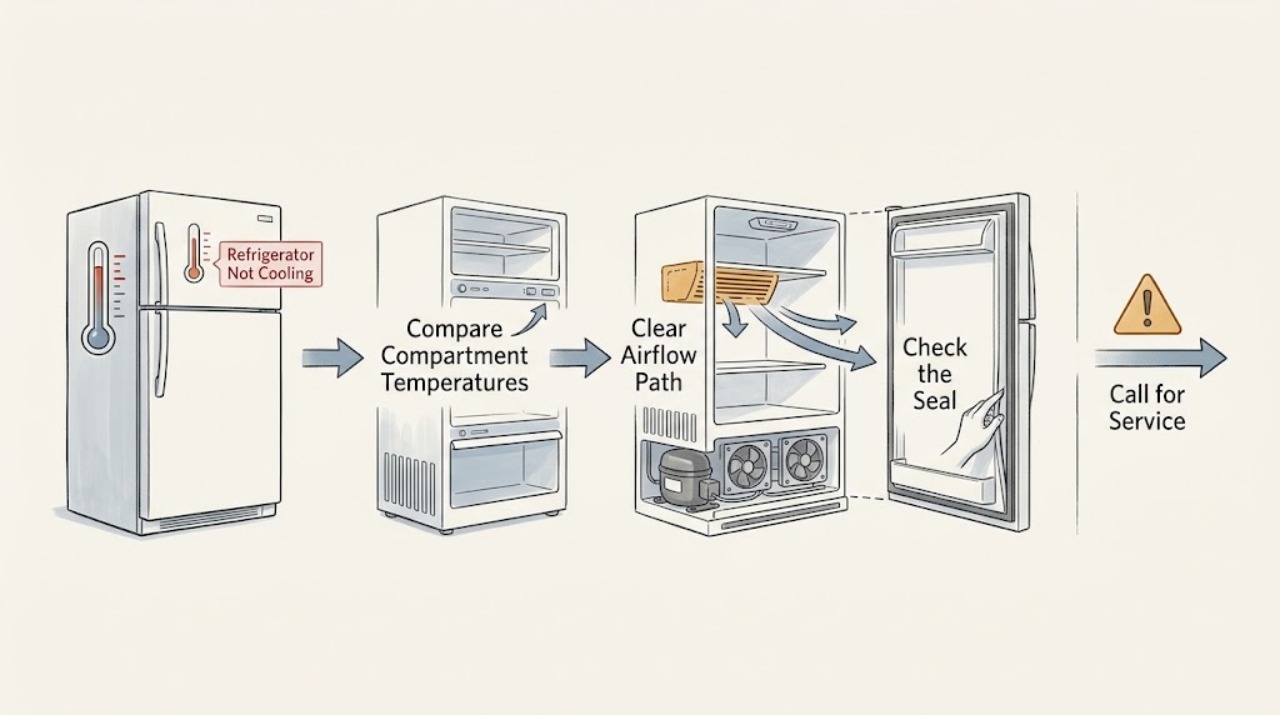
First determine whether the freezer is also warm. Kelvinator guidance separates a warm refrigerator compartment, a warm freezer, and no cooling at all. With the appliance powered and safe, verify the exact model setting, keep food away from cooling-air vents, check that doors close and seals contact evenly, and confirm the cabinet has the ventilation clearance specified by its own manual. A new or recently switched-on unit may need time to stabilize after a small control adjustment. If both compartments stay warm, the compressor or fans never run, frost covers the freezer back wall, or cooling does not return after the model-directed checks, stop guessing at parts and arrange qualified service. Do not open sealed-system panels, handle refrigerant, make live electrical measurements, or move a heavy refrigerator alone.
Before you begin
Safety first
- The user may make model-directed setting and loading corrections and inspect visible seals and vents. Qualified personnel must handle internal fans, defrost parts, controls, wiring, compressors, refrigerant, sealed systems, live testing, and heavy-appliance movement.
Work through in order
Diagnostic checks
Use only checks that match the exact appliance or system and its official guide.
-
Check 1
Identify the exact model and compare the freezer and refrigerator compartments without leaving doors open longer than necessary. Use a reliable thermometer if available, or record whether frozen food remains hard and whether refrigerated food is clearly warmer than usual. Do not use a soft food or a single reading as proof of a precise internal fault.
Expected result: The freezer is cold but the refrigerator is warm; both compartments are warm; only the freezer is warm; or the appliance has just been installed or switched on.
Next step: Use the matching branch, then record the model, compartment pattern, and start date. Do not change multiple controls at once.
Stop if: Stop if food has unsafe temperature exposure, the appliance smells burnt, wiring is exposed, or the cabinet is unstable.
Why this matters
Why: Kelvinator documents separate refrigerator and freezer temperature concerns. A single warm compartment can fit an airflow, loading, seal, or setting issue; both warm compartments or a warm freezer make a cooling-system or power assessment more important; a new installation needs stabilization time.
-
Check 2
With the exact manual available, check that the refrigerator and freezer controls are enabled and set as intended. Move packages away from visible cooling-air outlets, confirm shelves and drawers are seated, and avoid packing food tightly against the rear or vent openings.
Expected result: A control is set warmer than intended; food blocks a vent; a drawer or shelf is out of position; or settings and vents look normal.
Next step: Make only the model-permitted small setting change and allow the manual’s stabilization period. Do not keep turning controls colder or remove internal panels to watch a fan.
Stop if: Stop if a control is cracked, wet, sparking, or requires a cover to be removed.
Why this matters
Why: Kelvinator says incorrect settings and blocked cooling paths can make one or both compartments warm. If the vents are clear and settings are normal but cooling remains poor, an airflow restriction, fan, frost, or internal cooling issue becomes more likely.
-
Check 3
Inspect the door edges, gasket contact, and visible cabinet surroundings. Remove an accessible package that holds a door open, clean a dirty seal with the model-approved method, and check from the front whether the refrigerator is crowded against a wall, cabinet, oven, cooktop, or direct heat source. Do not pull the cabinet out or adjust feet by guesswork.
Expected result: A door does not close firmly; the gasket is dirty, torn, or gapped; visible ventilation space is restricted; a heat source is nearby; or the doors and accessible surroundings look normal.
Next step: Correct only an accessible obstruction and follow the exact manual for any clearance or leveling requirement. Arrange service for a torn seal, persistent gap, heavy movement, or an appliance that must be pulled out.
Stop if: Do not lift, tilt, pull out, or re-level a heavy refrigerator alone; stop for a strained water line or unstable cabinet.
Why this matters
Why: Kelvinator lists doors, seals, ventilation, nearby heat, and the surrounding environment among causes of poor cooling. A persistent gap or restricted clearance can keep the unit warm, but a normal seal and accessible clearance do not rule out a hidden cooling fault.
-
Check 4
Without removing panels, look at the accessible freezer interior for a light, temporary frost pattern versus frost or ice covering the rear wall. Listen from outside for normal cycling or for no operation, repeated clicking, scraping, or an unusual hot odor; do not reach behind guards or into a fan path.
Expected result: The rear freezer wall is heavily iced; frost is light and temporary; the compressor or fan never seems to run; or abnormal noise, heat, odor, or electrical signs accompany poor cooling.
Next step: Keep the doors closed and arrange service for a persistent ice wall, no cooling operation, or abnormal sound or heat. Do not use sharp tools, a heat gun, or an internal panel removal to force defrosting.
Stop if: Stop immediately for smoke, burning odor, exposed wiring, water near electrical parts, or a hot cord.
Why this matters
Why: Kelvinator identifies a freezer rear wall covered in ice as a not-defrosting condition and directs service. Normal cycling or a temporary frost pattern does not prove a failure. No operation or abnormal electrical or mechanical signs need professional assessment rather than a guessed motor or thermostat.
-
Check 5
After only the safe, model-directed setting or loading correction, record whether the compartments improve during the manual’s stabilization period. Prepare the model, compartment pattern, temperature observations, frost photos, door-seal result, installation context, and recent power history for service.
Expected result: Cooling returns; one compartment improves but the other remains warm; both remain warm; frost returns; or the refrigerator stops operating or becomes unsafe.
Next step: If cooling does not return, contact Kelvinator customer care or a qualified refrigeration technician with the exact model and evidence. Keep food safely stored elsewhere while the appliance is out of service.
Stop if: Do not add refrigerant, open a sealed system, make live electrical measurements, or continue operation with smoke, burning odor, exposed wiring, or water near electrical parts.
Why this matters
Why: Improvement after a setting or airflow correction supports an external condition. Partial or absent improvement, recurring frost, or a non-running appliance shifts the diagnosis toward a fan, defrost, control, compressor, or sealed-system fault that cannot be confirmed from the symptom alone.
Use your observations
Decision map
Find the observation that best matches what you see, then follow the next safe action.
-
PATH 01Safety boundary
What you see
The freezer remains cold but the refrigerator compartment is warm, and there is no obvious door or loading obstruction.
Do this next
Clear accessible vents and check the exact model settings. Arrange service if airflow does not return, a fan never operates, or frost covers the freezer rear wall.
Why this path and its safety boundary
Why it matters: A blocked cooling vent, airflow path, fan, frost condition, or model-specific control issue becomes more likely than a total loss of cooling, but the exact architecture is needed.
Safety stop: Do not remove an evaporator cover or reach into a fan.
-
PATH 02Safety boundary
What you see
The refrigerator and freezer are both clearly warmer than usual, or no cooling occurs at all.
Do this next
Confirm the model-directed settings and visible power context without moving the unit, then arrange qualified service if cooling does not recover during the stated stabilization period.
Why this path and its safety boundary
Why it matters: The issue is less likely to be only a refrigerator-compartment vent and more likely to involve power, controls, compressor, fans, condenser airflow, or the sealed cooling system.
Safety stop: Do not open the rear or sealed system, add refrigerant, or perform live tests.
-
PATH 03Safety boundary
What you see
A control is too warm, food blocks a vent, a package holds a door open, or a dirty gasket visibly fails to contact the cabinet.
Do this next
Correct the accessible condition as the exact manual permits, make only small settings changes, and allow stabilization. Call service for a damaged gasket or persistent warm compartment.
Why this path and its safety boundary
Why it matters: An accessible airflow, loading, setting, or seal condition is more likely, and it can raise temperature without proving a compressor failure.
Safety stop: Do not force drawers or doors, use heat on a seal, or move a heavy unit alone.
-
PATH 04Safety boundary
What you see
Ice or frost covers the freezer rear wall, returns quickly, or blocks the expected air path.
Do this next
Keep the unit closed and arrange qualified service. Follow only the exact manual’s safe defrost instructions; do not chip ice or remove panels.
Why this path and its safety boundary
Why it matters: Kelvinator identifies a covered rear freezer wall as a not-defrosting condition. The defrost timer, heater, termination control, sensor, or airflow path cannot be safely isolated by a user check.
Safety stop: Do not use sharp tools, open flame, heat gun, or internal disassembly.
-
PATH 05Safety boundary
What you see
The refrigerator has no operation, abnormal heat or odor, exposed wiring, water near electrics, a damaged cord, or cooling remains poor after safe external checks.
Do this next
Stop use, protect food, and contact Kelvinator customer care or qualified refrigeration service with the exact model and observations.
Why this path and its safety boundary
Why it matters: The remaining possibilities include electrical, mechanical, control, or sealed-system faults that require qualified diagnosis. Continuing to run it can worsen damage or create a hazard.
Safety stop: Do not energize the appliance to reproduce the fault or touch internal parts.
Helpful context
Understand the symptom
Start with the compartment pattern
“Not cooling” is more useful when split into freezer warm, refrigerator warm, both warm, or no cooling at all. A freezer that is cold while the food compartment is warm points attention toward air circulation or a blocked outlet; two warm compartments require a wider service assessment. Kelvinator’s troubleshooter also lists door closure, ventilation, temperature settings, and environment as separate causes, so do not begin by ordering a fan or compressor.
Use the exact model and region
Kelvinator Australia’s manual page lists several refrigerator models, and the opened refrigerator manual covers top-mount and bottom-mount layouts while warning that features vary by model. A control knob, display, ice arrangement, vent position, and clearance instruction may not match another Kelvinator. Read the model label and use its manual before changing settings or removing a shelf.
Safe checks for airflow and sealing
With the doors open briefly, move food away from visible cooling vents, make sure drawers and shelves are seated, and check that each door closes without a package holding it open. Inspect the gasket for dirt, tears, or a gap; clean it only with the model’s care guidance and dry it. Inspect ventilation clearance from the front or other already accessible position. Do not pull out or tilt the refrigerator to reach the rear.
Separate normal stabilization from a fault
Kelvinator guidance says a new or recently switched-on refrigerator can take time to reach its normal running pattern, and its manual recommends small temperature adjustments with time allowed to stabilize. That does not explain a steadily warming appliance, a frost-covered freezer back wall, or a compressor and fan that never operate. Record when the problem began, recent installation or power interruption, and whether either compartment ever reaches its expected condition.
What belongs to service
A frost wall that returns, no cooling in both compartments, abnormal compressor or fan behavior, damaged wiring, or a suspected sealed-system problem needs qualified diagnosis. Do not remove interior panels to reach an evaporator, test a fan with a meter, add refrigerant, open a sealed circuit, or replace a control by symptom alone. Keep doors closed and move food to safe cold storage while arranging service.
Safety boundary
Stop conditions
- Stop for smoke, sparks, burning odor, abnormal heat, exposed wiring, water near electrical parts, or a hot or damaged cord.
- Do not chip ice, use a sharp tool, use an open flame or heat gun, or remove an evaporator or rear panel.
- Do not open a sealed refrigeration circuit, add refrigerant, or perform live electrical measurements.
- Do not pull out, tilt, lift, or re-level a heavy, built-in, or water-connected refrigerator alone.
- If cooling remains poor after accessible checks, keep doors closed and protect food while arranging qualified service.
Only after diagnosis
Potential parts
- model-matched door gasket, temperature control, vent or shelf component
Consider only if the exact model inspection identifies a damaged seal, control, or accessible component as the cause; not cooling alone does not establish a part.
Kelvinator top-mount and bottom-mount layouts and features vary. Confirm the exact model before ordering. - model-matched fan, defrost, compressor, control, or sealed-system component
These are qualified-service findings only after model-specific diagnosis distinguishes airflow, defrost, electrical, and sealed-system faults.
Do not select or replace internal or refrigeration parts from a symptom or visual similarity alone.
When checks do not resolve it
Need a professional?
Arrange qualified Kelvinator or refrigeration service when both compartments remain warm, cooling does not return after the exact model-directed setting and stabilization guidance, the freezer rear wall is covered in recurring frost, a fan or compressor never operates, a door seal is damaged, or the cabinet must be moved or opened. Stop immediately for smoke, sparks, burning odor, abnormal heat, exposed wiring, water near electrical parts, a damaged cord, or an unstable appliance. The user may identify the model, note both compartment conditions, clear accessible vents or door obstructions, make a small manual-directed setting adjustment, inspect a visible seal, and document frost. Internal panels, fans, defrost parts, controls, compressors, refrigerant, sealed systems, live electrical tests, and heavy-appliance movement belong to qualified personnel.
Safety scope: The user may make model-directed setting and loading corrections and inspect visible seals and vents. Qualified personnel must handle internal fans, defrost parts, controls, wiring, compressors, refrigerant, sealed systems, live testing, and heavy-appliance movement.
Common questions
FAQ
Why is my Kelvinator freezer cold but the refrigerator warm?
Kelvinator points to settings, blocked cooling vents, door or seal conditions, and airflow concerns as checks. Clear accessible vents and use the exact model guidance; recurring frost, no fan operation, or persistent warmth needs service.
Why are both sections of my Kelvinator refrigerator warm?
Both warm compartments suggest more than a single food-compartment vent issue. Confirm the model-directed settings and visible door or ventilation conditions, then arrange qualified service if cooling does not recover during the manual’s stabilization period.
Can blocked vents make a Kelvinator refrigerator stop cooling?
Blocked cooling-air vents can affect circulation and temperature. Move food away from accessible vents without removing internal panels, and follow the exact manual for the model layout.
What does frost covering the rear wall of a Kelvinator freezer mean?
Kelvinator identifies ice covering the freezer rear wall as a not-defrosting condition and directs the owner to service. Do not chip the ice, apply a flame or heat gun, or remove the evaporator cover.
How long should I wait after a Kelvinator temperature adjustment?
The official Kelvinator manual says to make only small adjustments and allow time for stabilization; the exact behavior depends on the model and conditions. If cooling remains poor, use the model manual and arrange service rather than repeatedly changing the control.
Read the exact guide
Official sources
- Troubleshooter | Support | KelvinatorKelvinator Australia · Official Kelvinator Australia troubleshooter; product layouts, temperatures, controls, and service coverage vary by model and region.
- User Manuals | Support | Kelvinator AustraliaKelvinator Australia · Official Kelvinator Australia manual index; listed models and regional documents do not establish identical features across all Kelvinator refrigerators.
- Kelvinator | Quality, Easy to Use Fridges & Air ConditionersKelvinator Australia · Official Kelvinator Australia support hub; customer-care and service pathways are regional.
- Refrigeration User Manual: Top Mount, Bottom Mount - KelvinatorKelvinator Australia / Electrolux · Opened official Kelvinator refrigerator manual for listed top-mount and bottom-mount families; features and instructions vary by exact model.
Community feedback
Share a repair observation
Share a plain-text repair observation. Accepted observations are published automatically; this page may take a moment to update.