
On this page
Start here
Quick answer
If a brand-new Kenmore 110.61652021 powers its controls but never turns the drum or produces heat, make only one safe front-panel observation, then use the seller or authorized warranty route before opening the cabinet. Confirm that the door closes and latches, the selected cycle actually starts, and the accessible plug and breaker show no obvious problem. Record whether the display stays at sensing, moves to cool down, and whether there is any drum movement, motor sound, heat, odor, or breaker trip. Kenmore's warranty page says dryers have one year of coverage for defects in material or workmanship with proof of original sale, subject to its stated installation, operation, and maintenance conditions. A Reddit report for this exact model described the same sensing-to-cooldown, no-spin/no-dry pattern and later said the store confirmed a defect and sent a replacement; that is a reported case, not a diagnosis of this dryer.
Before you begin
Safety first
- No cabinet disassembly, live electrical testing, gas work, safety-device bypass, or repeated operation with a stationary drum.
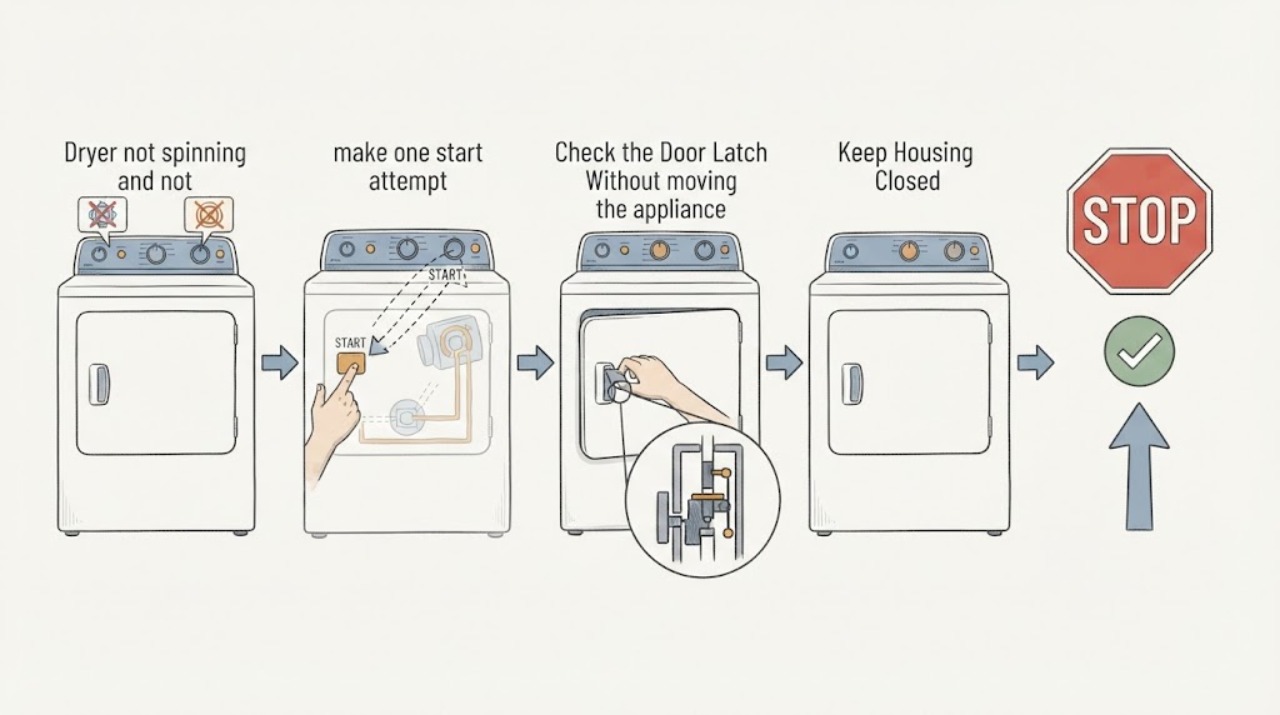
Work through in order
Diagnostic checks
Use only checks that match the exact appliance or system and its official guide.
-
Check 1
With the drum empty and the lint screen in its normal position, make one start attempt from the front panel and stand clear. Do not repeat it if the drum stays still or a hazard appears.
Expected result: Record whether the controls respond, whether the display remains on sensing or changes to cool down, whether the drum moves at all, whether there is a click, hum, or silence, and whether heat or an odor is noticed.
Next step: Stop operating the brand-new dryer, preserve the observation, and move to the door and accessible-supply checks once only; do not keep restarting it to reproduce the symptom.
Stop if: Stop immediately for smoke, burning or gas odor, sparks, a hot cabinet, abnormal vibration, or a breaker trip.
Why this matters
Why: A sensing-to-cooldown sequence with no movement and no heat is a distinct no-start/no-dry pattern; it does not identify a belt, motor, heater, or control as the failed part.
-
Check 2
Turn the dryer off and check only ordinary front-panel access: close the door squarely, confirm that it latches without force, verify the intended cycle, and press Start once.
Expected result: Note whether the door remains closed, whether an open-door message appears, whether Start changes the display, and whether any pause, delay, or other indicator remains active.
Next step: Correct only a plainly misclosed door or selected front-panel setting. If the latch is damaged, the controls are normal but there is no motion, or the display returns to sensing/cool down, stop and provide the result to the seller or authorized service.
Stop if: Do not defeat or tape the door switch, insert a tool into the latch, operate with a cracked door, or continue if the strike or latch is visibly damaged.
Why this matters
Why: A door or selected-cycle condition can prevent the motor from being enabled. If the door latches and the controls respond normally but the drum still never moves, do not convert that result into a part diagnosis; it supports warranty service for a new unit.
-
Check 3
Without moving the appliance or removing a cover, inspect the accessible plug and cord and check the household breaker or fuse serving the dryer. Do not use an extension lead.
Expected result: Record whether the plug is secure, the cord or outlet has visible heat or damage, the control display has power, and the breaker or fuse is open or trips again.
Next step: If there is no hazard, restore only a plainly loose connection or reset the breaker once. If it opens again, or if there is damage, sparking, or heat, leave the dryer off and arrange qualified electrical or appliance service.
Stop if: Do not test live voltage, open the terminal area, touch exposed conductors, or continue after sparking, odor, heat, or repeated trips.
Why this matters
Why: A lit display does not prove that every supply needed by the drum drive and heater is available. A recurring trip, damaged cord, or heat at the connection is an electrical safety issue, not a reason to keep restarting a new dryer.
-
Check 4
After the dryer is unplugged and fully cool, look through the open door and gently rotate the drum only with light hand pressure, without tools, panels, or reaching around guards.
Expected result: Note whether the drum turns smoothly, binds, scrapes, feels unusually loose, or has a plainly visible foreign item at the door opening.
Next step: Remove only a loose item that is plainly reachable from the door opening. For binding, scraping, looseness, or anything requiring panel access, keep the new dryer off and give the observation to warranty service.
Stop if: Stop if the drum is hot, sharp metal is exposed, rotation requires force, the drum is unstable, or a part can be seen only through an opening that would require disassembly.
Why this matters
Why: A smooth drum does not clear the motor, drive, or controls; binding, scraping, or severe looseness points to a mechanical service boundary. None of these observations alone proves which internal part is at fault.
-
Check 5
Prepare a warranty or return handoff instead of ordering a replacement part: photograph the model and serial label from its ordinary location and gather the proof of purchase.
Expected result: Record that the unit is brand-new, the date and first-use condition, selected cycle, sensing/cooldown display sequence, door and Start result, drum movement and sound, accessible power result, and any safety symptom.
Next step: Use Kenmore's exact-model manual lookup and customer-care or warranty information to request the appropriate seller, repair, or replacement route. Ask the service provider to diagnose the start enablement, supply, drive, and heating systems rather than naming a part from the symptom.
Stop if: Do not open the cabinet, bypass a safety device, enter an unverified diagnostic sequence, or run the dryer again while waiting for service if the drum remains stationary or a hazard was observed.
Why this matters
Why: A complete record lets the seller or authorized technician assess a new-unit defect without the user changing the evidence or voiding a service path. Kenmore's opened warranty information lists one year for dryers for defects in material or workmanship, with stated coverage conditions.
Use your observations
Decision map
Find the observation that best matches what you see, then follow the next safe action.
-
PATH 01Next step
What you see
The brand-new dryer reaches sensing or cool down, never moves the drum, and produces no heat, with no odor or electrical hazard.
Do this next
Stop using it and use the seller or authorized warranty route with the recorded display and sound sequence; do not open the cabinet or buy a part based on the pattern.
Why this path and its safety boundary
Why it matters: This combined pattern is more consistent with a start/drive/heating or installation fault than with a setting that should be solved by repeated cycling. The exact-model community case was ultimately handled as a confirmed defect and replacement, but that report cannot identify this unit's cause.
-
PATH 02Next step
What you see
The door does not latch, the display says the door is open, or Start does not produce a normal cycle response.
Do this next
Correct only an obviously misclosed door or ordinary cycle selection. If the latch or controls remain abnormal, stop and request warranty or qualified service.
Why this path and its safety boundary
Why it matters: The door or front-panel start condition remains unresolved, so the motor may not be enabled. A damaged latch or normal controls with continued no motion still needs service rather than a bypass.
-
PATH 03Next step
What you see
The cord or outlet is damaged or hot, the breaker trips again, or there is sparking, smoke, burning odor, or a gas odor.
Do this next
Leave the dryer off, keep clear of damaged connections, and arrange qualified electrical or appliance service; include the brand-new warranty information after the area is safe.
Why this path and its safety boundary
Why it matters: This is a safety boundary, not a normal no-spin troubleshooting branch. The appliance should not be repeatedly energized while the supply or hazard is unresolved.
-
PATH 04Next step
What you see
The drum turns smoothly by hand but the controls start normally and the dryer still never spins or heats, or the drum binds/scrapes/feels loose.
Do this next
Keep the new dryer off and give the drum result and sound to seller or authorized service. Do not remove panels or order a belt, idler, roller, motor, or heater without a model-specific diagnosis.
Why this path and its safety boundary
Why it matters: A smooth drum does not prove the drive or heating path is healthy; binding, scraping, or looseness raises a mechanical concern. The symptom alone cannot distinguish a belt, motor, support, heater, control, or supply fault.
Helpful context
Understand the symptom
Why a new dryer changes the next step
Controls that light up do not prove that the drum-drive and heating functions are operating. On a brand-new unit, a repeatable no-spin/no-heat symptom from the first use should be documented and routed through the seller or authorized warranty process rather than treated as permission to buy a belt, motor, or heater. The exact manual remains the source for the model's cycle controls and appliance type.
Keep the observation external
Do not remove panels, bypass a door switch, test live voltage, enter a service mode, or run repeated cycles to force a diagnosis. The useful handoff is the exact model and serial information, the display sequence, the door and Start response, the sound and drum observation, the accessible power result, and any odor, smoke, heat, or breaker behavior.
When checks do not resolve it
Need a professional?
Use the new-unit warranty or return path when the door and accessible supply are normal but the drum remains still or no heat is produced. Request qualified service for a damaged latch, abnormal sound, binding or loose drum, damaged connection, or any safety symptom.
Safety scope: No cabinet disassembly, live electrical testing, gas work, safety-device bypass, or repeated operation with a stationary drum.
Common questions
FAQ
Should I buy a belt, motor, or heater because this new dryer does not spin or heat?
No. The symptom does not identify a part, and opening a brand-new dryer can interfere with the seller or warranty path. Record the safe external results and request an authorized diagnosis.
Does a powered display prove the dryer has the right supply?
No. Controls that light up do not prove that the drum-drive and heating functions are available. Check only the accessible plug, cord, and breaker for obvious condition, and stop for damage, heat, sparking, or repeat trips.
What should I give the seller or service technician?
Give the exact model and serial information, proof of purchase, the selected cycle, sensing or cool-down sequence, door and Start response, drum movement and sound, accessible power result, and any odor, smoke, heat, or breaker behavior.
Read the exact guide
Official sources
- Customer Care | Kenmore AppliancesKenmore · Kenmore's customer-care page provides the brand's support, manual, and repair/service starting points; use it with the exact model and purchase record.
- Kenmore ManualsKenmore · Kenmore's official manual portal instructs users to enter the exact model number; use it to verify the manual and appliance-specific cycle or installation instructions for 110.61652021.
- Brand New Kenmore Dryer Turns On, But Won't Spin or DryReddit r/appliancerepair · Exact-model community report for Kenmore 110.61652021: controls powered on, sensing changed to cool down, and the drum did not spin or dry.
- Warranty Information | Kenmore AppliancesKenmore · Kenmore's warranty information lists dryers as covered for one year from original sale for defects in material or workmanship, with proof of original sale and the page's stated installation, operation, and maintenance conditions.
Community feedback
Share a repair observation
Share a plain-text repair observation. Accepted observations are published automatically; this page may take a moment to update.