
On this page
Start here
Quick answer
Stop the dryer and first separate a normal brief thump from a machine that rocks or walks. Empty loose objects, untangle a balled load, and check that the dryer sits on a solid floor with every leveling foot firmly contacting it. Use a level front-to-back and side-to-side, adjust the feet only as the exact Kenmore manual directs, and confirm the cabinet no longer rocks. A vibration that remains with an empty drum, a damaged or missing foot, scraping or grinding, a burning smell, or movement of a stacked or pedestal installation needs qualified service; do not keep running it to see if it settles.
Before you begin
Safety first
- User checks are limited to stopping the cycle, removing a load or accessible loose object, checking visible clearance and stability, and following the exact model's safe leveling instructions with appropriate help. Do not operate a violently vibrating or overheated dryer, open energized panels, reach past sharp edges, unstack or move a heavy appliance alone, bypass safety parts, or replace an unverified part.
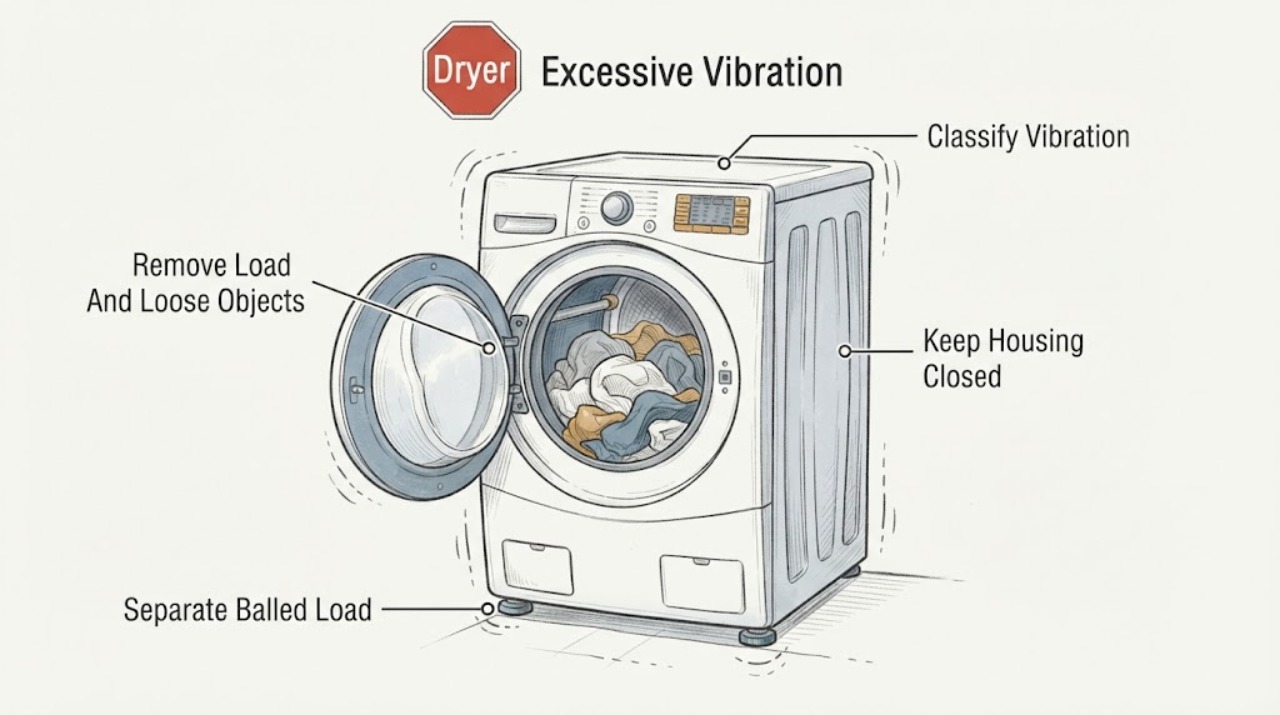
Work through in order
Diagnostic checks
Use only checks that match the exact appliance or system and its official guide.
-
Check 1
From a safe position, stop the cycle and record when the vibration occurs: at startup, only with a particular load, continuously while tumbling, or with an empty drum; note whether the cabinet rocks, walks, thumps, rattles, scrapes, or only transmits a mild hum.
Expected result: The cabinet moves or rocks, the vibration is load-specific, the sound follows each drum revolution, or the symptom is electrical, hot, or otherwise hazardous.
Next step: Photograph the installation and model tag, then follow the branch that matches the observed pattern; do not run an unsafe appliance to collect more evidence.
Stop if: Stop immediately for smoke, burning odor, sparking, a hot cord or outlet, exposed wiring, violent movement, or a gas odor; isolate the appliance only if safe and obtain qualified help.
Why this matters
Why: Cabinet movement points first to stability or installation. A load-specific thump points toward items bunching together. A repeating drum-related sound or hazard points toward internal or electrical service rather than leveling alone.
-
Check 2
With the dryer off and the drum stopped, remove the load, check pockets and the drum edge for loose coins, fasteners, shoes, or other objects, and remove only an accessible object without prying the drum seal or reaching past sharp edges.
Expected result: The vibration or rattle is tied to a loose object, shoes, hardware, or an item caught at the drum edge, or the empty drum and cabinet still vibrate.
Next step: Clear only the accessible object, then make one supervised short test with a suitable load. If the sound persists or the object is trapped, stop and arrange service.
Stop if: Unplug before reaching into an opening, wear protection for sharp edges, and do not dismantle the drum, seal, or cabinet as a user check.
Why this matters
Why: Objects and hard garment hardware can rattle or scrape, while shoes can make a dryer shake. A symptom that persists empty is not explained by the load and should move to stability and mechanical checks.
-
Check 3
If the vibration happens only with sheets, curtains, bedspreads, jeans, or another large load, stop the dryer and separate any twisted or balled fabric; reload loosely according to the exact Kenmore cycle and capacity guidance.
Expected result: The fabric has formed a dense ball and the vibration disappears with a loose, balanced load, or the dryer still shakes with an appropriate load.
Next step: Run one supervised test with the corrected load. If the cabinet still moves or the vibration is not load-dependent, continue to the stability check and do not increase the load to mask it.
Stop if: Stop for cabinet walking, severe banging, fabric caught in a seam, or a smell of overheating; do not hold the door or drum to counter movement.
Why this matters
Why: A balled load can thump and cause vibration as it repeatedly falls in the drum. Persistence with a loose load shifts suspicion to levelness, floor stability, drum supports, or the drive system.
-
Check 4
With the dryer empty and off, inspect the visible installation: a solid, dry floor; no loose mat, debris, or raised edge under the feet; adequate clearance; and nothing leaning against or sitting on the cabinet. Gently test for rocking without tipping the appliance.
Expected result: The floor flexes or is uneven, a foot is not contacting, the dryer rocks, an object touches it, or the installation is stable and clear.
Next step: Remove only loose external objects and clean the contact area; do not wedge improvised material under the cabinet. Then use the model-specific leveling instructions.
Stop if: Do not move a heavy or stacked dryer alone, lift it by the door, work on a damaged floor, or climb around it to reach inaccessible feet.
Why this matters
Why: A soft or uneven surface and external contact can transmit or create vibration even when the drum is healthy. A stable, clear installation makes a load or internal rotating component more likely.
-
Check 5
Using the exact Kenmore installation instructions, place a level across the top side-to-side and front-to-back, then adjust the accessible leveling feet only as necessary until all feet are firmly on the floor and the cabinet no longer rocks; secure any lock nuts or pedestal feet only as that manual specifies.
Expected result: The dryer becomes level and stable with all feet in firm contact, or a foot is missing, seized, damaged, overextended, or cannot be reached safely.
Next step: After the appliance is safely returned to position, perform one short supervised test. If vibration remains despite level, firm contact, and a suitable load, stop and move to service.
Stop if: Do not tilt a heavy dryer without help, place fingers under an unsupported cabinet, overextend feet, or alter a stack or pedestal attachment without the model instructions.
Why this matters
Why: Manufacturer guidance consistently treats levelness and firm foot contact as the first stability correction. A missing, damaged, or inaccessible foot is an installation or parts issue, not a reason to operate on three points.
-
Check 6
If the dryer was unused for a long time and the symptom is a light thump that fades during the first few minutes, stop the test if it becomes stronger; otherwise observe one brief supervised run without a load or with a model-appropriate small load.
Expected result: The sound fades as operation continues, or it persists, intensifies, repeats at the same drum position, or is accompanied by cabinet movement.
Next step: If it fades and the cabinet remains stable, monitor the next normal cycle. If it persists or the sound is scraping, grinding, or heavy pounding, discontinue use and request service.
Stop if: Stop for a burning smell, hot cabinet, belt-like thump, metal scraping, visible rubbing, or any movement across the floor.
Why this matters
Why: Manufacturer guidance notes that drum-support rollers can develop a temporary flat spot during storage and that a light initial thump may fade. Persistence or escalation is not evidence that a damaged roller or drive part will self-correct.
-
Check 7
If the dryer is stacked, mounted on a pedestal, or installed beside a washer, inspect only the visible interface for movement, loose stored items, contact with the washer, or a drawer that rattles; do not remove attachment hardware or unstack the unit as a solo check.
Expected result: The vibration changes when the adjacent washer runs, an object or drawer rattles, the pedestal or stack visibly moves, or the installation remains fixed and clear.
Next step: Remove only loose external objects and leave clearance. If the interface moves or fasteners appear loose, stop using the unit and have a qualified installer or servicer inspect it.
Stop if: Do not climb on the appliance, support a door while moving it, unstack it, or tighten hidden hardware while the unit is energized or unsupported.
Why this matters
Why: Contact, stored objects, and a loose mounting interface can transmit vibration even when the dryer itself is level. A moving stack or pedestal is a safety and installation issue requiring the model-specific instructions and appropriate help.
-
Check 8
Stop using the dryer and request qualified appliance service when excessive vibration remains with an empty drum and stable level installation, or when there is scraping, grinding, a damaged belt or foot, repeated heavy thumping, overheating, or electrical symptoms.
Expected result: The vibration is repeatable after safe user checks, is coming from inside the cabinet, or is accompanied by a safety symptom; alternatively, one safe load correction fully restores quiet stable operation.
Next step: Give the technician the model, installation type, load or empty-drum result, sound description, photos, and every check performed. Leave the dryer unplugged when safe until assessed.
Stop if: This is a hard stop for smoke, burning odor, sparking, a hot cord or outlet, gas odor, violent movement, or exposed wiring; obtain urgent qualified assistance without opening the cabinet.
Why this matters
Why: Persistent empty-drum vibration is no longer explained by load balance. Internal drum supports, rollers, belt, blower, motor mount, cabinet, or other model-specific components require diagnosis; continued use can add wear.
Use your observations
Decision map
Find the observation that best matches what you see, then follow the next safe action.
-
PATH 01Safety boundary
What you see
Vibration occurs only with sheets, bulky fabric, shoes, or a twisted or balled load.
Do this next
Separate and reload loosely, remove hard objects, and perform one supervised test.
Why this path and its safety boundary
Why it matters: The load can repeatedly fall as a dense mass or hard objects can strike the drum.
Safety stop: Stop for cabinet movement, a trapped object, overheating, or vibration with a corrected load.
-
PATH 02Safety boundary
What you see
The cabinet rocks, a foot is not firmly contacting, the floor flexes, or something leans against the dryer.
Do this next
Clear external contact and level the dryer using the exact Kenmore instructions; ensure every foot is firmly supported.
Why this path and its safety boundary
Why it matters: Installation stability is the leading user-checkable cause of cabinet vibration.
Safety stop: Do not move a heavy or stacked dryer alone, overextend feet, or use improvised wedges.
-
PATH 03Safety boundary
What you see
The dryer vibrates or makes a repeating thump, scrape, or grind with an empty drum after it is level and stable.
Do this next
Stop use and arrange service rather than changing parts by symptom alone.
Why this path and its safety boundary
Why it matters: A rotating or support component, cabinet, or trapped object may need diagnosis.
Safety stop: Unplug before any permitted cleaning and stop immediately for a burning smell, hot cabinet, smoke, or electrical signs.
-
PATH 04Safety boundary
What you see
A light thump appears after long storage and fades during a brief safe run while the cabinet remains stable.
Do this next
Monitor a normal cycle only if the sound fades and no hazard or movement appears; record it if it returns.
Why this path and its safety boundary
Why it matters: A temporary drum-support roller flat spot can make an initial thump that diminishes with operation.
Safety stop: Stop if the sound persists, grows, scrapes, or is accompanied by walking or heat.
-
PATH 05Safety boundary
What you see
Vibration is transmitted through a pedestal, stacked installation, adjacent washer, or loose drawer or object.
Do this next
Remove accessible loose objects and have a qualified installer or servicer inspect the interface and attachment using the model manual.
Why this path and its safety boundary
Why it matters: The interface or nearby contact can amplify vibration even if the dryer itself is level.
Safety stop: Do not unstack, climb on, or move the appliance without suitable help and instructions.
-
PATH 06Safety boundary
What you see
Vibration is accompanied by smoke, burning odor, sparking, exposed wiring, a hot outlet or cord, gas odor, or violent movement.
Do this next
Stop, isolate water or gas only if relevant and safe, leave the dryer unplugged when safe, and obtain qualified assistance.
Why this path and its safety boundary
Why it matters: The risk is no longer a routine noise or leveling problem.
Safety stop: Do not restart, open panels, test with a larger load, or attempt an internal repair.
Helpful context
Understand the symptom
A dryer should not rock or walk
A brief first-use thump or a sound from a loose garment is different from a cabinet that rocks, moves across the floor, or vibrates with an empty drum. Start with external and load checks. Kenmore's manual library is the authoritative place to retrieve the instructions for the exact model, especially if the dryer is stacked, on a pedestal, or recently moved.
Leveling is a stability check, not a cure for every noise
A level floor and firm contact at every foot prevent rocking. A dryer can still make a thump from a twisted load, a temporary flat spot on drum-support rollers after long storage, or an object caught at the drum edge. If the cabinet is stable but the sound follows the drum, do not keep adjusting feet; document the sound and arrange service when the manual or the safe checks do not resolve it.
Stop for movement, heat, or internal contact
Unplug the dryer before cleaning or maintenance that requires reaching into an opening, and do not remove panels while energized. Stop using the appliance for scraping or grinding, a frayed-belt type thump, exposed wiring, a hot outlet or cord, smoke, a burning smell, or a vibration that returns with an empty drum. Those symptoms need a qualified diagnosis rather than a guessed roller, belt, motor, foot, or cabinet part.
Only after diagnosis
Potential parts
Only when a model-specific inspection confirms a missing, damaged, seized, or non-contacting foot after the dryer is safely supported.
Only when empty-drum vibration or a repeating internal sound remains after safe load and leveling checks.
When checks do not resolve it
Need a professional?
Safety scope: User checks are limited to stopping the cycle, removing a load or accessible loose object, checking visible clearance and stability, and following the exact model's safe leveling instructions with appropriate help. Do not operate a violently vibrating or overheated dryer, open energized panels, reach past sharp edges, unstack or move a heavy appliance alone, bypass safety parts, or replace an unverified part.
Common questions
FAQ
Why is my Kenmore dryer vibrating or walking?
Start with the floor, feet, and load. A dryer that rocks or walks may not be level or may not have every foot firmly contacting a solid floor. A balled load or object can also cause a thump. If it still moves when empty and level, stop using it and arrange service.
Can an uneven floor make a dryer vibrate?
Yes. An uneven or flexing floor can leave a foot unloaded and let the cabinet rock. Use a level front-to-back and side-to-side and follow the exact Kenmore manual for foot adjustment; do not use improvised wedges or overextend the feet.
Why does my dryer thump only with sheets or blankets?
Large fabric can twist into a dense ball and repeatedly fall in the drum. Stop the cycle, separate the load, and reload loosely according to the manual. If the dryer shakes with an appropriate load or empty drum, the problem is not just load balance.
Is a brief thump after storage normal?
A light initial thump can occur after a dryer has sat unused because drum-support rollers may temporarily develop a flat spot. It should fade during a brief safe run while the cabinet stays stable. Persistent, worsening, scraping, or movement-related noise needs service.
Should I keep using a Kenmore dryer that vibrates loudly?
No if it walks, rocks, vibrates empty, scrapes, overheats, smells hot, sparks, or has a damaged foot or belt symptom. Unplug it when safe and arrange qualified service. Continued operation can add wear or damage.
Read the exact guide
Official sources
- Dryer - LevelingGE Appliances · GE dryer guidance used for the general mechanical principle; Kenmore's exact model instructions control the Kenmore installation.
- Sounds or Noises in a DryerMaytag · Maytag dryer guidance used for general dryer sound and vibration mechanisms; Kenmore's exact model manual controls model-specific procedure.
- Dryer - NoisesGE Appliances · GE dryer troubleshooting guidance used for general dryer mechanisms; it is not a Kenmore model-specific diagnosis.
- Kenmore ManualsKenmore · Official Kenmore manual index; the exact model manual controls the installation, stacking, pedestal, and service instructions for a particular dryer.
Community feedback
Share a repair observation
Share a plain-text repair observation. Accepted observations are published automatically; this page may take a moment to update.