
On this page
Start here
Quick answer
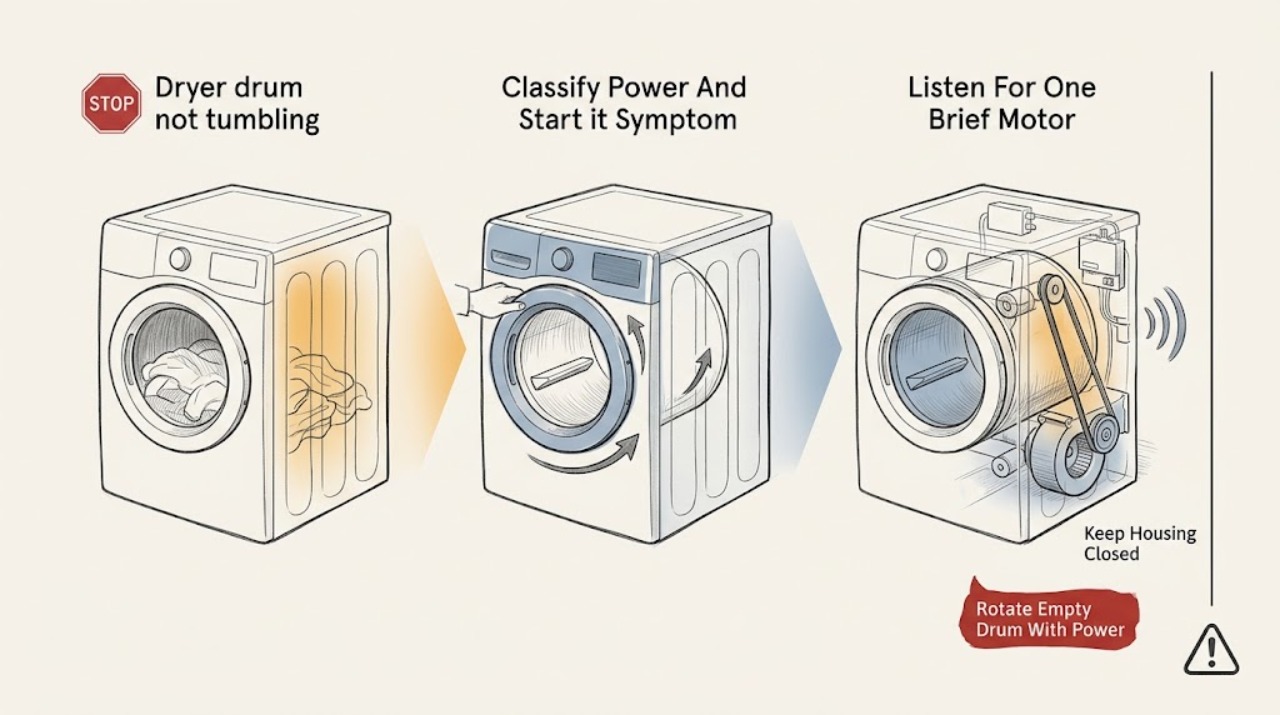
First separate a dryer that has no power from one that powers on but cannot turn the drum. Check that the door is fully closed, the selected cycle is valid, and the Start control is pressed as the Kenmore manual describes. If the dryer is safe to handle, disconnect power and turn the empty drum by hand: a very loose drum suggests a broken or displaced belt, while a drum that binds, scrapes, or will not turn points toward rollers, an idler, glides, a blower obstruction, or drum damage. A motor hum with no rotation can fit a belt, seized support, blower obstruction, or motor problem; no motor sound with working controls can involve the door switch, thermal protection, wiring, or control. Do not keep running the dryer if it smells of burning rubber, makes grinding noises, overheats, exposes a gas odor, or needs a panel removed. Belt, roller, motor, and electrical tests are service work unless the exact manual and your skills make the procedure safe.
Before you begin
Safety first
- This article covers model identification, control and door observations, a powered-off gentle hand-rotation check, visible loose-object and lint-screen checks, and one brief external sound observation when safe. It does not authorize opening panels, reaching into the blower or drive, handling gas connections, bypassing safety devices, testing live circuits, or replacing internal components.
Work through in order
Diagnostic checks
Use only checks that match the exact appliance or system and its official guide.
-
Check 1
Check whether the Kenmore dryer's display, controls, and drum light operate, whether the door is fully latched, and whether the selected cycle requires a press-and-hold Start action. Keep hands and clothing out of the opening and do not start a cycle if the cabinet, cord, or gas connection is damaged.
Expected result: The controls are dark, the controls respond but the drum stays still, the door does not latch, Start was not held as the manual requires, or a cycle begins but stops with no tumbling.
Next step: Use the exact Kenmore manual for the cycle and Start behavior. If controls remain dark or a breaker trips, stop and arrange electrical or appliance service; if controls run, continue only with the powered-off drum check.
Stop if: Stop for smoke, sparks, burning odor, a hot or damaged cord, a gas odor, a repeatedly tripping breaker, or a door that cannot latch safely.
Why this matters
Why: Dark controls point to supply, breaker, cord, or control power rather than a belt alone. A responding panel with no tumbling shifts attention to the drive system, door switch, motor, or thermal protection. A latch or Start-control issue can prevent a motor command without proving a mechanical failure.
-
Check 2
Empty the dryer, disconnect its power from a dry safe location, and gently rotate the drum by hand. Do not reach past the drum, remove panels, or turn a gas burner on during this check.
Expected result: The drum turns very freely with little belt drag, turns smoothly with normal resistance, binds or stops, scrapes, wobbles, or cannot be turned safely.
Next step: Record the result and use the exact model manual to decide whether belt or support access is user-level. If access requires a cabinet panel or the drum cannot turn safely, arrange service.
Stop if: Stop for sharp edges, exposed wiring, a loose drum, heavy binding, scraping metal, or any need to reach into the blower or drive area.
Why this matters
Why: Unusually free rotation makes a broken or displaced drive belt more likely. Binding, scraping, or wobble makes a roller, idler, glide, blower obstruction, bearing, or drum problem more likely. A smooth hand turn does not rule out a belt, motor, or control fault under load.
-
Check 3
Only if the dryer is dry, intact, and safe to operate, restore power and make one brief no-load start observation from outside the opening; keep the door closed and stop immediately if the drum does not move. Note a normal motor sound, a hum, a click with no motor sound, or grinding.
Expected result: The motor runs but the drum stays still, the motor hums and stops, a click occurs with no motor sound, grinding or squealing occurs, or the drum starts and then stalls.
Next step: Stop the test and give the sound and timing to a technician. Do not run a heated cycle to see whether the drum eventually starts, and do not force the drum while power is connected.
Stop if: Stop at once for burning rubber, smoke, sparks, gas odor, grinding, a stalled motor, abnormal heat, or any drum movement that is jerky or unsafe.
Why this matters
Why: Motor sound without drum motion fits a belt, idler, seized support, blower obstruction, or motor-load issue. A click without motor sound can fit a door switch, thermal device, wiring, or control path. Grinding or squealing makes a support, idler, blower, or drum mechanical issue more likely; start-and-stall suggests overload or motor thermal protection.
-
Check 4
With power disconnected, remove only loose clothing or objects visible at the door and clean the lint screen as the manual directs. Look through the opening for a garment edge, loose object, or visible obstruction near the drum entrance; do not probe the blower housing or remove a guard.
Expected result: A garment or object was caught at the drum entrance, the lint screen is heavily blocked, the drum seal or front edge is damaged, or nothing visible is obstructing the drum.
Next step: Remove only the loose visible item, refit the lint screen, and do not run the dryer if the seal, drum edge, or obstruction is damaged or inaccessible. Continue to model-specific service guidance for a no-tumble result.
Stop if: Do not reach into the blower, remove a guard, use a tool through the lint opening, or operate the dryer with a damaged drum seal or loose component.
Why this matters
Why: A visible object can hold or scrape the drum, while a damaged seal or drum edge can create binding. A dirty lint screen affects airflow and may contribute to heat protection, but it does not by itself prove why the drum stopped. A clear opening shifts concern to the belt, supports, blower, motor, or controls.
-
Check 5
Record the full Kenmore model number, gas or electric type, hand-rotation result, start sound, and whether the problem began after squealing, an object event, overheating, or a power event. Use that model number in the Kenmore manual library to identify the belt, roller, idler, blower, motor, door switch, and thermal-protection access and warnings.
Expected result: The exact manual documents a safe user check, the manual does not match the dryer, internal access is required, or the suspected component is a belt, roller, idler, blower, motor, switch, or control.
Next step: Follow only the matching manual. Otherwise leave the dryer off and arrange appliance service with the recorded observations; do not order a part from a generic Kenmore family description.
Stop if: Do not remove cabinet panels, disconnect gas lines, test live circuits, bypass a door switch or thermal device, or replace a part without exact model diagnosis.
Why this matters
Why: Model identity controls the drive layout, access method, gas or electric hazards, and part fit. A part category inferred from a symptom is not a confirmed failure, and internal drive or electrical diagnosis requires qualified service when the manual does not authorize it.
-
Check 6
Compare the power, hand-rotation, and one-brief-sound results without repeating a loaded or heated cycle. Record whether the drum is free, bound, silent, humming, grinding, or starting and stalling, and keep the dryer off when the cause is not obvious and safe.
Expected result: The drum turns normally after a documented correction, the drum is very free, the drum binds, the motor hums, no motor sound occurs, or the symptom returns.
Next step: Arrange qualified appliance service for a persistent no-tumble symptom and provide the model, gas or electric type, hand-turn result, sound, timing, and safety observations.
Stop if: Do not keep running the dryer, use heat with a stalled drum, remove panels, or perform electrical or gas tests at home.
Why this matters
Why: Recovery after a visible loading or control correction supports that correction. A free drum supports belt or tension loss; binding supports mechanical support or obstruction; hum supports a stalled drive or motor load; silence supports a command, switch, thermal, wiring, or motor path. Recurrence after a brief test requires diagnosis rather than more cycles.
Use your observations
Decision map
Find the observation that best matches what you see, then follow the next safe action.
-
PATH 01Safety boundary
What you see
The control panel or drum light is dark, the door does not latch, Start is not being accepted, or a breaker trips before the motor can run.
Do this next
Use the exact Kenmore manual for power and Start checks. Arrange appliance or electrical service for persistent loss of power, a failed latch, or a tripping breaker.
Why this path and its safety boundary
Why it matters: The immediate path is power, door-switch authorization, control input, cord, breaker, or thermal protection rather than a confirmed belt failure.
Safety stop: Do not open the control area, reset a repeatedly tripping breaker, bypass the door switch, or test live circuits.
-
PATH 02Safety boundary
What you see
The empty drum turns unusually freely with power off, and the motor can be heard or attempts to run without rotating the drum.
Do this next
Keep the dryer off and use the exact model manual or qualified service to inspect the drive path. Do not run a heated cycle with a suspected broken belt.
Why this path and its safety boundary
Why it matters: A broken or displaced drive belt is more likely, although an idler, motor pulley, or related drive fault remains possible. The symptom does not identify the exact belt or fit.
Safety stop: Do not open the cabinet or order a belt until the exact Kenmore model and diagnosis are confirmed.
-
PATH 03Safety boundary
What you see
The drum binds, scrapes, wobbles, or starts and stalls, with squealing, grinding, or a motor hum.
Do this next
Leave the dryer off and arrange qualified service for internal inspection. Provide the hand-rotation resistance, sound, load condition, and whether the symptom started gradually or suddenly.
Why this path and its safety boundary
Why it matters: A drum roller, idler pulley, glide, blower obstruction, drum edge, bearing, or overloaded motor is more likely than a simple control setting. A hard object can also damage the drive path.
Safety stop: Do not force the drum, lubricate an unknown part, reach into the blower, or run the dryer through a grinding or stalled condition.
-
PATH 04Safety boundary
What you see
The hand-turn test is inconclusive, the motor is silent despite valid controls, the symptom returns after one brief observation, or access requires a cabinet or electrical panel.
Do this next
Keep the dryer off and arrange appliance service. Supply the exact model, gas or electric type, control behavior, hand-turn result, sound, heat, odor, and any recent event.
Why this path and its safety boundary
Why it matters: A motor, door switch, thermal device, wiring, control, internal belt path, or model-specific mechanical fault remains possible and cannot be safely separated by more cycles.
Safety stop: Do not bypass safety devices, test live circuits, disconnect gas, or replace a motor, switch, thermal device, or control without diagnosis.
Helpful context
Understand the symptom
A dead control panel is not the same as a stalled drum
If the panel and drum light are dark, begin with the dryer's power supply and the model manual rather than the belt. If the panel responds but the drum stays still, note whether the motor hums, clicks, or stays silent. A brief sound observation can narrow the path, but do not keep applying heat to a drum that is not moving.
Hand rotation is a useful powered-off clue
With power disconnected and the drum empty, gentle hand rotation can show whether the drum is free or mechanically restricted. A drum that turns unusually freely can have a belt that has broken or come off. A drum that is hard to turn, scrapes, or wobbles points toward support rollers, idler tension, glides, a blower obstruction, or drum damage. The test does not identify the exact failed part and is not a reason to remove panels.
Kenmore models are not one universal repair layout
Kenmore dryers span different gas and electric designs and may use different access panels, belt routes, controls, and safety devices. Use the exact model number in the Kenmore manual library before ordering a part or opening a cabinet. A community report can suggest a symptom pattern, but it cannot establish the correct repair for a different model.
Safety boundary
Stop conditions
- Stop and keep the dryer off for smoke, sparks, burning rubber, gas odor, abnormal heat, a damaged cord, a repeatedly tripping breaker, or grinding that can damage the drive.
- Disconnect power before any hand-rotation or manual inspection; do not touch exposed wiring, live terminals, a moving drum, or a gas connection.
- Do not remove cabinet or blower panels, bypass a door switch or thermal device, test live circuits, disconnect gas, or force a bound drum.
- Do not run a heated cycle when the drum is stalled, the belt may be broken, airflow is blocked, or a motor hums without rotation.
- Do not use a community symptom or a generic Kenmore family description to choose a belt, roller, motor, switch, or control; confirm the exact model and diagnosis first.
Only after diagnosis
Potential parts
- dryer drive belt
Consider this category only when the powered-off drum is unusually free and qualified inspection confirms a broken, displaced, or damaged belt or belt path.
Confirm the exact Kenmore model, belt route, length, width, and manufacturer or manual fit information before ordering. - dryer drum roller, glide, or idler
Consider this category only when the drum binds, scrapes, wobbles, or produces a support or tension noise and qualified inspection identifies the worn assembly.
Confirm the exact Kenmore model, support layout, shaft or pulley design, and technician diagnosis before ordering. - dryer motor, door switch, thermal device, or control
Consider this category only when the belt and mechanical path are cleared and qualified diagnosis links a silent, stalled, or recurring no-tumble symptom to the failed electrical or motor assembly.
Confirm the exact Kenmore model, gas or electric design, electrical connectors, safety rating, and technician diagnosis before ordering.
When checks do not resolve it
Need a professional?
Arrange qualified appliance service when the drum remains still after the manual's safe power, door, Start, and visible-obstruction checks; when it turns unusually freely, binds, scrapes, wobbles, hums, starts and stalls, or the motor is silent; when a belt, roller, idler, blower, motor, switch, thermal device, wiring, or control requires internal access; or when the symptom returns. Seek prompt help for gas odor, smoke, sparks, burning rubber, abnormal heat, exposed wiring, or a repeatedly tripping breaker.
Safety scope: This article covers model identification, control and door observations, a powered-off gentle hand-rotation check, visible loose-object and lint-screen checks, and one brief external sound observation when safe. It does not authorize opening panels, reaching into the blower or drive, handling gas connections, bypassing safety devices, testing live circuits, or replacing internal components.
Common questions
FAQ
Why does my Kenmore dryer run but the drum does not tumble?
If the motor runs but the drum stays still, a broken or displaced belt, idler or roller resistance, blower obstruction, or motor-load problem is possible. Disconnect power and gently rotate the empty drum; keep the dryer off if it is unusually free, bound, noisy, or unsafe.
What does a very loose Kenmore dryer drum mean?
A drum that turns unusually freely with power disconnected can make a broken or displaced drive belt more likely, but it does not identify the exact failure. Use the exact model manual or arrange service before opening the cabinet or ordering a belt.
What if my Kenmore dryer only hums and will not tumble?
A hum without rotation can fit a belt problem, seized support, idler or blower obstruction, or motor fault. Stop the dryer, record the hand-rotation result, and do not run heat or probe the drive area.
Can a door switch stop a Kenmore dryer drum from turning?
Yes. If the controls respond but the motor is silent and the door does not latch or authorize the cycle, a door switch or control path is possible. Do not bypass the switch; use the model manual and arrange service if the latch or electrical path needs testing.
When should I stop using a Kenmore dryer that will not tumble?
Stop for burning rubber, gas odor, smoke, sparks, abnormal heat, grinding, a stalled motor, a damaged cord, a tripping breaker, or a drum that is bound or unsafe. Keep it off and arrange qualified appliance service.
Read the exact guide
Official sources
- Kenmore ManualsKenmore · Official Kenmore manual library used to require exact model matching before any dryer access or part decision; no universal Kenmore dryer layout is assumed.
- Advice on a Kenmore HE2 has dryer that won't spinReddit r/appliancerepair · One exact Kenmore community report used as a symptom example only; it is not a repair authority and does not establish behavior for another model.
- Customer Care & Support | Kenmore AppliancesKenmore · Official Kenmore support page used for the boundary between model documentation and qualified repair; it does not establish a shared internal dryer design.
- Not Tumbling or Spinning - DryerWhirlpool Corporation · Official dryer guidance used only for general power and Start-control distinctions; Kenmore model manuals control the exact Kenmore procedure.
Community feedback
Share a repair observation
Share a plain-text repair observation. Accepted observations are published automatically; this page may take a moment to update.