
On this page
Start here
Quick answer
Do not hit the control panel again. On the KitchenAid KUDI01DL, a panel that temporarily responds after an impact is an intermittent symptom, not proof that a control board, keypad, or wire is the failed part. From a dry, safe position, record the complete display or light pattern, which buttons respond, whether the door latches, and whether the symptom returns without touching the panel. Check the model's Control Lock indication and use the documented Cancel/Start controls once; if a cycle is active, let the KUDI01DL complete its safe cancel-and-drain action. You may perform one normal external power reset, but do not repeatedly reset, press hard, remove the door panel, bypass the latch, or make live measurements. If the panel again needs impact or pressure, goes dark, shows heat or water damage, trips the breaker, or behaves unpredictably, leave the dishwasher out of use and arrange qualified appliance or electrical service.
Before you begin
Safety first
- Do not hit or flex the panel, remove the outer door or control console, bypass the latch or door switch, probe wiring, make live voltage tests, or select a keypad, control board, connector, or harness from the symptom alone. Stop immediately for smoke, burning or electrical odor, heat damage, liquid intrusion, a shock hazard, a breaker trip, or water near electrical parts.
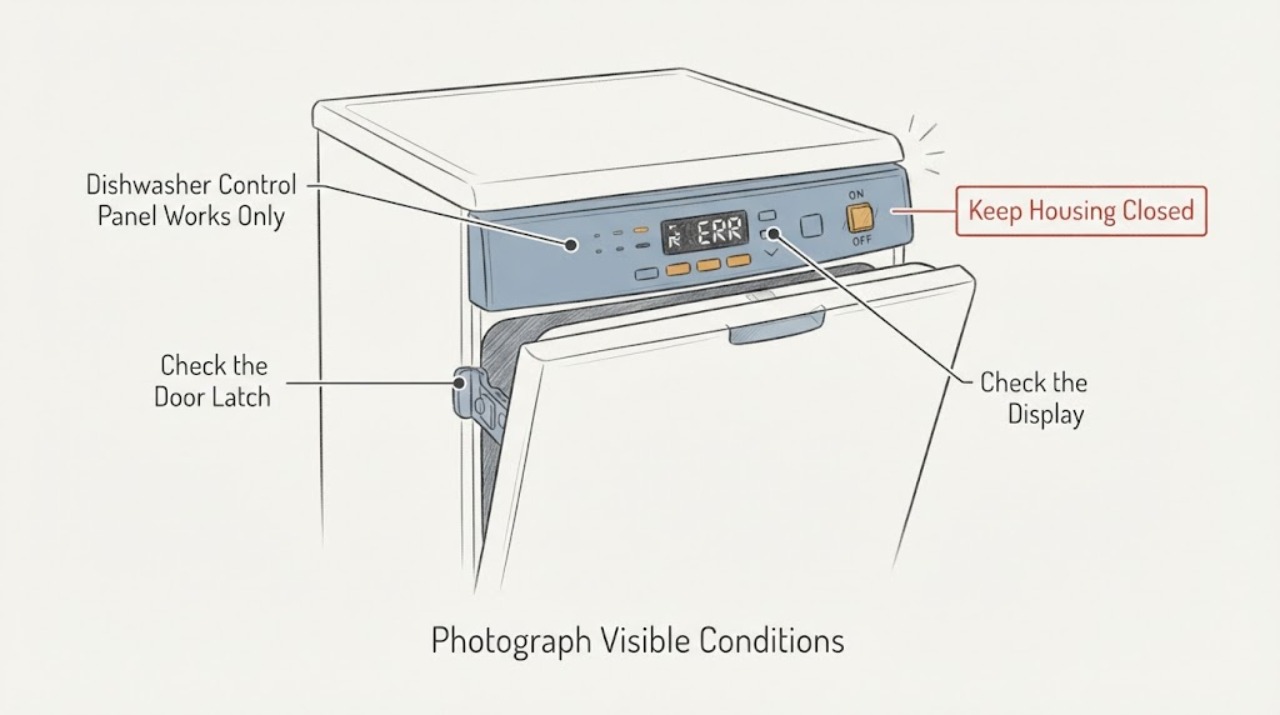
Work through in order
Diagnostic checks
Use only checks that match the exact appliance or system and its official guide.
-
Check 1
Stop trying to revive the dishwasher by tapping, hitting, flexing, or pressing hard on the control panel. From a dry position, photograph or write down the full display, every illuminated or flashing light, which buttons respond, whether the dishwasher was in a cycle, and exactly whether the panel recovered without another impact.
Expected result: The panel is responsive without contact, only one or two pads fail, all lights are dark, the display pattern changes, or impact is still required for any response.
Next step: Continue only with the safe lock, door, and external power observations below if there is no smoke, burning smell, water intrusion, hot plastic, or visible damage. Preserve the record for service.
Stop if: Do not strike the panel again, remove the outer door, touch wet controls, or continue operation after heat, smoke, arcing, burning odor, or visible electrical damage.
Why this matters
Why: A repeatable need for impact or a changing response is an intermittent control symptom, not evidence of a particular board, keypad, or wire. A dark panel also requires an external power and service branch rather than more button pressure.
-
Check 2
With the dishwasher stopped, check the door from the outside: make sure no rack or utensil protrudes into the seal, the door closes squarely, and the latch engages without forcing it. Look at the panel surface for spilled liquid, cracks, lifted film, or a loose-looking section; do not remove trim or a panel to inspect behind it.
Expected result: The door latches normally and the panel is dry and intact; the rack or an item prevents closure; the latch needs force; or the panel is cracked, wet, loose, or heat-discolored.
Next step: Remove only an obvious rack or utensil obstruction and close the door normally. If the latch needs force, the panel is damaged, or the symptom remains, stop user diagnosis and arrange service.
Stop if: Do not force the latch, bypass the door switch, open the outer panel, or operate with liquid, scorch marks, or damaged insulation near the controls.
Why this matters
Why: A door that does not latch can prevent Start or interrupt a cycle, while a dry intact door with a panel that still needs impact points toward a control-response fault. Physical damage or moisture raises the safety boundary and cannot be confirmed by a button test.
-
Check 3
Check the KUDI01DL Control Lock indicator without striking the panel. If CONTROL LOCK is lit, hold the model's ENERGY SAVER Dry control for four seconds as the quick reference describes; if a pad press makes the lock light flash three times, treat that as a locked-control response rather than a failed keypad.
Expected result: The lock light is on and clears with the documented hold, the light flashes three times when a pad is pressed, or the controls remain unresponsive with no lock indication.
Next step: Run the dishwasher only from its normal controls if the lock clears and the panel remains stable. If the controls still fail or only respond after impact, proceed to one external reset and then service if it recurs.
Stop if: Do not use a control sequence from another model, hold buttons indefinitely, or use impact to clear a lock indication.
Why this matters
Why: The first two results are consistent with the documented lock feature, which disables the buttons. Unresponsive controls with no lock indication, especially when impact changes the response, are not explained by Control Lock alone.
-
Check 4
If a cycle is active, press the KUDI01DL Cancel pad once and allow its documented drain to finish before opening the door. Then perform one external control reset: disconnect the dishwasher from its accessible plug or switch its dedicated breaker off for at least 30 seconds, restore power, close the door normally, and select Start once. Do not repeat this sequence to chase an intermittent response.
Expected result: The panel returns and stays responsive after the one reset, the same failure returns, the panel remains dark, the breaker trips, or water is left in the tub.
Next step: If the symptom returns or the dishwasher does not drain safely, leave it out of use and arrange qualified appliance service; involve a qualified electrician for a supply or breaker concern.
Stop if: Do not open the door while spraying, repeatedly cycle power, remove panels, reach into standing water near electrical parts, or make live voltage tests.
Why this matters
Why: A single reset can clear a transient control state, but it cannot prove that an impact-sensitive connection or control component is sound. Recurrence, persistent darkness, breaker operation, or undrained water requires service rather than more resets.
-
Check 5
Only if the panel is dry and intact, the door latches, there is no odor, heat, smoke, water, or breaker problem, and the one reset was successful, observe one ordinary selection without touching the panel between commands. Record whether Start, Cancel, cycle lights, and the display continue to respond while the door remains still; do not deliberately reproduce the failure by tapping or flexing the door.
Expected result: All controls remain stable, one pad or display segment fails, the fault appears when the door moves, or the panel again works only after impact or pressure.
Next step: Stop using the dishwasher for any recurrence and give the technician the time line, photos, display pattern, and reset result. Do not use the appliance as a test rig.
Stop if: Do not repeat cycles to reproduce the fault, hit the panel, bend the door, bypass the latch, or run with a loose, cracked, wet, or hot control area.
Why this matters
Why: Stable operation after one reset may fit a transient state, but a selective, movement-related, or impact-dependent recurrence supports an intermittent control, door, or connection problem that cannot be isolated safely by continued use.
-
Check 6
Prepare a service note with the exact KUDI01DL model and serial label, market, display or light pattern, buttons that failed, whether Control Lock was lit, door-latch behavior, whether Cancel drained, breaker or outlet observations, any water or heat damage, and whether a single reset changed the symptom. Include safe-distance photos rather than removing the panel.
Expected result: The record shows a repeatable impact-dependent recovery, a persistent dead panel, a door-related interruption, a power problem, or a stable panel after one reset.
Next step: Arrange qualified KitchenAid appliance service for recurring or unexplained control behavior. Use a qualified electrician when the evidence points to the household supply, breaker, outlet, or wiring.
Stop if: Do not choose a keypad, control board, wire harness, or latch from the symptom alone, and do not open the appliance to verify a suspected part.
Why this matters
Why: The time line helps a technician separate a lock or door condition, household supply issue, transient control state, and intermittent user-interface or control fault without treating the impact as a repair result.
Use your observations
Decision map
Find the observation that best matches what you see, then follow the next safe action.
-
PATH 01Next step
What you see
CONTROL LOCK is illuminated or pressing a pad makes the lock light flash three times, and the controls respond after the KUDI01DL lock procedure.
Do this next
Use the normal cycle selection and Start sequence. If the panel later becomes impact-dependent or unresponsive with the lock off, stop and use the intermittent-control service branch.
Why this path and its safety boundary
Why it matters: The immediate no-response pattern is explained by the documented Control Lock feature, which disables the buttons; it is not evidence that the panel needed impact.
-
PATH 02Next step
What you see
The panel is dark, the dedicated breaker or outlet is abnormal, the breaker trips again, or the dishwasher has water, scorch marks, a burning odor, or heat around the controls.
Do this next
Leave the dishwasher isolated from power only when that can be done safely and arrange qualified appliance or electrical service. Do not re-energize it to see whether impact restores the display.
Why this path and its safety boundary
Why it matters: This is an external power or safety condition until proven otherwise. A dead display or breaker event cannot be safely converted into a keypad or control-board diagnosis by pressing the panel.
-
PATH 03Next step
What you see
The panel responds after a tap or pressure, or it fails again after one external reset even though Control Lock is off and the door closes normally.
Do this next
Stop using the dishwasher and arrange qualified service with the documented time line, photos, model label, and reset result. Do not remove the panel, bypass the door circuit, or make live tests.
Why this path and its safety boundary
Why it matters: The physical-impact time line is a distinct sign of an intermittent control or connection path, but it does not identify which internal part is at fault. Continuing to strike the panel can worsen damage and leaves the appliance's electrical safety uncertain.
-
PATH 04Next step
What you see
The display is stable, the door latches without force, Control Lock is off, and the problem occurs only when Start is pressed or after the door is moved.
Do this next
Follow the KUDI01DL Cancel/Start sequence once. If the interruption returns, leave the dishwasher out of use and arrange qualified service.
Why this path and its safety boundary
Why it matters: A normal door or command sequence remains possible, but a repeatable Start- or movement-related failure still needs model-specific service; it is not a reason to hit the panel or select a latch or board.
-
PATH 05Next step
What you see
The controls stay stable after one documented reset and one ordinary observation, with no physical damage, water, heat, odor, or breaker symptom.
Do this next
Resume ordinary use without striking or flexing the panel, keep the service note, and arrange service if any intermittent response returns.
Why this path and its safety boundary
Why it matters: A transient control state is possible, but the absence of a recurrence does not validate impact as a repair or prove the internal control path is healthy.
Helpful context
Understand the symptom
What the impact-dependent recovery means
A dishwasher that begins responding after the control panel is struck has not been safely repaired. The impact may have changed an intermittent contact or temporarily disturbed the symptom, but the observation does not identify a keypad, connector, control board, or door switch. KitchenAid's public guidance addresses an unresponsive panel through Control Lock, power, door and start conditions, a single external reset, and service; it does not endorse striking the appliance. Treat the recovery as evidence to preserve for a technician, not as a repeatable operating technique.
Keep the old model's exact controls in scope
The opened KitchenAid quick reference names KUDI01DL and shows that its control panel is a distinct model layout. It says that when Control Lock is lit all buttons are disabled, pressing a locked pad flashes the light three times, and the Energy Saver Dry control is held for four seconds to change the lock state. It also gives KUDI01DL-specific Cancel and Start behavior. Do not substitute a button sequence from a newer KitchenAid dishwasher, and do not remove the panel to find out which internal part is intermittent.
When checks do not resolve it
Need a professional?
Arrange qualified KitchenAid appliance service when the panel responds only after impact or pressure, becomes intermittently unresponsive after Control Lock is ruled out, fails again after one external reset, or has a door-related or unexplained command failure. Use qualified electrical service for a breaker, outlet, supply, or wiring concern.
Safety scope: Do not hit or flex the panel, remove the outer door or control console, bypass the latch or door switch, probe wiring, make live voltage tests, or select a keypad, control board, connector, or harness from the symptom alone. Stop immediately for smoke, burning or electrical odor, heat damage, liquid intrusion, a shock hazard, a breaker trip, or water near electrical parts.
Have this ready
- Provide the complete KUDI01DL model and serial information, market, display and light pattern, buttons that respond, Control Lock result, door-latch behavior, whether Cancel drained, breaker or outlet observations, the one-reset result, and safe-distance photos of any visible damage.
Common questions
FAQ
Does tapping the KitchenAid KUDI01DL panel prove the control board is bad?
No. It only shows that the symptom changes after physical impact. That can involve an intermittent user-interface or connection path, but it does not identify a board, keypad, wire, or latch. Stop using impact as a workaround and arrange service if the response returns.
How do I tell whether the KUDI01DL controls are locked?
The KUDI01DL quick reference says CONTROL LOCK disables all buttons; pressing a pad while locked makes the light flash three times. It documents holding the ENERGY SAVER Dry control for four seconds to change the lock state. Use that exact model instruction rather than a sequence from another KitchenAid dishwasher.
Should I keep resetting or running the dishwasher when the panel comes back?
No. One external reset is a reasonable user-level check when the dishwasher is dry and otherwise safe, but repeated resets or cycles can hide a recurring electrical or control problem. If the panel fails again, goes dark, trips the breaker, or needs another impact, leave the dishwasher out of use and arrange qualified service.
Read the exact guide
Official sources
- Controls Not Responding - DishwasherKitchenAid Product Help · KitchenAid dishwasher unresponsive-control checks, lock state, external power reset, and service boundary
- Dishwasher Not Starting or Not Operating - Product Help | KitchenAidKitchenAid Product Help · KitchenAid dishwasher external power, door latch, water supply, control lock, delay, and reset checks
- Control Light Flashing - DishwasherKitchenAid Product Help · KitchenAid dishwasher Control Lock indication and external reset guidance
- Resetting the Dishwasher's Controls (Cycle Power)KitchenAid Product Help · KitchenAid dishwasher external control reset and escalation guidance
- HOW TO FIND YOUR MODEL NUMBERKitchenAid · KitchenAid dishwasher model-label location and exact identity verification
- Quick Reference ManualKitchenAid · KitchenAid KUDI01DL dishwasher control layout, Control Lock behavior, Cancel/Start operation, and cycle status
Community feedback
Share a repair observation
Share a plain-text repair observation. Accepted observations are published automatically; this page may take a moment to update.