
On this page
Start here
Quick answer
First compare the elapsed time with the selected cycle and options: KitchenAid says cycle length can vary with soil level, water temperature, sensors, and Heated Dry or Sani Rinse, and typical cycles range from about 1.5 to 4 hours. If the cycle stopped, check whether the door was opened, power was interrupted, Start/Resume is flashing, or a delay or control lock is active. Then check for water remaining: KitchenAid directs owners to inspect the filter, a kinked or clogged drain hose, and—when connected—the sink disposer and its knockout plug. If the exact model supports it, press Cancel/Drain and cycle power using KitchenAid's documented procedure; use the model manual for hard-wired access. A cycle that still stalls, leaves water, shows a code, trips power, leaks, or needs internal access should go to KitchenAid-authorized service rather than a guessed pump, heater, sensor, or control replacement.
Before you begin
Safety first
- Owner checks stop at cycle-time observation, door and control state, safe accessible water-supply and drain-path checks, and one documented reset. Internal pump, heater, inlet, sensor, latch, wiring, and control work requires authorized service.
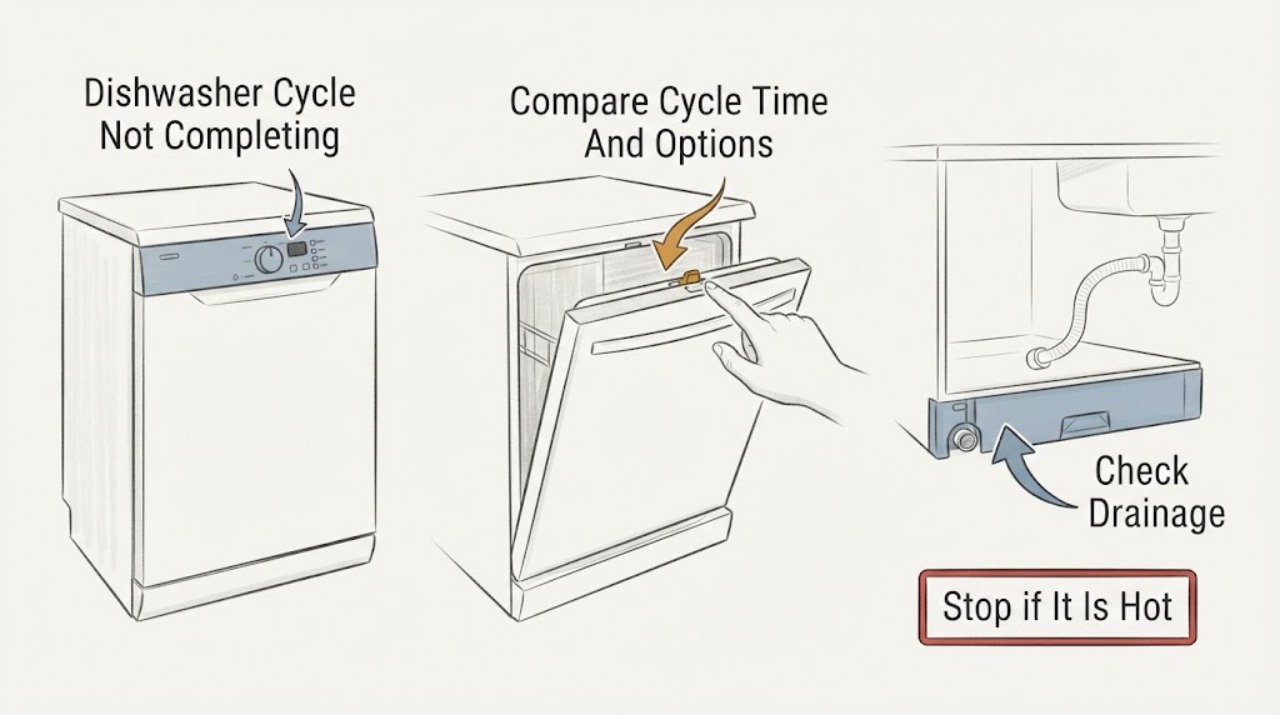
Work through in order
Diagnostic checks
Use only checks that match the exact appliance or system and its official guide.
-
Check 1
Record the selected cycle, Heated Dry, High Temp Wash, Sani Rinse, or sensor options and the elapsed time. Compare the result with the exact model manual rather than assuming that a fixed duration applies.
Expected result: The cycle is within a model-expected range, has an unusually long pause, is a sensor or heavy cycle, or has run without advancing for an abnormal period.
Next step: If the appliance is still visibly washing or heating and no hazard is present, allow the documented cycle time. If it has stopped with no progress, continue to the interruption and drain checks.
Stop if: Stop if smoke, burning odor, sparking, a hot cord, a leak reaching electrical areas, or another immediate hazard is present.
Why this matters
Why: KitchenAid says cycle duration varies with soil, water temperature, water pressure, sensors, and options; a long cycle alone does not prove a fault.
-
Check 2
Inspect the closed door from the outside and note whether the door was opened during the cycle, whether the Start/Resume indicator is flashing, or whether a lower rack or item prevents the latch from engaging. Press Start/Resume and close the door only as the exact manual directs.
Expected result: The door was opened, Start/Resume flashes, the door is not latched, an item blocks closure, or the door is closed and the indicator remains abnormal.
Next step: Remove only a clearly obstructing item, latch the door, and resume once using the model instructions. If the latch will not engage or the cycle stops again, arrange service.
Stop if: Do not force the door, defeat the latch, reach into a running tub, or remove panels to adjust the lock.
Why this matters
Why: KitchenAid says an opened door or power interruption can pause a cycle and that an unlatched door prevents operation or resumption. A correctly latched door does not identify an internal latch or control failure.
-
Check 3
If water remains at the end or the dishwasher stopped mid-cycle, switch it off and inspect only the user-accessible filter. Check the visible drain hose behind the unit for a kink, pinch, or clog; if connected to a sink disposer, confirm the disposer path is clear and the knockout plug was removed on a new installation.
Expected result: The filter is dirty, the hose is kinked or obstructed, disposer connection is blocked or still has a knockout plug, or the visible drain path is clear but water remains.
Next step: Clean the filter under running water and correct only a clearly accessible hose or new-disposer installation issue permitted by the manual. Run one model-approved drain or cycle check; escalate if water remains.
Stop if: Do not disconnect a pressurized water line, reach into a pump, remove a sealed cover, or continue operating with a leak.
Why this matters
Why: KitchenAid identifies these conditions as drainage checks before resuming a stopped cycle. A clear external path does not prove a failed drain pump, valve, sensor, or control.
-
Check 4
From a safe accessible position, verify that the dishwasher's hot-water supply valve is open and note whether the machine pauses while heating. Do not adjust plumbing or infer a heater fault from a pause alone; use the exact manual for model-specific temperature or fill information.
Expected result: The supply valve is closed, water at the sink is unavailable, the cycle pauses during a thermal hold, the door indicator flashes, or the supply and door state are normal but the cycle does not advance.
Next step: Restore only a clearly closed accessible valve when safe and allow the model cycle to continue. If supply is normal but the dishwasher remains stalled, use the reset or service branch.
Stop if: Do not loosen water fittings, work near a wet electrical area, or change an unknown temperature or service setting.
Why this matters
Why: KitchenAid says the dishwasher must have water to fill and that cycles may pause two or three times for thermal holds before advancing. A supply problem or normal heating pause is different from a persistent stall after the expected condition is met.
-
Check 5
Read the display or status lights and record any error code, flashing Start/Resume indicator, red padlock, Delay Start selection, or unresponsive controls. Use the exact Owner's Manual to disable Control Lock or cancel Delay Start; do not guess a code meaning from another model.
Expected result: A code or flashing panel is present, Control Lock is active, Delay Start is selected, the controls respond normally, or no control state explains the stall.
Next step: Follow the exact model's control instruction once. If a code returns or controls remain unresponsive, stop and arrange service.
Stop if: Do not enter service diagnostics, bypass Control Lock, repeatedly clear codes, or open the control panel.
Why this matters
Why: KitchenAid identifies error codes, door or power interruption, Control Lock, Sleep Mode on some models, and Delay Start as distinct operating states. The observed state chooses the manual path but does not identify an internal component.
-
Check 6
If the exact model permits a control reset and no leak or electrical hazard is present, press Cancel/Drain and let the pump finish. Disconnect power using the accessible plug or dedicated breaker, wait at least one minute, restore power, close the door, select a cycle, and press Start as KitchenAid documents.
Expected result: The cycle completes after reset, the same stall returns, water remains, an error returns, the breaker trips, or the unit cannot be safely disconnected.
Next step: Arrange KitchenAid-authorized service with the model, cycle, elapsed time, status lights or code, drain observations, and reset result.
Stop if: Do not repeatedly cycle power, work on hard-wired connections, remove panels, or continue operation with a leak, smoke, sparking, or burning odor.
Why this matters
Why: KitchenAid presents reset as a way to clear transient control states and directs owners to contact Customer Care or an authorized technician if the concern returns. A repeated stall needs diagnosis rather than repeated resets.
Use your observations
Decision map
Find the observation that best matches what you see, then follow the next safe action.
-
PATH 01Safety boundary
What you see
The dishwasher is still washing or heating, no hazard is present, and the selected cycle or options allow a longer run or thermal pause.
Do this next
Allow the exact model's cycle to continue and record the final duration. If it never advances or ends with water, use the drain and service branches.
Why this path and its safety boundary
Why it matters: KitchenAid says soil sensing, water temperature, water pressure, cycle type, and Heated Dry or Sani Rinse can change duration; a long run is not automatically a stall.
Safety stop: Do not interrupt a running cycle solely because it exceeds a remembered fixed time.
-
PATH 02Safety boundary
What you see
The door was opened, power was interrupted, or Start/Resume is flashing and the door is not fully latched.
Do this next
Close the door firmly and press Start/Resume as the model manual directs. Escalate if the indicator continues flashing or the latch will not engage.
Why this path and its safety boundary
Why it matters: KitchenAid identifies interruption and unlatched-door states as causes of a paused or non-advancing cycle.
Safety stop: Do not force the latch or reach into the tub while a cycle is active.
-
PATH 03Safety boundary
What you see
The dishwasher stopped with water remaining and the filter, drain hose, or disposer connection shows a visible user-accessible issue.
Do this next
Clean the filter and correct only the documented accessible drain-path issue, then run one model-approved drain check. Arrange service if water remains.
Why this path and its safety boundary
Why it matters: A drain-path condition is more plausible than a proven pump or control failure, but KitchenAid's external checks do not select an internal part.
Safety stop: Do not reach into the pump, disconnect plumbing, or keep running with a leak.
-
PATH 04Safety boundary
What you see
Control Lock, Delay Start, an error or flashing indicator, or a transient unresponsive state is present, and there is no physical hazard.
Do this next
Use the exact manual to change the control state, or perform one documented Cancel/Drain and power reset. Escalate if the state returns.
Why this path and its safety boundary
Why it matters: The controls may be preventing or pausing operation; KitchenAid documents model-specific lock, delay, code, and reset paths.
Safety stop: Do not bypass a lock or repeatedly clear an error.
-
PATH 05Safety boundary
What you see
The cycle repeatedly stalls after the door, supply, drain-path, control-state, and one reset check are normal, or the dishwasher leaks, trips power, smokes, or produces a burning odor.
Do this next
Stop use, disconnect power only from a safe accessible position, protect the area from water, and arrange KitchenAid-authorized service with the recorded observations.
Why this path and its safety boundary
Why it matters: The available KitchenAid guidance does not establish whether the unresolved cause is a pump, heater, inlet, latch, sensor, wiring, or control issue; continuing operation may be unsafe.
Safety stop: Do not open panels, perform live tests, bypass safety devices, or order an internal part from the symptom alone.
Helpful context
Understand the symptom
A long cycle is not always a failed cycle
KitchenAid says cycle time changes with soil level, incoming water temperature, water pressure, sensors, and options. Heated Dry, High Temp Wash, and Sani Rinse can add time, while sensor cycles adjust duration as they measure the load. Check the selected cycle and elapsed time before interrupting it; a normal pause for heating is different from a machine that has stopped with water or an error.
Separate an interrupted cycle from a drain problem
An opened door or power interruption can leave Start/Resume flashing and require the cycle to be resumed. If the dishwasher stops with water remaining, KitchenAid directs owners to check the filter, drain hose, and connected disposer. Those observations identify the next safe external check; they do not prove that the drain pump or control has failed.
Use only the documented reset and door controls
KitchenAid's reset instructions are for an unresponsive or stalled dishwasher: cancel or drain the active cycle, disconnect power, wait at least one minute, restore power, close the door, select a cycle, and press Start. A red padlock or inactive controls can indicate Control Lock, which must be disabled using the exact Owner's Manual. Do not repeatedly cycle power or open the door while the pump or heating system is operating unless the manual directs it.
Escalate repeated stalls and error states
If a correct cycle selection, firm door latch, safe drain-path inspection, and one model-appropriate reset do not restore completion, record the code or flashing pattern, remaining water, selected options, and where the cycle stopped. KitchenAid routes persistent concerns to Customer Care or an authorized technician. A symptom alone cannot distinguish a pump, heater, sensor, inlet, latch, wiring, or control problem.
Safety boundary
Stop conditions
- Stop using the dishwasher for smoke, burning odor, sparking, a hot or damaged cord, a breaker that trips again, or water reaching electrical components.
- Do not reach into a running tub or pump, defeat the door latch or Control Lock, or remove electrical, pump, heater, or control covers.
- Do not repeatedly cycle power, clear an error without the exact manual, or disconnect pressurized plumbing to prove a diagnosis.
- Do not replace a pump, heater, inlet valve, sensor, latch, wiring, or control from the cycle symptom alone; persistent stalls require qualified diagnosis.
When checks do not resolve it
Need a professional?
Arrange KitchenAid-authorized service when a cycle repeatedly fails to advance after the model-appropriate door, water, drain-path, control-state, and one reset check; when water remains; when a code returns; or when internal electrical, pump, heater, inlet, sensor, latch, or control access would be required. Provide the complete model, selected cycle and options, elapsed time, status lights or code, water level, and checks completed.
Safety scope: Owner checks stop at cycle-time observation, door and control state, safe accessible water-supply and drain-path checks, and one documented reset. Internal pump, heater, inlet, sensor, latch, wiring, and control work requires authorized service.
Common questions
FAQ
Why is my KitchenAid dishwasher taking so long to finish?
Cycle time can change with soil level, water temperature, water pressure, sensor decisions, cycle selection, and Heated Dry or Sani Rinse. A long cycle is not automatically a failure; check whether it is still progressing and compare with the exact model manual.
What should I check if my KitchenAid dishwasher stops mid-cycle?
Check whether the door was opened or power was interrupted, whether Start/Resume is flashing, and whether water remains. KitchenAid directs owners to inspect the filter, drain hose, and connected disposer path before resuming.
How do I reset a KitchenAid dishwasher that stalls?
KitchenAid's general reset path is to press Cancel/Drain, disconnect power for at least one minute, restore power, close the door, select a cycle, and press Start. Use the exact manual for your model and do not repeat resets if the concern returns.
Should I replace the KitchenAid dishwasher pump or control board?
Not from the cycle symptom alone. The official checks distinguish timing, interruption, drainage, water supply, and control states, but they do not identify a compatible internal part. Persistent stalls or returning errors require model-specific service diagnosis.
Read the exact guide
Official sources
- Will Not Wash - DishwasherKitchenAid Product Help · KitchenAid dishwasher cycle-advance guidance; exact cycle and indicator behavior varies by model.
- Stops Mid Cycle - DishwasherKitchenAid Product Help · KitchenAid dishwasher Product Help; exact controls and access vary by model.
- Dishwasher Not Starting or Not OperatingKitchenAid Product Help · KitchenAid dishwasher Product Help; Control Lock, Sleep Mode, and control details vary by model.
- Information on Dishwasher Cycle TimeKitchenAid Product Help · KitchenAid general cycle-time guidance; actual duration depends on model, cycle, load, and options.
- Resetting the Dishwasher's Controls (Cycle Power)KitchenAid Product Help · KitchenAid dishwasher control-reset guidance; always verify the exact model manual and safe disconnect method.
Community feedback
Share a repair observation
Share a plain-text repair observation. Accepted observations are published automatically; this page may take a moment to update.