
On this page
Start here
Quick answer
Check the external conditions in order: confirm the water valve under the sink is open, look for a lit control-lock indicator, wake the dishwasher or cancel Delay Wash, and close the door until the latch engages. KitchenAid says a door that is not fully latched can prevent a cycle from starting or resuming, and some models also use a lower rack position or door-opening feature that affects closure. If the controls remain unresponsive, use the model-appropriate reset: cancel the cycle, disconnect power for about 30 seconds to one minute, and restore it. Do not bypass the latch or keep resetting a dishwasher with smoke, sparks, burning odor, water near electrical parts, a damaged cord, or a tripped breaker that will not stay reset.
Before you begin
Safety first
- Owner checks stop at accessible water-valve observation, control-state identification, door/rack clearance, visible latch observation, external plug/outlet or breaker observation, and one model-appropriate power reset. Interlock, control, wiring, junction-box, pump, valve, and built-in access require qualified service.
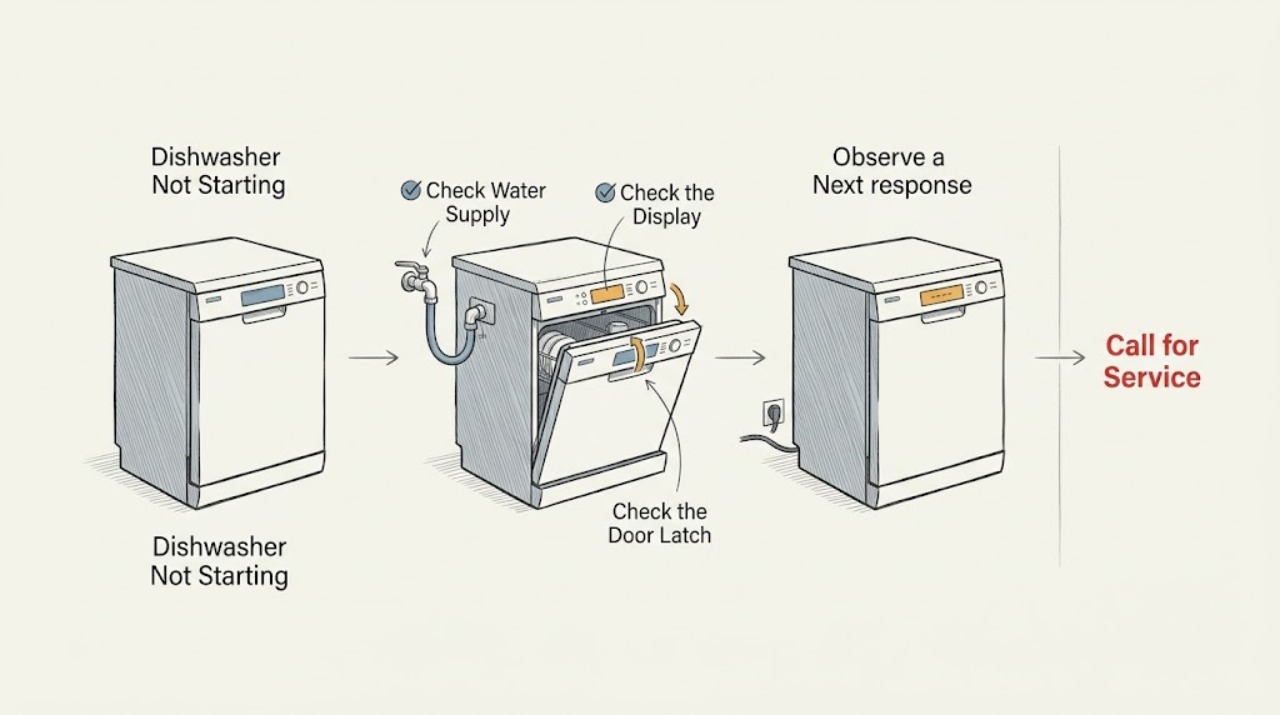
Work through in order
Diagnostic checks
Use only checks that match the exact appliance or system and its official guide.
-
Check 1
From a dry, safe position, check that the dishwasher's household water-supply valve under the sink is fully open. Do not disconnect the hose or loosen a fitting just to test the valve.
Expected result: The valve is closed or restricted, the valve is open, or the supply area is leaking or inaccessible.
Next step: Open a clearly closed valve fully and continue to the control and door checks. If the valve, hose, or connection leaks or needs plumbing disassembly, stop and arrange qualified service.
Stop if: Do not handle a leaking connection, remove plumbing, or continue if water can reach the outlet, cord, junction box, or other electrical part.
Why this matters
Why: KitchenAid says a dishwasher may refuse to start or show an error when immediate water supply is unavailable. An open valve does not prove that the inlet system or control is working.
-
Check 2
Look at the control panel for a Control Lock indicator, a delay indication, or a dark panel that may be in Standby or Sleep mode. Press Start or open and close the door only as the model's controls allow; if a delay is active, cancel it with the exact model's documented control.
Expected result: A lock indicator is lit, the dishwasher is asleep, Delay Wash is selected, the panel responds normally, or the controls remain dark/unresponsive.
Next step: Disable the lock or delay only with the model-specific control sequence, then select a cycle and press Start. If the panel remains unresponsive, continue to the external power check and one reset.
Stop if: Do not guess at a multi-button sequence, remove the control panel, or probe wiring to defeat a lock or interlock.
Why this matters
Why: A locked, sleeping, or delayed control can make a working dishwasher appear not to start. A dark or unresponsive panel after the allowed wake-up action points to power or control investigation rather than a water-supply conclusion.
-
Check 3
With the dishwasher off, inspect the door seal, latch area, and rack positions. Remove an accessible utensil or dish blocking the seal, confirm that the lower rack is not installed backward where the model uses that design, and close the door gently until the latch engages.
Expected result: The door is blocked, a rack or dish projects into the path, the door closes with a click, the latch will not engage, or the latch/door is visibly damaged.
Next step: Clear only the accessible obstruction and reseat the rack, then make one start attempt. If the latch still will not engage or the door cannot close evenly, keep the dishwasher off and arrange model-specific service.
Stop if: Do not force the door, bypass the latch, hold the interlock closed, or operate with a cracked seal, door, tub edge, latch, or strike.
Why this matters
Why: KitchenAid links an unlatched door to failure to start or resume, and says a backward lower rack can prevent latching on some models. A damaged latch or door is not a safe user-reset problem.
-
Check 4
Check only the accessible plug and outlet, or observe the dishwasher breaker from a dry position for a hardwired unit. After canceling any active cycle, disconnect power for the interval in the exact model guide; where no model interval is available, KitchenAid's two official guides describe approximately 30 seconds to one minute. Restore power and make one normal start attempt.
Expected result: The outlet or breaker is off, power returns and the controls wake, the dishwasher remains dark, the breaker trips again, or the dishwasher starts after the reset but stops later.
Next step: Correct only a clearly off breaker or loose plug when safe, then make one reset attempt. If power is absent, the breaker will not stay reset, or the dishwasher remains unresponsive, arrange electrical or KitchenAid appliance service.
Stop if: Do not change breaker ratings, use an extension cord, open a junction box, test live wiring, or repeatedly reset after a trip, smoke, sparks, burning odor, or abnormal heat.
Why this matters
Why: A loose plug, tripped protection, sleep/control state, or transient control condition may explain a no-start symptom. A repeated trip, persistent dark panel, or later stop indicates an unresolved electrical or internal fault rather than a reason to repeat the reset.
-
Check 5
Record the exact model, panel indicators, water-valve state, door/rack findings, power result, and what happened after the single reset. Keep the dishwasher off when those external checks do not restore operation.
Expected result: The dishwasher starts normally, remains dead, will not latch, shows a recurring lock/error state, trips protection, or starts and stops again.
Next step: Contact KitchenAid support or a qualified appliance technician with the model and recorded observations. If water or electrical damage is present, isolate water and power only from a safe dry position.
Stop if: Do not remove panels, bypass the interlock, perform live tests, or order a replacement part from the no-start symptom alone.
Why this matters
Why: The observations narrow the handoff but do not identify a compatible latch, control, pump, valve, wiring, or other part. Persistent or hazardous behavior requires model-specific diagnosis.
Use your observations
Decision map
Find the observation that best matches what you see, then follow the next safe action.
-
PATH 01Safety boundary
What you see
A lock icon or indicator is lit, the panel wakes when the door or Start control is used, or Delay Wash is visibly selected.
Do this next
Use the exact model's Control Lock, wake, or delay-cancel sequence, then select a cycle and press Start once.
Why this path and its safety boundary
Why it matters: The dishwasher may be waiting for a model-defined control action rather than suffering a hardware no-start failure.
Safety stop: Do not guess at button combinations or open the control panel.
-
PATH 02Safety boundary
What you see
A rack, utensil, dish, seal obstruction, or backward lower rack prevents the door from closing and engaging the latch.
Do this next
Clear the accessible obstruction, reseat the rack, and close the door gently once. Escalate if the latch will not engage or the door is damaged.
Why this path and its safety boundary
Why it matters: The door interlock is not receiving a normal closed-latch condition, so the dishwasher can remain silent even when power and water are available.
Safety stop: Do not force the door or bypass the latch.
-
PATH 03Safety boundary
What you see
The panel is dark or unresponsive after the water, control-state, and door checks, and the accessible outlet or breaker appears abnormal.
Do this next
Correct only a clearly off breaker or loose plug if safe, disconnect power for the exact model interval, and make one restart attempt. Arrange service if the panel remains dark or protection trips again.
Why this path and its safety boundary
Why it matters: External power or a control state is more likely than a water-supply issue, but a breaker that trips again may indicate a fault that should not be repeatedly reset.
Safety stop: Stop for smoke, sparks, burning odor, heat, water near electrical parts, or a breaker that will not stay reset.
-
PATH 04Safety boundary
What you see
Water is available, controls are awake and unlocked, the door latches, and one model-appropriate reset does not restore operation, or the dishwasher starts and stops again.
Do this next
Keep the dishwasher off and arrange KitchenAid or qualified appliance service with the exact model and observations.
Why this path and its safety boundary
Why it matters: A latch/interlock, control, wiring, or another internal fault is possible, but the symptom does not identify a safe replacement part.
Safety stop: Do not remove panels, defeat an interlock, perform live electrical tests, or continue repeated restart attempts.
Helpful context
Understand the symptom
Confirm that the dishwasher is allowed to start
A silent dishwasher is not necessarily an electrical failure. KitchenAid's operating guide first separates a closed water valve, Control Lock, Standby or Sleep mode, Delay Wash, and an unlatched door. Read the panel for a lock icon or delay indication, open or close the door or press Start to wake a sleeping control, and use only the buttons named by the exact model when canceling a delay.
Treat the door and racks as part of the start circuit
The door must close and latch before the dishwasher can start or resume. Check the seal and latch area for an obstruction, and make sure a rack or dish is not projecting into the door path. KitchenAid's broader no-start guidance also warns that a lower dish rack installed backward can prevent proper latching on some models. Do not hold the latch closed with a tool or force the door against a rack.
Check only external power, then reset once
For a plugged-in model, verify the plug is seated and that the outlet is live without using an extension cord or opening the dishwasher. For a hardwired installation, observe the household breaker from a dry, safe position. After canceling any active cycle, KitchenAid describes disconnecting power for about 30 seconds on one guide and approximately one minute on another; use the exact model instruction where available and make one reset attempt rather than repeatedly cycling a fault.
Escalate a persistent no-start condition
If water is available, the controls are unlocked and awake, the door closes and latches, and one model-appropriate reset does not restore operation, the symptom no longer selects a safe user-level cause. A control, latch/interlock, wiring, or other internal problem may be involved, but the official guidance does not support a symptom-only part choice. Use the exact model manual or KitchenAid service.
Safety boundary
Stop conditions
- Stop immediately for smoke, sparks, burning odor, abnormal heat, water near an outlet, cord, junction box, or control, or a breaker that trips again.
- Do not bypass or hold the door latch/interlock closed, run with a damaged door or seal, or force the door against a rack or utensil.
- Do not change breaker ratings, use an extension cord, open the junction box or control panel, probe live wiring, or remove built-in panels without qualified service.
- Do not repeatedly cycle power or order a latch, control, pump, valve, or wiring part from a no-start symptom alone.
When checks do not resolve it
Need a professional?
Arrange KitchenAid or qualified appliance service when the water supply is available, the controls are awake and unlocked, the door closes and latches, and one model-appropriate reset does not restore operation; when the latch or door is damaged; or when the unit starts and stops again. Use electrical service for an absent supply or breaker that will not remain reset, and do not recreate a hazardous condition.
Safety scope: Owner checks stop at accessible water-valve observation, control-state identification, door/rack clearance, visible latch observation, external plug/outlet or breaker observation, and one model-appropriate power reset. Interlock, control, wiring, junction-box, pump, valve, and built-in access require qualified service.
Common questions
FAQ
Why is my KitchenAid dishwasher not starting?
Check the water valve, Control Lock, Standby/Sleep or Delay Wash state, and door latch first. Remove any rack or dish obstruction and close the door until it engages. If the controls remain unresponsive, use one exact-model power reset; persistent or hazardous faults need service.
Can a KitchenAid dishwasher fail to start if the door is not latched?
Yes. KitchenAid says a door that is not fully latched can prevent a cycle from starting or resuming. A dish or utensil in the seal path, a protruding rack item, or a lower rack installed backward on some models can prevent latching.
What does the lock light mean on a KitchenAid dishwasher?
It can indicate that Control Lock is enabled, which disables the buttons to prevent unintended changes. Use the exact model manual for the unlock sequence; do not guess at button combinations or open the control panel.
How do I reset a KitchenAid dishwasher that will not start?
Cancel any active cycle, then use the exact model instructions to disconnect power. KitchenAid's official guides describe about 30 seconds to one minute before restoring power. Make one restart attempt and stop if the breaker trips, smoke or burning odor appears, or the unit remains unresponsive.
Can a closed water valve keep a KitchenAid dishwasher from starting?
Yes. KitchenAid says the dishwasher may refuse to start or show an error when immediate water supply is unavailable. Check that the under-sink valve is fully open, but do not disconnect a leaking hose or fitting.
When should I stop trying to start the dishwasher?
Stop for smoke, sparks, burning odor, abnormal heat, water near electrical parts, a damaged cord, or a breaker that trips again. Do not bypass the latch, probe wiring, remove panels, or repeatedly reset the dishwasher; arrange qualified appliance or electrical service.
Read the exact guide
Official sources
- Dishwasher Not Starting or Not OperatingKitchenAid Product Help · KitchenAid dishwasher assistance page; it describes common checks and states that exact manuals control model-specific details.
- Not Starting or Operating - DishwasherKitchenAid Product Help · KitchenAid dishwasher operating guidance; button sequences and installation details remain model-dependent.
Community feedback
Share a repair observation
Share a plain-text repair observation. Accepted observations are published automatically; this page may take a moment to update.