
On this page
Start here
Quick answer
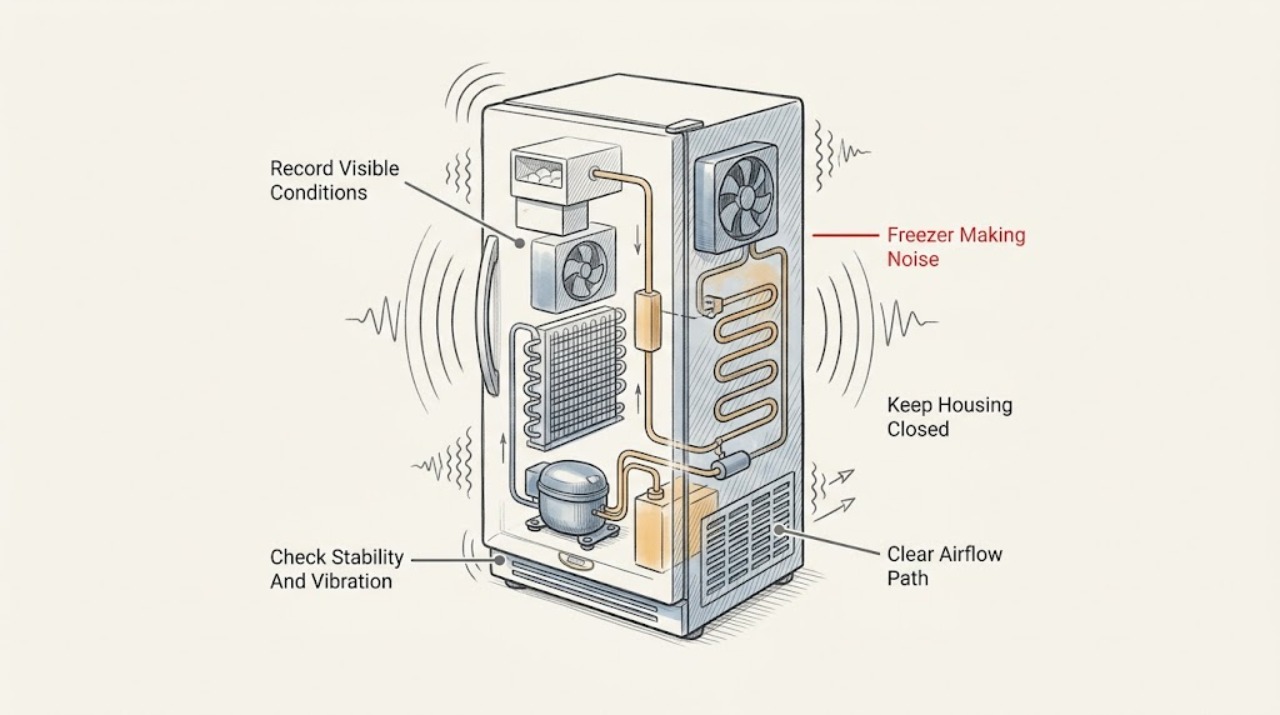
Many KitchenAid freezer sounds are normal: humming or pulsating from the compressor or fans, dripping or gurgling during defrost, cracking as interior walls contract, refrigerant rattling, and clacking from an ice maker. First record the sound, where it comes from, when it occurs, whether the freezer is cooling, and whether the sound is new or getting louder. Check from outside the appliance that it is stable, the door closes, vents are not blocked, and items or tubing are not vibrating against the cabinet. If a refrigerator-freezer has an ice maker but is not connected to water, turn that ice maker off according to the model manual. KitchenAid says unusually loud clicking or buzzing can involve an evaporator fan or dirty condenser coils, and persistent or amplified sounds should be assessed by a qualified professional. Do not remove panels, touch the fan or compressor, probe wiring, or force the ice maker; stop and arrange service for a grinding or scraping sound, warming, repeated clicking with no cooling, burning odor, water leak, or electrical symptom.
Before you begin
Safety first
- This article covers listening and ordinary-access checks of stability, clearances, vents, food arrangement, gasket, temperature, and ice-maker context only. Qualified service must diagnose fans, compressors, sealed-system parts, controls, wiring, and concealed water or defrost components.
Work through in order
Diagnostic checks
Use only checks that match the exact appliance or system and its official guide.
-
Check 1
From a safe position, listen without opening panels and record the sound's character, source direction, duration, cycle timing, and whether it changes when the door opens or the ice maker fills.
Expected result: Classify it as hum, pulsating, click, rattle, hiss, drip, gurgle, crack, clack, vibration, grinding, or scraping; note whether the freezer remains cold, is warming, leaks, or builds frost.
Next step: Make a short private recording if safe, note the model and event timing, and continue only with non-invasive checks that match the sound category.
Stop if: Stop for a burning or electrical odor, smoke, sparking, a hot cord or outlet, a severe grinding or scraping sound, active water leak, or loss of cooling.
Why this matters
Why: KitchenAid describes many brief hums, defrost sounds, refrigerant noises, wall cracks, and ice-maker sounds as normal. A new, amplified, persistent, grinding, or scraping sound with a cooling or leak symptom needs service rather than a sound-only adjustment.
-
Check 2
From the floor around the appliance, check whether the freezer is stable and whether nearby cabinets, wall surfaces, loose items on top, or exposed tubing are touching or amplifying the vibration; do not move a heavy unit by force.
Expected result: Record rocking, rolling, a cabinet or item rattling in sync with the sound, loose visible tubing, or a stable appliance with the noise coming from inside.
Next step: Remove only a loose external item or safely clear visible tubing that is touching the cabinet; arrange installation or appliance service if the unit is unstable or the internal sound persists.
Stop if: Do not tip, roll, lift, pull out, shim, or adjust a built-in or water-connected appliance without the exact installation procedure and help for its weight.
Why this matters
Why: KitchenAid says an unlevel or unstable unit can transfer vibration to the floor or cabinets, while tubing or objects can rattle. A stable installation with an internal sound keeps fan, compressor, defrost, or ice-maker branches open.
-
Check 3
Inspect the visible internal air vents and stored food arrangement without touching fans; verify packages are not blocking the vents or pressed against the freezer wall, and check the door closes fully.
Expected result: Record blocked vents, food contacting a wall or fan area, a door that does not close, frost at the gasket or vent, or clear airflow with the sound still present.
Next step: Rearrange only packages that clearly block vents or closure, then monitor one normal cooling period; arrange service for persistent noise, warming, heavy frost, or a damaged seal.
Stop if: Do not reach behind an evaporator cover, touch a fan, chip frost, or force a door or drawer past a package or ice obstruction.
Why this matters
Why: KitchenAid's manual says blocked vents can restrict airflow and cause temperature or moisture problems. Extra cooling demand can make fans or compressors run more often, but a loud internal sound with normal loading still warrants assessment.
-
Check 4
If the freezer has an ice maker, note whether the noise occurs during ice production or water filling and whether the appliance is connected to a household water supply; do not reach into the ice maker.
Expected result: Record normal clacking during ice production, a buzz or click while the ice maker is enabled without a water connection, a restricted or kinked visible water line, or a sound unrelated to ice activity.
Next step: If no water supply is connected, turn the ice maker OFF using the exact model instructions; for a line or valve concern, close water from a safe location and arrange service.
Stop if: Do not force the ice maker, pull internal tubing, remove the valve, or leave an uncontrolled water connection open.
Why this matters
Why: KitchenAid says ice-maker clacking can be normal and an unconnected, enabled ice maker can make the water valve buzz or click. A noise outside that context or with a leak suggests a different service branch.
-
Check 5
Check the temperature display or an appropriate freezer thermometer and observe visible frost, door-gasket condition, and compressor run behavior without changing the setting repeatedly.
Expected result: Record normal freezing, a warming compartment, thick frost, a torn or dirty gasket, compressor running continuously, or an intermittent sound with stable temperature.
Next step: Keep the door closed and protect food if the freezer is warming; arrange qualified service for warming, heavy frost, continuous operation, or recurring loud noise.
Stop if: Do not remove an evaporator cover, adjust sealed-system components, chip ice, or continue operating through a grinding sound, hot cabinet, smoke, or electrical odor.
Why this matters
Why: A loud buzz or fan sound alongside warming or heavy frost is more concerning than a brief sound with stable cooling. KitchenAid links frost, gasket leakage, airflow, and cooling demand to longer or louder operation but does not identify an internal part from sound alone.
-
Check 6
From ordinary external access, check whether the model's owner manual permits cleaning the condenser area and whether visible dust or restricted clearance could make cooling noise louder; do not remove a rear panel unless the exact manual authorizes it and power is safely disconnected.
Expected result: Record clear airflow and clean accessible surfaces, visible dust near the permitted condenser area, blocked clearances, or a condenser and fan area that is inaccessible or unsafe to reach.
Next step: If the exact manual permits it, disconnect power, clean only the specified accessible area, restore any panel, and monitor; otherwise arrange professional cleaning and diagnosis.
Stop if: Do not touch a moving fan, probe wiring, remove an unauthorized panel, use water on electrical components, or operate with a panel removed.
Why this matters
Why: KitchenAid says dirty condenser coils can make the freezer work harder and contribute to buzzing, but not every model exposes the same parts or allows user cleaning. An inaccessible or persistent problem belongs to service.
-
Check 7
After the non-invasive checks, decide whether the sound matches a normal operating event and the freezer remains stable and cold, or whether it is loud, persistent, worsening, or paired with a cooling, frost, water, or electrical symptom.
Expected result: Answer yes if the sound is brief and consistent with compressor, fan, defrost, refrigerant, wall, or ice-maker operation and no abnormal symptom is present; answer no for a new or amplified sound, repeated clicking, grinding, scraping, unstable vibration, warming, leak, or hazard.
Next step: For no, keep food protected if cooling is affected and arrange KitchenAid or qualified refrigeration service with the sound recording, model, location, timing, temperature, frost, ice-maker, and clearance observations.
Stop if: Do not open the sealed system, test live wiring, remove fan or compressor parts, bypass controls, or keep using an appliance with smoke, electrical odor, water leak, or severe mechanical noise.
Why this matters
Why: A yes result supports monitoring and correct loading or ice-maker settings. A no result requires qualified diagnosis; sound does not prove an evaporator fan, condenser, compressor, relay, or other part has failed.
Use your observations
Decision map
Find the observation that best matches what you see, then follow the next safe action.
-
PATH 01Safety boundary
What you see
The sound is a brief or familiar hum, pulsation, gurgle, drip, crack, refrigerant rattle, or ice-maker clack and the freezer remains stable and cold.
Do this next
Monitor its pattern, keep vents clear and the appliance stable, and consult the exact manual if the sound changes.
Why this path and its safety boundary
Why it matters: The sound is consistent with normal compressor, fan, defrost, refrigerant, wall-temperature, or ice-making operation described by KitchenAid.
Safety stop: Stop and arrange service if it becomes louder, persistent, grinding, scraping, or paired with warming, frost, water, smoke, or electrical symptoms.
-
PATH 02Safety boundary
What you see
Buzzing or clicking occurs during ice-maker filling, especially when the ice maker is enabled without a connected water supply.
Do this next
Turn the ice maker OFF using the exact model instructions when no water supply is connected; request service for a connected line, leak, or persistent abnormal sound.
Why this path and its safety boundary
Why it matters: KitchenAid says the water valve can make this sound while trying to fill an unconnected ice maker.
Safety stop: Do not reach into the ice maker, remove tubing, or keep an uncontrolled water connection open.
-
PATH 03Safety boundary
What you see
The sound is a rattle or vibration that changes when nearby objects, tubing, cabinets, or the appliance position is addressed, with normal cooling.
Do this next
Remove a loose external item or safely clear visible contact, keep the freezer stable, and request installation or appliance service if movement remains.
Why this path and its safety boundary
Why it matters: The noise may be transmitted or amplified externally rather than caused by an internal failed component.
Safety stop: Do not tip, lift, roll, or forcibly move a heavy or built-in freezer.
-
PATH 04Safety boundary
What you see
Buzzing or humming is louder or more frequent with blocked vents, heavy frost, a poor door seal, warm food, or prolonged door opening.
Do this next
Clear only safe package or vent obstructions, confirm the gasket closes, keep the door closed, and arrange service for persistent frost, warming, or loud noise.
Why this path and its safety boundary
Why it matters: The freezer may be working harder to restore temperature, and airflow or warm-air entry may be contributing to the sound.
Safety stop: Do not chip frost, access the evaporator fan, or run the freezer with an exposed or damaged component.
-
PATH 05Safety boundary
What you see
Clicking, buzzing, or humming is unusually loud or persistent, especially with poor cooling, and external vibration or loading does not explain it.
Do this next
Keep the freezer closed and schedule qualified service; provide the sound recording, location, temperature, frost, and condenser-clearance observations.
Why this path and its safety boundary
Why it matters: KitchenAid identifies a faulty evaporator fan or dirty condenser coils as possible causes, but professional inspection is needed to confirm the source.
Safety stop: Do not remove panels, touch moving fans, probe wiring, or replace a fan or compressor part by sound alone.
-
PATH 06Safety boundary
What you see
The sound is grinding, scraping, severe knocking, or accompanied by warming, smoke, a burning odor, sparking, a hot cord, water, or rapid worsening.
Do this next
Disconnect power from a safe location when possible, protect food and the area, and request qualified appliance or electrical service.
Why this path and its safety boundary
Why it matters: The freezer may have a mechanical, cooling, water, or electrical hazard that should not be confirmed by continued operation.
Safety stop: Do not touch wet or hot electrical parts, open panels, restart repeatedly, or continue using the appliance to reproduce the sound.
Helpful context
Understand the symptom
Classify the sound before calling it a fault
KitchenAid's freezer guidance distinguishes normal operating sounds from changes that deserve attention. Humming or pulsating can come from the compressor or fans; dripping or gurgling can occur when defrost water enters the pan; cracking can come from the interior walls changing temperature; and clacking can be the ice maker. A sound that suddenly becomes louder, lasts longer than usual, or occurs with warming or a leak takes a different path from a familiar brief cycle sound.
Check vibration, airflow, and ice-maker context from outside
Hard floors, walls, and cabinets can amplify normal vibration. Confirm the freezer is stable, leave the internal vents clear, and keep stored items from touching the wall or fan area. KitchenAid also notes that a water valve can buzz or click when an ice maker is enabled without a water supply. Turn that feature off only as the exact manual permits; do not reach into a moving fan or ice-maker assembly.
Loud mechanical sounds with cooling changes need service
Unusually loud clicking, buzzing, grinding, scraping, or vibrating can be a clue to a fan, condenser, compressor, mounting, or other component problem, but the sound alone cannot identify the part. A certified professional should inspect a suspected evaporator fan or condenser problem, especially if the freezer is warming, frosting, leaking, or running continuously. Keep the door closed and protect food if cooling is lost while service is arranged.
Safety boundary
Stop conditions
- Stop for smoke, burning or electrical odor, sparking, a hot cord or outlet, severe grinding or scraping, water near electrical parts, or rapid loss of cooling.
- Do not remove fan, compressor, evaporator, condenser, rear, or control panels to locate a noise.
- Do not touch a moving fan or probe live wiring, and do not operate with an unauthorized panel removed.
- Do not force the ice maker, pull internal water tubing, or repeatedly operate an ice maker with an uncontrolled or unconnected water path.
- Do not chip frost, use sharp tools, open the sealed system, or replace a component by sound alone; persistent abnormal noise requires qualified diagnosis.
Only after diagnosis
Potential parts
- model-specific evaporator or condenser fan assembly
Consider this category only if qualified testing confirms fan damage or bearing noise after external vibration, airflow, loading, and ice-maker causes are ruled out.
Confirm the exact KitchenAid model, fan location, motor design, and manufacturer fit information before ordering; do not infer fan failure from a buzz or click alone. - model-specific condenser or compressor support component
Consider this category only if qualified diagnosis confirms a compressor, start, mounting, or related cooling-system fault associated with the noise and temperature symptom.
Confirm the exact model and sealed-system or electrical requirements with qualified service; do not open the sealed system or substitute a component by sound. - model-specific ice-maker water valve or assembly
Consider this category only if the noise is tied to ice-maker fill or harvest and qualified testing identifies a valve, mechanism, or water-path fault.
Confirm the exact KitchenAid model, water connection, valve design, and manufacturer fit information; turn off the ice maker or water supply as appropriate for the symptom.
When checks do not resolve it
Need a professional?
Arrange qualified KitchenAid refrigeration service when a sound becomes significantly louder or persistent, when clicking or buzzing occurs with poor cooling, when grinding, scraping, or severe vibration appears, or when the freezer also warms, frosts, leaks, runs continuously, or has a damaged gasket or ice-maker water line. Treat smoke, burning or electrical odor, sparking, a hot cord or outlet, water near energized parts, or rapid cooling loss as an urgent appliance or electrical matter.
Safety scope: This article covers listening and ordinary-access checks of stability, clearances, vents, food arrangement, gasket, temperature, and ice-maker context only. Qualified service must diagnose fans, compressors, sealed-system parts, controls, wiring, and concealed water or defrost components.
Common questions
FAQ
Why is my KitchenAid freezer making a loud noise?
First classify the sound and check whether cooling is normal. Brief humming, pulsation, defrost dripping or gurgling, wall cracking, refrigerant rattling, and ice-maker clacking can be normal. A new or amplified click, buzz, grind, scrape, or vibration—especially with warming or frost—needs qualified diagnosis.
Is a humming KitchenAid freezer normal?
Often. KitchenAid says compressor and fan hum or pulsation can occur during normal operation, and it may be more frequent after warm food or frequent door openings. If the hum becomes loud or persistent, or the freezer is warming, leaking, or running continuously, arrange service.
Why does my KitchenAid freezer click or buzz when there is no water line?
KitchenAid says an ice maker that is enabled without a water supply can make the water valve buzz or click while trying to fill. Turn the ice maker off using the exact model instructions. Do not remove the valve or tubing; request service if the sound persists or a connected line leaks.
Can blocked vents make a freezer louder?
Blocked internal vents can restrict airflow and contribute to temperature or moisture problems, while heavy frost or a poor door seal can increase cooling demand. Move only packages that clearly block vents or closure. Do not access a fan or evaporator cover; persistent loud noise or warming needs service.
When should I stop using a noisy KitchenAid freezer?
Stop for grinding or scraping, severe knocking or vibration, smoke, burning or electrical odor, sparking, a hot cord or outlet, water near electrical parts, rapid cooling loss, or a freezer that is warming or heavily frosting. Disconnect power from a safe location when possible and arrange qualified appliance or electrical service.
Read the exact guide
Official sources
- How to Manually Defrost a FreezerKitchenAid · KitchenAid general manual-defrost guidance; only models designed for manual defrost should follow that process.
- Why Is My Refrigerator Making Noise?KitchenAid · KitchenAid general refrigerator/freezer noise guidance; exact model manual and service documentation take precedence.
- Freezer OperationKitchenAid · An official KitchenAid freezer owner manual used for general operating and safety context; the exact model manual takes precedence.
- Refrigerator Noise - BuzzingKitchenAid Product Help · KitchenAid Product Help guidance for full-size refrigerator-freezer configurations; controls and access vary by model.
- 9 Possible Freezer Troubleshooting Fixes & TipsKitchenAid · KitchenAid general freezer troubleshooting guidance; model-specific instructions control.
Community feedback
Share a repair observation
Share a plain-text repair observation. Accepted observations are published automatically; this page may take a moment to update.