
On this page
Start here
Quick answer
First determine whether the KitchenAid freezer is completely off, running but warm, or cooling unevenly. Check the power connection and control setting, make sure the door gasket seals and vents are clear, and confirm food is not blocking circulation. KitchenAid identifies a damaged seal, dirty condenser, blocked vents, heavy frost, overpacking, and unsuitable loading as possible contributors to poor cooling; its troubleshooting guidance also notes that a continuously running compressor, persistent unusual noise, or temperature that does not recover can require professional diagnosis. Keep the door closed and move vulnerable food to a known-safe cold location if temperature is rising. Do not remove electrical or evaporator covers, pierce refrigerant tubing, or repeatedly restart the freezer. Smoke, a burning smell, sparks, a hot cord or outlet, water near wiring, or a repeated breaker trip is an immediate stop-use condition.
Work through in order
Diagnostic checks
Use only checks that match the exact appliance or system and its official guide.
-
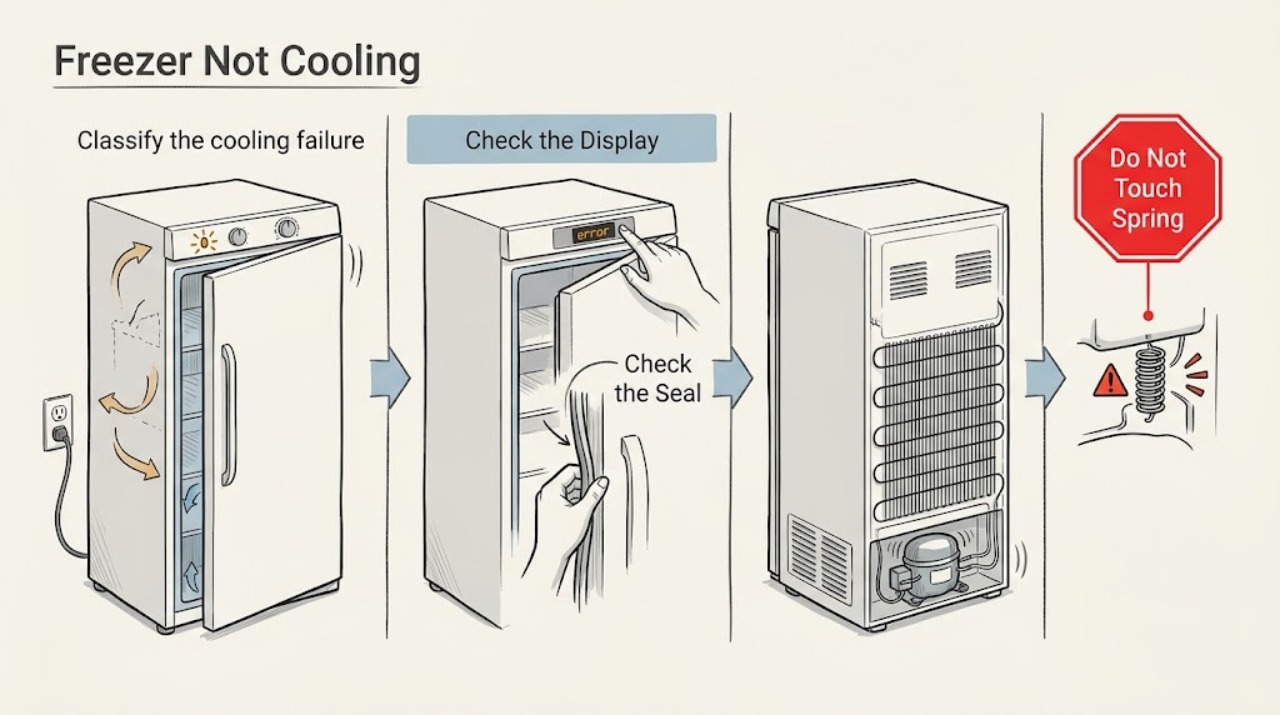
Classify the cooling failure and protect food
From a safe position, note whether the interior light or display works, whether the compressor or fan can be heard, whether the freezer is partially cold or completely warm, whether food is soft, and whether an alarm or warning is active. Keep the door closed while recording the temperature trend and do not repeatedly open it to feel the air.
Expected result: No light or display suggests a power or control problem. A working display with warm food suggests a cooling, airflow, door, frost, or temperature-setting branch. A freezer that is cooling unevenly or has a warning needs attention even if some food remains frozen.
Next step: Move vulnerable food to a known-safe cold location if temperature is rising. Follow the no-power branch if all indicators are off; otherwise continue with control, door, vent, frost, and condenser checks.
Why this matters
Why: The first observation determines whether external power checks or cooling checks are appropriate and prevents mistaking a brief door-opening warm-up for a failed system.
-
Check power and the temperature control safely
With dry hands, confirm the plug is seated and check whether the outlet works with another suitable appliance. Check the household breaker once and verify that the freezer control is not set to Off or an unusually warm setting. Use the exact model manual for the control location; do not open the electrical compartment or repeatedly reset a tripping breaker.
Expected result: A dead outlet, hot receptacle, damaged cord, or breaker that trips again is a supply or electrical safety issue. If the outlet is live and the display or light remains off, an internal supply or control fault is possible. If controls respond, continue to the sealed-door and airflow checks.
Next step: Stop and arrange qualified electrical or appliance service for a hot or damaged connection, repeated breaker operation, or a freezer that remains dead with a known-good outlet. If power and controls respond, continue without opening panels.
Why this matters
Why: An external power check can separate a household supply problem from a freezer fault, but it cannot safely diagnose an internal compressor or control circuit.
-
Inspect the door seal, closure, and loading
Check that no package, basket, shelf, or ice prevents the door from closing fully. Inspect the visible gasket for dirt, tears, gaps, hard spots, or sections pulled out of position, and clean it only as the model instructions permit. Avoid storing food against the door or in a way that prevents the gasket from contacting the cabinet.
Expected result: KitchenAid says a torn or loose gasket can let cold air escape and force the compressor to work harder. Frost or moisture concentrated near the door edge, a door that rebounds, or a visible gap supports a seal or alignment branch.
Next step: Remove only the obstruction and restore the seal as the manual allows. If the gasket or door is damaged, or the freezer remains warm after the door seals, arrange qualified service and minimize door openings.
Why this matters
Why: A door leak can make a properly operating freezer appear not to cool; cleaning an obstruction cannot repair a damaged gasket or misaligned door.
-
Clear vents and check internal airflow
Use the exact model manual to locate freezer vents and the evaporator-airflow path. Move food away from vents and leave room for air circulation; do not pack items tightly against the back wall or fan area. Check for frost blocking a vent, but do not remove a cover or reach into a fan.
Expected result: KitchenAid identifies blocked vents and overpacking as causes of poor circulation and temperature problems. Frost that covers vents can prevent cold air from reaching the compartment; a clear vent with a warm freezer points to another branch.
Next step: Reorganize only loose items that block a vent and observe without repeated door opening. If airflow remains absent, frost is extensive, or the freezer stays warm, follow the defrost or service branch.
Why this matters
Why: Cold air must circulate through the compartment; correcting an accessible blockage can help, but it cannot prove that the evaporator fan or cooling system is working.
-
Check frost and use only a model-approved defrost
Record whether frost is a light, even layer, a thick sheet on the back wall, or a band around the door. Check the owner manual to determine whether the model is manual-defrost or automatic-defrost. If manual defrost is approved and buildup is substantial, turn off cooling, unplug as directed, protect the floor and food, and use only the manual-approved plastic scraper or melting method.
Expected result: KitchenAid explains that warm humid air, a door left open, warm food, or a damaged gasket can create frost that covers vents and sensors. Frost that clears and cooling returns after one complete approved defrost supports an airflow or moisture cause; frost that quickly returns suggests an unresolved fault.
Next step: Dry the compartment fully and reconnect only as the manual directs. Never use a knife or sharp tool. If the procedure is unclear, water reaches electrical parts, or frost returns, stop and arrange qualified service.
Why this matters
Why: A safe defrost can restore blocked airflow but does not repair a defrost heater, sensor, timer, fan, control, drain, gasket, or sealed-system issue.
-
Check condenser access, clearance, and room conditions
If the manual identifies an accessible condenser location, inspect it for dust and clean it only as instructed with power safely disconnected. Confirm the freezer has the required clearance and is not surrounded by heat sources. Do not move a loaded unit or remove a grille that exposes electrical or refrigeration parts unless the manual expressly permits it.
Expected result: KitchenAid lists dirty condenser coils and inadequate clearance among causes of a freezer working harder or failing to maintain temperature. If external airflow and cleanliness are normal but cooling remains poor, an internal fan, compressor, control, or sealed-system fault becomes more likely.
Next step: Correct only an obvious manual-approved clearance or cleaning issue and monitor one cooling period. Persistent warmth, continuous running, or abnormal noise needs qualified diagnosis.
Why this matters
Why: Heat rejection affects cooling, but an accessible condenser check cannot confirm a refrigerant charge, compressor, thermostat, or defrost component.
-
Record compressor, fan, alarm, and leak behavior
From outside the cabinet, listen for normal cycling, continuous operation, repeated clicking, loud buzzing, or no compressor or fan sound. Note a water leak, an alarm, a temperature display, or whether the freezer becomes hot on the outside. Do not remove an evaporator cover or test a start device, relay, heater, or wiring.
Expected result: KitchenAid says a compressor that always runs can reflect cold-air leakage or frost, while persistent clicking, buzzing, humming, unusual vibration, a leak from frozen evaporator or drain areas, or no cooling after simple checks can require professional inspection.
Next step: Keep the freezer out of use if it remains warm, leaks, or repeatedly alarms, and provide the observations to a qualified technician. Stop immediately for smoke, burning odor, sparks, hot electrical parts, or a suspected refrigerant leak.
Why this matters
Why: Sound and temperature trends help a technician distinguish airflow, defrost, motor, control, compressor, and sealed-system possibilities without unsafe disassembly.
-
Run one supervised confirmation after a safe correction
Only after correcting a control, door, loading, vent, clearance, or model-approved defrost condition, reconnect the freezer as directed and observe one cooling period with minimal door opening. Stop immediately for smoke, burning odor, sparks, a hot cord or outlet, water near wiring, repeated clicking, a leak, or a breaker trip.
Expected result: Temperature beginning to recover with stable cycling supports an external setup or airflow cause. No recovery, continuous running, returning frost, repeated alarm, clicking, or a new electrical symptom indicates an unresolved internal fault.
Next step: Keep the freezer out of use and arrange qualified service when the confirmation fails. Preserve the model, temperature trend, frost photos, control setting, sound, and food-storage timeline for the technician.
Why this matters
Why: One controlled observation tests whether the safe external correction changed cooling; repeated restarts or defrosts can hide a failed component and increase food or water damage.
Use your observations
Decision map
Find the observation that best matches what you see, then follow the next safe action.
-
PATH 01Next step
What you see
The display and light are off, the outlet is dead, or the breaker trips again.
Do this next
Stop resetting the breaker and arrange qualified electrical or appliance service. Do not open the electrical compartment.
-
PATH 02Next step
What you see
The freezer is powered but warm, with a door gap, dirty gasket, blocked vent, overpacking, or frost visible.
Do this next
Correct only the accessible manual-approved condition, protect food, minimize door openings, and arrange service if temperature does not recover or frost returns.
-
PATH 03Next step
What you see
Frost covers vents or the back wall, or the freezer has a recurring heavy frost pattern.
Do this next
Follow the exact model's approved defrost procedure once. Never use a sharp tool; call service if the procedure is unclear, incomplete, or the frost returns.
-
PATH 04Next step
What you see
The compressor runs continuously, clicks, buzzes, leaks, alarms, or the freezer stays warm after external checks.
Do this next
Keep the freezer out of use and obtain qualified diagnosis of the fan, defrost system, drain, control, compressor, or sealed system. Do not remove covers.
-
PATH 05Next step
What you see
Smoke, burning odor, sparks, a hot or damaged cord or outlet, water near electrical parts, a suspected refrigerant leak, or a repeated breaker trip is present.
Do this next
Stop immediately, keep clear, and seek qualified help from a safe location. Do not restart the freezer, pierce tubing, or open panels.
Helpful context
Understand the symptom
Start by separating no power from no cooling
A dark display or interior light points toward a supply, control, or door-switch branch. A lit freezer that is warm points toward temperature setting, door leakage, airflow, frost, condenser, fan, or cooling-system diagnosis. A compressor that runs continuously does not prove that it is healthy; it can be responding to warm air entering or to an internal cooling fault. Record the symptom before making changes.
Protect food and stay outside the sealed system
Limit door openings while checking the cause and follow local food-safety guidance for food that has thawed or warmed. Do not scrape frost with a knife, remove an evaporator cover, test live wiring, bypass a control, or puncture a refrigerant line. A suspected leak, smoke, burning odor, hot electrical connection, or repeated breaker trip is a reason to stop immediately and obtain qualified help.
Only after diagnosis
Potential parts
- door gasket or door-alignment hardware
Consider this only when inspection confirms a torn gasket, persistent air gap, or door-alignment problem after obstructions are removed.
Gaskets and hinges are model-specific; verify the exact model and do not use a replacement to mask a cooling fault. - evaporator or condenser fan assembly
Consider this only when qualified testing confirms absent, noisy, or stalled airflow after vents and frost are addressed safely.
Fan assemblies and connectors vary by model; do not reach into a fan or remove covers. - defrost heater, sensor, timer, or control
Consider this only when recurring frost or temperature instability is traced by a technician to the defrost or control system.
Defrost and control parts are model-specific and must not be bypassed. - compressor start device or sealed-system component
Consider this only after qualified testing finds a start, compressor, or sealed-system fault following external checks.
Compressor and refrigerant work requires qualified service; do not infer a part from sound alone or open tubing.
When checks do not resolve it
Need a professional?
Arrange qualified KitchenAid appliance service when the freezer remains warm after the power, control, door, vent, frost, loading, clearance, and accessible condenser checks; when it runs continuously, clicks, leaks, alarms, or develops recurring frost; or when temperature does not recover after one model-approved defrost. Stop immediately for smoke, burning odor, sparks, a hot or damaged cord or outlet, water near electrical parts, a suspected refrigerant leak, or repeated breaker operation. Do not open panels, bypass controls, or puncture sealed tubing.
Common questions
FAQ
Why is my KitchenAid freezer running but not cooling?
Check the temperature control, door seal, vents, frost, loading, clearance, and accessible condenser area. If the compressor runs continuously or the temperature remains warm after these checks, a fan, defrost, control, compressor, or sealed-system fault needs qualified diagnosis.
Can a bad door gasket make a KitchenAid freezer warm?
Yes. KitchenAid says a torn or ineffective gasket can let cold air escape and make the compressor work harder. Check for gaps, dirt, tears, and obstructions; arrange service if the seal or door alignment cannot be corrected safely.
Can frost stop a KitchenAid freezer from cooling?
Yes. KitchenAid explains that frost can cover vents and sensors and disrupt airflow. Follow the exact model's approved defrost procedure once, never use a sharp tool, and call service if frost quickly returns.
How long should I wait after correcting a KitchenAid freezer setting?
Use the exact model manual for the expected stabilization period and avoid frequent door openings while observing temperature. If food continues to warm, the freezer alarms, or cooling does not recover, protect the food and arrange service rather than repeatedly changing settings.
When should I stop using a KitchenAid freezer immediately?
Stop for smoke, burning odor, sparks, a hot or damaged cord or outlet, water near electrical parts, a suspected refrigerant leak, repeated breaker trips, or an abnormally hot cabinet. Keep clear and seek qualified help; do not restart or open panels.
Read the exact guide
Official sources
- What's Normal Condensation or FrostKitchenAid Product Help · Normal frost patterns, humidity, seals, vents, loading, and temperature-control guidance
- How to Manually Defrost a FreezerKitchenAid · Frost causes, food protection, model-specific defrost process, plastic-scraper safety, and recurrence prevention
- Frosting in the Freezer Section - RefrigeratorKitchenAid Product Help · Humidity, door opening, gasket sealing, blocked vents, and service routing for a frosted freezer section
- 9 Possible Freezer Troubleshooting Fixes & TipsKitchenAid · Power, warm freezer, condenser, gasket, frost, unusual sounds, continuous operation, leaks, fans, and service escalation
Community feedback
Share a repair observation
Share a plain-text repair observation. Accepted observations are published automatically; this page may take a moment to update.