
On this page
Start here
Quick answer
Start by protecting the food and measuring the freezer temperature if you can. Confirm that the freezer is powered on and not in an Off, Demo, or Showroom mode, then verify the temperature setting and wait for the model's specified stabilization period. Next check that the door closes and seals, vents are not blocked, food is not packed against the air path, and frost is not covering the evaporator or vents. A warm room, recent loading, or frequent door opening can temporarily extend run time, while a loud abnormal sound, water near electrical parts, burning smell, repeated breaker trip, damaged seal, heavy recurring frost, or a freezer that remains warm after the safe checks requires qualified service. Do not remove panels, chip ice, use direct heat, or open the sealed refrigeration system.
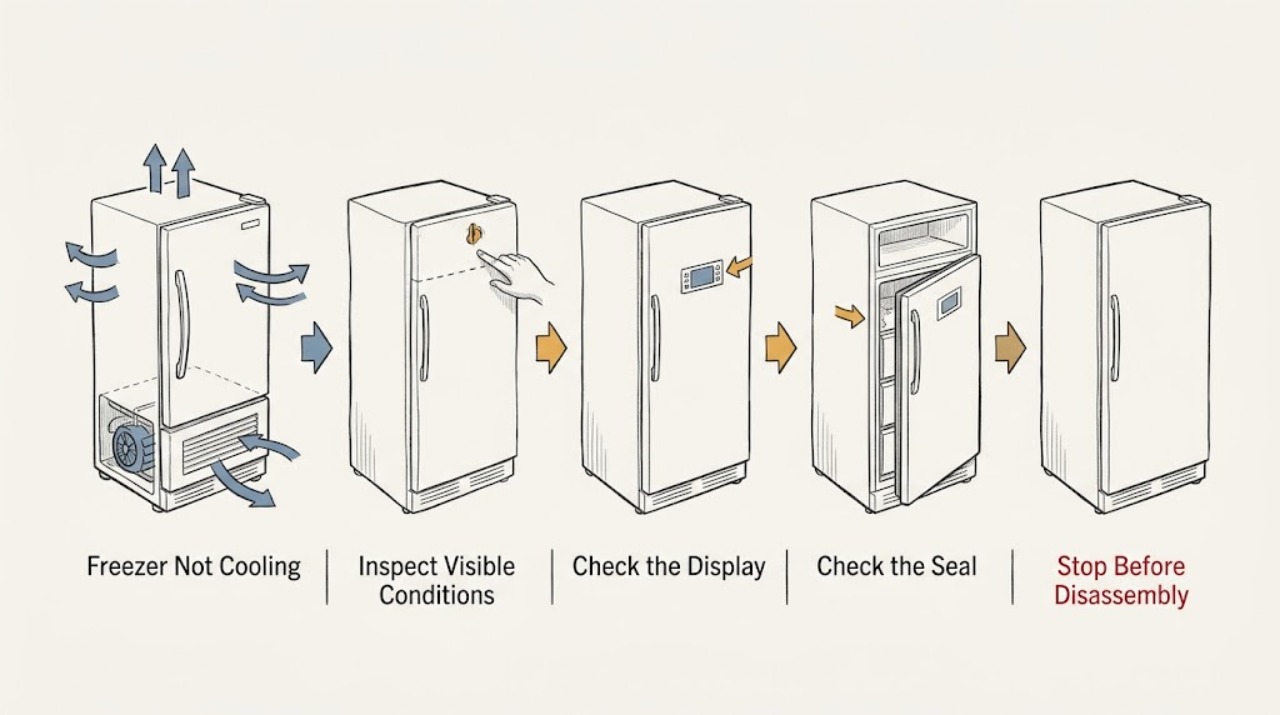
Work through in order
Diagnostic checks
Use only checks that match the exact appliance or system and its official guide.
-
Check 1
From a dry, safe position, check whether the freezer has power: look for the interior light or display, confirm the cord is seated without touching a wet area, and check whether the control shows Off, Demo, Showroom, or another cooling-disabled state. Record any displayed error code exactly rather than guessing its meaning.
Expected result: The freezer has no power, the control indicates cooling is off or in Demo/Showroom mode, an error is displayed, or the lights and controls work but no cooling is enabled.
Next step: Restore only an obvious control setting using the exact manual, and check a safe, dry household outlet or breaker only if there is no water or electrical damage. For a recurring code, no-power condition, wet outlet, or suspected appliance electrical fault, stop and arrange qualified service.
Stop if: Do not reset a tripping breaker repeatedly, touch wet electrical parts, remove a cover, or continue operating after smoke, burning odor, sparking, exposed wiring, or heat damage.
Why this matters
Why: A freezer can appear powered while cooling is disabled by a mode or control setting. No power points to the household supply, cord, breaker, or appliance power circuit; an error code is model-specific and may require service. A normal display with an active cooling mode moves the check to temperature and airflow.
-
Check 2
Check the temperature with an appliance thermometer if available and note whether the freezer was recently installed, unplugged, adjusted, or loaded with a large amount of unfrozen food. Set the control to the model's recommended setting or a modestly colder setting, then keep the door closed for the stabilization time in the manual before judging the result.
Expected result: The temperature is near the recommended target, the unit is still within its recovery period, a large warm load was recently added, or the temperature remains high after the documented stabilization period.
Next step: Keep the door closed and recheck at the manual's interval. If the target is not reached, continue with seal, load, frost, room, and operating-sound checks; if food is warming, protect it before continuing.
Stop if: Do not keep changing the control repeatedly, leave perishable food in a warming freezer, or rely on a cold-feeling air stream instead of a thermometer or food condition.
Why this matters
Why: A control change, installation, power interruption, or large warm load can require hours before the cabinet reaches its target. If the measured temperature remains high after the waiting period, the problem is not explained by a recent adjustment alone.
-
Check 3
Inspect the door or lid from outside. Remove packages that press against it, make sure baskets or drawers are seated, clean an intact gasket with a damp cloth and dry it, and briefly close the door on a sheet of paper at several points around the perimeter.
Expected result: The door is obstructed, the gasket is dirty or displaced, the paper slides out with little resistance, frost or condensation is concentrated around the seal, or the seal is even and the door closes normally.
Next step: Correct only the package placement or intact gasket cleaning/reseating allowed by the manual, then monitor temperature and frost. Arrange service for a damaged gasket, persistent gap, door misalignment, or a seal that fails after cleaning.
Stop if: Do not glue, cut, stretch, heat, or force the gasket, remove the door, or place fingers in a closing gap.
Why this matters
Why: A gap lets warm moist air enter, which can raise temperature and create frost. An obstruction or dirty gasket may be correctable without a part; a torn, hardened, warped, or persistently loose gasket indicates a sealing or alignment problem that needs service.
-
Check 4
With the door open only briefly, map the interior airflow: find the vents in the manual or on the rear wall, leave space around them, and move food away from the back wall and air outlets. Check whether cold air is present at the expected outlet without putting hands near a hidden fan or sharp frost.
Expected result: Food blocks a vent, the compartment is overpacked, airflow is weak or absent, a fan is noisy, or the vents are clear and air circulation seems normal.
Next step: Rearrange food to restore the documented air path and close the door. If airflow remains weak, a fan strikes ice, or the fan never runs when the manual says it should, stop user troubleshooting and arrange service.
Stop if: Do not reach into a fan, remove an interior panel, or probe a vent with a tool or object.
Why this matters
Why: Blocked vents and overpacking can create uneven temperatures even when the cooling system is running. Weak airflow can also result from frost around a fan or evaporator, a fan fault, or a control problem; normal airflow shifts attention to measured temperature, room conditions, and the cooling system.
-
Check 5
Inspect visible frost without trying to break it. Note whether frost is absent, a thin localized layer is present, the rear panel or vents are heavily covered, or frost returns quickly after an approved manual defrost. Keep towels and food away from wet electrical areas if defrost water is present.
Expected result: Heavy or localized frost blocks vents, frost is concentrated near a door edge, frost returns after defrost, or there is no unusual frost pattern.
Next step: Use only the exact manual's user-approved defrost procedure, if one exists, and keep the freezer unplugged only from a dry, safe position while water is controlled. Arrange service for heavy, recurring, inaccessible, or fast-returning frost.
Stop if: Do not chip ice, use a knife, screwdriver, hair dryer, heat gun, or other direct heat, pour water into the cabinet, or operate with exposed wiring or wet controls.
Why this matters
Why: Warm moist air from a poor seal can cause frost near the door, while frost that blocks the air path can reduce cooling. Heavy or recurring frost may involve a defrost drain, heater, sensor, fan, or control and cannot be diagnosed safely by removing panels.
-
Check 6
Check the surrounding conditions without moving the freezer: note whether it is in direct sun or beside a heat source, whether the room is unusually hot or cold, whether the cabinet has clearance for heat to leave, and whether vents or accessible condenser areas are covered by dust or stored items. Follow the exact manual for any cleaning or clearance requirement.
Expected result: The freezer is crowded against a wall or heat source, the room is outside the model's allowed range, accessible airflow is obstructed, or the surroundings are reasonable.
Next step: Restore only the clearance and environmental conditions specified by the manual, without pulling or tipping the appliance, then allow the documented recovery period. Arrange service if the temperature remains high or the unit overheats.
Stop if: Do not move a heavy freezer alone, remove panels to reach coils, wash electrical parts, or continue if the cabinet is hot with a burning smell or repeated breaker trip.
Why this matters
Why: A freezer must reject heat and circulate air. Restricted clearance, a hot location, or an unusual ambient condition can lengthen compressor run time and reduce cooling without proving a failed component. Normalizing the surroundings is a useful low-risk test; no improvement points toward an appliance fault.
-
Check 7
Listen from a safe position and record the pattern and location of sounds: normal low compressor or fan hum, brief gurgling, sizzling during automatic defrost, or a loud grinding, clicking, rattling, or fan-on-ice sound. Compare the sound with the temperature result and whether the compressor ever starts.
Expected result: The sound is soft and cyclical with improving temperature, or it is loud, continuous, electrical, mechanical, or paired with no cooling.
Next step: Leave a normal sound alone while completing the low-risk checks. For an abnormal sound or no-cooling combination, stop repeated tests, keep the door closed, record the symptom, and arrange qualified service.
Stop if: Do not put a hand near a fan, bypass a control, tap the compressor, or run the appliance repeatedly to reproduce a suspected electrical or mechanical fault.
Why this matters
Why: Compressors, fans, refrigerant flow, and automatic defrost can all make ordinary sounds. A loud or persistent sound, especially with a warm cabinet, fan striking ice, or no compressor start, can indicate a fan, compressor, control, or sealed-system problem requiring service.
-
Check 8
Protect the food while the fault is unresolved. Minimize door openings, check the thermometer again, and classify packages as hard frozen, still containing ice crystals, soft, thawed, or exposed to contaminated water. Keep a record of the last known safe temperature and when the freezer stopped cooling.
Expected result: Food remains frozen or has ice crystals, or food is soft, warm, thawed, contaminated, or the freezer cannot hold a safe temperature.
Next step: Move food to safe cold storage when needed and follow FoodSafety.gov's frozen-food chart. Keep the freezer closed and arrange service for continued warming; do not use food exposed to contaminated water or taste questionable food.
Stop if: Do not repeatedly open the freezer to monitor it, place food outside in unsafe conditions, or treat odor or appearance as a safety test.
Why this matters
Why: Food safety depends on time, temperature, ice crystals, and contamination rather than smell or appearance alone. A freezer can preserve food longer when full and closed, but a cooling fault or leak can shorten that window.
-
Check 9
After the safe external checks, record the model and freezer style, measured temperature, control mode, door-seal result, frost location, airflow result, room conditions, sound pattern, power history, and any water, smell, smoke, or breaker symptom. Compare the record with the exact manual and arrange qualified service if the freezer is still not cooling.
Expected result: Cooling returns and the temperature stabilizes, or the freezer remains warm, repeatedly loses cooling, develops heavy frost, or needs an internal panel, sealed-system, electrical, fan, or compressor diagnosis.
Next step: Monitor a resolved condition with the thermometer and normal door use. For persistent or recurring no-cooling, keep food safe, limit operation if the unit is overheating or electrically unsafe, and provide the symptom record to service.
Stop if: Stop user troubleshooting for water near electrical parts, smoke, burning odor, sparking, repeated breaker trips, cabinet overheating, exposed wiring, unstable installation, or any need to open the sealed system.
Why this matters
Why: A resolved setting, obstruction, warm load, or environmental condition is different from a persistent failure. Continued high temperature after the documented recovery period is evidence that a professional needs to test components and the sealed cooling circuit.
Use your observations
Decision map
Find the observation that best matches what you see, then follow the next safe action.
-
PATH 01Safety boundary
What you see
The freezer has no power, cooling is Off/Demo/Showroom, or an exact error code is displayed.
Do this next
Use only the exact model manual for a safe setting correction; arrange service for recurring codes, no power, or an electrical fault.
Why this path and its safety boundary
Safety stop: Continue with the temperature and stabilization check.
-
PATH 02Safety boundary
What you see
The measured temperature is improving after a recent adjustment, installation, power restoration, or large warm load.
Do this next
Keep the door closed for the model's documented stabilization period and recheck with a thermometer.
Why this path and its safety boundary
Safety stop: Continue with seal, airflow, frost, and surrounding-condition checks.
-
PATH 03Safety boundary
What you see
The door is blocked, the gasket fails the brief paper test, or frost/condensation is concentrated around the seal.
Do this next
Remove only the obstruction and clean or reseat an intact gasket as the manual permits; service a damaged or persistently loose seal.
Why this path and its safety boundary
Safety stop: Inspect interior airflow and frost without touching hidden parts.
-
PATH 04Safety boundary
What you see
Food blocks a vent or heavy frost covers the vents, rear panel, or fan area.
Do this next
Restore space around vents and use only an exact manual-approved defrost procedure; service heavy, inaccessible, or recurring frost.
Why this path and its safety boundary
Safety stop: Check room conditions, clearance, and normal versus abnormal operating sounds.
-
PATH 05Safety boundary
What you see
The freezer is beside a heat source, lacks required clearance, or is operating outside the manual's ambient range.
Do this next
Correct only the documented environment and allow recovery time without moving the appliance unsafely.
Why this path and its safety boundary
Safety stop: Treat persistent poor cooling as an appliance fault rather than continuing adjustments.
-
PATH 06Safety boundary
What you see
The sound is loud, continuous, mechanical/electrical, or the fan strikes ice while the freezer remains warm.
Do this next
Stop repeated testing, keep the door closed, and arrange qualified service with the sound and temperature record.
Why this path and its safety boundary
Safety stop: A soft cyclical hum, brief gurgle, or defrost sound can be normal; continue monitoring the measured temperature.
-
PATH 07Safety boundary
What you see
Food is soft, thawed, contaminated by water, or the freezer temperature is rising.
Do this next
Move food to safe cold storage and follow FoodSafety.gov's ice-crystal and temperature guidance; never taste questionable food.
Why this path and its safety boundary
Safety stop: Keep the door closed and complete only the low-risk diagnostic checks.
-
PATH 08Safety boundary
What you see
Cooling remains poor after the safe checks, or there is water near electrical parts, smoke, burning odor, sparking, repeated tripping, overheating, or exposed wiring.
Do this next
Stop user troubleshooting, isolate power only from a dry and safe position when possible, keep food safe, and arrange qualified service.
Why this path and its safety boundary
Safety stop: Monitor a stable temperature and document the simple correction that restored cooling.
Helpful context
Understand the symptom
Not cooling can mean the freezer is completely warm, is colder in one area than another, or is running but cannot reach its target. The first distinction is whether the controls and compressor are allowed to cool at all. A lit display or interior light does not prove that cooling is enabled: some models have an Off, Demo, or Showroom mode that leaves the controls active while cooling is disabled. Do not assume a button sequence from another brand; use the exact model manual for control changes.
Frost and airflow are closely linked. A door that leaks warm moist air can create frost, and accumulated frost or tightly packed food can block the cold-air path. A little warm cabinet surface or a quiet hum can be normal because the freezer rejects heat and cycles its compressor and fans. A sudden loud, grinding, electrical, or repeated abnormal sound changes the decision from adjustment to service.
Treat food and electricity as separate safety decisions. Keep the door closed, move food to safe cold storage if temperatures are rising, and use an appliance thermometer when available. FoodSafety.gov says a full closed freezer generally holds a safe temperature for about 48 hours, or about 24 hours when half full; food may be refrozen when it still has ice crystals or is at or below 40°F, but questionable food should never be tasted to decide whether it is safe.
When checks do not resolve it
Need a professional?
Provide the freezer style and model, measured temperature and timing, control or error display, door-seal result, frost and airflow pattern, room clearance, sound description, power history, food condition, and any water, odor, smoke, spark, or breaker symptom.
Have this ready
- Have the exact manual or model information, a thermometer reading, photographs taken from a dry safe position, and the safe checks already completed available for the service provider. Do not remove panels or attempt sealed-system work.
Common questions
FAQ
Why is my freezer running but not getting cold?
Check the measured temperature, setting or Demo mode, door seal, blocked vents, heavy frost, room clearance, and recent warm loading. A normal hum does not prove the freezer is reaching its target; if temperature remains high after the model's recovery period, arrange service.
Can a freezer be on but not cooling?
Yes. Some models leave lights and controls active in Cooling Off, Demo, or Showroom mode. Check the exact manual and displayed status rather than copying a button sequence from another model.
How long should I wait after changing the freezer setting?
Use the exact model manual. Manufacturer guidance commonly calls for hours after startup or a large load and at least a full stabilization interval after an adjustment. Keep the door closed and judge the result with a thermometer, not just by touching the air.
Can frost make a freezer stop cooling?
Yes. Frost can block vents and airflow, and a poor door seal can continually admit moist air that freezes. Do not chip the frost or use a hair dryer or other direct heat; use only an exact manual-approved defrost procedure, and service heavy or recurring frost.
Is a humming or gurgling freezer sound normal?
Soft compressor, fan, refrigerant, and defrost sounds can be normal. A loud, continuous, grinding, electrical, or fan-on-ice sound—especially with poor cooling—should be documented and serviced rather than repeatedly reproduced.
Is food safe if the freezer is not cooling?
Keep the door closed and use a thermometer if possible. FoodSafety.gov says food may be refrozen when it still has ice crystals or is at or below 40°F, but do not taste questionable food; discard food that the official guidance identifies as unsafe or that contacted contaminated water.
Read the exact guide
Official sources
- Food Safety During Power OutageFoodSafety.gov · Government food-safety guidance relevant when a freezer is not cooling or food has warmed.
- Cooling issues with Samsung refrigerator or freezerSamsung Support · Official Samsung guidance used for general freezer mechanisms; exact model controls and timing take precedence.
- How to Use the Controls (Chest and Upright Freezer)Whirlpool Product Help · Official general freezer guidance used for control and recovery concepts; the exact model manual controls settings.
- How to Avoid Frost Build UpWhirlpool Product Help · Official general freezer guidance used for frost mechanisms and low-risk gasket/organization checks.
- Upright & Chest Freezer - Normal SoundsGE Appliances · Official GE freezer guidance used for general sound classification; exact model instructions control.
- Understanding the different noises coming from your Samsung refrigeratorSamsung Support · Official Samsung sound guidance used for general symptom classification; exact model behavior controls.
- Demo Mode - Top Freezer RefrigeratorWhirlpool Product Help · Official top-freezer refrigerator example used to explain why a lit display does not always prove active cooling; button steps vary by model.
Community feedback
Share a repair observation
Share a plain-text repair observation. Accepted observations are published automatically; this page may take a moment to update.