
On this page
Start here
Quick answer
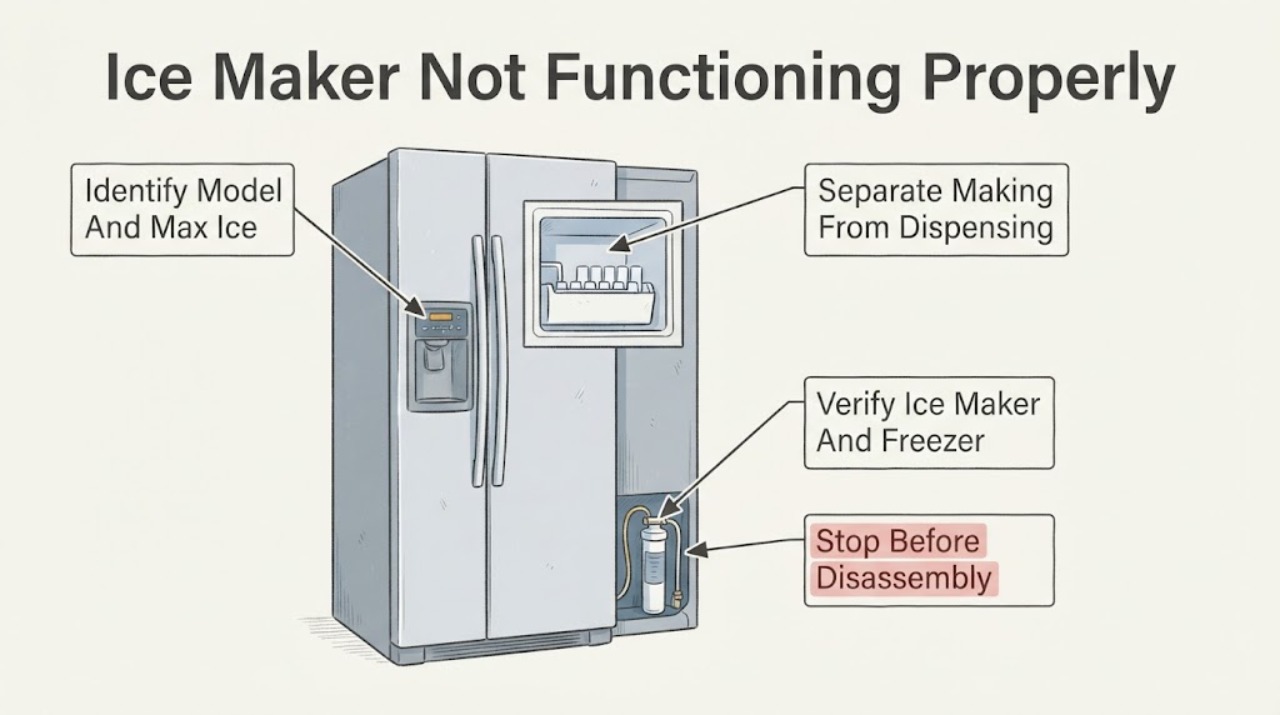
Max Ice is an accelerated-production feature, not a repair mode: KitchenAid says it produces a greater quantity of ice over a 24-hour period, requires the ice maker to be on, and may be named differently on different models. First identify the exact model and confirm the feature indicator actually turns on; then separate no ice production from ice that is made but not dispensed. Check the model-documented freezer setting, ice-maker enable state, water valve/line, filter installation and visible bin or arm condition. Do not assume Max Ice can overcome a restricted water supply, a warm freezer or a disabled ice maker. If the correct external conditions are satisfied and ice still does not return after the model’s normal production interval, or there is a leak, smoke, electrical symptom or persistent failure, stop and arrange KitchenAid or qualified appliance service.
Work through in order
Diagnostic checks
Use only checks that match the exact appliance or system and its official guide.
-
Check 1
Record the complete KitchenAid model number and open its owner manual. Confirm whether the control is called Max Ice, Fast Ice or Accelerated Ice, whether the ice maker must be enabled separately, what the indicator means and how long the feature remains active.
Expected result: The exact manual confirms the feature and its indicator, or the control/name does not match the manual.
Next step: Use only the model-documented control sequence. If the model cannot be identified or the indicator does not behave as the manual describes, stop guessing at resets and obtain model-specific support.
Why this matters
Why: KitchenAid says the feature name and operation vary by model, and the accelerated mode is intended to increase ice quantity over a defined period rather than repair a failed ice maker.
-
Check 2
Inspect the ice bin without reaching into moving mechanisms and determine whether fresh ice is being produced: the bin is empty, new ice is present but not delivered, or cubes are slow/small/misshapen.
Expected result: There is no new ice in the bin, ice is present but the dispenser does not deliver it, or production is limited/abnormal.
Next step: Follow the corresponding production or dispensing branch below; do not repeatedly activate Max Ice as a substitute for identifying the failed stage.
Why this matters
Why: KitchenAid treats no production and no dispensing as different problems. Max Ice cannot make a dispenser deliver ice that is not being made, and it does not by itself prove a dispenser motor or control fault.
-
Check 3
Using the exact manual, verify that the ice maker is turned on/not paused and that any arm or model-specific enable control is in its normal position. Check the freezer setting and allow the appliance to operate at the model’s documented condition.
Expected result: The ice maker was off/paused or the freezer is warmer than the documented production range, or both conditions were already correct.
Next step: Correct only the documented setting and allow the normal production interval. If the setting is correct and no ice returns, continue to the water/filter checks rather than opening the ice maker.
Why this matters
Why: KitchenAid lists an accidentally disabled ice maker and a freezer that is too warm among common causes of no ice; its current troubleshooting page gives 0–5°F as an optimal production range, but the exact manual controls.
-
Check 4
From outside the appliance, confirm that the water shutoff is open, the line is securely connected and not kinked, and a recently installed filter is locked and sealed. Replace a filter only with the exact model-approved procedure.
Expected result: The supply is restricted/kinked, the filter is loose or clogged, or the external supply and filter appear correct.
Next step: Correct the documented external condition and allow the model’s normal ice-making interval. Do not guess a pressure value or open the inlet/ice-maker assembly; request service if flow and filter checks are normal but production remains absent.
Why this matters
Why: KitchenAid says restricted water supply and improperly installed or clogged filters can stop or reduce ice production and may cause leaks at the filter housing. A Max Ice command cannot overcome restricted water flow.
-
Check 5
If ice is present but not delivered, check that the bin is correctly positioned and that the model’s documented control/arm is not blocked. Remove only user-accessible ice or bin parts described by the manual; do not insert fingers or tools into the dispenser or attempt to force the auger.
Expected result: The bin is mispositioned or visibly blocked, or ice is seated correctly but still will not dispense.
Next step: Correct only the model-documented seating/blockage condition and make one normal dispensing attempt. If it still fails, stop at external checks and arrange qualified service.
Why this matters
Why: KitchenAid’s dispensing guidance first asks whether the ice maker is making ice, then routes persistent failure to service. A clear bin with no delivery does not identify a particular motor, auger or control board.
-
Check 6
After any model-documented correction, note the time, Max Ice indicator state, freezer setting, water/filter result and whether a new batch appears during the model’s normal interval. Stop immediately for a water leak, smoke, electrical odor, repeated breaker trip or unsafe food temperature.
Expected result: Ice production returns, the feature times out normally, or no ice returns after the documented interval / a hazard appears.
Next step: If ice returns, monitor normally and follow the manual. If it does not, or a hazard appears, keep the appliance/function out of service as appropriate and contact KitchenAid or a qualified appliance technician with the model and recorded observations.
Why this matters
Why: Max Ice is time-limited and is not proof of a repair; a persistent failure after prerequisites are satisfied needs model-specific diagnosis. A leak or electrical symptom is a safety boundary, not a reason to keep cycling the feature.
Use your observations
Decision map
Find the observation that best matches what you see, then follow the next safe action.
-
PATH 01Next step
What you see
The Max Ice/Accelerated Ice indicator turns on with the ice maker enabled, production resumes, and the feature turns off after the model’s documented period.
Do this next
Let the ice maker operate under the normal model conditions and reactivate the feature only when the manual says it is appropriate.
Why this path and its safety boundary
Why it matters: The automatic timeout is normal feature behavior; Max Ice is a temporary production boost, not a continuously latched repair setting.
-
PATH 02Next step
What you see
The bin remains empty and there is no new ice after the ice maker is enabled, the freezer meets the documented condition and the normal production interval has passed.
Do this next
Recheck the external water/filter path once, then request model-specific service; do not assume a motor, valve or control module from this symptom alone.
Why this path and its safety boundary
Why it matters: The failure is on the production side or its prerequisites, not merely the Max Ice button. KitchenAid identifies water supply, freezer temperature, on/off state and filter problems as possible causes.
-
PATH 03Next step
What you see
The bin contains ice but the dispenser does not deliver it.
Do this next
Check model-documented bin seating and visible obstruction only. If a normal attempt still produces no ice, arrange service instead of opening the dispenser mechanism.
Why this path and its safety boundary
Why it matters: KitchenAid treats this as a dispensing branch; the Max Ice feature may be working even though delivery is not.
-
PATH 04Next step
What you see
Water supply is off/restricted, the line is kinked, or a recently changed filter is not locked/sealed; cubes are absent, slow or misshapen.
Do this next
Restore only the documented external connection or reinstall the exact filter correctly, then allow the normal production interval. Escalate if water flow and filter status are normal but the symptom persists.
Why this path and its safety boundary
Why it matters: Restricted water flow can prevent or reduce ice production and can create a filter-housing leak; Max Ice does not bypass that dependency.
-
PATH 05Next step
What you see
There is a leak near electrical parts, smoke/electrical odor, repeated breaker interruption, unsafe food temperature, or no ice after the documented external checks.
Do this next
Stop using the affected function/appliance as appropriate, isolate water or power only when safe, protect food and contact KitchenAid or a qualified technician. Do not bypass interlocks or perform live/internal testing.
Why this path and its safety boundary
Why it matters: This exceeds a generic Max Ice adjustment and may require model-specific appliance service.
Helpful context
Understand the symptom
Max Ice increases production; it does not bypass the ice-maker prerequisites
KitchenAid describes Max Ice, Fast Ice and Accelerated Ice as a feature for producing a greater quantity of ice in a 24-hour period. Its indicator is used while the ice maker is on, and the feature turns off automatically after the model-defined period; KitchenAid also warns that the name and operation vary by model. A Max Ice icon therefore does not prove that the water valve, filter, freezer temperature or ice-making mechanism is working.
First decide whether ice is being made at all
Look at the bin and the dispenser symptom separately. If the bin has no new ice, use KitchenAid’s ice-production checks for the on/off state, freezer temperature, water supply and filter. If the bin has ice but the dispenser does not deliver it, use the dispensing branch and the exact owner manual rather than repeatedly toggling Max Ice. A filter or water-line problem can reduce production, while a full bin with no delivery is a different path.
Keep model-specific resets and internal work behind the owner-manual gate
KitchenAid says the reset method varies by model and directs owners to the manual. With no model number in the task, this guide does not prescribe a universal reset sequence, pressure value, replacement part or internal motor/control diagnosis. Record the model and the result of the external checks before requesting service.
When checks do not resolve it
Need a professional?
Request KitchenAid or qualified appliance service when ice does not return after the exact model’s external on/off, freezer, water and filter checks and normal production interval., Stop and seek service for a leak, smoke/electrical odor, repeated breaker interruption, damaged wiring or unsafe food temperature; do not keep activating Max Ice to reproduce the problem., Do not open the ice-maker/dispenser assembly, bypass a control or safety arm, test live wiring or order an internal motor, valve or control module from the symptom alone.
Have this ready
- complete KitchenAid model and serial information
- Max Ice/Accelerated Ice indicator behavior and when it was enabled
- whether the ice bin is empty or contains ice
- freezer setting and time allowed for a new batch
- water-line, shutoff-valve and filter observations
- any leak, alarm, breaker or electrical symptom
Common questions
FAQ
Does Max Ice repair an ice maker that is not working?
No. KitchenAid describes Max Ice/Fast Ice/Accelerated Ice as a temporary feature that produces more ice in a 24-hour period. It still requires the ice maker, freezer condition, water supply and filter path to work, and its name/operation varies by model.
Why is Max Ice on but there is still no ice?
Check whether the ice maker is enabled, the freezer is at the model-documented condition, the water valve is open, the line is kink-free and the filter is installed/sealed correctly. KitchenAid lists each as a possible cause of no or low ice production.
What if the ice maker makes ice but the dispenser does not?
That is a dispensing problem rather than proof that Max Ice failed. KitchenAid directs users to confirm that ice is being made, check model-documented bin/visible conditions and use service when the dispenser remains inoperative.
Can I use a universal reset sequence?
Do not assume one. KitchenAid says reset methods vary by model and directs owners to the owner manual. With no model supplied, record the model and use only its documented procedure.
Read the exact guide
Official sources
- Refrigerator Ice Maker Troubleshooting | KitchenAidKitchenAid · Official KitchenAid consumer troubleshooting article. Supports symptom separation, water/freezer/on-state/filter checks, model-dependent reset caution and professional boundary; exact model remains controlling.
- KitchenAid Owners CenterKitchenAid · Official KitchenAid owner-support entry point used to keep reset and fitment instructions model-specific. It supports the manual gate, not an unseen model’s technical behavior.
- Not Making Ice - Refrigerator - Product Help | KitchenAidKitchenAid Product Help · Official KitchenAid refrigerator help page. Used for model-dependent ice-maker reset caution, filter sealing, water-line connection/kink checks and service routing; it is not a universal reset prescription.
- Ice Maker Not Working - Troubleshooting - Product Help | KitchenAidKitchenAid Product Help · Official KitchenAid troubleshooting page. Supports water supply, freezer temperature, on/off state, filter installation and filter replacement checks; exact model/manual controls the reset.
- Not Dispensing Ice - Refrigerator - Product Help | KitchenAidKitchenAid Product Help · Official KitchenAid page. Supports separating ice production from dispenser delivery and routing persistent no-dispense symptoms to service; the exact model controls the bin/mechanism procedure.
- What is the Accelerated Ice Feature? - Product Help | KitchenAidKitchenAid Product Help · Official KitchenAid product-help page. Supports the feature purpose, 24-hour increased production, enable state, indicator and model-dependent naming; it does not diagnose a particular model or component.
Community feedback
Share a repair observation
Share a plain-text repair observation. Accepted observations are published automatically; this page may take a moment to update.