
On this page
Start here
Quick answer
Uneven heating on a KitchenAid induction cooktop often comes from the cookware rather than the glass surface: a warped or dented base, a pan with only part of its bottom made from magnetic material, a base that does not match the cooking area, or a pan that is not centered. If several zones are being used, a paired zone or Performance Boost setting can also reduce the power available on one area on some models. With the cooktop cool and safe, check the pan base, use a compatible flat pan that matches and covers the zone, center it, and compare one zone at a time. If the same compatible pan heats unevenly on more than one zone, stop treating it as a cookware-only issue and arrange qualified service; do not open the cooktop.
Work through in order
Diagnostic checks
Use only checks that match the exact appliance or system and its official guide.
-
Check 1
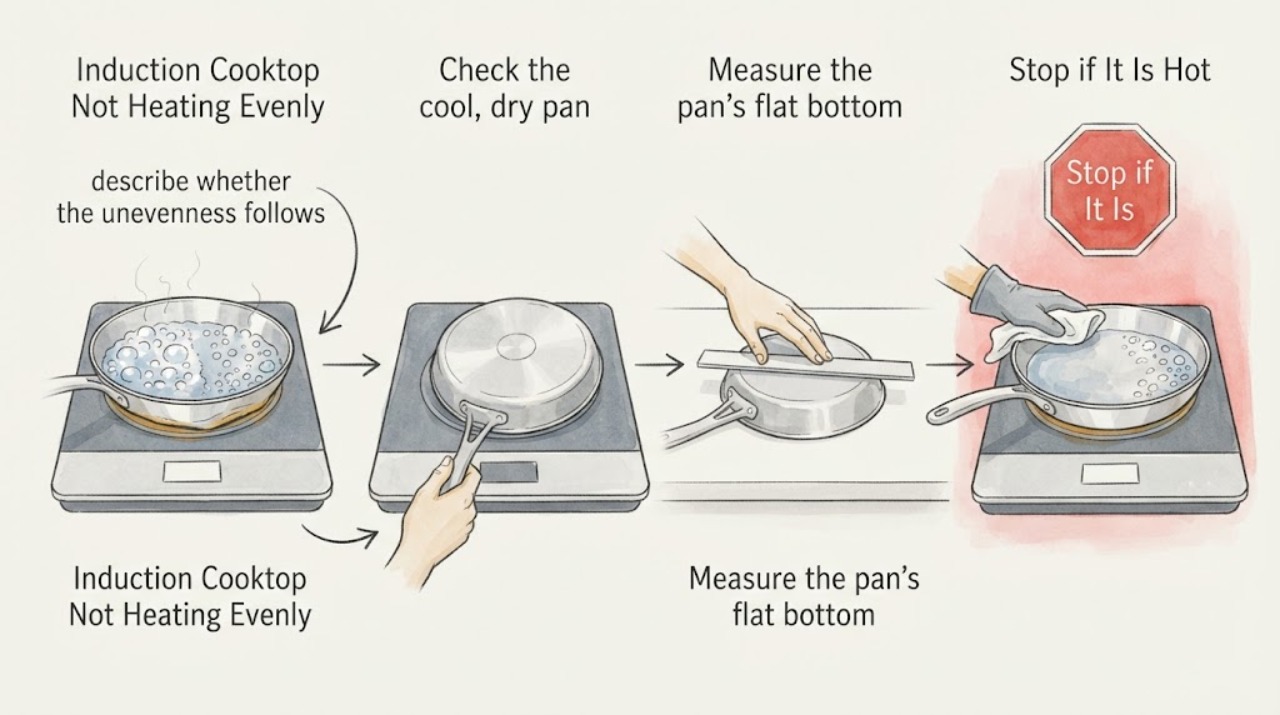
With the cooktop and pan cool enough to handle, describe whether the unevenness follows one pan, one cooking area, or only a multi-zone/Boost combination. Use one clean pan and one zone for the first comparison, changing only the pan or zone on the next comparison.
Expected result: The same pan shows the same uneven pattern on different zones, the pattern stays with one zone, or the result changes when another zone is turned off.
Next step: Continue with the cool pan-base and size checks. If the pattern stays with a zone after a known suitable pan is used alone, stop repeated cooking tests and prepare the model details for service.
Stop if: Stop using the cooktop for smoke, burning smell, sparks, a cracked or shattered glass surface, liquid entering the controls, or damaged electrical parts.
Why this matters
Why: A pattern that follows the pan makes the pan base or contact more likely; a pattern that remains with one zone or appears only under combined power use points toward a zone-specific or power-management condition.
-
Check 2
Check the cool, dry pan for the induction symbol or test the base with a magnet. Inspect the base with a straight edge while rotating it, and do not use a pan with a visible gap, rocking motion, or warped, rounded, ribbed, or dented bottom for the comparison.
Expected result: The pan is magnetic and flat across the working base, or only part of the base responds to the magnet or the straight edge reveals uneven contact.
Next step: Repeat the comparison with a different flat-bottomed pan designed for induction. If the new pan heats evenly, retire the original pan for this cooktop or use it only as its construction permits.
Stop if: Do not inspect or alter the pan while it is hot, and do not scrape the glass or open the appliance to correct a cookware mismatch.
Why this matters
Why: A partially ferromagnetic base can heat different areas at different levels, and an uneven base can reduce contact, power transfer, and heat conduction. A magnet response by itself does not prove uniform heating across the base.
-
Check 3
Measure the pan’s flat bottom rather than its top opening, select the cooking area that best matches that measurement, and center the pan within the marked area. Keep the base clean and dry and avoid a pan that is substantially oversized for the zone.
Expected result: The pan base is close to the zone size and centered, or the base is much smaller, extends beyond the marked area, or is off-center.
Next step: Use the model’s marked minimum and maximum area when available, then repeat the one-pan test. If placement corrects the result, the cooktop is responding to cookware geometry rather than showing a confirmed internal fault.
Stop if: Do not slide a heavy pan across the glass or continue if the surface is cracked or the control area has liquid in it.
Why this matters
Why: Induction detection and maximum wattage depend on pan material, size, and positioning. A top-opening measurement can make a pan appear to match when its actual flat magnetic base does not.
-
Check 4
Run the known suitable, centered pan on one zone at a normal setting, then repeat with the paired zone or Performance Boost only if the model guide supports that function. Watch whether a displayed level changes when another area is activated.
Expected result: The pan heats evenly alone but slows or changes level only when another area or Boost is active, or it remains uneven with one zone and one suitable pan.
Next step: Use the model guide’s zone combinations and settings. If uneven heating persists on one zone with a suitable pan, stop testing and arrange qualified service rather than replacing an induction component from the symptom.
Stop if: Do not change electrical settings or access the breaker panel unless qualified and following the model installation instructions.
Why this matters
Why: KitchenAid documents lower output when paired Performance Boost areas compete and automatic limits when the configured total power would be exceeded. A persistent one-zone result after cookware checks is not explained by that expected power-sharing behavior.
-
Check 5
If the output changes after extended high-power use, turn all controls off, let the cooktop cool naturally, and check only the visible ventilation path for blockage. Restart only as the model guide permits and compare with the same suitable pan on one zone.
Expected result: Heating returns after cooling and the ventilation path is clear, or the cooktop remains uneven, shuts down, shows an error, or becomes unusually hot again.
Next step: Keep the ventilation path clear and monitor only if operation is normal. Arrange qualified KitchenAid or appliance service if the symptom recurs or the unit remains abnormal.
Stop if: Stop immediately for smoke, burning odor, sparks, cracked glass, liquid at the controls, or damaged power parts.
Why this matters
Why: Poor ventilation or excessive internal temperature can lengthen heating or cause shutdown, but recovery after cooling does not identify a failed internal part. Recurrence requires service diagnosis.
Use your observations
Decision map
Find the observation that best matches what you see, then follow the next safe action.
-
PATH 01Next step
What you see
The uneven heating follows one pan, while a second flat, induction-compatible pan heats evenly on the same zone.
Do this next
Use the pan that performs evenly and follow the cookware limits in the model guide. Do not replace a cooktop part based only on the first pan’s result.
Why this path and its safety boundary
Why it matters: The original pan’s flatness, magnetic coverage, construction, or base-to-zone fit is more likely than a confirmed cooktop fault.
-
PATH 02Next step
What you see
A suitable pan heats evenly on one zone alone but becomes slower or changes level only when a paired zone or Performance Boost is active.
Do this next
Use a permitted zone combination and setting from the exact model guide, or cook with one area active when full output is needed.
Why this path and its safety boundary
Why it matters: The result is consistent with the model’s power-management behavior, in which a paired area or configured total power can limit the available level.
-
PATH 03Next step
What you see
The same suitable, centered pan remains uneven on more than one zone when used alone, or the pattern stays with one zone after the pan checks pass.
Do this next
Stop repeated heating tests and arrange qualified KitchenAid or appliance service with the full model, affected zone, pan used, settings, and any displayed indication.
Why this path and its safety boundary
Why it matters: The cookware explanation is less likely, and the symptom may need diagnosis of the specific cooktop, control, power, or sensing system; the symptom alone does not identify a replaceable part.
-
PATH 04Next step
What you see
The glass is cracked, smoke or burning odor appears, sparks occur, liquid enters the controls, or electrical parts or wiring are visibly damaged.
Do this next
Stop using the cooktop and isolate power only if it is safe to do so without touching wet or damaged parts; arrange qualified appliance or electrical service. Do not operate a damaged surface or open the enclosure.
Why this path and its safety boundary
Why it matters: The situation has crossed into a glass, fire, liquid, or electrical hazard where uneven-heating diagnosis should stop.
Helpful context
Understand the symptom
First separate a pan problem from a zone problem
Describe what is uneven: one side of the food or pan stays cooler, the entire pan heats slowly, or the selected zone changes output. Let the cookware and glass cool before inspecting them. Then use the same clean pan for a controlled comparison, changing one variable at a time. An issue that follows one pan points toward its base or shape; an issue that follows one cooking area deserves a model-specific service check.
Check the pan base for magnetic coverage and flat contact
Use a pan marked for induction or place a magnet against its base as KitchenAid recommends. A magnet response does not prove that the entire base has the same magnetic construction: KitchenAid notes that some pans have only part of the bottom made from ferromagnetic material, so different areas can heat at different levels or lower temperatures. With the pan cool and dry, place a straight edge across the base and rotate it; the official guide says there should be no visible gap or light for a flat base. Replace that test pan with another suitable flat pan if the base is warped, rounded, ribbed, dented, or uneven.
Match the flat base to the cooking area and center it
Measure the flat part of the pan base, excluding sides that curve upward; the diameter printed on cookware is often its top opening and may be larger than the heating base. Select the cooking area that best matches the base, place the pan centrally, and keep its bottom within the marked area. KitchenAid guidance says cookware should be about the same size as the cooking area and should not extend more than 1/2 inch beyond it; use the complete manual for your model if its markings differ. Recheck the pan after it has not been moved or lifted during the comparison.
Compare power settings with only one zone active
If the uneven result appears while two areas on the same side or zone are active, turn the other area off and compare again at an ordinary heat level. KitchenAid documents that Performance Boost operates only one cooking area in a cooktop zone; the area set later can leave the other at a lower level. Its support material also says some models automatically limit zone levels when the configured cooktop power limit would be exceeded. A lower displayed level or slower heating only while paired or Boost settings are in use can therefore be a power-management behavior, not proof of a failed coil.
Check cooling and ventilation when output changes after use
If the cooktop becomes less consistent after extended or high-power cooking, turn the controls off and allow the unit to cool naturally. Keep the visible ventilation path clear and follow the installation instructions for the model. KitchenAid says poor ventilation can cause overheating, shutdown, and longer heating or boiling times. Do not remove the glass, cabinetry, or electrical covers to inspect the fan or power electronics.
When checks do not resolve it
Need a professional?
Call qualified KitchenAid or appliance service when the same compatible, flat, centered pan heats unevenly on more than one zone, the symptom remains tied to one zone, an error or shutdown recurs, or any internal inspection would be needed. Stop immediately for cracked glass, smoke, burning odor, sparks, liquid entering the controls, or damaged electrical parts; do not open the cooktop.
Common questions
FAQ
If a magnet sticks to the pan, why can heating still be uneven?
KitchenAid notes that some cookware has only part of its bottom made from ferromagnetic material. Those areas can heat at different levels or lower temperatures. Check the base’s flatness and compare another induction-compatible pan before blaming the cooktop.
Should I use a larger pan to fix uneven heating?
Use a pan whose actual flat base matches the cooking area; do not choose by the top-opening measurement alone. KitchenAid says the base should correspond to the zone and that cookware should not extend more than 1/2 inch beyond the marked area in the cited guidance. Follow the markings and manual for your model.
Is a lower setting while using two areas automatically a fault?
Not necessarily. KitchenAid documents that paired Performance Boost areas can leave one area at a lower level, and some models limit total power according to their configured maximum. Compare the same pan on one zone alone and use the exact model guide for supported combinations.
When should I stop testing the cooktop?
Stop when a suitable pan remains uneven on more than one zone, when the result stays with one zone after cookware checks, or when an error, shutdown, abnormal heat, cracked glass, smoke, burning odor, sparks, liquid near controls, or electrical damage appears. The symptom does not identify a safe replacement part or justify opening the cooktop.
Read the exact guide
Official sources
- KitchenAid Product GuideKitchenAid · Official KitchenAid product guide used for general cookware diagnostics; exact cooktop model instructions control where they differ.
- Not Operating Correctly - Induction CooktopKitchenAid · Official KitchenAid troubleshooting page with model-dependent behavior; use the exact owner manual for controls and power-reset details.
- KitchenAid 36 inch Sensor Induction Cooktops Quick Start GuideKitchenAid · Official quick-start page for the KCIG556J 36-inch sensor cooktop; cited as a placement example and not as a universal model procedure.
- Induction Compatible CookwareKitchenAid · Official KitchenAid product-help guidance for general induction cookware checks; use the complete model manual for model-specific markings or controls.
- Long Water Boiling Times - Induction CooktopKitchenAid · Official KitchenAid troubleshooting guidance for induction cooking performance; power settings and available functions vary by model.
- Performance Boost Flashing - Power Level Changes - Induction CooktopKitchenAid · Official KitchenAid guidance for models with the described Performance Boost zone behavior; do not assume the same pairing on another model.
Community feedback
Share a repair observation
Share a plain-text repair observation. Accepted observations are published automatically; this page may take a moment to update.