
On this page
Start here
Quick answer
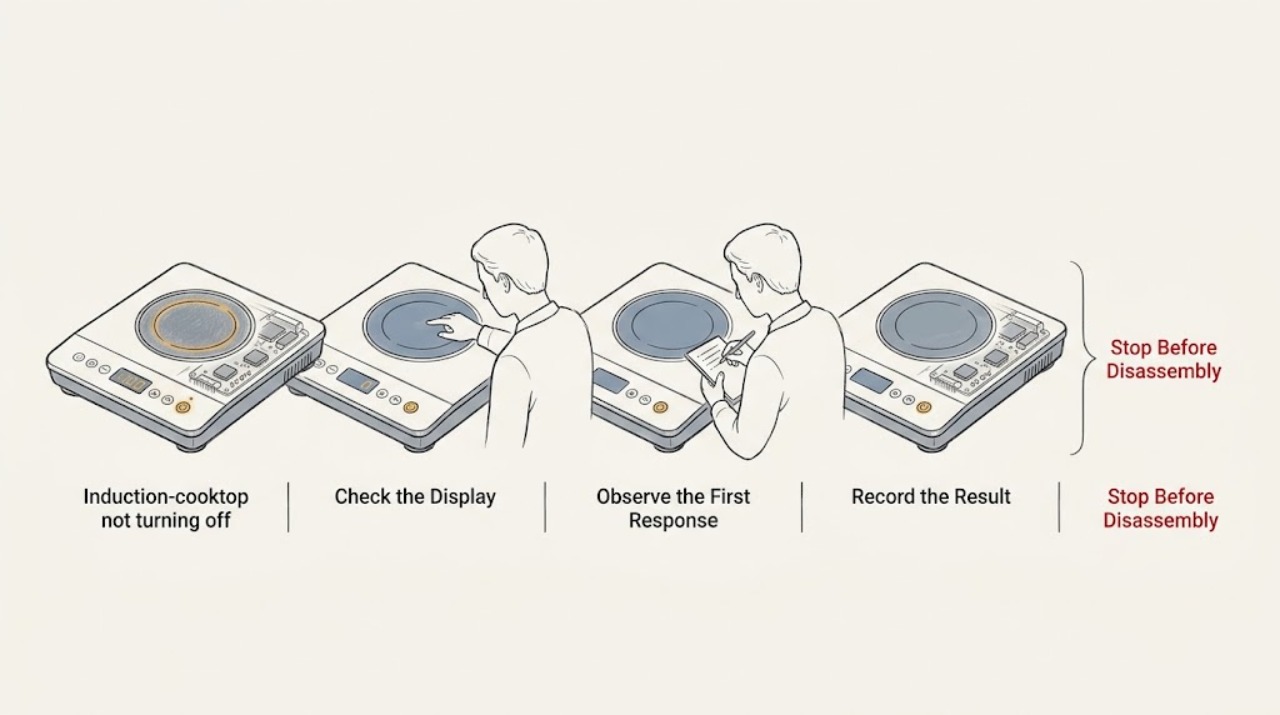
First separate a cooktop that is still heating from one that is only showing a residual-heat indicator. KitchenAid says an H indicator can remain after a zone is off because the glass is still hot, including when a neighboring zone or hot pan heated it; it should disappear as the zone cools. If a cooking zone remains active, remove cookware only when safe, press that zone's Off or the main Power control as directed for the model, clear liquids and objects from the touch panel, and release Key Lock if controls do not respond. If heat continues, the panel will not respond, the surface is damaged, or the fault returns after a safe power reset, stop using the cooktop and arrange qualified service.
Work through in order
Diagnostic checks
Use only checks that match the exact appliance or system and its official guide.
-
Check 1
From a safe position, read the display and identify whether a cooking-zone power level is active, the panel shows only H or HOT, or the entire panel is unresponsive. Leave a hot pan in place until it can be moved safely according to the cookware and model instructions.
Expected result: A zone power level remains active, only an H or HOT indicator remains, or the panel does not respond to a normal Off command.
Next step: For H or HOT only, keep the surface clear and allow it to cool without touching it. For an active zone or unresponsive controls, continue with the control-area and Key Lock checks; if heat continues unexpectedly, stop use and isolate the appliance only through a safe external method.
Why this matters
Why: An H indicator can mean residual heat even after the zone is off, including heat transferred from an adjacent zone or a hot pan. A continuing power level or a nonresponsive panel is a control or operating fault, not merely residual heat.
-
Check 2
Once the glass is safe to clean and no cooking command is needed, remove utensils and any object or spilled liquid from the touch-control area. Wipe the panel according to the model care instructions and dry it completely; do not press multiple keys through moisture or debris.
Expected result: The panel had a pan handle, utensil, food, or liquid over a key, or the panel was already clean and dry.
Next step: After the panel is dry, issue one normal Off command and observe the display. If it does not change, do not keep tapping or scrape the glass; proceed to the Key Lock check and then the safe power-reset boundary.
Why this matters
Why: KitchenAid notes that objects, food, or liquid on the control area can apply pressure or hinder touch responsiveness. A clean dry panel that still refuses Off makes a lockout or control fault more likely.
-
Check 3
Check the Key Lock indicator and use the model's documented Key Lock procedure if the controls are locked. KitchenAid describes holding the Key Lock control until the lock state changes; use the center of the intended key and follow the owner's instructions rather than forcing a cooking-zone control.
Expected result: The lock clears and Off responds, or the panel remains locked or unresponsive.
Next step: If Off responds, confirm every zone display is inactive and leave the surface to cool. If the lock cannot be cleared or the panel remains unresponsive, stop attempting control commands and continue only with an external power reset if the installation and breaker can be handled safely.
Why this matters
Why: Key Lock can prevent unintended setting changes, although KitchenAid notes that model behavior determines which power controls remain available. If clearing the lock restores Off, the cooktop was responding normally to a safety state; if not, the control surface or electronics need further diagnosis.
-
Check 4
Look for heat-related symptoms without touching the glass: unusually high surface heat, an overheated or flashing display, blocked ventilation around the cooktop, an empty pan, or objects pressing the control area. Remove only a safe, cool object and wait for the cooktop to cool; do not move a hot pan by hand.
Expected result: The cooktop is excessively hot, ventilation is restricted, an empty pan was heating, or none of these conditions is present.
Next step: Stop heating, keep the area clear, and allow the cooktop to cool. If an overheating indication returns or the surface remains active after cooling, arrange qualified service rather than trying to cool or repair the electronics yourself.
Why this matters
Why: KitchenAid says high internal electronic temperature can switch the control panel off, and poor ventilation can contribute to overheating. An empty pan or a control-area obstruction can also produce abnormal behavior. These conditions do not justify operating a cooktop that will not reliably turn off.
-
Check 5
If the cooktop is cool enough for a controlled reset and the external electrical panel is accessible without removing covers, switch off the cooktop's breaker using the installation's normal procedure, wait the interval specified by KitchenAid, restore power, and observe the display before placing cookware on a zone.
Expected result: The control returns to normal after the reset, or the same active-zone, hot, error, or unresponsive behavior returns.
Next step: If the fault returns, leave the breaker off when appropriate and keep the cooktop out of use until a qualified appliance or electrical technician evaluates it. Never open the cooktop or test internal wiring yourself.
Why this matters
Why: KitchenAid uses a brief external power reset to clear some control and temperature states. A repeated symptom after a reset is evidence that the cause is not a temporary control state and may involve the touch interface, temperature sensing, power electronics, or installation.
-
Check 6
After any successful Off command or reset, confirm each zone's power display is inactive and distinguish a cooling H indicator from active heating. Keep cookware away from the surface until the residual-heat indicator clears and check whether any control activates without being touched.
Expected result: Only the residual-heat indicator remains and later clears, or a zone remains powered, a control activates by itself, or an indicator returns after cooling.
Next step: Use the cooktop only when controls and displays behave normally. For any repeat or self-activating symptom, stop use, keep the external power isolated if safe, and arrange qualified service with the exact display behavior and model number.
Why this matters
Why: A temporary H indicator is compatible with normal residual heat. A zone that remains powered or a control that activates without a touch is abnormal and creates a burn or property risk even if the surface eventually cools.
Use your observations
Decision map
Find the observation that best matches what you see, then follow the next safe action.
-
PATH 01Safety boundary
What you see
The cooking zone is off but H or HOT remains on the display.
Do this next
Treat this as residual heat: keep the surface clear, do not touch it, and wait for the zone to cool. If the indicator does not clear after cooling or returns without a heat source, arrange service.
Why this path and its safety boundary
Safety stop: A live power level or unresponsive control requires the touch, lock, temperature, and external reset checks below.
-
PATH 02Safety boundary
What you see
An object, liquid, food, or a locked-control state is affecting the touch panel.
Do this next
Clear and dry the panel, then clear Key Lock using the model procedure. Issue one Off command and stop if the display does not respond.
Why this path and its safety boundary
Safety stop: If the panel is clean, dry, unlocked, and still cannot turn the zone off, treat it as a control or electronics fault and do not continue repeated commands.
-
PATH 03Safety boundary
What you see
The cooktop is unusually hot, poorly ventilated, or has an empty pan or an obstructed control area.
Do this next
Stop heating and allow the appliance to cool while keeping hands and cookware clear. Correct only an obvious external obstruction; persistent overheating needs qualified service.
Why this path and its safety boundary
Safety stop: A normal-temperature cooktop that will not turn off after control checks is more likely to need control-system diagnosis.
-
PATH 04Safety boundary
What you see
The same active or unresponsive behavior returns after a safe external power reset.
Do this next
Leave the cooktop out of use and arrange qualified appliance or electrical service. Do not remove the glass, open panels, or work on internal wiring.
Why this path and its safety boundary
Safety stop: Verify all zone displays are inactive and allow any residual-heat indicator to clear before normal use.
Helpful context
Understand the symptom
The word “on” can describe two different conditions. Induction power may be off while the glass and an H or hot-surface indicator remain warm, or a cooking zone may still be energized because a touch command was missed, the panel is obstructed, or the controls are locked. Do not touch the surface to decide which condition you have; use the display and whether the pan is still being heated.
KitchenAid's own sequence is to clear the controls, use the correct key or lock procedure, allow an overheated cooktop to cool, and reset power only when the external breaker can be operated safely. Internal induction electronics and wiring are not an ordinary-user repair.
Only after diagnosis
Potential parts
- touch-control interface
Consider this only after a qualified technician confirms that the panel remains unresponsive or self-activates after the surface is clean, dry, unlocked, and safely reset.
Control interfaces vary by KitchenAid model; confirm the complete model number before any part decision. - temperature sensor or control electronics
Consider this only when repeated overheating or residual-heat indication is diagnosed as an internal sensor or control fault by a qualified technician.
Internal induction components require model-specific diagnosis and qualified installation. - induction power control module
Consider this only if a professional confirms that a zone stays energized or the control fault returns after safe external checks and reset.
Do not infer fit or safety from appearance; use the model-specific technical and parts information.
When checks do not resolve it
Need a professional?
Stop using the KitchenAid induction cooktop and arrange qualified service if a cooking zone remains active after Off, the panel activates without being touched, the controls stay unresponsive after the panel is cleared and unlocked, overheating or a damaged glass surface is present, a breaker trips, an error returns after a safe external reset, or the residual-heat indicator does not clear after the surface has cooled. Do not open the appliance, remove the glass, or work on internal electrical parts.
Have this ready
- KitchenAid model number
- Whether a zone was actively heating or only H or HOT remained displayed
- Any error or indicator text and whether the panel was wet, obstructed, locked, or overheated
- Whether an external power reset changed the behavior and whether it returned
Common questions
FAQ
Why does my KitchenAid induction cooktop show H after I turn it off?
H means the cooking zone is still hot. KitchenAid says it can appear after that zone or an adjacent zone heats the surface, even when the zone is no longer active; it should disappear after cooling.
What should I do if my induction cooktop controls will not respond?
Clear objects, food, and liquid from the dry touch panel, use the center of the intended key, and clear Key Lock using the model instructions. If Off still does not respond, stop repeated attempts and arrange service.
Can an induction cooktop turn itself off because it is too hot?
Yes. KitchenAid says high internal electronic temperature can switch the control panel off, and poor ventilation can contribute to overheating. Let it cool and have recurring overheating evaluated.
When should I cut power to a KitchenAid induction cooktop?
Use an external breaker reset only according to the installation and model instructions and only when the panel can be operated safely. If a zone remains active, controls self-activate, a breaker trips, or the fault returns, keep the cooktop out of use and call a qualified professional.
Read the exact guide
Official sources
- Burner Turns Off During Cooking - InductionKitchenAid Product Help · KitchenAid induction cooking-zone automatic shutoff, overheating, ventilation, empty cookware, and control-area obstruction
- E_H - Induction CooktopKitchenAid Product Help · KitchenAid induction cooktop high-temperature control-panel shutdown and external power reset
- Not Operating Correctly - Induction CooktopKitchenAid Product Help · KitchenAid induction cooktop controls, Key Lock, ventilation, overheating, cookware, and power reset
- H - Residual Heat - Error Code - Induction CooktopKitchenAid Product Help · KitchenAid induction cooktop H residual-heat indicator after a zone or adjacent zone heats the surface
- Controls Not Responding - InductionKitchenAid Product Help · KitchenAid induction cooktop Key Lock, touch-key response, control-area cleaning, and service boundary
Community feedback
Share a repair observation
Share a plain-text repair observation. Accepted observations are published automatically; this page may take a moment to update.