
On this page
Start here
Quick answer
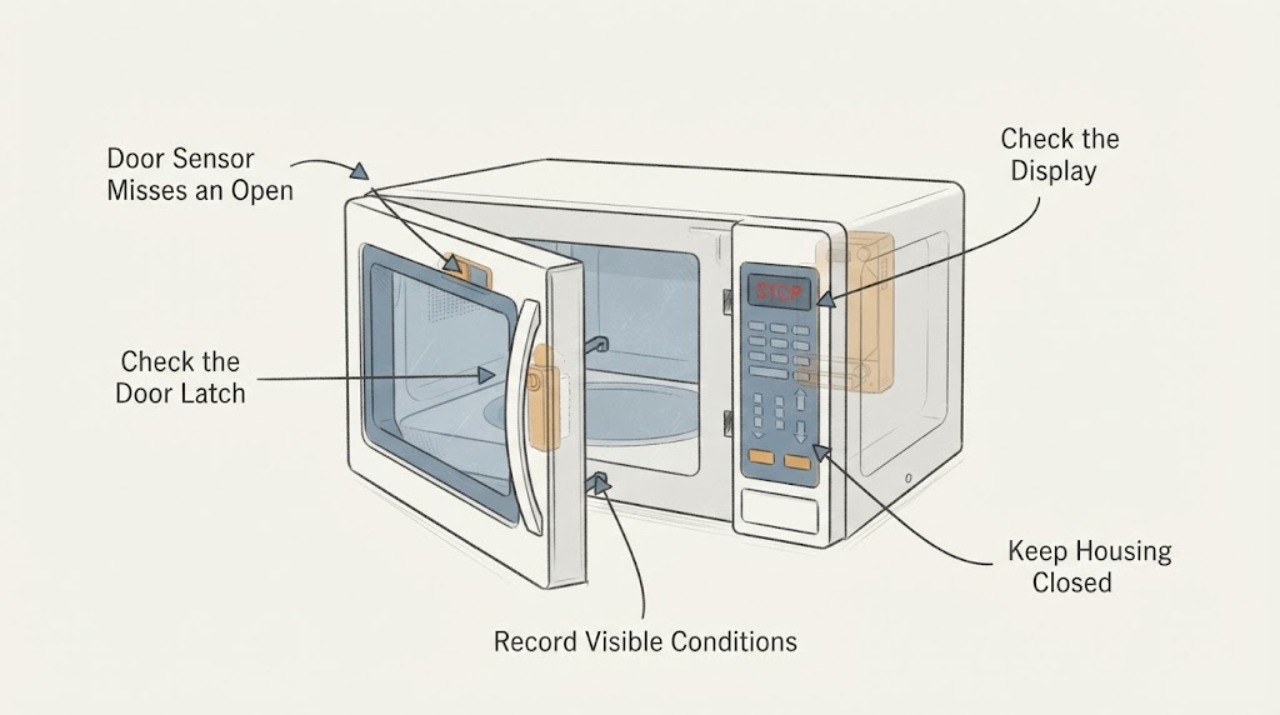
If the KitchenAid KHMS2040BSS1 sometimes fails to recognize that the door is open, stop using the microwave and disconnect power only by a safe, accessible means; do not open the cabinet or keep testing it. The door interlocks are a safety system, so replacing one switch does not prove that the latch, switch holder, wiring or related controls are safe. Check only the closed-door fit and visible latch area from outside for obstruction or damage. If the symptom remains, have a qualified microwave servicer inspect the complete interlock and door system and perform the required safety checks before the appliance is returned to service. Never adjust, bypass or defeat the interlocks, operate it with the door open, or test heating while watching the door.
Work through in order
Diagnostic checks
Use only checks that match the exact appliance or system and its official guide.
-
Check 1
Stop cooking use immediately if the cavity light, display state or other behavior sometimes fails to change when the door is opened. Disconnect power only through a safe, accessible plug or isolator; do not reach behind a built-in or over-the-range unit and do not keep opening and closing the door to make it pass.
Expected result: The microwave has ever continued a cooking function, humming, heating, turntable motion or other microwave operation after the door was opened, or the power cannot be safely isolated from outside.
Next step: Keep the appliance out of service and arrange qualified microwave service; use emergency help if there is smoke, arcing, burning odor or immediate danger.
Stop if: Do not energize the microwave, test heating, hold the door, or attempt to make it run with the door open.
Why this matters
Why: The safety interlock behavior cannot be trusted, and continued testing could expose the user to a dangerous operating condition or electrical hazard.
-
Check 2
With power isolated and without removing any panel, inspect the closed-door fit from the front: look for food or packing material at the latch/contact area, a door that sits crooked, a visibly damaged latch hook, loose hinge, broken seal or cabinet damage. Do not press, bend, shim or adjust any latch or switch holder.
Expected result: An obstruction or visible damage prevents the door from closing squarely, or the door appears closed but the symptom has occurred without an obvious external cause.
Next step: Remove only loose, visible debris without tools if it can be done safely; otherwise leave the unit off and give the observed condition to a qualified servicer. Do not retest heating after cleaning.
Why this matters
Why: An external obstruction or damaged door assembly can prevent reliable interlock actuation, while a clean-looking exterior still does not clear hidden interlock or control faults.
-
Check 3
Record the exact model and serial from the label only if it is readable without moving or opening the microwave, along with when the light or door-state symptom occurs and which switch was replaced. Use KitchenAid's official manuals and support path to identify the applicable documentation.
Expected result: The identifier is readable and exactly matches KHMS2040BSS1, or the label is inaccessible or differs from the assigned model.
Next step: Give the identifier and symptom history to the servicer and follow only the matching KitchenAid documentation. If the model cannot be confirmed, stop at professional identification rather than guessing a switch or holder.
Why this matters
Why: Model-specific service information and parts boundaries depend on the complete identifier; a similar-looking KitchenAid microwave must not be substituted.
-
Check 4
Have a qualified microwave servicer inspect the complete door and interlock system, including the latch/hinge fit, switch mounting, wiring, control response and seals, and complete the applicable safety checks before releasing the unit.
Expected result: The servicer can document a model-matched repair and verifies safe interlock operation and required safety checks, or cannot establish a safe repair path.
Next step: Use the documented repair only after professional verification. If safe operation cannot be established, keep the microwave out of service and discuss replacement with the servicer.
Why this matters
Why: Reliable operation requires the whole safety system to be verified; replacing a single switch or seeing continuity at one point is not enough to clear an intermittent door-state fault.
Use your observations
Decision map
Find the observation that best matches what you see, then follow the next safe action.
-
PATH 01Next step
What you see
The microwave has run, hummed, heated or continued a cooking function when the door was opened, or the user cannot safely isolate power.
Do this next
Keep it de-energized and arrange qualified microwave service. Do not use the door as a test instrument or open the cabinet.
Why this path and its safety boundary
Why it matters: This is a failed or untrusted safety-interlock condition, not a switch-adjustment problem for home testing.
-
PATH 02Next step
What you see
The door is visibly misaligned, a latch/hinge/seal is damaged, or debris prevents a square close.
Do this next
Leave the microwave off and have the door and interlock assembly assessed by a qualified servicer.
Why this path and its safety boundary
Why it matters: The door may not actuate its interlock system consistently; a visible problem does not justify bending or adjusting the mechanism.
-
PATH 03Next step
What you see
The door looks normal and the symptom is intermittent, including after one or more switches were replaced.
Do this next
Do not try another switch or run a heating test. Provide the exact model and replacement history to a qualified servicer for complete safety verification.
Why this path and its safety boundary
Why it matters: A normal exterior does not rule out a switch-holder, latch, wiring, control or related interlock fault, and the source post does not establish which one is responsible.
-
PATH 04Next step
What you see
The exact KHMS2040BSS1 identifier is confirmed and a servicer completes the model-matched repair and safety checks.
Do this next
Follow the servicer's release decision. Keep the unit out of service if any interlock, door, seal or leakage check remains unresolved.
Why this path and its safety boundary
Why it matters: Only documented professional verification establishes that the appliance can return to service; the brand and a replaced switch alone do not.
Helpful context
Understand the symptom
An oven light or control that intermittently misses an open door is not a harmless convenience fault. The microwave must reliably recognize door position before microwave power is used. A new switch does not establish that the entire interlock chain, latch geometry, switch holder, wiring and control input are correct.
This page keeps the checks outside the cabinet. The exact KHMS2040BSS1 model is preserved, but no internal switch adjustment, continuity test, door removal, leakage test or part-fit claim is provided for do-it-yourself work. Those steps belong to a qualified servicer with the model documentation and safety equipment.
When checks do not resolve it
Need a professional?
Arrange qualified microwave service before any further use. Treat operation with the door open, arcing, smoke, burning odor, damaged door glass or inability to safely isolate power as an immediate stop condition; leave the area and use appropriate emergency help when there is immediate danger.
Common questions
FAQ
Why can the problem remain after replacing a door switch?
The symptom does not identify a single part. The latch fit, switch mounting, wiring, control response, door condition and other interlocks may all need assessment, and one replacement does not verify the complete safety system.
Can I run the microwave briefly with the door open to see whether it detects it?
No. Do not test heating or any microwave operation with the door open. Keep the unit de-energized and use a qualified servicer for the required safety checks.
Can I adjust the latch or switch holder myself?
No. A latch or holder adjustment can affect the interlock system and microwave safety. Do only an external visual check for obstruction or visible damage, then arrange professional service.
What should I give the technician?
Provide the complete KHMS2040BSS1 model and serial, when the light or door state fails, whether any microwave operation continued after opening, which switches were replaced, and any visible door or latch damage. Do not open the cabinet to collect more information.
Read the exact guide
Official sources
- Tech Sheet - W11307970 - Rev AWhirlpool Corporation · Supports the safety boundary only: do not operate with the door open; check interlock, door closing, seals, hinges and latches; qualified service and leakage verification are required before release. It is not used to claim a KHMS2040BSS1-specific wiring layout or failed part.
- Door or Open Door Closed - Error Code - Over-the-Range MicrowaveWhirlpool Product Help · Supports external checks for obstruction and full door closure and escalation to a qualified servicer; it does not prove a KHMS2040BSS1-specific cause.
- Kitchen Appliance Manuals | KitchenAidKitchenAid · Supports entering the exact KHMS2040BSS1 model to obtain matching documentation and scheduling service; it does not itself diagnose the door sensor symptom.
Community feedback
Share a repair observation
Share a plain-text repair observation. Accepted observations are published automatically; this page may take a moment to update.