
On this page
Start here
Quick answer
Treat a damaged KitchenAid control panel as a safety and service issue before treating the oven as a normal no-heat fault. Do not continue operating an oven with a cracked, loose, wet, melted, sparking, or exposing panel, and do not open the console. If the panel is intact and only the display or controls seem inactive, use the exact model manual to check Control Lock, Demo Mode, or Delayed Start; KitchenAid lists those settings as possible reasons an oven may not heat. With controls off and the appliance cool, an intact surface may be cleaned gently with soap, water, and a soft cloth, then dried. A tripped breaker, recurring power fault, visible panel damage, or continued no-heat condition requires the circuit to remain safely off and qualified service or electrical assessment.
Before you begin
Safety first
- This no-model guide is limited to external observation, gentle cleaning of an intact cool panel, model-specific control-setting checks, and safe observation of breaker status. Do not continue operating a damaged oven, open the control console, touch wiring, perform live electrical testing, bypass controls, splice conductors, or select a control board, keypad, relay, element, sensor, or fuse from the symptom alone.
Work through in order
Diagnostic checks
Use only checks that match the exact appliance or system and its official guide.
-
Check 1
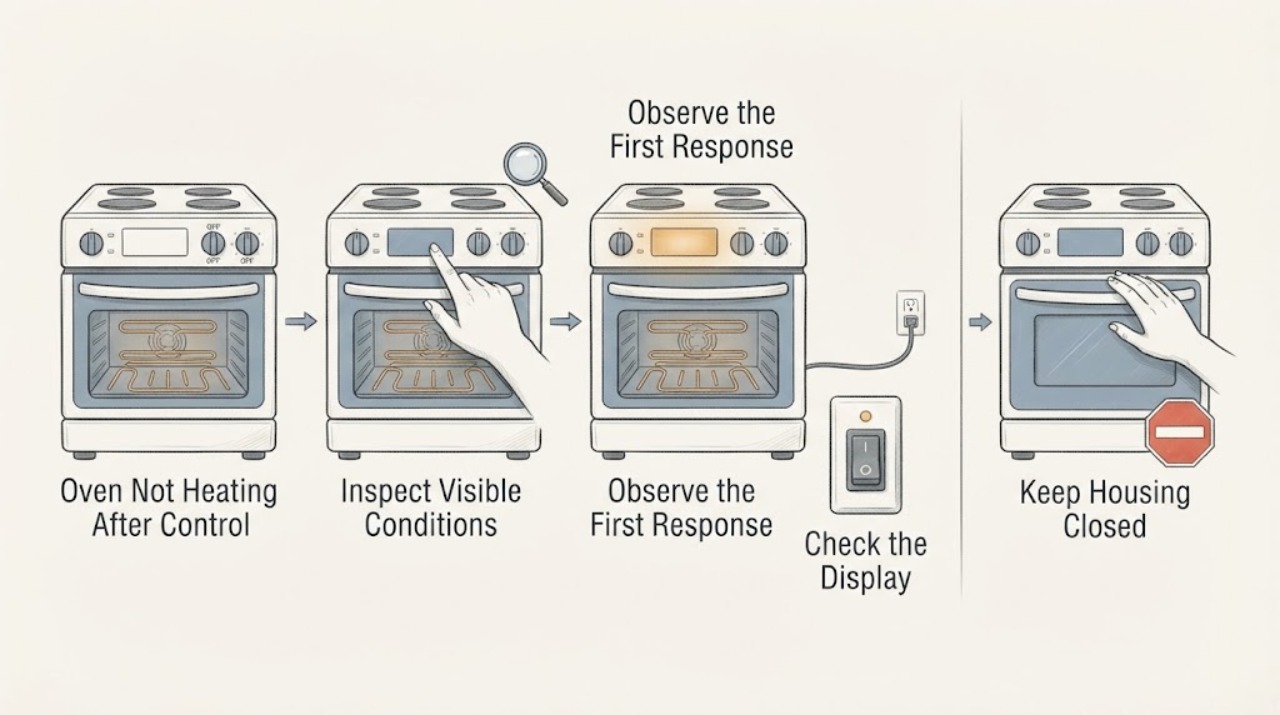
From outside the appliance, inspect the control panel without pressing damaged areas. Look for a crack, detached trim, liquid entry, melted or discolored plastic, exposed conductor, sparking, burning odor, unusual heat, or a panel that activates functions by itself.
Expected result: The panel is visibly damaged or electrically abnormal, or it is intact with no visible hazard.
Next step: For any visible or electrical damage, do not continue operating, do not open the console, and turn off the controlling breaker only if it is safely accessible; arrange qualified service. Continue only to the safe external identification checks when the panel is intact.
Why this matters
Why: Visible damage or abnormal electrical behavior cannot be separated safely from the no-heat symptom by a user-level control check. KitchenAid's safety and no-power guidance supports stopping use when an oven is damaged or an unresolved fault remains.
-
Check 2
If the panel is intact, all controls are off, and the oven is cool, look for food, grease, water spots, or steam residue on the display and keys. Clean only the outside surface with a soft cloth or sponge and the KitchenAid-approved mild cleaning method, then dry it completely.
Expected result: The display or keys respond normally after the surface is dry, or they remain unresponsive, intermittent, or physically distorted.
Next step: If response returns and the panel remains intact, continue with the model-specific no-heat checks. If the fault remains or any moisture entered damage, leave the oven off and request service; do not use abrasive cleaners, oven cleaner, steel wool, or a wet cloth on the controls.
Why this matters
Why: KitchenAid says soil, debris, or water spots can affect display response, but cleaning cannot repair a cracked panel, damaged keypad, or internal control fault.
-
Check 3
Only when the panel is intact and safely responsive, check the exact model's display for Control Lock, Demo Mode, or a Delayed Start setting. Confirm that Bake and the desired temperature were actually selected according to the model's owner manual; do not use a generic key sequence on an unknown model.
Expected result: A lock, showroom/demo indication, delayed start, or incorrect cycle is shown, or the controls appear normal but the oven still does not heat.
Next step: Correct a documented setting using the model manual and verify one safe operation only if there is no physical or electrical damage. If the control cannot accept commands or the oven remains cold, stop and arrange service rather than opening the console.
Why this matters
Why: KitchenAid lists these operating states as possible reasons an oven may not heat, while a control panel malfunction remains only a possible cause and is not proven by the symptom alone.
-
Check 4
Observe the household breaker or fuse status from a safe position and note whether it tripped when the oven was selected. Do not remove covers, access terminals, replace a breaker with a larger one, or repeatedly reset a tripping circuit; leave electrical testing to a licensed electrician.
Expected result: The breaker is tripped, trips again, the oven has no supply, or the supply appears normal but the oven remains cold.
Next step: Leave the oven off when the breaker trips again or the panel is damaged, and contact a licensed electrician or qualified appliance service as appropriate. Do not infer a failed element, relay, control board, or wiring from the breaker alone.
Why this matters
Why: KitchenAid identifies power supply, amperage, wiring, and breaker conditions as possible no-heat causes, but a repeat trip can indicate an electrical fault that needs a qualified assessment rather than more operation.
-
Check 5
Prepare the complete model number, whether the oven is a wall oven or range and gas or electric, a description or photo of the panel damage, the display state, the selected cycle, any error message, breaker behavior, and whether the cavity heats at all. Keep the appliance off while arranging service for damage or persistent no heat.
Expected result: The panel is damaged, the oven does not heat after safe model-specific checks, an error returns, or internal access would be needed.
Next step: Request KitchenAid-qualified appliance service and use a licensed electrician for supply or wiring concerns. Do not continue cooking, bypass controls, splice wires, or replace the control panel without model-specific professional diagnosis.
Why this matters
Why: KitchenAid's support pages route unresolved oven faults to model-specific manuals, qualified service, or a licensed electrician; the public symptom does not identify a safe replacement part or internal repair.
Use your observations
Decision map
Find the observation that best matches what you see, then follow the next safe action.
-
PATH 01Next step
What you see
The control panel is intact and the display shows Control Lock, Demo Mode, or Delayed Start, with no electrical or physical damage.
Do this next
Use the exact model owner manual to change the setting or cancel the delay, then verify one normal operation only while the appliance remains safe. Escalate if it still will not heat.
Why this path and its safety boundary
Why it matters: A documented operating setting may be preventing a heating cycle from starting; this does not prove a failed component.
-
PATH 02Next step
What you see
The panel is intact but dirty or damp from residue or steam, and there is no crack, looseness, odor, heat, or exposed wiring.
Do this next
Turn controls off, let the oven cool, clean and dry the accessible surface using KitchenAid's gentle method, then use the model-specific no-heat checks. Do not wet a damaged surface.
Why this path and its safety boundary
Why it matters: Surface contamination can affect display response, but it cannot explain every no-heat condition.
-
PATH 03Next step
What you see
A breaker trips again, the oven has no supply, or the electrical condition is uncertain after a no-heat attempt.
Do this next
Leave the oven off and contact a licensed electrician or qualified appliance service. Do not repeatedly reset the breaker or perform live tests.
Why this path and its safety boundary
Why it matters: KitchenAid identifies supply and breaker conditions as possible causes, but repeated tripping requires electrical assessment rather than continued operation.
-
PATH 04Next step
What you see
The panel is cracked, loose, wet, melted, sparking, hot, self-activating, or otherwise damaged, or the oven remains cold after safe external checks.
Do this next
Do not continue operating or open the console. Disconnect power or turn off the breaker only when safely accessible, keep others away from the damaged appliance, and arrange qualified service.
Why this path and its safety boundary
Why it matters: The condition is an unresolved damaged-appliance or control fault with electrical and heat risk; the exact internal cause cannot be established from the supplied identity.
Helpful context
Understand the symptom
A no-heat symptom combined with control-panel damage changes the first decision. A locked or demo-mode control can prevent heating on an intact appliance, but a cracked, loose, wet, melted, or sparking panel can expose a user to electrical or heat hazards. Do not press through a damaged surface or remove the console to identify a board, keypad, relay, or wiring fault.
If the panel is physically intact and the concern is a dark or unresponsive display, use the exact KitchenAid model instructions for Control Lock, Demo Mode, and the selected bake cycle. A clean, dry surface can be wiped only with the gentle method KitchenAid specifies for the wall-oven control panel. Do not apply liquid to a crack or keep resetting a control that behaves abnormally.
KitchenAid's no-power guidance directs owners to stop operating an unresolved wall-oven problem and disconnect power or turn off the controlling breaker. Keep the oven off for visible panel damage, repeat breaker trips, burning odor, smoke, arcing, exposed wiring, or a panel that becomes hot, and give the technician the model number, fuel type, damage description, display state, and any breaker or error behavior.
When checks do not resolve it
Need a professional?
Call qualified KitchenAid service immediately for a cracked, loose, wet, melted, sparking, hot, or self-activating control panel, repeat breaker trips, burning odor, smoke, exposed wiring, or an oven that remains cold after safe model-specific setting checks.
Safety scope: This no-model guide is limited to external observation, gentle cleaning of an intact cool panel, model-specific control-setting checks, and safe observation of breaker status. Do not continue operating a damaged oven, open the control console, touch wiring, perform live electrical testing, bypass controls, splice conductors, or select a control board, keypad, relay, element, sensor, or fuse from the symptom alone.
Common questions
FAQ
Can a damaged KitchenAid control panel cause an oven not to heat?
KitchenAid lists a malfunctioning control panel among possible causes for an electric oven that does not heat, but the symptom does not prove that diagnosis. If the panel is physically damaged or electrically abnormal, stop operating and arrange qualified service rather than testing the console.
Can I clean the KitchenAid oven control panel?
Only if it is intact, the controls are off, and the oven is cool. KitchenAid recommends soap, water, and a soft cloth or sponge, followed by rinsing and drying; avoid abrasive cleaners, steel wool, gritty cloths, abrasive paper towels, and liquids on cracks or openings.
Should I reset the breaker when the KitchenAid oven will not heat?
First observe whether the breaker is tripped and follow the exact model guidance. Do not repeatedly reset a breaker, and do not reset or operate an oven with visible panel damage, smoke, odor, arcing, exposed wiring, or moisture. A recurring trip needs a qualified electrical or appliance assessment.
Could Demo Mode or Control Lock explain a KitchenAid oven that does not heat?
Yes, on models that provide those features. KitchenAid says Demo Mode can leave heating elements off and Control Lock can prevent commands. Check the exact owner manual only when the panel is intact and safe; a damaged panel should remain off for service.
Read the exact guide
Official sources
- Bake Cycle Not Working - Wall OvenKitchenAid · Opened KitchenAid wall-oven guidance. It says Demo Mode can leave heating elements off, Control Lock can prevent commands, and model manuals control the settings.
- Oven Not Heating - Powering On - Electric RangeKitchenAid · Opened KitchenAid support guidance for electric ranges. It covers Control Lock, Demo Mode, Delayed Start, installation/power conditions, and service routing; setting details remain model-specific.
- Nothing Is Working - No Power - Wall OvenKitchenAid · Opened KitchenAid wall-oven guidance. It addresses control lock, supply/amperage, breaker or fuse conditions, and explicitly says not to continue operating when unresolved and to disconnect power or turn off the breaker.
- Display Not Scrolling - RangeKitchenAid · Opened KitchenAid range guidance. It distinguishes Control Lock from soil/debris/water spots and specifies mild soap, warm water, and a clean microfiber cloth for an intact display surface.
- Oven Not Working - ElectricKitchenAid · Opened KitchenAid electric oven/range guidance. It covers power-outage behavior, Control Lock, Demo Mode, Delayed Start, breaker/fuse conditions, and qualified electrical service.
- Cleaning the Control Knobs or Control Panel - Wall OvenKitchenAid · Opened KitchenAid wall-oven cleaning guidance. It requires controls off and the appliance cool before cleaning, recommends soap, water, and a soft cloth or sponge, and prohibits abrasive materials.
- Oven Not WorkingKitchenAid · Opened KitchenAid oven support index. It directs owners to model-number manuals and service for electric or gas oven problems, without establishing a universal component diagnosis.
- Oven Not Heating Up: Possible Causes and FixesKitchenAid · Opened KitchenAid overview. It identifies electrical supply, heating elements, temperature sensors, and a malfunctioning control panel as possible electric-oven no-heat causes and directs damaged-part work to a licensed technician.
- KitchenAid Oven Owner's ManualKitchenAid · Opened official KitchenAid oven owner's manual PDF. Its safety section states not to operate an oven if it is damaged or not working properly; the manual is an older model document, so no model-specific repair details are generalized from it.
Community feedback
Share a repair observation
Share a plain-text repair observation. Accepted observations are published automatically; this page may take a moment to update.