
On this page
Start here
Quick answer
On the LG DLE3500W, a solid Cool light does not by itself mean the dryer is stuck in cool air or that its thermal fuse has failed. LG says the Cooling/Drying indicators can be normal cycle status and that the cooling portion begins near the end of the cycle. First distinguish the control's Low temperature from a Dry Level setting: LG says Dry Level Low leaves more moisture in the load and does not change the drying temperature. Then use a properly spun, moderate load, check the lint filter and accessible exhaust path, and compare the exact cycle result with a permitted Time Dry setting only when there is no warning or safety sign. If the drum tumbles but never produces normal warmth, a Flow Sense or airflow warning remains, the same prepared load stays damp, or the dryer overheats, smells burnt, smokes, sparks, or trips power, stop using it and arrange qualified LG service. Do not bypass the vent, open the cabinet, or perform live electrical tests.
Work through in order
Diagnostic checks
Use only checks that match the exact appliance or system and its official guide.
-
Check 1
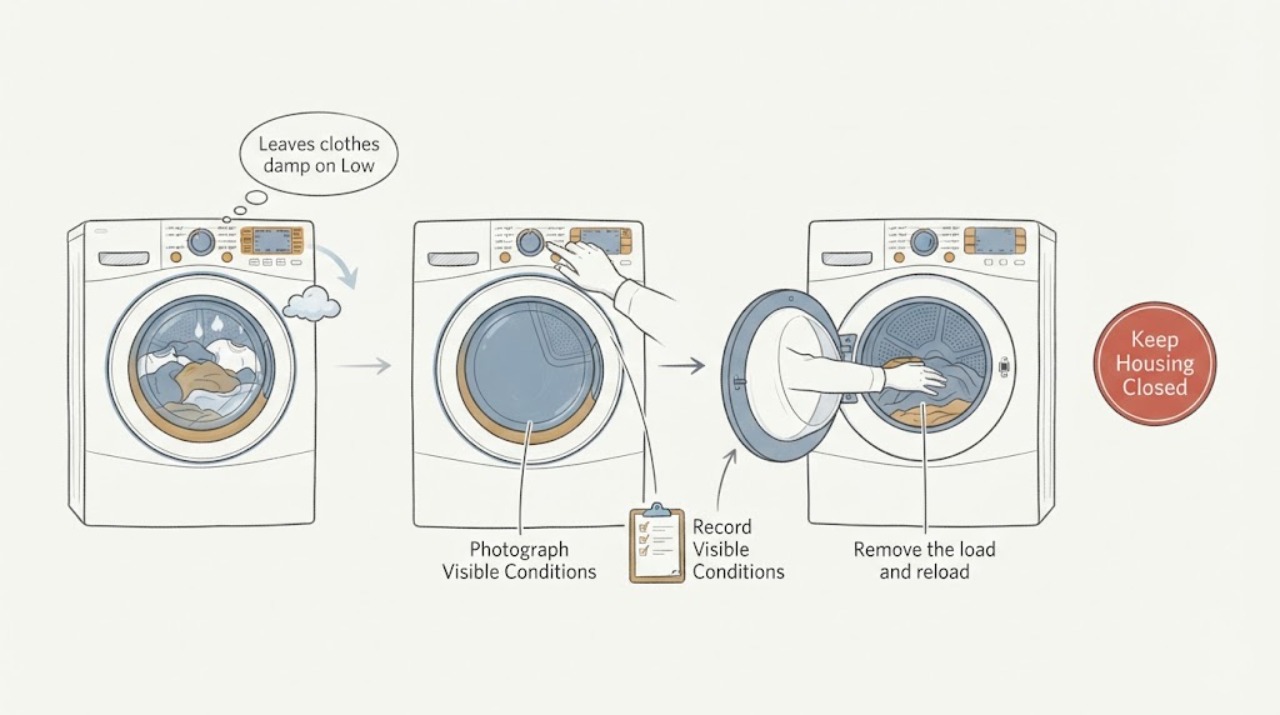
Read and photograph the rating label, confirming the complete LG DLE3500W suffix and market. Compare the panel with LG's DLE3500W support page, then record whether the selected control is Low temperature, Dry Level Low, or another setting, along with the cycle name and the exact Cool/Dry light pattern.
Expected result: The label matches DLE3500W, the suffix is different or unreadable, the panel shows Low temperature, the panel shows Dry Level Low, or a complete warning/code is present.
Next step: Use the full model and manual for the control meanings. If the label or display is uncertain, do not apply another LG dryer's button sequence or assume the heater, sensor, or thermal fuse is bad.
Stop if: Do not open the console, enter service mode, bypass a safety control, or continue if there is smoke, burning odor, sparking, abnormal heat, or a repeated breaker trip.
Why this matters
Why: LG supplies manuals and support by exact product identity. Low temperature and Dry Level Low are different user choices, and a displayed code takes precedence over interpreting the light by appearance.
-
Check 2
With the dryer cool and safely off, record the cycle timeline from outside: whether the Dry light flashes or remains active, whether the Cool light is present throughout or only near the end, whether the drum tumbles, and whether clothes and drum feel normally warm only after the cycle is stopped and safe to open. Do not use the light alone to classify the heat state.
Expected result: The Cool light is present as documented near cycle end, the light is present from the start but the dryer produces normal warmth, the drum tumbles with no normal warmth, or the display shows a warning.
Next step: If the light pattern matches normal status and warmth is present, continue to the load and airflow checks. If the drum tumbles without normal warmth, stop repeated cycles and arrange qualified LG service after safe external observations.
Stop if: Do not reach into a moving or hot drum, repeat high-heat cycles, or continue for smoke, burning odor, scorching, sparking, abnormal heat, or a cycle that cannot be stopped normally.
Why this matters
Why: LG describes Cooling/Drying indication as normal cycle status, so the light alone cannot prove no heat. Tumbling with no normal warmth or a persistent warning moves the case toward power, heating, airflow, or service; a normal end-stage light does not explain damp laundry by itself.
-
Check 3
Remove the load and reload only laundry that completed its washer spin. Use a moderate load with thick items separated from thin items, and avoid judging the result from one tightly rolled bulky item or a very small load. Select the cycle that matches the fabric label and follow the exact manual's dryness choice.
Expected result: A small, bulky, mixed-thickness, or unusually wet load ends damp, while a moderate evenly distributed load dries better, or both loads remain damp.
Next step: If the result improves with the prepared load, keep using suitable load sizes and settings. If it does not, inspect the filter and exhaust path before assuming a sensor or heater part.
Stop if: Stop if clothes become scorched, unusually hot, smoky, or the dryer shows an airflow or electrical warning.
Why this matters
Why: Uneven moisture and poor contact can make sensor drying end before thick areas are dry; a load with excess washer water also takes longer. If a correctly prepared load remains damp, load setup is no longer a sufficient explanation.
-
Check 4
When the dryer is cool and off, clean and reseat the lint filter according to the owner material. From ordinary safe access, inspect the visible exhaust hose and outside flap for crushing, kinks, lint, or a blocked termination; do not move the dryer, open a wall, reach into the duct, or disconnect the vent.
Expected result: The filter is coated or not seated, the visible hose is restricted, the outside flap is blocked, a Flow Sense/d80/d90/d95 warning appears, or the accessible path looks clear.
Next step: Correct only accessible lint or a plainly visible external restriction. If the warning persists or the concealed path needs cleaning, stop heated use and arrange qualified vent or LG service.
Stop if: Do not bypass the exhaust, operate with a disconnected or damaged vent, open the wall or cabinet, or continue after abnormal heat, burning odor, smoke, or sparking.
Why this matters
Why: LG identifies lint and exhaust restriction as common reasons for long or ineffective drying. A clear visible hose does not clear a concealed wall duct, and an airflow warning is not permission to keep using heated cycles or bypass the vent.
-
Check 5
After the load, filter, and accessible exhaust checks, compare one properly sized load on the selected Sensor Dry cycle with a permitted Time Dry cycle from the DLE3500W owner's material, only when no warning or safety symptom is present. Record whether Time Dry produces normal warmth and tumbles, whether Sensor Dry ends early, and whether the Cool light changes near the end.
Expected result: Sensor Dry ends early while thick items remain damp, Time Dry produces warmth and dries more fully, both settings leave the load damp, or neither setting produces normal warmth.
Next step: Use the result to describe the fault to LG service. Do not use Time Dry as a permanent bypass for a damaged sensor, restricted vent, abnormal heat, or a dryer that lacks normal warmth.
Stop if: Stop immediately for scorching, smoke, burning odor, sparks, abnormal heat, a repeated power trip, or any inability to stop the dryer normally.
Why this matters
Why: LG says Dry Level Low can intentionally leave moisture and that Time Dry can add drying when needed. A difference between the settings points toward cycle/load sensing or a selected dryness level; failure in both settings raises airflow, supply, heater, or service questions without naming a part.
-
Check 6
Prepare a service record with the complete DLE3500W model and suffix, market, cycle and temperature/dryness selections, Cool/Dry light timing, load size and spin result, filter and exhaust observations, whether Time Dry produced warmth, and every warning or safety symptom. Keep the dryer off if the result is unexplained or abnormal.
Expected result: A prepared load remains damp, the Cool light is accompanied by no normal warmth, an airflow warning persists, a displayed code returns, or the dryer overheats or produces an odor.
Next step: Give the record and photos to LG or a qualified appliance technician and ask for model-specific diagnosis. Protect clothing and stop using the dryer until a hazard or persistent no-heat condition is addressed.
Stop if: Leave the dryer off for smoke, burning odor, scorching, sparking, exposed wiring, abnormal heat, a hot cord, or a repeated breaker trip; do not restore power as a test.
Why this matters
Why: The timeline separates a normal status light or selected Low dryness level from a persistent airflow, heating, control, or sensor fault. The observations do not identify a thermal fuse, heater, thermistor, or board for user replacement.
Use your observations
Decision map
Find the observation that best matches what you see, then follow the next safe action.
-
PATH 01Next step
What you see
The Cool light follows LG's normal cycle indication, the drum produces normal warmth during the dry portion, and the issue occurs only with Dry Level Low or an unsuitable load.
Do this next
Use the exact fabric-appropriate cycle and a properly spun moderate load. If more dryness is needed, use the model-approved Time Dry option once; reassess if the same prepared load remains damp.
Why this path and its safety boundary
Why it matters: The light is a status cue, while the selected dryness level or load preparation better explains the damp result. LG says Dry Level Low leaves more moisture and does not change temperature.
-
PATH 02Next step
What you see
A moderate, properly spun load remains damp, the filter or exhaust path is restricted, or Flow Sense/d80/d90/d95 appears.
Do this next
Clean only the accessible filter and visible outlet path. Stop heated use and arrange qualified vent or LG service if the warning or long-dry symptom remains.
Why this path and its safety boundary
Why it matters: Moist air may not be leaving at the expected rate, so the damp result is not a reason to blame the moisture sensor or heater first. LG treats persistent airflow warnings as a vent or service issue.
-
PATH 03Next step
What you see
Sensor Dry ends early but a permitted Time Dry run produces normal warmth and dries the same properly prepared load more fully.
Do this next
Record the exact cycle and dryness selection. If the pattern persists with suitable loads and settings, arrange LG service; do not use Time Dry to bypass a sensor, warning, or physical fault indefinitely.
Why this path and its safety boundary
Why it matters: This supports a cycle-setting, load-contact, or moisture-sensing branch rather than proving that the Cool light represents no heat. Dry Level Low can also intentionally leave moisture.
-
PATH 04Next step
What you see
The drum tumbles but neither Sensor Dry nor Time Dry produces normal warmth, or a code such as nP, PS, tE, or a persistent airflow warning appears.
Do this next
Leave the dryer off and arrange qualified LG appliance or electrical service with the code, model, cycle, and external observations. Do not open the terminal area or cabinet.
Why this path and its safety boundary
Why it matters: A supply, heating, thermistor, airflow, or control problem is possible. LG's code guidance routes persistent codes to service and does not support opening energized wiring or naming a part from the light.
-
PATH 05Next step
What you see
The Cool light is accompanied by scorching, smoke, burning odor, sparking, abnormal heat, a hot cord, exposed wiring, or a dryer that cannot stop normally.
Do this next
Stop using the dryer, isolate power only from a safe accessible position, leave the area for smoke or fire, and obtain qualified appliance or electrical service. Do not restart it to compare settings.
Why this path and its safety boundary
Why it matters: This is an immediate fire, electrical, or overheating boundary, not a cycle-light interpretation.
Helpful context
Understand the symptom
Start with the light, not a part. LG's opened DLE3500W support page confirms the exact electric-dryer family and its owner materials. LG's error guide says the Cooling/Drying light can be normal status and that cooling starts near the end of the cycle. The exact-model community case reports the same light behavior while thick or pocketed clothes remained damp, so a solid Cool light should be treated as a timing clue until heat and cycle behavior are observed separately.
Also separate Low temperature from Dry Level Low. LG says the Dry Level Low setting leaves more moisture and does not alter drying temperature; it is not a heater diagnosis. A properly prepared load that remains damp on a suitable cycle after the accessible lint and exhaust checks is a different branch from a load that is intentionally being stopped with moisture remaining. Keep the dryer out of service for abnormal heat, burning odor, smoke, sparks, or a repeated power trip.
When checks do not resolve it
Need a professional?
Arrange qualified LG appliance service when DLE3500W leaves a prepared load damp after accessible lint and exhaust checks, Sensor Dry and Time Dry disagree repeatedly, the drum tumbles without normal warmth, an airflow or nP/PS/tE warning returns, or the exact model/manual does not match. Stop immediately for scorching, smoke, burning odor, sparking, abnormal heat, exposed wiring, a hot cord, a repeated breaker trip, or inability to stop the dryer. Do not bypass the vent, open the cabinet or terminal area, perform live electrical tests, or choose a heater, fuse, thermistor, sensor, or board from the Cool light alone.
Common questions
FAQ
Does the Cool light mean my LG DLE3500W is not heating?
Not by itself. LG says the Cooling/Drying light is normal cycle status and that the cooling portion begins near the end of the cycle. Judge heat and drying separately by the cycle result and safe external observations; a drum that never produces normal warmth needs service rather than a light-based part guess.
Is Dry Level Low the same as Low temperature?
No. LG says Dry Level Low leaves more moisture for ironing and does not change drying temperature. Confirm which control is set to Low before treating damp clothing as a heater failure, and use the exact DLE3500W manual for the panel labels.
Why are thick items still damp when thin items are dry?
A small, bulky, mixed-thickness, or unusually wet load can produce an uneven sensor result and leave dense areas damp. Use laundry that completed its washer spin, load a moderate amount, separate thick and thin items, and compare with the model-approved Time Dry setting only after the filter and visible exhaust path are clear.
Should I replace the thermal fuse because the Cool light stays on?
Do not replace a fuse or heater from the light alone. Confirm the full DLE3500W identity, observe whether the drum has normal warmth, check the accessible lint and exhaust conditions, and record any code. If both suitable Sensor Dry and Time Dry runs lack normal warmth, arrange qualified LG service instead of opening the dryer.
Read the exact guide
Official sources
- Electric LG Dryer not drying all the way and "cool" LightAnecdotal exact-model observation only; it supports separating status-light interpretation from load, setting, and heat diagnosis.
- LG DLE3500W.ABWEEUS: Support, Manuals, Warranty & MoreLG USA · Exact DLE3500W model-family identity for the assigned article; use the full suffix and market to select the matching owner material. The page does not by itself diagnose the Cool light or name a failed part.
- LG Dryer - Error Code ListLG USA Support · General LG dryer guidance for the DLE3500W scope: Cooling/Drying light status, Wrinkle Care, airflow and heating code branches. Confirm exact model behavior before applying any model-specific control sequence.
- [LG Dryer] Remaining Dry Time Decreases Quickly, Laudry Still DampLG USA Support · General LG dryer guidance for the assigned DLE3500W scope: small-load sensor contact, filling the drum about halfway, and Dry Level Low leaving more moisture; the page notes that content may differ by model.
Community feedback
Share a repair observation
Share a plain-text repair observation. Accepted observations are published automatically; this page may take a moment to update.