
On this page
Start here
Quick answer
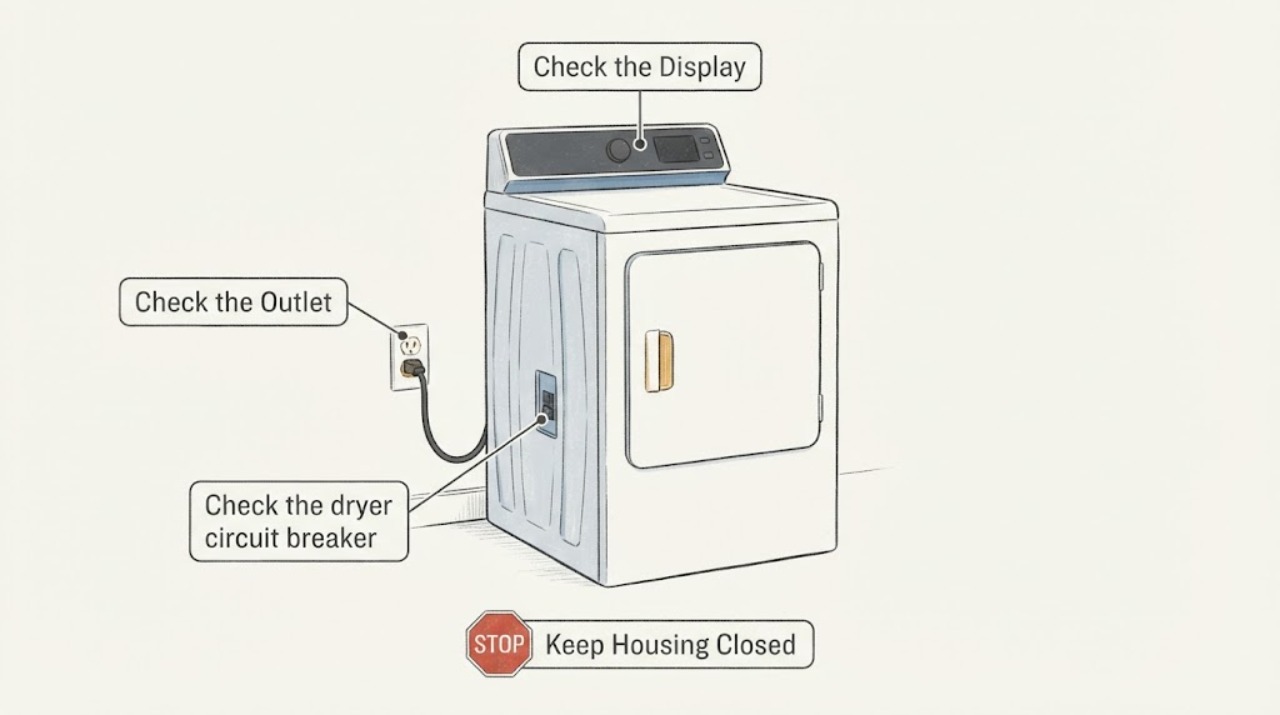
A technician's opinion that the power button is broken is not enough to identify the cause of an LG dryer that will not start. First separate a dead dryer from a powered dryer with an unresponsive control: check the drum light and display, verify the outlet and cord from the outside, and check the dryer breaker once. LG says that a lit drum light with no power-on response requires service, while an outlet that also fails with another small appliance points to the home's power supply. If the outlet and breaker are good but the dryer remains dead after LG's unplugged reset, stop there and arrange service; do not open the console or order a button/control part without the model number and a confirmed diagnosis.
Before you begin
Safety first
- Do not open the console or terminal block, probe live wiring, bypass controls, change the cord, or repeatedly reset a tripping breaker.
Work through in order
Diagnostic checks
Use only checks that match the exact appliance or system and its official guide.
-
Check 1
With the dryer cool and the door open, check whether the drum light, display or any indicator responds when the Power control is pressed; do not remove a panel.
Expected result: The drum light or display is on, or the dryer is completely dark.
Next step: If the drum light/display is on but the controls do not respond, proceed only to the dry-hands/center-press check if the panel is touch-sensitive, then arrange service if it still fails. If the unit is dark, continue with the outlet and breaker checks.
Why this matters
Why: A lit drum light with no power-on response means power is reaching at least part of the dryer and LG directs the user to service. A completely dark unit requires the external power checks below before blaming the button.
-
Check 2
From outside the appliance, confirm that the cord is fully seated at the wall and dryer connection, that no extension cord or multi-outlet arrangement is being used, and test the wall outlet with a small appliance only if doing so is safe.
Expected result: The small appliance also fails, or it works while the dryer remains dark.
Next step: For a dead outlet, stop using it and have the household electrical supply checked. For a working outlet, do not open the dryer; continue to the breaker/reset step or arrange LG service.
Why this matters
Why: If the test appliance fails, the outlet or household supply is suspect. If it works, LG's next distinction is the dryer's own connection or an internal dryer fault; this does not prove a failed power button.
-
Check 3
Check the dryer circuit breaker and reset it once according to the panel instructions; if the dryer remains dark, unplug it and perform LG's external hard reset by holding Power/Start for 5 seconds and Play/Pause for 5 seconds before reconnecting it.
Expected result: The drum light/display returns, the dryer starts, or it remains dead; note whether the breaker trips again.
Next step: Do not repeatedly reset a tripping breaker. If power does not return, stop troubleshooting and provide the complete model number and the observed light/outlet/breaker results to LG or a qualified technician.
Why this matters
Why: A recovered dryer points to an interrupted supply or reset state, not a confirmed button failure. A breaker that trips again or a dryer that stays dead after the reset requires electrical or appliance service.
-
Check 4
If the dryer has a touch-control panel, dry your hands and press the center of Power; on models that require it, hold Power or Start for one second rather than pressing an outer edge.
Expected result: The control responds from the center/one-second press, or it remains unresponsive despite the correct interaction.
Next step: If it responds, use the model manual for the cycle-start gesture. If it does not, stop at external checks and arrange diagnosis; do not replace the button or console based only on the technician's preliminary statement.
Why this matters
Why: LG explains that touch controls can ignore the outer edge, wet hands and a press shorter than the model's required duration. A correct interaction that still produces no response does not identify which internal control component failed.
Use your observations
Decision map
Find the observation that best matches what you see, then follow the next safe action.
-
PATH 01Next step
What you see
The drum light or display is on, but pressing Power/Start correctly produces no usable response.
Do this next
Stop at the external checks and request LG or qualified service with the complete model number; do not treat the button diagnosis as confirmed or open the console.
Why this path and its safety boundary
Why it matters: The dryer is receiving at least some power, but the supplied evidence cannot distinguish a touch-interface issue from another internal control or safety fault.
-
PATH 02Next step
What you see
The dryer and a safe test appliance are both dead at the wall outlet.
Do this next
Stop using that outlet and contact a qualified electrician or the responsible building service; do not substitute an extension cord or adapter.
Why this path and its safety boundary
Why it matters: The outlet or household electrical supply is the leading boundary to investigate, rather than a dryer button.
-
PATH 03Next step
What you see
The test appliance works, the breaker stays on, and the dryer remains dark after its unplugged reset.
Do this next
Arrange an LG service inspection and provide the model label plus the results; do not buy a replacement button/control board or perform live electrical tests.
Why this path and its safety boundary
Why it matters: The external supply appears available, but LG's published checks do not identify the failed internal part.
-
PATH 04Next step
What you see
The breaker trips again when the dryer is used, or there is heat, scorching, smoke, arcing or a burning smell at the cord or outlet.
Do this next
Stop using the dryer, keep clear of damaged wiring, and have the circuit and appliance assessed by a qualified electrician or LG service professional. Do not repeatedly reset the breaker.
Why this path and its safety boundary
Why it matters: This is an electrical hazard and is outside safe button troubleshooting.
Helpful context
Understand the symptom
Separate no power from a control that will not start
The same symptom—pressing Power and seeing nothing—can come from the home's outlet, the dryer's supply connection, a tripped breaker, a touch-button interaction, or an internal fault. LG's no-power guide starts with the drum light and power source, and says that a lit drum light with no power-on response needs service. The available task has no LG model number, so the technician's button diagnosis should remain a report, not a confirmed component failure.
Use the model number before discussing a part
A 2019 production year does not identify the control layout or the correct service information. If the outside checks do not restore operation, record the complete rating-label model and serial information for LG or the service provider. Do not remove the console, probe the terminal block, bypass a control, or buy a replacement button/control assembly from the symptom alone.
When checks do not resolve it
Need a professional?
Call LG service or a qualified appliance technician when the drum light is on but controls remain unresponsive, when the outlet is good but the dryer stays dark after the published reset, or when the model-specific diagnosis is needed. Use a qualified electrician for a dead, hot, damaged or repeatedly tripping outlet/circuit.
Safety scope: Do not open the console or terminal block, probe live wiring, bypass controls, change the cord, or repeatedly reset a tripping breaker.
Have this ready
- Provide the complete model and serial labels, whether the drum light/display is on, outlet test result, breaker behavior, and whether the cord or outlet shows heat or damage.
Common questions
FAQ
Does a dryer that will not start prove the power button is broken?
No. LG's support path first separates the drum-light/display state from an outlet, cord or breaker problem. A button or control fault remains unconfirmed until the external supply checks pass and a technician diagnoses the exact model.
Can I order a replacement button or control board for this 2019 LG dryer?
Not safely from the year and symptom alone. The complete model number and a confirmed diagnosis are needed to identify any compatible part, and this task does not establish that the button itself failed.
What should I do if the breaker trips again?
Stop using the dryer and do not keep resetting the breaker. Have the circuit and appliance checked by a qualified electrician or LG service professional, especially if the cord or outlet is hot, damaged or scorched.
Read the exact guide
Official sources
- [LG Dryer power] The power turns off during use, or there is no power supplyLG USA · LG dryer-family outlet, cord, breaker and no-power decision path
- Power Issues - Laundry DryerLG USA · LG dryer-family no-power, drum-light, breaker, hard-reset and service boundary guidance; guide states images/content may differ by model
- LG Dryer – How to Install a 3-Wire Power CordLG USA · LG electric dryer cord-installation safety boundary; not a task-specific diagnosis
- [LG Dryer Button] The power/operation button is difficult to pressLG USA · LG dryer touch-button interaction, center press, one-second activation and dry-control-panel guidance
Community feedback
Share a repair observation
Share a plain-text repair observation. Accepted observations are published automatically; this page may take a moment to update.