
On this page
Start here
Quick answer
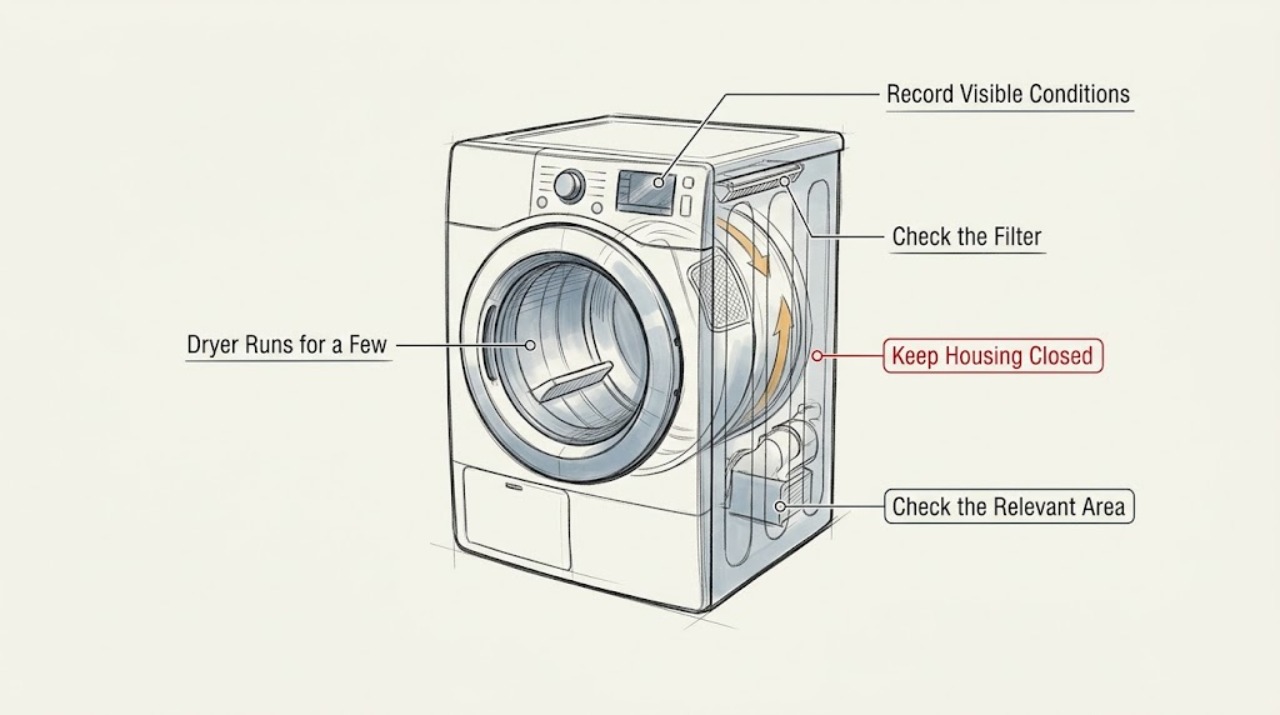
On the LG DLE6100W, a Sensor Dry cycle can end early when the load is too small to keep contacting the humidity sensors, or when residue prevents the sensors from reading the load. That is different from the dryer losing power, stopping with an error, or shutting down with a normal-sized load. First record whether the display and drum stop at an apparent cycle end, whether the dryer powers back on, the load size and dryness, and any d80/d90/d95, F0, HS, PF, or dE indication. With the dryer off, cool, and empty, clean the humidity-sensor surface below the lint-filter area as LG directs, make sure the lint filter is seated, and inspect only the accessible exhaust path for crushing or blockage. For a small load, use the model's Time Dry option rather than using Sensor Dry as a test. If the dryer will not power back on, repeatedly stops with a normal load, shows an unresolved code, smells electrical or burned, smokes, sparks, overheats, or has a damaged cord or vent, stop using it and arrange qualified appliance or vent service. Do not open the cabinet or test live circuits.
Before you begin
Safety first
- Owner checks are limited to model identification, documenting the stop, selecting an appropriate load or manual cycle, cleaning the accessible sensor surface, seating the lint filter, inspecting the accessible exhaust path, and following LG's published external reset instructions. Do not open the cabinet, bypass a door or thermal device, test live voltage, touch the heater or motor, or replace a sensor, control, or other part from the stop symptom alone.
Work through in order
Diagnostic checks
Use only checks that match the exact appliance or system and its official guide.
-
Check 1
Confirm the product identity from the rating label without moving the dryer or removing a panel. Record DLE6100W, every suffix or market marking, serial number, electric configuration, and the cycle and Dry Level selected. Verify that the display and controls are the ones shown for this model before applying a manual or reset sequence.
Expected result: The label confirms DLE6100W, shows a different suffix or model, or cannot be read without moving or opening the cabinet.
Next step: Use the complete model on LG's product-support page and matching owner's manual. If identity remains incomplete, limit the work to safe observations and arrange service rather than borrowing another LG dryer's cycle or button sequence.
Stop if: Do not remove the rear cover, control panel, terminal cover, or any wiring to locate the model.
Why this matters
Why: The DLE6100W support page identifies this model as a 7.3 cu. ft. electric dryer with Sensor Dry, but a different suffix or market can have different controls and documentation. Model identity is required before treating a stop as a Sensor Dry behavior or using a code procedure.
-
Check 2
Record the stop without repeatedly rerunning the dryer: note the approximate remaining-time display, whether the drum and heat stop together, whether the display stays lit, whether the load is damp or dry, and whether the dryer powers back on immediately. Record if the load is a few items, one bulky item, or a normal mixed load.
Expected result: A small or single load ends quickly with the display still available and the clothes damp; the time drops sharply before stopping; or a normal-sized load stops and the dryer will not restart.
Next step: For a genuinely small load, follow the DLE6100W manual and use a manual Time Dry cycle if appropriate. If a normal load repeatedly stops, or the unit will not power back on, stop testing and continue to the safe reset or service path.
Stop if: Do not add items to a running drum, reach inside while it turns, or keep repeating heated cycles to force a failure.
Why this matters
Why: LG says small loads may not brush the sensors and can make the displayed time drop and the cycle end abruptly; that points first to sensing/load contact rather than proving a timer or motor failure. A loss of power or failure to restart is a different branch and needs the power/reset and service boundary.
-
Check 3
With the dryer off, unplugged or isolated at its normal disconnect, cool, and empty, wipe the accessible humidity-sensor surface below the lint-filter area with a damp rag or paper towel as LG directs, then allow it to dry fully. Reinsert the lint filter completely and note whether it is damaged or leaves an F0/INSERT FILTER indication.
Expected result: The sensor area has residue, the lint filter was not seated, an F0 or INSERT FILTER indication remains, or the sensor and filter are clean and correctly positioned.
Next step: Let the sensor dry, seat the filter, and use only the matching manual's ordinary cycle instructions. If F0 remains or the early stop continues with a suitable load, arrange service instead of replacing a sensor or control by guesswork.
Stop if: Do not pour liquid into the filter housing, scrape the sensor, remove the housing, or operate with the filter bypassed or damaged.
Why this matters
Why: LG says residue can prevent the humidity sensor from measuring correctly and cause a cycle to end early; a filter-out indication can stop the dryer. A clean sensor and correctly seated filter make a persistent early stop less explainable as a simple surface-sensing or filter-position issue.
-
Check 4
Inspect only the accessible lint filter, duct section behind the dryer, and outside vent hood. Look for a packed filter, crushed or kinked exhaust hose, loose connection, blocked hood, or a FlowSense d80/d90/d95 indication. Do not reach into the blower or heater area.
Expected result: The filter or accessible duct is restricted, a d80/d90/d95 message is present, outside airflow is weak when checked safely, or the accessible path is clear and no airflow indication appears.
Next step: Clean the filter and correct only an obvious accessible hose or hood issue; have a qualified vent professional address a hidden or persistent restriction. Keep the dryer off if the vent is severely blocked or the stop is accompanied by overheating or a burning smell.
Stop if: Do not run with a blocked vent, use a sharp object in the duct, install an unapproved booster fan, or dismantle the exhaust or cabinet.
Why this matters
Why: LG identifies d80/d90/d95 as restricted airflow between the dryer and outside exhaust and recommends filter, load-size, and accessible duct checks. That warning does not by itself prove why the dryer stops after a few minutes, but unresolved restriction can make operation unsafe and can confuse drying performance.
-
Check 5
If there is no gas odor, smoke, spark, melted material, hot cord, water exposure, or other hazard, check whether the dryer returns to power after the stop. If it does not, use LG's published power-reset procedure with the dryer disconnected, then restore power once and observe whether the display and drum light return. Record any PF, dE, HS, nP, PS, or thermistor-related indication rather than guessing its cause.
Expected result: The dryer powers back on after an interruption, comes back after the reset but still stops with an appropriate load, shows a code, or remains completely dead.
Next step: For a recovered small-load case, use Time Dry when appropriate and monitor. For a recurring stop with a normal load, an unresolved code, or no power after reset, leave the dryer off and request qualified LG appliance service. Have an electrician assess the supply if the model-specific electrical indication points outside the dryer.
Stop if: Do not reset repeatedly, remove the terminal cover, measure voltage, bypass a door or thermal device, or continue if the breaker trips, the cord is hot, smoke appears, or the dryer smells electrical or burned.
Why this matters
Why: LG associates an abnormal shutdown that recovers with interrupted power, small loads, or sensor residue. LG says a unit that does not power back on after the documented reset requires repair; display codes can narrow the service conversation but do not authorize cabinet testing by the owner.
Use your observations
Decision map
Find the observation that best matches what you see, then follow the next safe action.
-
PATH 01Next step
What you see
A few items or a single bulky item in Sensor Dry ends quickly, the display remains usable, and the load is still damp or has poor sensor contact.
Do this next
Use a suitable load and the DLE6100W manual's Time Dry option for genuinely small loads. If a normal load also ends early, clean the sensor and escalate the recurring symptom.
Why this path and its safety boundary
Why it matters: The pattern matches LG's small-load and sensor-contact explanation more closely than a proven hardware failure.
-
PATH 02Next step
What you see
The sensor area was dirty or the lint filter was not seated, and the dryer behaves normally after the surface is cleaned, dried, and the filter is reinserted.
Do this next
Keep the sensor surface and filter maintained according to the matching manual. Stop and request service if the problem returns with a suitable load or an F0 indication remains.
Why this path and its safety boundary
Why it matters: The change supports a sensing or filter-position issue; it does not establish that the sensor or a control part needs replacement.
-
PATH 03Next step
What you see
The dryer stops with a normal-sized load, the display or drum light goes dead, it will not return after LG's reset, or the same stop occurs in an appropriate manual cycle.
Do this next
Keep the dryer off and arrange qualified appliance service. Provide the full model, cycle, load, stop timing, display state, reset result, and any code; do not order a control, motor, heater, or sensor from the symptom alone.
Why this path and its safety boundary
Why it matters: This is not adequately explained by normal Sensor Dry load sensing. Power delivery, protection, control, drive, heat, or another internal condition remains unresolved without qualified testing.
-
PATH 04Next step
What you see
A d80/d90/d95 indication or an accessible crushed, kinked, disconnected, or blocked exhaust path is present.
Do this next
Clean the accessible filter and correct an obvious external hose issue; use a qualified vent professional for hidden or persistent restriction. Do not run while severe restriction or overheating remains.
Why this path and its safety boundary
Why it matters: LG treats this as restricted airflow. It is a vent and fire-safety concern rather than proof of a timer or sensor failure.
-
PATH 05Next step
What you see
There is smoke, a spark, a hot or damaged cord, melted material, electrical or burning odor, a repeated breaker trip, water exposure, or uncontrolled heat.
Do this next
Stop using the dryer. From a dry safe location, isolate power if that can be done without touching damaged or wet parts, keep clear, and obtain qualified appliance, electrical, or emergency help as appropriate.
Why this path and its safety boundary
Why it matters: This is an immediate fire, electrical, or property-safety stop, not a Sensor Dry troubleshooting branch.
Helpful context
Understand the symptom
A DLE6100W that tumbles for only a few minutes and then stops is not automatically a failed control. Sensor Dry is allowed to shorten its time when it believes the load has reached the selected dryness, and LG specifically warns that a small load may not keep touching the sensors. The useful distinction is whether the load is damp, whether the display remains available, whether the dryer restarts, and whether the same stop occurs with an appropriate load or a manual timed cycle.
Keep the checks external and model-specific. The DLE6100W support page provides the exact product identity and manual path; LG's opened troubleshooting pages provide the Sensor Dry, sensor-cleaning, abnormal-shutdown, airflow, and display-code boundaries used below. Those pages do not justify naming a motor, heater, thermistor, or control board from the stop symptom alone.
When checks do not resolve it
Need a professional?
Call qualified LG appliance service for a recurring early stop with a normal load, dead controls after reset, unresolved display code, or any need to inspect the internal power, drive, heat, sensing, or control circuits. Call a qualified vent professional for hidden or persistent exhaust restriction and an electrician for a supply problem identified outside the dryer.
Safety scope: Owner checks are limited to model identification, documenting the stop, selecting an appropriate load or manual cycle, cleaning the accessible sensor surface, seating the lint filter, inspecting the accessible exhaust path, and following LG's published external reset instructions. Do not open the cabinet, bypass a door or thermal device, test live voltage, touch the heater or motor, or replace a sensor, control, or other part from the stop symptom alone.
Have this ready
- Provide the complete model and serial, electric configuration, selected cycle and Dry Level, load type and size, approximate stop time, remaining-time behavior, whether the display and drum light remain on, load dryness, sensor and filter condition, vent observations, code messages, reset result, and any odor, heat, cord, or breaker symptom.
Common questions
FAQ
Is it normal for the LG DLE6100W to stop after only a few minutes in Sensor Dry?
It can happen with a very small or single-item load when the clothes do not keep contacting the humidity sensors, but a normal-sized load that repeatedly stops is not explained by that observation alone. Check whether the load is damp, whether the display remains on, and whether the dryer powers back on.
Should I use Time Dry for a small load?
LG's abnormal-shutdown guidance recommends Speed Dry or Time Dry when a small load cannot maintain sensor contact. Follow the exact DLE6100W manual for available cycles and settings, and do not use a cycle change to excuse a burning smell, dead controls, or a repeated stop with a suitable load.
Can a dirty humidity sensor make the dryer end early?
Yes. LG says residue on the humidity sensor can prevent accurate moisture measurement and change drying time. With the dryer cool and disconnected, wipe the accessible sensor surface as directed and let it dry fully; persistent symptoms require service rather than a guessed sensor replacement.
What if the DLE6100W turns off and will not come back on?
Check the normal power connection and breaker from a safe, dry position, then follow LG's published reset procedure once. If the dryer does not power back on after the reset, LG says it requires repair. Do not remove the terminal cover or test the 240-volt supply yourself.
Does a d80, d90, or d95 message prove the sensor is bad?
No. LG uses those messages for restricted airflow between the dryer and the outside exhaust. Clean the lint filter and inspect the accessible duct and hood; use a qualified vent professional for hidden or persistent restriction. The message does not identify a sensor, heater, or control part.
Read the exact guide
Official sources
- LG Dryer – Why Does My Dryer Turn Off Abnormally?LG Electronics · Opened LG's official help article. It directly addresses a dryer that stops during a cycle and distinguishes interrupted power, small loads that lose sensor contact, and sensor residue; it also provides LG's external hard-reset and service boundary. The page notes that guidance is general and model images may differ.
- LG DLE6100W.ABWEEUS Support, Manuals, Warranty & MoreLG Electronics · Opened LG's official US product-support page for DLE6100W.ABWEEUS. It identifies the product as a 7.3 cu. ft. electric dryer with Sensor Dry and provides the exact manual/support path; it does not by itself diagnose an early stop.
- LG Dryer - Error Code ListLG Electronics · Opened LG's official error-code help page. It identifies d80/d90/d95 as restricted airflow, F0 as an improperly inserted lint filter, and provides scoped guidance for HS, PF, dE, power, and thermistor-related indications. It is used to route symptoms, not to assign an internal part without the exact manual.
- LG Dryer - How to Clean the Humidity SensorLG Electronics · Opened LG's official help article. It says the humidity sensor adjusts drying time, residue can cause inaccurate moisture readings, and the surface should be cleaned regularly; it warns that images and content may differ by model.
Community feedback
Share a repair observation
Share a plain-text repair observation. Accepted observations are published automatically; this page may take a moment to update.