
On this page
Start here
Quick answer
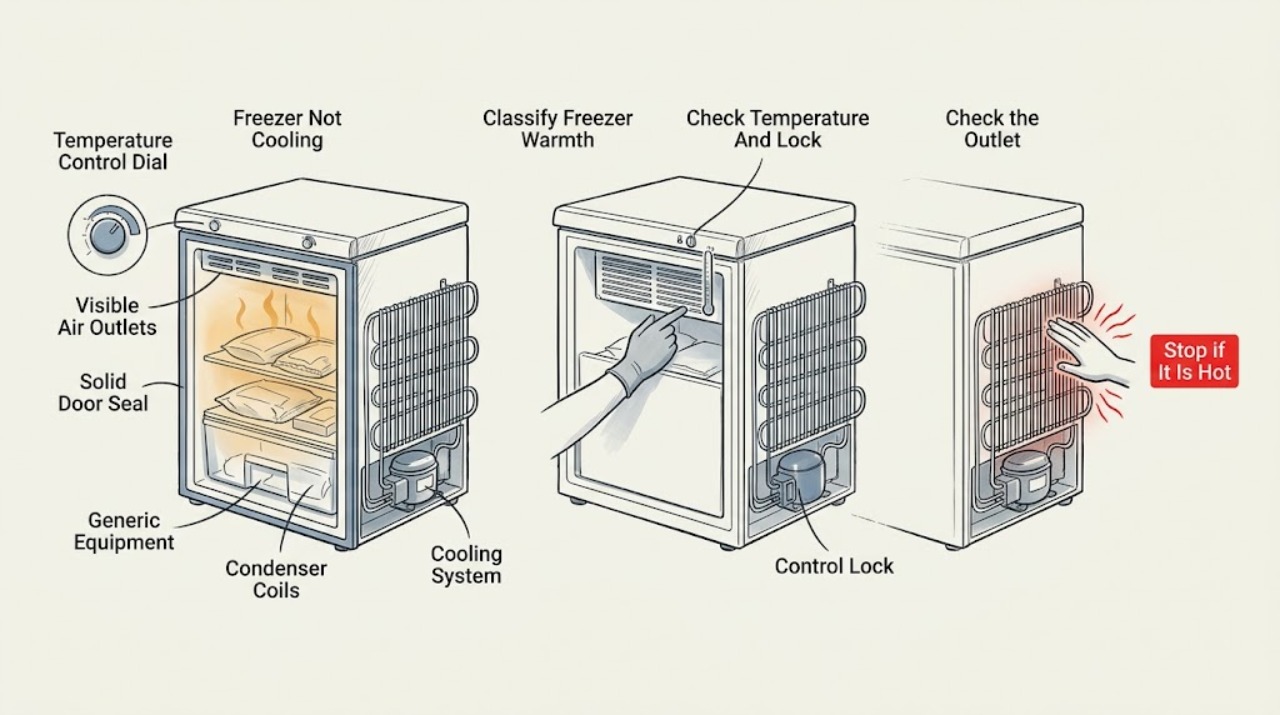
If an LG freezer is not cooling, first determine whether the freezer is warming while the refrigerator still cools, whether the entire appliance is off, or whether the display shows a normal target temperature but the food is thawing. Confirm the freezer setting and control lock, keep cold-air outlets clear, avoid overpacking, and make sure the door closes and seals fully. Check for frost that blocks circulation, dust around the rear mechanical compartment, a recent power outage, a hot installation location, or frequent door opening. Let hot food cool before storage and do not chip ice with a sharp tool. If the unit remains warm after these safe external checks, the compressor or sealed cooling system may need professional diagnosis; arrange LG service, especially for repeated temperature loss, unusual noise, water, burning odor, or a damaged seal.
Work through in order
Diagnostic checks
Use only checks that match the exact appliance or system and its official guide.
-
Check 1
Check the freezer from a safe position and record whether the display is lit, the freezer is partially or completely warm, the refrigerator compartment is also warm, and whether the unit makes its normal cooling sounds.
Expected result: Note the food condition, any alarm or error display, visible frost, water, unusual noise, and whether the problem began after a power interruption, move, or large loading event.
Next step: Continue with the external power and setting checks for a dead unit, or with airflow, sealing, and frost checks when the display works but the freezer is warm.
Stop if: Stop using the appliance and arrange service for burning odor, smoke, damaged wiring, leaking water near electricity, a cracked liner, or an abnormal electrical or mechanical noise.
Why this matters
Why: A whole-appliance outage points toward power or controls; freezer-only warming points toward setting, airflow, door sealing, frost, or cooling-system conditions. A safety symptom changes the task from troubleshooting to service.
-
Check 2
Read the freezer temperature control and confirm that the panel is not locked; if the model uses a dial, button, or display, adjust it only as the exact LG manual describes.
Expected result: Record whether the setting was warmer than intended, the lock prevented changes, the display shows a target temperature rather than a measured temperature, or the setting is correct but the freezer remains warm.
Next step: Restore the model-recommended setting, keep the door closed, and reassess after the appliance has had time to respond; continue if food remains thawed.
Stop if: Do not force a locked control, remove the control panel, or repeatedly change settings while the freezer is warming rapidly.
Why this matters
Why: An incorrect setting or locked control can explain a warm freezer without a failed cooling system. LG notes that actual temperature can vary with load and surroundings, so a normal target display does not prove the compartment is cold.
-
Check 3
Rearrange food so it does not cover the freezer's cold-air outlets or block the path used by drawers and the door, and remove excess items only when they can be handled safely.
Expected result: Record whether food was pressed against an outlet, shelves were overfilled, cold air can circulate around the stored items, or only the front or edge of the compartment is cold.
Next step: Leave outlets clear, close the door fully, and observe one normal cooling period; do not use a packed compartment as a test of cooling performance.
Stop if: Stop if drawers or shelves are damaged, food is caught in the door, the liner is cracked, or moving items would require force.
Why this matters
Why: LG says blocked cold-air outlets prevent circulation and can allow food to thaw even when the appliance is operating. A clear path that does not restore cooling shifts attention to the seal, frost, power, or cooling system.
-
Check 4
Inspect the freezer door and gasket around the full perimeter, then look for frost or ice on the upper wall, shelves, food, or one side of the compartment without prying panels or touching hidden components.
Expected result: Record whether the gasket has gaps or residue, the door is held open by a package, frost is light and localized, or ice is thick and obstructs vents or drawers.
Next step: Close the door correctly and clean the gasket as the manual permits; use only the model-approved defrost method and arrange service for recurring heavy frost or a damaged seal.
Stop if: Never use a knife, ice pick, heater, or sharp object to remove ice, and do not force a drawer through frozen frost.
Why this matters
Why: LG links an incompletely sealed door with outside moisture, frost, and ice buildup that can impair circulation. Frost after a power event or humid conditions may be temporary, but recurring or heavy frost suggests a sealing or defrost condition.
-
Check 5
Check the space around the appliance and the recent operating conditions: note direct sunlight or a nearby heat source, blocked ventilation clearance, hot food placed inside, frequent door opening, a large recent load, or a recent power restoration.
Expected result: Record which condition is present and whether cooling began to weaken at the same time; do not move a loaded appliance or alter its installation without the model instructions.
Next step: Remove only safe external obstructions, let hot food cool before storage, minimize door opening, and allow the appliance to stabilize; proceed to service if the freezer stays warm.
Stop if: Stop if the cabinet is unstable, the power cord or outlet is hot or damaged, or moving the unit would strain water, electrical, or refrigerant connections.
Why this matters
Why: LG identifies ambient heat, blocked ventilation, hot food, frequent opening, food quantity, and power restoration as conditions that can temporarily reduce perceived freezing. If these conditions are absent or the temperature does not recover, a mechanical or sealed-system fault becomes more likely.
-
Check 6
If the model exposes a safe external rear or lower mechanical-compartment cover, unplug the appliance before cleaning and remove only loose dust or foreign matter from the accessible outside area as LG describes; do not remove the cover or reach into components.
Expected result: Record whether dust, insects, debris, or another obstruction was restricting air circulation around the mechanical compartment, and whether the appliance's exterior ventilation path is now clear.
Next step: Restore power only after the area is dry and clear, then monitor one normal cooling period; arrange service if cooling remains weak or the area shows damage or oil-like residue.
Stop if: Do not remove panels, touch electrical parts, use water inside the compartment, or clean while the appliance is connected to power.
Why this matters
Why: LG says foreign matter around the mechanical compartment can raise temperatures and weaken freezing. Cleaning the accessible exterior can address an airflow condition, but it cannot confirm a compressor, fan, or sealed-system repair.
-
Check 7
After the safe external checks, keep the freezer doors closed, leave cold-air outlets clear, and observe one controlled cooling period without adding hot food or repeatedly changing the setting.
Expected result: Record whether the freezer temperature and food condition improve, the display remains only a target setting, frost returns, the compressor or fan behaves abnormally, or the unit remains warm.
Next step: Leave the appliance running only if it is operating safely; arrange LG or qualified refrigeration service for persistent warming and protect perishable food according to local food-safety guidance.
Stop if: Stop and disconnect power only when safe for smoke, burning odor, damaged electrical parts, severe water leak, or uncontrolled heat; otherwise avoid repeated power cycling and request service.
Why this matters
Why: Improvement after a setting, load, seal, frost, ventilation, or recent-event correction supports that branch. No improvement after those checks points to a cooling, sensor, fan, defrost, or sealed-system problem that needs professional testing.
Use your observations
Decision map
Find the observation that best matches what you see, then follow the next safe action.
-
PATH 01Safety boundary
What you see
The display is active, the setting was warmer than intended, or a control lock prevented a change.
Do this next
Use the exact LG manual to restore the recommended setting, then keep the door closed and reassess cooling.
Why this path and its safety boundary
Why it matters: The freezer may be operating normally under an incorrect or locked target setting.
Safety stop: Request service if the setting is correct but food continues to thaw or controls remain unresponsive.
-
PATH 02Safety boundary
What you see
Food blocks a cold-air outlet, the freezer is overpacked, or the door cannot close around stored items.
Do this next
Reorganize the load, clear the outlet and door path, and observe one normal cooling period.
Why this path and its safety boundary
Why it matters: Cold-air circulation or sealing is impaired by the load rather than necessarily by a failed cooling component.
Safety stop: Arrange service if the freezer remains warm with clear airflow and a fully closed door.
-
PATH 03Safety boundary
What you see
The gasket has a gap, the door was held open, or frost or ice obstructs the compartment.
Do this next
Correct the door closure and use only the manual-approved frost procedure; request service for a damaged seal or recurring buildup.
Why this path and its safety boundary
Why it matters: Outside moisture can enter and freeze, reducing effective airflow and cooling; recurring heavy frost can indicate a sealing or defrost issue.
Safety stop: Do not chip ice, use sharp tools, or force drawers through frost.
-
PATH 04Safety boundary
What you see
Cooling weakened after a power restoration, large load, hot food, frequent opening, high ambient heat, or obstructed ventilation.
Do this next
Clear safe external obstructions, close the door, avoid hot food and frequent opening, and monitor recovery; escalate if the freezer remains warm.
Why this path and its safety boundary
Why it matters: The appliance may need time to recover after the condition is corrected, but persistent warming is not explained by the event alone.
Safety stop: Do not move a loaded appliance or operate it with damaged power or water connections.
-
PATH 05Safety boundary
What you see
The freezer remains warm after the setting, load, door, frost, environment, rear-area, and safe external checks.
Do this next
Arrange LG or qualified refrigeration service with the model, temperature behavior, frost pattern, recent events, and checks already performed.
Why this path and its safety boundary
Why it matters: A fan, sensor, defrost, compressor, refrigerant, or control fault may remain and cannot be identified safely from temperature alone.
Safety stop: Stop for smoke, burning odor, electrical damage, major water leak, or any sign of unsafe operation.
Helpful context
Understand the symptom
Separate a warm freezer from a display or airflow problem
The temperature shown on many LG refrigerator controls is a target setting, not a live measurement of the food compartment. A freezer can therefore appear to have a normal setting while food is thawing. Note whether the refrigerator compartment is also warm, whether the compressor or fans run, whether the display is lit, and whether only one area of the freezer is affected. This observation determines whether to start with power, settings, airflow, sealing, or service.
Cold air needs an open path and a closed door
LG says that food blocking the cold-air outlet can restrict circulation, while a door that does not close or seal allows outside moisture into the freezer. Frost and ice can then build up and further limit airflow. Reorganize food without forcing drawers, check the gasket for gaps, and never use a knife or ice pick to remove frost.
Give the appliance time after a change or power event
A large load, hot food, frequent door openings, high ambient temperature, or restored power can make cooling appear weak for a while. LG notes that a newly powered refrigerator may take substantially longer to reach normal operating temperature depending on the model and stored food. If the freezer remains warm after the installation and loading conditions are normal, professional diagnosis is the safer next step than changing internal components.
Safety boundary
Stop conditions
- Stop using the freezer for smoke, burning odor, damaged wiring, water near electrical parts, a cracked liner, unusual uncontrolled noise, or a unit that becomes abnormally hot.
- Do not chip frost with a knife or ice pick, remove panels, reach into the mechanical compartment, move a loaded appliance, or alter wiring or refrigerant components.
- Arrange LG or qualified refrigeration service when food remains thawed after the safe external checks, heavy frost returns, a door seal is damaged, or the compressor, fan, or control behavior is abnormal.
When checks do not resolve it
Need a professional?
Contact LG or qualified refrigeration service when the freezer remains warm after the setting, airflow, door, frost, environment, and safe power checks, or whenever there is smoke, burning odor, electrical damage, major leakage, recurring frost, or uncontrolled operation.
Have this ready
- Give the professional the exact model, freezer and refrigerator behavior, displayed target setting, food and temperature observations, frost pattern, door-seal result, power history, and checks already performed.
Common questions
FAQ
Why is my LG freezer warm while the display shows a normal setting?
The display may show a target setting rather than the current internal temperature. Check that the control is not locked, keep cold-air outlets clear, verify the door seals, and arrange service if food remains thawed after safe external checks.
Can blocked vents or overpacked food stop an LG freezer from cooling?
Yes. LG says food in front of a cold-air outlet can prevent circulation and allow food to thaw. Reorganize the load without blocking outlets or the door path, then monitor recovery.
How do I remove frost from an LG freezer?
Use only the model-approved procedure. LG warns not to use sharp objects such as knives or ice picks; check the door seal and recurring frost pattern and request service when heavy buildup returns.
Read the exact guide
Official sources
- How to adjust the temperature for LG refrigeratorsLG USA Support · LG model-dependent freezer setting, control location, and target temperature guidance
- LG refrigerator frost build-up: There is frost build-up and icicles in the freezer compartmentLG USA Support · LG freezer frost, ice, door sealing, humidity, loading, and safe frost-removal guidance
- LG Refrigerator - Why Isn't My Freezer Cooling Properly?LG USA Support · LG freezer cooling performance and rear mechanical-compartment airflow
- LG refrigerator freezing: Food in the freezer is not frozenLG USA Support · LG freezer thawing, cold-air circulation, loading, door closure, environment, and recovery after power
- LG Refrigerator - Frost Buildup - FREEZER ONLYLG USA Support · LG freezer-only frost buildup, temperature setting, and door sealing
Community feedback
Share a repair observation
Share a plain-text repair observation. Accepted observations are published automatically; this page may take a moment to update.