
On this page
Start here
Quick answer
When an LG oven cycle does not complete, first record the exact mode, whether a cook-time or delayed-start setting is active, what the display shows, and whether heat is still present. A delayed or timed cycle can look inactive, a self-clean cycle can keep the fan running and the door locked while the oven cools, and Sabbath mode changes normal off behavior on supported models. Confirm the intended settings and START action in the exact model manual. If the oven continues heating after it is turned Off, shows smoke, fire, a gas odor, sparking, severe overheating, or a recurring error, stop using it and arrange qualified service; do not repeatedly reset or run another test cycle.
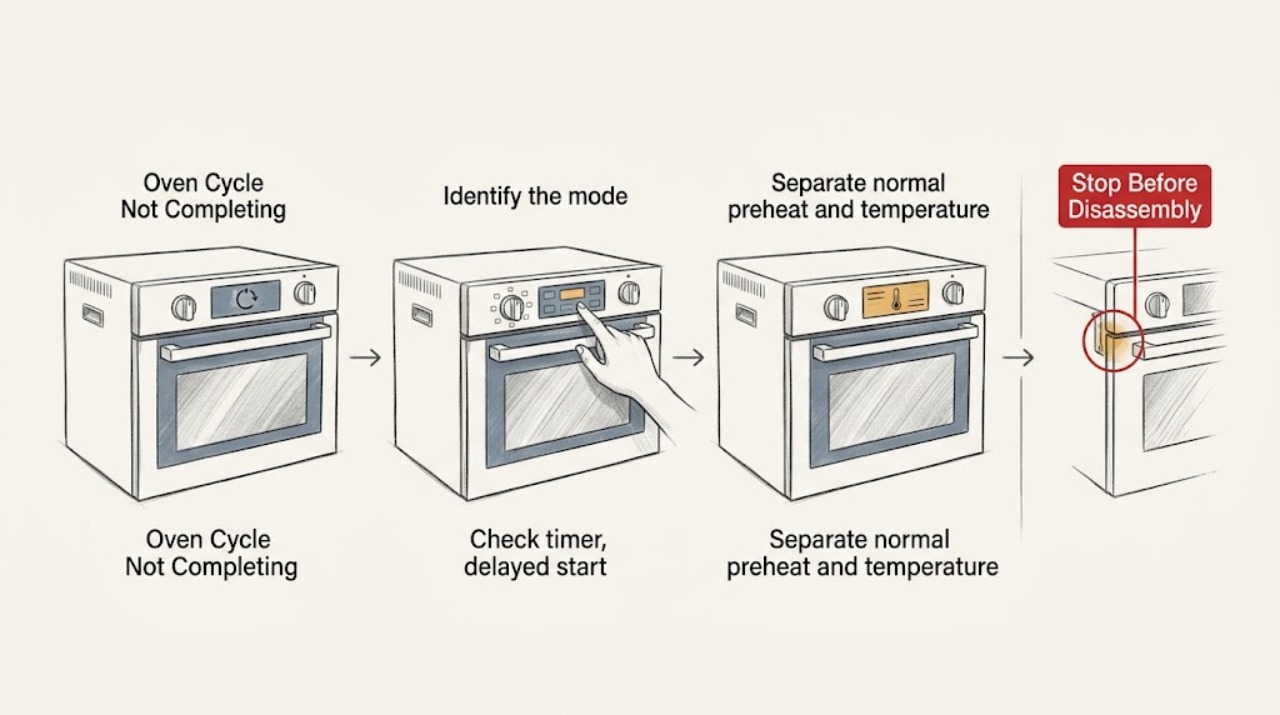
Work through in order
Diagnostic checks
Use only checks that match the exact appliance or system and its official guide.
-
Identify the mode and the exact point of failure
Without starting a new cooking cycle, write down the selected mode, set temperature, remaining time or end-time display, and whether the problem occurred during preheat, normal cooking, timed cooking, delayed start, Sabbath mode, self-clean, or the cooling period. Note whether the display is active, blank, frozen, or showing an F-style code.
Expected result: The display is counting down, waiting for a delayed start, showing a self-clean lock or cooling state, or the oven stopped with no expected completion indication.
Next step: Continue only with the matching branch below and the exact model manual. If the oven is still heating when it should be Off, stop use immediately and do not repeat the cycle.
Why this matters
Why: A timer or delayed-start state can postpone operation or end the heating period by design. Self-clean can continue into a locked cooling period. A stopped display, a missing end indication, or a mode that cannot be cancelled points toward a control or fault condition rather than ordinary completion.
-
Check timer, delayed start, and START confirmation
When the oven is cool enough to operate the controls safely, review the display for DELAY START, COOK TIME, an end-time setting, or a timer-only indication. Confirm that the intended mode and temperature were actually accepted with the model's START control; do not change settings while smoke, a gas odor, or uncontrolled heat is present.
Expected result: DELAY START or a future start time is displayed, the cook-time countdown has ended, the display shows only a kitchen timer, or no timing function is active.
Next step: Use the exact manual to cancel or reprogram a harmless timing setting once. If the oven still stops early, will not accept START, or continues heating after the programmed end, stop using it and request service rather than repeating settings tests.
Why this matters
Why: LG explains that delayed start can make a powered oven appear not to run, while a timed cook can end the heating period automatically. A kitchen timer may only signal an end and does not necessarily control cooking. If no timing function explains the behavior, inspect the mode and fault branches instead.
-
Separate normal preheat and temperature cycling from a fault
For a non-hazardous symptom, observe the display and heat behavior without opening the door repeatedly: does the preheat indication change, does the oven cycle its heat source during cooking, and does the cavity remain at the selected mode after START? Record whether it never warms, warms and then stops early, or keeps heating after Off or after the expected end.
Expected result: The oven reaches its preheat indication and cycles heat during cooking, never produces expected heat, loses heat and stops early, or remains actively hot after the controls are Off.
Next step: Do not dismantle the oven or test live components. If it remains hot with all controls Off, displays an overheat condition, or cannot be stopped, isolate it only using the safe model procedure and arrange qualified service. For a gas oven, do not inspect an igniter or burner while energized.
Why this matters
Why: Heating sources can cycle during normal temperature control, and opening the door can delay cooking by losing heat. No heat, an early stop, or active heating after Off is not explained by normal cycling and may involve a sensor, control, heating system, or model-specific safety fault.
-
Handle self-clean and a locked door as a cooling state
If the incomplete cycle is Self Clean or Easy Clean, leave the door closed and allow the oven to cool naturally. Check whether the lock icon remains on and whether the cooling fan is still running. Do not force the door, insert tools, or cancel by opening the door; if there is excessive smoke or fire, use the emergency stop path.
Expected result: The lock icon and fan clear after cooling, or the door remains locked after the oven is cool and the lock state does not clear.
Next step: When the oven is fully cool and no hazard is present, follow the exact model manual. If the manual permits one power-cycle recovery, perform it once only; if the lock or incomplete cycle returns, leave the oven out of service and request repair.
Why this matters
Why: LG says the door locks during self-clean and remains locked until the internal temperature is safe; the fan can continue after the oven is turned off. A lock that persists after cooling can require service and is not a reason to force the door.
-
Check control lock, Sabbath mode, and mode-specific behavior
Read the visible status text before changing anything. Look for OVEN LOCKOUT, CHILD LOCK, Sb, a delayed-start label, or a mode whose controls are intentionally limited. Compare the displayed status with the exact owner's manual for the model and oven type; do not guess a lock-cancel key combination.
Expected result: A lock or Sabbath indicator is present, a mode-specific status is shown, or the display has no such indicator but controls still do not respond.
Next step: If the manual identifies a safe unlock sequence, use it once with the oven cool. If the panel remains unresponsive, the cycle cannot be cancelled, or the oven heats despite a lock or Off command, stop use and arrange service.
Why this matters
Why: LG documents that control lock can prevent operation and that Sabbath mode changes which buttons and automatic shutoff behaviors are available. A nonresponsive panel without an expected status may indicate a control or communication fault.
-
Capture the exact error code before any reset
Photograph the complete display, including every letter, number, and flashing pattern, and record whether it appeared during preheat, cooking, self-clean, fan cooling, or door locking. Use LG's error-code list only after matching the oven type and the model manual; do not substitute a code from another range family.
Expected result: The code is a documented heating, sensor, fan, communication, or door-lock code, or the display is blank or has no code.
Next step: Follow the model-specific correction only if it is a low-risk user step. If LG permits a single CLEAR/OFF or power-cycle recovery for that exact code, use it once after the oven is safe and cool; if the code returns or the cycle fails again, request service and do not run another test.
Why this matters
Why: LG maps different codes to different model functions, including heating, temperature sensing, convection fan, and door-lock conditions. A blank display after a power interruption does not show that the oven is safe to restart.
-
Stop and arrange qualified service when the cycle remains abnormal
Leave the oven out of service when a cycle stops early without a settings explanation, repeats the fault after one documented recovery, stays hot after Off, cannot unlock after cooling, or shows a heating, sensor, fan, control, or door-lock error. Give service the model number, oven type, mode, display, temperature behavior, and the exact stage where it stopped.
Expected result: A qualified technician can inspect the oven safely, or an immediate hazard is still present.
Next step: Use the emergency branch for continuous heating, gas odor, smoke, fire, sparking, severe overheating, melted controls, or repeated breaker trips. Do not open the control area, remove panels, adjust gas components, or conduct live tests.
Why this matters
Why: The symptom can involve controls, sensors, heating elements or ignition, the cooling fan, the door-lock system, or power and gas systems. These cannot be safely separated by opening the appliance or applying repeated cycles.
Use your observations
Decision map
Find the observation that best matches what you see, then follow the next safe action.
-
PATH 01Next step
What you see
The oven is in DELAY START, a timed-cook end period, or a kitchen-timer state, and there is no hazard.
Do this next
Compare the display with the exact model manual, cancel or reprogram the timing setting once, and stop for service if the oven still ends early or refuses to accept START.
-
PATH 02Next step
What you see
The cycle is Self Clean or Easy Clean, the door is locked, and the fan is still cooling the cavity.
Do this next
Keep the door closed and wait for safe cooling. Never force the lock. If it remains locked after cooling, use only the model-specific one-time recovery if documented, then request service.
-
PATH 03Next step
What you see
The display shows OVEN LOCKOUT, CHILD LOCK, Sb, or another mode status that changes normal controls.
Do this next
Use the exact LG model manual to identify the status and perform one safe unlock or mode-exit sequence. If controls remain unresponsive or heating behavior is abnormal, stop use and arrange service.
-
PATH 04Next step
What you see
The oven reaches some heat but stops before the expected end, never reaches expected heat, or repeatedly loses temperature during a normal cooking mode.
Do this next
Record the mode, set temperature, preheat indication, oven type, and any code. Do not open panels or run repeated tests; request qualified diagnosis for the heating, sensing, control, or supply system.
-
PATH 05Next step
What you see
The oven continues heating after Off or after the programmed end, cannot be stopped, or shows severe overheating.
Do this next
Stop use immediately. If safe without touching hot or damaged parts, isolate power using the model's safe procedure; otherwise leave the area and obtain emergency or qualified help. Do not re-energize the oven.
-
PATH 06Next step
What you see
There is a gas odor, delayed ignition, abnormal flame, smoke, fire, sparking, a burning odor, melted controls, or repeated breaker trips.
Do this next
Stop immediately. For suspected gas, avoid flames and electrical switches, leave the area, and contact the local gas or emergency service from a safe location. For smoke, fire, sparking, or an electrical danger, leave as needed and contact emergency assistance. Do not attempt another cycle.
Helpful context
Understand the symptom
“The cycle did not complete” can mean different things: the oven stopped before the expected end, kept heating after the expected end, is still cooling after self-clean, or is waiting because a timer or delayed-start function was programmed. Treat the displayed mode and the point where behavior changed as evidence. Do not assume the same button sequence applies to every LG oven, range, or double-oven model.
Before any check, keep children away from a hot cavity and do not touch racks, glass, vents, or the door area to judge temperature. A gas model adds ignition and gas-safety concerns; an electric model adds heating-element and supply concerns. This guide limits the user checks to controls, visible indications, cooling, and the model-specific manual.
A single manual-directed reset is a recovery step, not a repair. If the symptom returns, the display shows a fault again, or the oven behaves as if a control is stuck, leave it out of service.
Only after diagnosis
Potential parts
- temperature sensor or thermistor
Only relevant if qualified diagnosis links the incomplete cycle or temperature fault to the sensor circuit; a slow or early-ending cycle alone does not identify this part.
Confirm the exact LG model and the technician's diagnosis before any part decision. - heating element or gas ignition assembly
Only relevant after the oven type and a qualified test identify a heating or ignition failure; do not infer it from a timer or lock state.
Electric and gas ovens use different systems, and model fit must be verified by the exact manual or service information. - door-lock or cooling-fan assembly
Only relevant when a cooled oven remains locked or a documented cooling or fan fault returns.
Do not force the door or access the lock or fan wiring; have a qualified person identify the correct assembly. - electronic control assembly
Only relevant after qualified diagnosis of a persistent control, communication, or stuck-heating symptom.
Do not treat a displayed code or incomplete cycle as proof that a control assembly needs replacement.
When checks do not resolve it
Need a professional?
Request qualified appliance service when the LG oven cycle stops early without a timing or mode explanation, repeats the same error after one documented recovery, cannot unlock after cooling, does not heat correctly, or continues heating after Off. For gas odor, delayed ignition, abnormal flame, smoke, fire, sparking, severe overheating, melted controls, or repeated breaker trips, stop use immediately and use the appropriate emergency or gas-safety response. Do not open panels, adjust gas components, or perform live electrical tests.
Common questions
FAQ
Why does my LG oven appear to stop before the cycle is complete?
Check whether DELAY START, COOK TIME, Self Clean cooldown, Sabbath mode, or a model-specific error explains the display. Record the exact stage and code. If no setting explains the stop or it repeats, leave the oven out of service for qualified diagnosis.
Is it normal for the LG oven fan to keep running after a cycle?
After Self Clean or another hot operation, LG says the cooling fan can continue while the oven returns to a safe temperature. Keep the door closed during a lock state. A fan or lock that remains abnormal after cooling should be serviced.
Could Delay Start make an LG oven look like it is not working?
Yes. LG says DELAY START can leave the oven powered but waiting, while a kitchen timer is separate from cooking control. Check the displayed mode and the exact owner's manual before changing settings.
Should I keep resetting my LG oven when the cycle stops?
No. If the exact model manual documents a low-risk CLEAR/OFF or power recovery, use it once only after the oven is cool and safe. A recurring fault, continued heating, or another incomplete cycle requires service rather than more resets.
When should I stop using an LG oven immediately?
Stop for continuous heating after Off, smoke, fire, sparking, severe overheating, a burning odor, melted controls, repeated breaker trips, gas odor, delayed ignition, or an abnormal flame. For gas odor or fire risk, leave the area and contact the appropriate emergency service from a safe location.
Read the exact guide
Official sources
- LG Range – Oven Cooking ModesLG USA Support · LG range cooking modes described by the help article; available modes and controls vary by model.
- LG Range - Troubleshooting A Locked OvenLG USA Support · LG range ovens with a lock after self-clean or easy-clean; exact unlock controls vary by model.
- LG Range – How to Clean Your Oven Using Self CleanLG USA Support · LG range models represented by the Self Clean help article; cycle duration and controls vary by model.
- Oven Not Heating - Gas RangesLG USA Support · LG gas range ovens covered by the help article; gas configuration and control details vary by model.
- LG Range – Troubleshooting the Control PanelLG USA Support · LG range control panels covered by the help article; key combinations and lock labels vary by model.
- LG Range - Error Codes ListLG USA Support · LG range codes listed by the help article; code meaning and supported recovery vary by model and oven position.
- LG Range Owner's Manual: Timer and Delayed Timed CookLG · The LG owner manual document's supported range models; timer labels and button sequences vary by model.
- LG Range, Oven, Electric Cooktop: Powers On, Won't RunLG USA Support · LG range and oven families covered by the help article; exact controls and sequence vary by model and gas or electric type.
Community feedback
Share a repair observation
Share a plain-text repair observation. Accepted observations are published automatically; this page may take a moment to update.