
On this page
Start here
Quick answer
If a Samsung oven cycle does not complete, first determine whether it stopped at the programmed end time, never started because Delay Start or a mode was selected, or stopped unexpectedly while heat was still needed. The kitchen timer only counts down and beeps; it does not start or stop cooking. Check the Cooking Time or Timed Cook setting, Delay Start, Sabbath or Demo mode, oven lock, and the exact display icon or code against the model manual. Confirm the door is fully closed and note whether the oven reached temperature, lost power, or stopped with an error. Self Clean can keep the door locked until the oven cools, so do not force it. A gas odor, delayed ignition or bang, abnormal flame, smoke, sparks, persistent heating after OFF, or repeated breaker trip is a stop-use condition: do not keep testing and arrange qualified appliance, gas, or electrical service.
Before you begin
Safety first
- This article covers display interpretation and ordinary external observation only. Do not force a locked door, bypass an interlock, open panels, test energized wiring, alter gas pressure, relight repeatedly, or continue use after gas odor, smoke, sparks, abnormal flame, or uncontrolled heat.
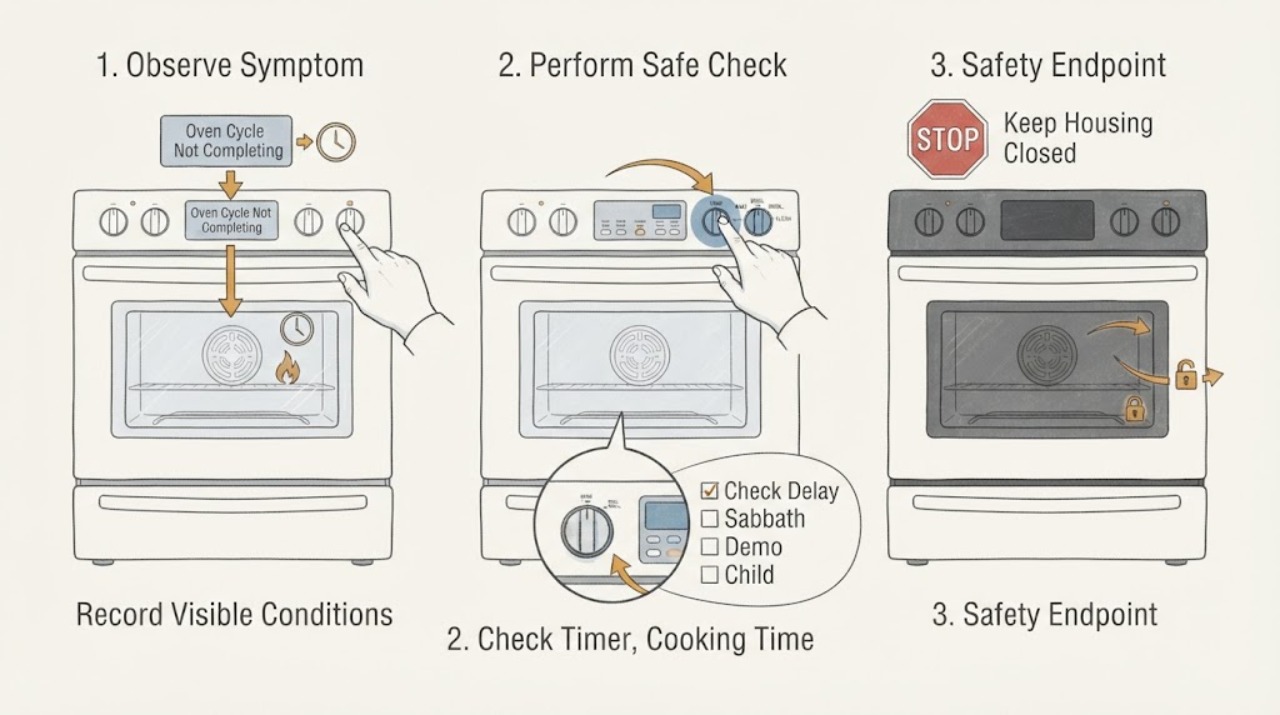
Work through in order
Diagnostic checks
Use only checks that match the exact appliance or system and its official guide.
-
Record when and how the cycle stopped
From a safe position, record the Samsung model, cooking or cleaning mode, set temperature, displayed time or icon, whether the oven had preheated, and whether the stop occurred before heating, during heating, at the programmed end, during cooling, or while the controls were off.
Expected result: The display shows End or a completed time, Delay Start or Cooking Time, Self Clean or a locked door, a code, a blank panel, or active heat after the user tried to stop the cycle.
Next step: Follow the matching timer, mode, door-lock, power, temperature, or gas branch below and keep the exact display text for service.
Stop if: Stop immediately for gas odor, smoke, sparks, abnormal flame, persistent heating after OFF, hot wiring or outlet, a loud delayed ignition bang, or repeated breaker trips.
Why this matters
Why: A programmed end, delayed start, cleaning lock, power loss, error state, and uncontrolled heating are different branches. A display icon cannot be safely interpreted across Samsung models without the exact manual.
-
Check Timer, Cooking Time, and Delay Start separately
Use the exact Samsung manual to identify whether the display is showing the kitchen Timer, Cooking Time or Timed Cook, or Delay Start. If a delayed or timed function is active, cancel or change it only through the documented control sequence; do not assume the kitchen Timer controls the oven.
Expected result: The kitchen Timer is counting down or shows End, Cooking Time is counting down, Delay Start is waiting, or no time function is active.
Next step: If the intended mode was timed or delayed, correct the documented setting and perform one controlled start. If the oven stopped before the intended time or ignores documented controls, continue to the mode and power checks.
Stop if: Do not keep changing time settings while the oven is actively overheating, producing smoke or odor, or showing a gas or electrical hazard.
Why this matters
Why: Samsung says the kitchen Timer only alerts and does not start or stop cooking, while Cooking Time can stop the oven when its time expires and Delay Start postpones the start. A cycle that appears incomplete may therefore be operating as programmed.
-
Check Delay, Sabbath, Demo, Child Lock, and Self Clean states
Compare every visible icon or status with the exact Samsung manual. Look specifically for Delay Start, Child Lock or oven lock, Sabbath mode, Demo mode, Self Clean or Steam Clean, and a locked-door indicator. Use only the manual’s documented cancel or unlock sequence; never force a hot door.
Expected result: A waiting, locked, Sabbath, Demo, or cleaning status is displayed, or the display shows a normal cooking mode but the cycle still stops.
Next step: Let Self Clean or cooling complete as documented, or cancel the mode with the manual’s controls. If the status returns or the door remains locked after the documented cool-down, arrange service.
Stop if: Do not pry a locked door, bypass Child Lock or a safety latch, disable Demo or Sabbath settings by guessing, or interrupt Self Clean because of ordinary heat or fan noise.
Why this matters
Why: Samsung says icons vary by model; these states can intentionally delay operation, suppress normal display changes, prevent heating, or keep the door locked during cooling. A normal mode with an unexpected stop points elsewhere.
-
Check the door and whether heat was actually lost
With the oven safe to approach, confirm the door was fully closed and record whether the display reached the expected preheat state, remained at a low starting temperature, or showed a normal cycling temperature. Do not open the door repeatedly during preheat or place hands near hot surfaces to measure heat.
Expected result: The door was left open or not fully closed, the oven never reached preheat, the temperature cycles while cooking, or the oven stops heating before the intended end.
Next step: Close the door normally and run one model-appropriate controlled cycle only if there is no hazard. For a gas oven, do not use a burner-lighting experiment; request service if heating or ignition is abnormal.
Stop if: Stop for a door that will not close, continuous heating, gas odor, delayed ignition, abnormal flame, smoke, sparks, a hot surface beyond expected operation, or any need to open the appliance.
Why this matters
Why: Samsung says a door left open too long can cause a safety shutoff and that an oven can cycle heat on and off to maintain temperature. Failure to heat or an unexpected stop is not explained by normal cycling alone.
-
Check power loss and record exact codes
If the display went blank, reset, or shows an error, note whether the kitchen circuit or range breaker is visibly tripped and record the complete code exactly as displayed. Only when the area is dry and free of smoke, odor, sparks, overheating, or water contact should you follow the manual’s single power-cycle instruction.
Expected result: The breaker is tripped, the panel returns after a safe reset, the code returns, or the circuit and display appear normal but the cycle still stops.
Next step: Leave the appliance out of service for a returning code or circuit trip and arrange qualified appliance or electrical diagnosis. Do not interpret a code from another model.
Stop if: Do not repeatedly reset a breaker, touch wet electrical parts, open the control area, test live voltage, or continue after smoke, burning odor, sparks, or hot wiring.
Why this matters
Why: A power interruption can end a cycle, but a repeated trip or returning code points to an electrical, control, sensor, heating, or gas-system issue. A normal panel with an unexpected stop keeps the mode, door, temperature, and service branches open.
-
Use the gas-only stop branch for ignition or combustion symptoms
For the gas configuration only, note from a safe distance whether the oven failed to ignite, produced a delayed bang, made a persistent hiss, showed an abnormal or unstable flame, or smelled of fuel. Do not relight the oven, use a flame to test it, adjust pressure, or open the burner or gas path.
Expected result: The oven cycles heat normally with no odor or flame abnormality, or an ignition or combustion warning is present.
Next step: For any ignition or combustion warning, stop using the gas oven and arrange qualified gas-appliance service. For fuel odor, leave the area as appropriate and contact emergency or fuel-gas professionals from a safe location.
Stop if: Do not operate switches in a suspected gas leak, relight repeatedly, search for a leak, adjust the regulator, or return the appliance to use before qualified clearance.
Why this matters
Why: Samsung describes normal gas temperature cycling, but delayed ignition, a persistent unexplained gas sound, abnormal flame, or fuel odor changes the risk and cannot be cleared by another test.
-
Reset only once, then escalate a persistent incomplete cycle
After the oven is cool and no gas, fire, smoke, spark, leak, or electrical hazard is present, follow the exact Samsung manual’s single power-reset or cancel procedure. Observe one subsequent start or status change without repeatedly cycling the controls.
Expected result: The cycle completes normally, the same stop returns, the oven continues heating after OFF, or the panel and circuit fail again.
Next step: Leave the appliance out of service and give a qualified technician the model, mode, display, stop stage, door and temperature behavior, code, and reset result.
Stop if: Do not repeat the reset, open panels, bypass a lock, test live components, or run another cycle after smoke, burning odor, sparks, abnormal flame, gas odor, or uncontrolled heat.
Why this matters
Why: A reset can clear a temporary control state but does not prove that the timer, lock, sensor, relay, igniter, burner, control, or circuit is sound. Persistent or uncontrolled behavior needs service.
Use your observations
Decision map
Find the observation that best matches what you see, then follow the next safe action.
-
PATH 01Safety boundary
What you see
The display shows the end of Cooking Time or Timed Cook, while the kitchen Timer merely beeped.
Do this next
Review the intended time function in the exact manual and set a normal untimed or correctly timed cycle for one controlled test.
Why this path and its safety boundary
Why it matters: Samsung distinguishes a reminder Timer from a time-based cooking function that can stop the oven.
Safety stop: Stop if the oven continues heating after OFF or shows smoke, gas odor, sparks, abnormal flame, or a returning error.
-
PATH 02Safety boundary
What you see
Delay Start, Sabbath, Demo, Child Lock, Self Clean, Steam Clean, or an oven-lock icon is active.
Do this next
Follow the exact model’s documented status, cancel, unlock, cool-down, or mode-exit steps. Do not force the door or guess a key sequence.
Why this path and its safety boundary
Why it matters: The oven may be waiting, intentionally suppressing controls or display updates, preventing heat in Demo mode, or keeping the door locked while hot.
Safety stop: Stop for a hot locked door that does not release after the documented cooling period, continuous heating, smoke, or electrical or gas symptoms.
-
PATH 03Safety boundary
What you see
The oven burner or heater cycles on and off while the selected mode maintains temperature, with no odor, smoke, abnormal flame, or error.
Do this next
Allow the programmed mode to run and compare its status with the manual. Escalate if the oven never reaches temperature or stops before the intended end.
Why this path and its safety boundary
Why it matters: Samsung notes that gas ovens can ignite and turn off multiple times while maintaining temperature; cycling is not necessarily an incomplete cycle.
Safety stop: Stop for delayed ignition, a loud bang, fuel odor, abnormal flame, smoke, sparks, or persistent heat after OFF.
-
PATH 04Safety boundary
What you see
The display reset or went blank, a breaker tripped, or an exact error returns after a safe single reset.
Do this next
Leave the oven out of service and arrange qualified appliance or electrical diagnosis with the exact code and event sequence.
Why this path and its safety boundary
Why it matters: A temporary power state may have interrupted the cycle, but a recurring trip or code can indicate an appliance or circuit fault.
Safety stop: Do not repeatedly reset the circuit, open panels, test live wiring, or continue if the cord, outlet, controls, or oven are hot or damaged.
-
PATH 05Safety boundary
What you see
A gas oven has delayed ignition, a loud puff or bang, persistent unexplained hiss, abnormal flame, fuel odor, or repeated failed ignition.
Do this next
Stop using the gas oven and arrange qualified gas-appliance service. For fuel odor or suspected leak, leave and contact emergency or fuel-gas professionals from a safe location.
Why this path and its safety boundary
Why it matters: This is a gas-safety escalation, not a normal cycle-timing problem.
Safety stop: Do not relight, use a flame to test, operate switches in the suspected leak area, adjust pressure, or return to use before qualified clearance.
-
PATH 06Safety boundary
What you see
The intended cycle stops early after time, mode, door, temperature, visible power, and one documented reset check are correct.
Do this next
Request qualified Samsung appliance service with the model, selected mode, exact display, time to stop, heat result, and any safe recording.
Why this path and its safety boundary
Why it matters: A timer, lock, sensor, relay, igniter, burner, control, wiring, or other model-specific fault remains possible.
Safety stop: Do not run repeated cycles, bypass locks, remove panels, or test energized gas or electrical components.
Helpful context
Understand the symptom
A timer ending is not the same as a failed cycle
Samsung ovens can show several time states. The kitchen Timer is an alert and does not control cooking; Cooking Time or Timed Cook can stop the oven at its programmed end; and Delay Start can leave the oven waiting before it begins. Record the display, icon, selected mode, and whether heat was present before treating the result as a fault.
Modes and locks can make a working oven look frozen
Delay Start, Sabbath mode, Child Lock, Demo mode, Self Clean, and an oven door lock can change what the display shows or which controls respond. Samsung says icons vary between models, so use the exact manual rather than holding random keys or forcing the door. A self-cleaning oven may remain locked while hot; wait for the documented cool-down and use only the documented cancel procedure.
Separate a normal heat cycle from an unexpected stop
A gas oven may ignite and turn off repeatedly while maintaining its set temperature. That is different from losing heat before the programmed end, failing to preheat, or stopping with a gas odor, delayed bang, abnormal flame, smoke, or a code. For a gas model, do not inspect or relight the burner as a repeated test; preserve the symptom for qualified service.
Reset once only after hazards are ruled out
If the oven is cool, dry, free of gas odor, smoke, sparks, abnormal flame, and uncontrolled heating, follow the exact manual’s power-reset instruction once. A reset can clear a temporary control state but cannot establish that a latch, sensor, igniter, control, or circuit is safe. A returning fault needs service rather than repeated resets.
Safety boundary
Stop conditions
- Stop immediately for a fuel-gas odor, delayed ignition bang, repeated failed ignition, abnormal or uncontrolled flame, persistent unexplained hiss, smoke, or fire. Do not operate switches or appliances in a suspected leak area; leave and contact emergency or fuel-gas professionals from safety.
- Stop for persistent heating after OFF, a hot or damaged cord or outlet, sparks or arcing, a repeated breaker trip, or any electrical burning odor. Do not repeatedly reset the circuit or test live parts.
- Do not force a Self Clean or cooling-locked door, bypass Child Lock or a safety latch, pry panels, or reach into hot or moving oven components.
- Do not guess at icons, error codes, timer behavior, Sabbath or Demo mode, gas pressure, ignition, or reset sequences across Samsung models; use the exact manual.
- Do not use a flame to test gas flow or ignition, adjust a regulator, clear internal burner passages, or relight repeatedly after a delayed or failed light-off.
- Do not keep rerunning an incomplete cycle with food inside when the oven has a safety, heating, gas, smoke, or electrical symptom.
Only after diagnosis
Potential parts
- oven door-lock assembly
Consider this category only when qualified diagnosis confirms that a documented cooling or self-clean lock state has ended but the exact model’s lock still fails to release or report its state.
Confirm the complete Samsung model and lock design; never force the door or bypass the latch. - oven control or timer assembly
Consider this category only after service confirms that the time function, display, or control is causing a recurring premature stop or failure to respond.
Verify the exact model and revision through qualified service; do not order a control from a symptom or code alone. - gas oven igniter or burner-control assembly
Consider this category only after qualified gas-appliance diagnosis confirms delayed or failed ignition on the exact model and the appliance is made safe.
Confirm fuel configuration, exact model, and gas-service compatibility with a qualified technician; do not repeatedly relight or open the gas path.
When checks do not resolve it
Need a professional?
Request qualified Samsung appliance service when the oven stops before the intended end after the exact Timer, Cooking Time, Delay Start, mode, lock, door, temperature, visible power, and one documented reset checks; when a code returns, Self Clean or the door lock does not release after documented cooling, or the oven never heats. For gas models, arrange qualified gas-appliance service for delayed ignition, repeated failed ignition, persistent unexplained hiss, abnormal flame, or a loud ignition bang. Treat fuel odor, smoke, fire, sparks, uncontrolled heating, hot wiring or outlet, and repeated breaker trips as immediate stop-use conditions.
Safety scope: This article covers display interpretation and ordinary external observation only. Do not force a locked door, bypass an interlock, open panels, test energized wiring, alter gas pressure, relight repeatedly, or continue use after gas odor, smoke, sparks, abnormal flame, or uncontrolled heat.
Common questions
FAQ
Why did my Samsung oven stop before the cycle ended?
First record whether Cooking Time ended, Delay Start was waiting, Self Clean was cooling, the panel lost power, a code appeared, or heat stopped unexpectedly. Check the exact model’s time and mode settings before treating a programmed stop as a failure.
Does the Samsung kitchen Timer turn the oven off?
No. Samsung says the kitchen Timer counts down and alerts you but does not start or stop cooking. Cooking Time or Timed Cook is the separate function that can stop the oven at its programmed end.
Why is my Samsung oven waiting instead of cooking?
Delay Start may be active, or the oven may be in a special mode such as Sabbath or Demo. Compare the display icon with the exact manual and use only its documented cancel or mode-exit sequence.
Why is the Samsung oven door still locked after Self Clean?
The door can remain locked while the oven is hot. Allow the documented cool-down and do not force the door. If it stays locked after the manual’s procedure or the oven continues heating, request service.
Can a Samsung gas oven cycle on and off during cooking?
Yes. Samsung says a gas oven can ignite and turn off multiple times to maintain temperature. Delayed ignition, a loud bang, abnormal flame, persistent hiss, gas odor, smoke, or repeated failed ignition is not normal cycling and requires stop-use service.
What if the oven display shows a code after stopping?
Record the complete code, model, mode, and stop stage. Do not apply another model’s code meaning. If it returns after the exact manual’s one reset or the breaker trips again, leave the oven out of service and arrange diagnosis.
Can an open oven door stop a Samsung cycle?
Samsung says the oven can shut off if the door is left open too long as a safety precaution. Close it normally and avoid repeated opening during preheat; a door that will not close or a cycle that still stops needs service.
When should I stop using a Samsung oven that will not complete its cycle?
Stop for gas odor, delayed ignition, abnormal flame, smoke, sparks, persistent heat after OFF, a hot cord or outlet, active electrical damage, or repeated breaker trips. Do not force a lock, open panels, relight repeatedly, or keep resetting the circuit.
Read the exact guide
Official sources
- Samsung oven temperature issuesSamsung Support · Official Samsung oven guidance used for heating and gas-specific branches; exact model, fuel configuration, and manual govern.
- The oven control panel, Setting the clock, Temp Adjust, Demo mode, and Using the Sabbath feature: NE63*811***Samsung Support · Official Samsung example for one model family; used to demonstrate why the exact model manual must control mode and reset interpretation.
- An icon appears on my Samsung oven displaySamsung Support · Official Samsung icon reference; Samsung explicitly says icons vary between models, so the exact manual governs.
- Set or clear the timer on your Samsung ovenSamsung Support · Official Samsung guidance; exact model controls the names and steps for timed and delayed cooking.
Community feedback
Share a repair observation
Share a plain-text repair observation. Accepted observations are published automatically; this page may take a moment to update.