
On this page
Start here
Quick answer
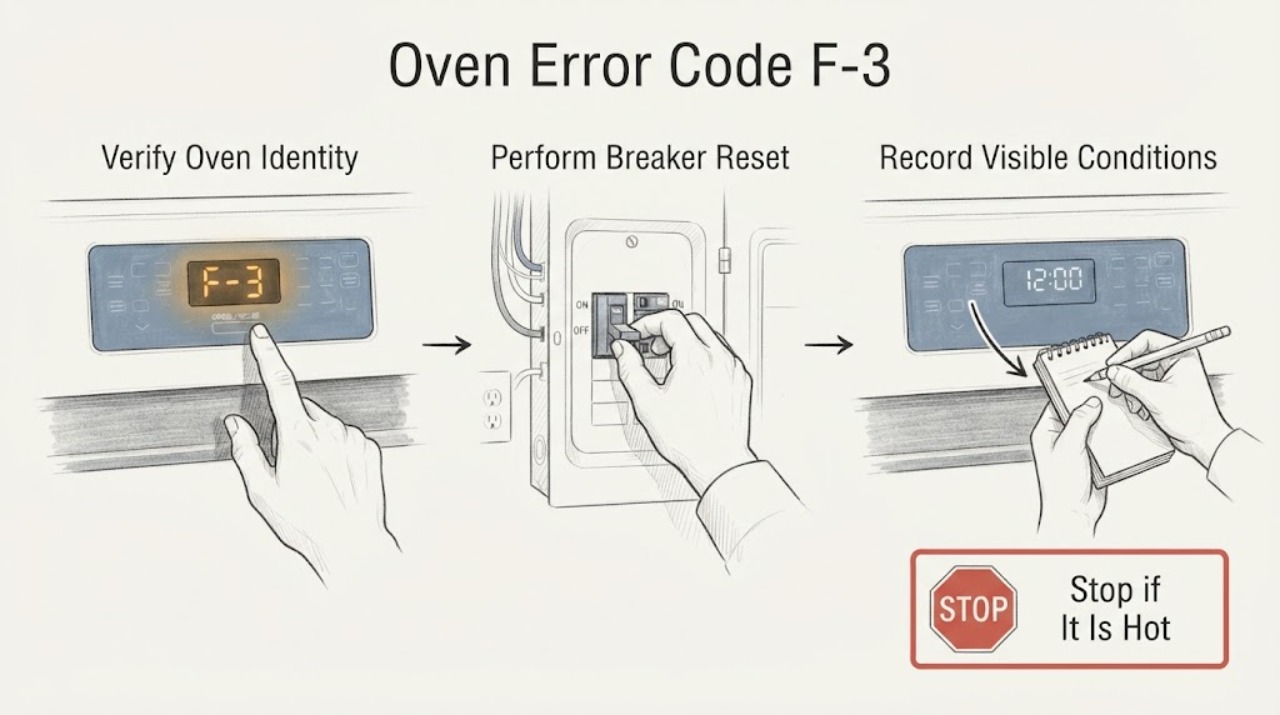
For an LG range/oven platform, LG defines F3 as a touch-pad sensor key error. Turn the range circuit breaker off for 30 seconds and turn it back on once, then check whether the code returns. If F3 reappears, the unit needs service; do not open the control panel, probe the keypad, replace a board or keep using an unresponsive oven. Confirm the exact model and display first because LG uses different F3 guidance for other cooking appliances, including microwaves.
Work through in order
Diagnostic checks
Use only checks that match the exact appliance or system and its official guide.
-
Check 1
Photograph the display and record the complete LG model number, fuel type and appliance category. Confirm that the appliance is an LG range/oven and that the display reads F3 or F-3 rather than another F-code, PF, a lock message or a microwave display.
Expected result: The appliance and code match an LG range/oven F3, or the appliance category/code is uncertain or different.
Next step: Continue only for a confirmed range/oven F3. For a different or uncertain identity, use the exact model's LG support page or request service without guessing the code meaning.
Why this matters
Why: LG assigns different meanings and steps to codes by appliance family. The published range F3 definition cannot be used for an LG microwave or for another displayed code.
-
Check 2
If there is no smoke, gas odor, exposed damage or unsafe heat, switch the oven/range circuit breaker off for 30 seconds, then switch it on once. Do not repeatedly cycle power or reach behind the control panel.
Expected result: The display returns normally, or F3 remains/reappears after power is restored.
Next step: If F3 remains or returns, stop resetting and arrange LG or qualified appliance service. If it clears, monitor the controls without opening the appliance.
Why this matters
Why: LG documents a 30-second breaker reset for F3; clearing the display does not establish that the touch-pad sensor fault is repaired.
-
Check 3
Without attempting internal access, note whether any keys fail, beep without a press, remain stuck, show incomplete characters, respond only intermittently, or whether the oven is heating or already hot. Keep the oven off if controls do not reliably respond.
Expected result: The panel remains unresponsive or erratic, or it operates normally after the reset.
Next step: Give the symptom record and model number to service. Do not press harder, use tools or remove the console to find the failed part.
Why this matters
Why: The F3 code points to the touch-pad sensor key circuit, but these observations cannot distinguish a keypad, connection or board cause.
-
Check 4
Keep the control surface dry and free of objects while the appliance is off. If cleaning is needed, use only the model manual's care method and a soft non-abrasive approach; do not use abrasive cleaners or tools on the panel.
Expected result: The panel has visible liquid, residue, dents, damaged keys or no visible external cause.
Next step: Remove only accessible surface residue after power is off and the panel is cool. For damage, recurring code or unreliable controls, request service.
Why this matters
Why: LG warns that abrasive cleaners or tools can damage the panel coating. An external surface condition does not prove it caused F3.
-
Check 5
Stop using the oven/range and arrange qualified service if F3 returns, the panel remains unreliable, the appliance heats unexpectedly, there is smoke/gas odor/electrical damage, or the reset cannot be performed safely.
Expected result: The code persists or the appliance presents a heat, gas, electrical or control hazard.
Next step: If there is smoke or a gas condition, leave the area and use appropriate emergency/gas-service help. Otherwise keep the appliance off and schedule LG or qualified service.
Why this matters
Why: LG says a continuing F3 or an unperformable troubleshooting step requires service. The code does not authorize control-board or keypad replacement by a user.
Use your observations
Decision map
Find the observation that best matches what you see, then follow the next safe action.
-
PATH 01Next step
What you see
The exact appliance is an LG range/oven and the display clearly shows F3 or F-3.
Do this next
Perform the one documented 30-second breaker reset, then monitor the display and controls.
Why this path and its safety boundary
Why it matters: LG defines this range code as a touch-pad sensor key error.
-
PATH 02Next step
What you see
The appliance is an LG microwave, another cooking product, or the display is not clearly F3/F-3.
Do this next
Use the exact model and appliance-family support page or request service rather than applying this article.
Why this path and its safety boundary
Why it matters: LG publishes separate appliance-specific F3 meanings and steps; the range definition cannot be transferred.
-
PATH 03Next step
What you see
F3 clears after the 30-second breaker reset and the controls respond normally.
Do this next
Monitor the appliance and arrange service if the code or erratic controls return; do not open the panel as a preventative test.
Why this path and its safety boundary
Why it matters: The reset cleared the displayed condition but did not identify or prove repair of the touch-pad circuit.
-
PATH 04Next step
What you see
F3 returns or stays displayed, controls remain unreliable, or there is smoke, gas odor, unexpected heating or visible electrical damage.
Do this next
Keep the oven off and request qualified service. Use emergency/gas-service help for smoke, fire or a suspected gas leak.
Why this path and its safety boundary
Why it matters: The issue exceeds the documented user reset and may involve the touch pad, wiring or control system; the exact internal cause is unconfirmed.
Helpful context
Understand the symptom
Confirm that F-3 belongs to the oven or range
Record the complete model number and the exact characters on the display before resetting anything. LG's range page identifies F3 as a touch-pad sensor key error for its range platform, but LG's microwave support page describes F-3 under a different appliance family. Do not apply microwave button or reset instructions to an oven, and do not treat a partial display as proof of F3.
Use the single documented reset
If the appliance is safe to access and there is no smoke, gas odor, exposed damage or hot control-panel hazard, turn the range circuit breaker off for 30 seconds and turn it back on. LG lists this reset for F3. A code that clears temporarily is not evidence that the touch pad or control circuit is repaired; treat a return as a service trigger.
Do not open the control panel
F3 identifies the control input/sensor error but does not tell a user whether a keypad, wiring connection or control board is responsible. Do not remove the console, probe contacts, bypass controls or buy a board from the code alone. LG's control-panel guidance directs unresolved problems to service and cautions that abrasive cleaners or tools can damage the panel.
When checks do not resolve it
Need a professional?
Request LG or qualified appliance service if F3 returns after the 30-second breaker reset or the control panel remains unreliable., Keep the oven off for smoke, gas odor, unexpected heating, visible electrical damage or a reset that cannot be performed safely., Do not open the control panel, probe the keypad, bypass controls or replace a board based only on F3.
Have this ready
- complete LG model number and appliance category
- exact display characters and a photo
- fuel type and whether the oven was hot or running
- which keys failed or behaved erratically
- whether the 30-second breaker reset cleared or reproduced the code
- any smoke, gas odor, unexpected heating or visible panel damage
Common questions
FAQ
What does F3 mean on an LG oven?
On LG's range error-code page, F3 means a touch-pad sensor key error. The exact model and appliance family still matter because LG publishes different F3 guidance for microwaves and other products.
How do I reset LG oven F3?
LG instructs range users to turn the circuit breaker off for 30 seconds and turn it back on. If F3 returns or the controls remain unreliable, arrange service instead of repeating the reset.
Can I replace the LG touchpad or control board for F3?
The code alone does not identify which internal part is responsible. LG directs a continuing F3 to service; do not open the panel, probe the keypad or replace a board without model-matched professional guidance.
Does LG microwave F3 mean the same thing as oven F3?
No. LG's microwave F-3 page gives a separate touch-button-panel troubleshooting path, so microwave instructions should not be transferred to an LG range or oven.
Read the exact guide
Official sources
- LG Microwave - Troubleshooting an F3 ErrorLG USA · LG microwave only; included to prevent transferring a microwave F3 meaning to the assigned oven/range identity.
- LG Range - Error Codes ListLG USA · LG electric, radiant-cooktop and gas-range platform; exact model is not supplied, so the article preserves model and appliance-family limits.
- LG Range – Troubleshooting the Control PanelLG USA · LG range control panels; supports control-lock and service/care boundaries, not internal repair.
Community feedback
Share a repair observation
Share a plain-text repair observation. Accepted observations are published automatically; this page may take a moment to update.