
On this page
Start here
Quick answer
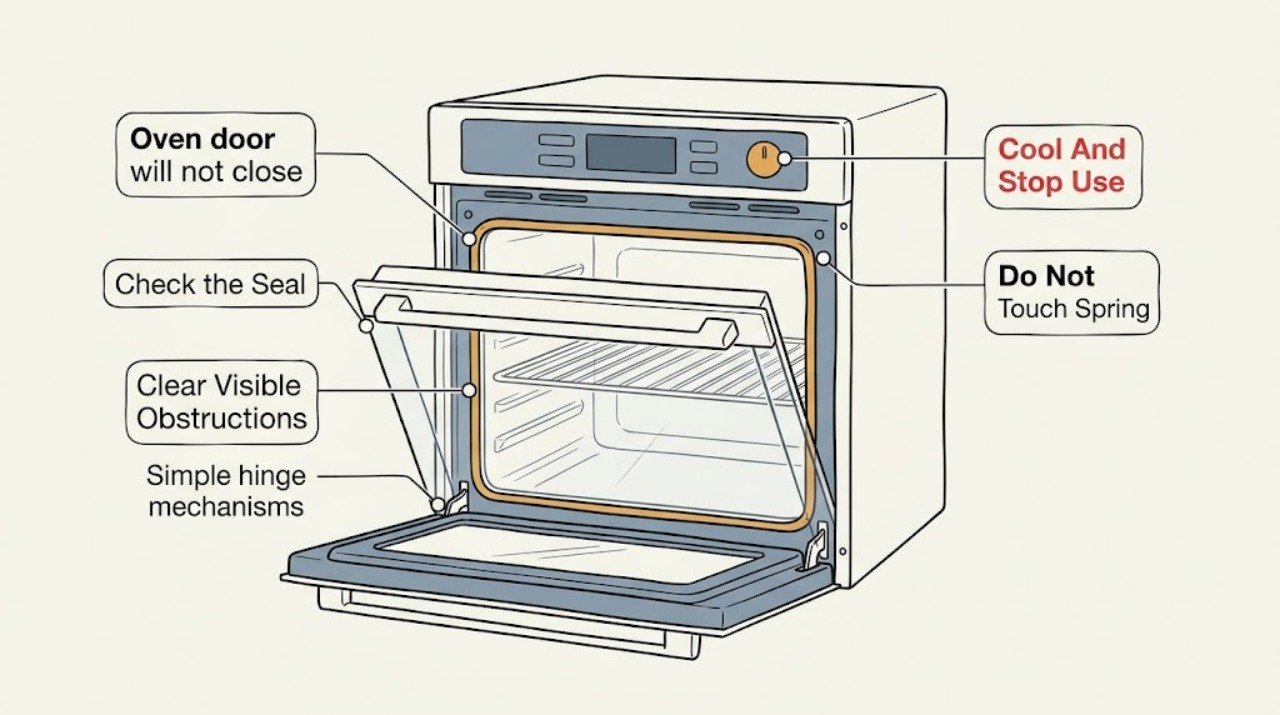
Turn the LG oven off and let it cool completely; do not force the door or run the oven with a gap. With the cavity and hinges cool, look for an extended rack, tray, foil, food, spill, or other visible obstruction, then inspect the door gasket and frame without pulling or damaging the gasket. LG notes that an incorrectly closed door can affect operation, and its self-clean guidance says never force a locked door. If the door is sagging, the seal is torn or displaced, the latch does not align, glass is damaged, or the problem began after the door was removed or a cleaning cycle, keep the oven off and arrange qualified LG appliance service. Door-lock controls and reset steps vary by model, so use the exact owner's manual rather than a generic door-removal procedure.
Before you begin
Safety first
- This article supports cooling the oven, external inspection, removal of a clearly loose obstruction, and model-approved ordinary controls only. A qualified professional should handle door removal, hinge locks, spring mechanisms, latch adjustment, glass or frame work, panels, wiring, and any hot, damaged, or gas appliance.
Work through in order
Diagnostic checks
Use only checks that match the exact appliance or system and its official guide.
-
Check 1
Turn the oven function off normally and wait until the cavity, door, glass, racks, and hinge area are fully cool before touching the fit. Do not run baking, broiling, or cleaning with the door open or partly closed.
Expected result: Note whether the door is hot, stuck by a lock after self-clean or EasyClean, held open by resistance, or accompanied by smoke, burning odor, gas odor if applicable, abnormal flame, damaged glass, or uncontrolled heat.
Next step: For smoke, fire, gas odor, or suspected carbon monoxide, leave the area as appropriate and contact local emergency or gas professionals from a safe location. For damaged glass or abnormal heat, keep the oven off and arrange qualified service after it is safe.
Stop if: Do not force the door, hold it shut during cooking, reach near hot hinges, or repeatedly start a cycle to make the door move.
Why this matters
Why: A hot or locked door may be responding to temperature and safety interlocks, while smoke, fire, gas, damaged glass, or uncontrolled heat overrides ordinary troubleshooting.
-
Check 2
With the oven cool, open the door only as far as it moves freely and inspect the sill, frame, cavity edge, racks, trays, foil, and visible hinge pockets. Remove only a loose obstruction that is clearly accessible without tools or force.
Expected result: Look for a rack or pan left extended, foil or food at the threshold, a hardened spill, a loose trim piece, or material caught between the door and frame. Note whether the door closes farther after the obstruction is removed or remains tilted or springy.
Next step: Close the door gently once after removing a loose obstruction. If anything is fixed, sharp, broken, hot, or trapped near the hinge or latch, leave it and arrange service.
Stop if: Do not pry debris from a hinge, pull trim, remove screws, or use the handle as leverage against a rack or pan.
Why this matters
Why: LG identifies a foreign object in the door as a possible reason the door is not recognized as closed. A persistent one-sided gap or resistance after the obstruction is gone makes alignment, seal, hinge, or latch trouble more likely.
-
Check 3
Inspect the visible door gasket, gasket channel, mating frame, and glass from outside the cool oven. Follow the exact LG manual for cleaning: wipe only permitted surfaces gently, and do not pull, scrub, remove, glue, or reshape the gasket.
Expected result: Record whether the gasket is folded, torn, pulled out, hardened, or uneven; whether the glass or inner panel is loose; and whether the frame or trim is bowed or displaced. Note whether the gap is uniform or confined to one corner.
Next step: If the seal or glass is damaged, keep the oven off and arrange qualified LG appliance service. If only permitted surface residue was removed and the door now closes evenly without force, use the exact manual before any normal-use check.
Stop if: Do not use oven cleaner, sharp tools, adhesive, tape, clamps, or makeshift packing on the door or seal.
Why this matters
Why: A displaced or damaged gasket or door panel can prevent even sealing. LG manuals may prohibit cleaning or disturbing the gasket, so a damaged seal is not a generic push-back repair.
-
Check 4
From outside the cool appliance, compare the left and right hinge positions, door angle, latch or catch alignment, and handle-to-frame gap. If the door was removed, impacted, or cleaned recently, stop at visual inspection rather than trying to reset a hinge.
Expected result: Look for a door lower on one side, a hinge that is visibly bent or differently positioned, a latch that misses its receiver, a door that springs back, or damage at the hinge pocket or frame.
Next step: Keep the door supported without forcing it and arrange qualified LG appliance service. Tell the technician whether the problem followed door removal, impact, self-clean, a spill, or installation.
Stop if: Do not put fingers into a hinge, release a hinge lock, bend a hinge, remove the door, or force the latch into alignment.
Why this matters
Why: Unequal gaps and visible hinge or latch misalignment point to hardware or frame work. The exact door-removal and hinge-lock sequence varies by LG model and can injure the user if performed incorrectly.
-
Check 5
If the door is physically aligned and the oven is cool, note any LOCK, LOC, or self-clean indication and use only the model's documented Clear/Off or unlock control sequence. Do not force a lock icon or disconnect power while the oven is hot.
Expected result: Record whether the lock releases after the manual-approved step, whether the display says the oven is still hot, whether controls respond, and whether the door closes normally once unlocked.
Next step: Allow the oven to cool fully and follow the exact manual once. If the lock remains, the display is unresponsive, or the physical door still does not close, keep the oven off and arrange qualified service.
Stop if: Do not insert tools into the latch, defeat a lock, repeatedly power-cycle a hot oven, or operate with a lock or door indication that does not clear normally.
Why this matters
Why: LG says a self-clean or EasyClean lock may remain until the internal temperature is safe and that lock controls can vary by model. A lock that remains after cooling and the permitted sequence needs service.
-
Check 6
Find the exact LG owner's manual using the model number and compare its door, gasket, lock, and cleaning instructions. If the door still will not close after the safe obstruction check, prepare a service handoff rather than testing a heat cycle.
Expected result: Gather the model and serial information, photos of the door gap, gasket, hinges, latch, glass, and frame, and whether the issue began after cleaning, door removal, impact, installation, self-clean, or overheating.
Next step: Arrange qualified LG appliance service and do not operate the oven until the door closes, latches, and seals normally. Include any lock message, error code, smoke, odor, heat, or power symptom.
Stop if: Do not follow another LG model's door-removal steps, remove glass or panels, bypass a latch, or run self-clean or heating with an unsafe door.
Why this matters
Why: LG states that instructions and images may differ by model. A persistent gap or an unavailable/mismatched manual leaves insufficient evidence for a safe homeowner repair.
Use your observations
Decision map
Find the observation that best matches what you see, then follow the next safe action.
-
PATH 01Safety boundary
What you see
The oven is hot and the door will not close or is stuck, or there is smoke, fire, gas odor, suspected carbon monoxide, burning odor, arcing, uncontrolled heat, or damaged glass.
Do this next
Stop using the oven. Leave the area for active smoke, fire, gas odor, or suspected carbon monoxide and contact local emergency or gas professionals from a safe location. Keep the appliance off and arrange qualified service for damage or abnormal heat.
Why this path and its safety boundary
Why it matters: A thermal, fire, combustion, electrical, or glass injury hazard overrides ordinary door troubleshooting.
Safety stop: Do not push the door, operate controls in a gas-odor area, reach near a hot hinge, or restart to reproduce the event.
-
PATH 02Safety boundary
What you see
The oven is cool, the door and gasket look intact, and removing a clearly loose rack, tray, foil, food, spill, or residue lets the door close evenly without force.
Do this next
Dry the permitted surfaces, confirm the gasket is not damaged, and follow the exact LG manual for one normal-use check. Stop if the gap or resistance returns.
Why this path and its safety boundary
Why it matters: The obstruction was the most likely immediate cause, but the seal and latch still need a gentle visual confirmation.
Safety stop: Do not use the oven if the door remains uneven, the seal is damaged, or the obstruction was in a hinge or latch mechanism.
-
PATH 03Safety boundary
What you see
The gasket is folded, torn, pulled out, hardened, or uneven, or the glass, inner panel, trim, or frame is loose or cracked.
Do this next
Keep the oven off and arrange qualified LG appliance service. Do not disturb the gasket or disassemble the glass unless the exact manual and a trained person make that work safe.
Why this path and its safety boundary
Why it matters: A seal or structural door problem can prevent safe closure and heat containment; pressure or an improvised repair can worsen the damage.
Safety stop: Do not glue, tape, stretch, scrub, cut, clamp, or remove the gasket or glass as a generic fix.
-
PATH 04Safety boundary
What you see
The door is lower on one side, the gap is unequal, it springs back, a hinge is visibly bent or differently positioned, the latch misses its receiver, or the issue followed door removal or impact.
Do this next
Do not operate the oven or manipulate the spring mechanism. Arrange qualified LG appliance service and provide photographs and the model number.
Why this path and its safety boundary
Why it matters: Alignment, hinge, latch, or frame damage is more likely than a dirty surface, and model-specific hinge mechanisms can create pinch or drop hazards.
Safety stop: Do not release hinge locks, put fingers into hinges, remove the door, bend hardware, or force the latch.
-
PATH 05Safety boundary
What you see
The lock icon or self-clean indication remains after the oven is fully cool and the exact model's permitted Clear/Off or unlock step has been tried once.
Do this next
Keep the oven off and arrange qualified LG appliance service. Record the cycle, cooldown, control step, and any error code or abnormal heat.
Why this path and its safety boundary
Why it matters: LG treats a lock that remains after cooling and the documented step as a service condition; the lock should not be defeated mechanically.
Safety stop: Do not force the door, insert tools into the latch, repeatedly power-cycle, or attempt to defeat the lock.
-
PATH 06Safety boundary
What you see
The door still will not close after the accessible obstruction check, the model manual is unavailable or mismatched, or a door/lock indication remains with no clear external cause.
Do this next
Keep the oven off and arrange qualified LG appliance service. Provide the model, photos, timing, and any recent cleaning, removal, impact, or self-clean event.
Why this path and its safety boundary
Why it matters: There is insufficient reliable evidence for a safe user repair; LG door and lock instructions vary by model.
Safety stop: Do not continue heating tests, use a generic online door procedure, bypass a latch, or order a part before diagnosis and fitment are confirmed.
Helpful context
Understand the symptom
First separate a hot locked door from a physical fit problem
An LG oven door that will not close may be blocked by an accessory or residue, or it may be physically out of alignment. A door that will not open after self-clean is a different condition: LG says the lock remains engaged until the oven cools and warns against forcing it. If the door is hot, locked, cracked, or surrounded by smoke or unusual heat, leave the oven off and wait for safe service guidance rather than pushing on it.
Use external checks and protect the gasket
When the oven is fully cool, inspect the sill, frame, racks, trays, door glass, seal, and visible hinge area. Remove only a clearly loose obstruction that is accessible without tools. LG manuals differ on gasket care; some specifically say not to rub, damage, or remove the woven gasket, so use the exact manual and limit cleaning to the surfaces it permits. A damaged or displaced seal is a service or model-specific replacement decision, not something to stretch, glue, or clamp.
Hinge and latch work needs model-specific service
LG built-in and range doors use model-specific hinge locks, latch geometry, and glass assemblies. A door that sits low on one side, springs back, leaves an uneven gap, or became misaligned after removal points to alignment or hardware work. Do not release a spring-loaded hinge, remove the door, bypass the lock, or test the oven with the door held shut. Give the technician the model number, photos, and the event that preceded the problem.
Safety boundary
Stop conditions
- Stop using the oven for smoke, fire, gas odor, suspected carbon monoxide, burning electrical odor, arcing, uncontrolled heat, or a hot or locked door that behaves abnormally.
- Stop for cracked or shattered glass, sharp exposed edges, a loose inner panel, a displaced frame, or a gasket that is torn, pulled out, or unable to seal.
- Do not force or clamp the door, bypass a latch or lock, release or manipulate a spring-loaded hinge, or reach into a hinge mechanism.
- Do not remove the door, glass, panels, or wiring from generic instructions; use the exact LG manual and qualified service for model-specific work.
Only after diagnosis
Potential parts
- oven door gasket or seal
Consider this category only if the exact model inspection finds a torn, hardened, displaced, or otherwise failed gasket and qualified diagnosis confirms it causes the gap or poor seal.
Confirm the full LG model and manufacturer's fit information before ordering; do not substitute a generic seal or disturb a woven gasket without model-specific instructions. - oven door hinge assembly
Consider this category only when a qualified technician confirms a bent, broken, incorrectly engaged, or failed hinge after the door alignment symptoms are documented.
Hinges and locking mechanisms are model-specific and spring-loaded; verify exact model fit and qualified installation. - oven door latch or lock assembly
Consider this category only if the door is aligned but the latch or lock does not engage or release and qualified diagnosis identifies that assembly as failed.
Confirm exact model compatibility and safe service instructions before ordering; never bypass the latch or lock. - oven door glass or frame hardware
Consider this category only when inspection confirms cracked glass, a loose panel, damaged trim, or a distorted frame that prevents safe sealing.
Glass and door hardware vary by model. Confirm the complete model and manufacturer's fit information, and use qualified service for broken or loose glass.
When checks do not resolve it
Need a professional?
Arrange qualified LG appliance service when the door remains open after a safe accessible-obstruction check, sits crooked, has a damaged or displaced gasket, shows a bent or misaligned hinge, misses the latch, remains locked after cooling and the model-approved control step, or has damaged glass, trim, or frame. Do not operate the oven until the door closes and seals normally. For gas odor, suspected carbon monoxide, smoke, fire, or an electrical hazard, leave the area as appropriate and contact emergency, gas, or electrical professionals from a safe location.
Safety scope: This article supports cooling the oven, external inspection, removal of a clearly loose obstruction, and model-approved ordinary controls only. A qualified professional should handle door removal, hinge locks, spring mechanisms, latch adjustment, glass or frame work, panels, wiring, and any hot, damaged, or gas appliance.
Common questions
FAQ
Can I keep using an LG oven if the door closes but leaves a small gap?
No. A visible gap means the door may not be sealing or engaging correctly, and LG says the oven is not designed for open-door cooking. Keep the oven off until the cause is corrected and the door closes evenly.
What should I check first when my LG oven door will not close?
After the oven is fully cool, check for an accessible rack, tray, foil, food, spill, or other object caught at the sill, frame, seal, or visible hinge area. LG's support guidance specifically says to check for a foreign object and close the door completely.
Should I remove and reinstall an LG oven door myself?
Do not use generic removal instructions. LG installation materials describe model-specific hinge locks and warn that the door is heavy; use the exact owner's manual and qualified service if a hinge moved, the door was removed, or the door will not align.
What if my LG oven door is locked after self-clean?
Allow the oven to cool completely. LG says the lock can remain until the internal temperature is safe; use only the exact model's documented Clear/Off or unlock step. Never force the door, and arrange service if it remains locked after cooling.
Read the exact guide
Official sources
- [LG DIOS lightwave oven] [Child lock] L or Loc is displayed and the buttons cannot be pressedLG USA Support · LG oven foreign-object and door-closed control guidance
- Part 2 — INSTALLATION REQUIREMENTSLG · LG built-in oven door hinge-lock and heavy-door handling instructions in the published installation guide
- LG Range – How to Clean Your Oven Using EasyClean™LG USA Support · LG oven cleaning-cycle cooldown, door closure, gasket care, and model-specific cleaning guidance
- LG Range – How to Clean Your Oven Using Self CleanLG USA Support · LG oven self-clean door-lock and cooldown safety guidance
- TROUBLESHOOTINGLG · LG range owner's manual troubleshooting and door-operation guidance for the published model
- LG Range - Troubleshooting A Locked OvenLG USA Support · LG range oven lock, cooling, model-specific unlock, power-cycle, and service guidance
- LG Cooking Appliance - How To Find My LG Model and Serial NumberLG USA Support · LG cooking-appliance model and serial number identification for manuals and troubleshooting
Community feedback
Share a repair observation
Share a plain-text repair observation. Accepted observations are published automatically; this page may take a moment to update.