
On this page
Start here
Quick answer
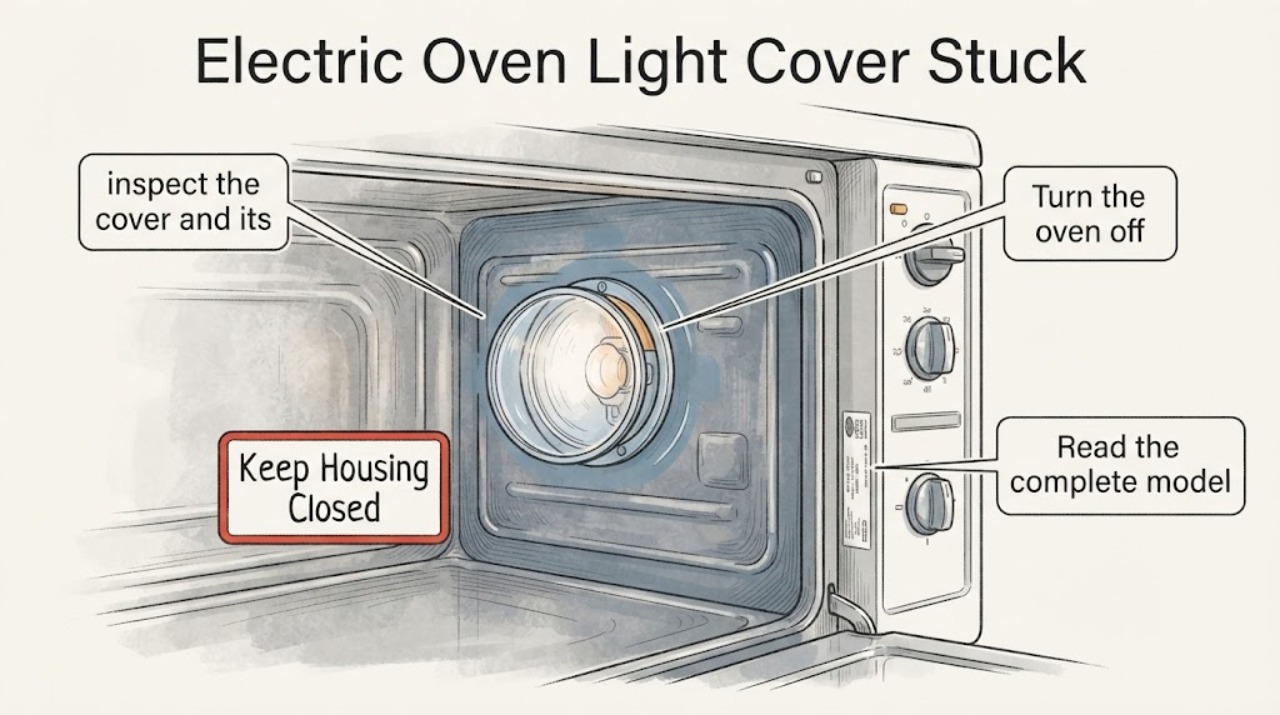
Do not force a stuck LG oven light cover while the oven is warm or powered. Let the oven and bulb cool fully, disconnect power at the plug or circuit breaker, and read the complete model number before trying to remove the cover. LG's official support page treats oven-light replacement as a product-support task and provides a repair path, while LG's cleaning guidance says oven procedures and features vary and warns about hot surfaces, high-temperature cycles, gaskets and accessories. The cover may be a twist-off or another model-specific fitting, so follow the exact manual's removal direction with clean, dry hands and no pliers, screwdriver leverage, heat, oil or spray. If the cover is cracked, spinning without releasing, fused by grease, or still stuck after the model-specific gentle attempt, leave the bulb area untouched and arrange LG service; a broken glass cover or damaged socket can create a shock or burn hazard.
Work through in order
Diagnostic checks
Use only checks that match the exact appliance or system and its official guide.
-
Check 1
Turn the oven off and wait until the cavity, bulb and cover are completely cool. Disconnect power at the plug or the oven's circuit breaker before placing a hand near the light housing.
Expected result: The oven was recently used or cleaned, the bulb/cover is still warm, or the cavity is fully cool and power is isolated.
Next step: Do not twist, pry or replace the bulb until the oven is cool and power is disconnected. If power cannot be safely isolated or the cover is cracked, stop and arrange service.
Why this matters
Why: A warm glass cover or energized socket adds burn and shock risk. LG's cleaning guidance says oven and surrounding surfaces can become hot and remain hot until cooled; the light-help topic provides an official repair path if the task cannot be completed safely.
-
Check 2
Read the complete LG model number from the rating label and retrieve that model's owner manual or LG support instructions. Confirm whether the light cover is a threaded glass cover, a retained cover, or another fitting before choosing a removal motion.
Expected result: The exact model and a matching light-removal procedure are available, or the model/procedure remains unknown.
Next step: Use only the matching manual's access and bulb instructions. If the identity or procedure cannot be confirmed, leave the cover in place and request LG service.
Why this matters
Why: The public LG light-help page establishes the support topic but does not prove a single cover design for every LG electric oven. A procedure from another model can apply the wrong force or direction.
-
Check 3
With power isolated, inspect the cover and its edge without inserting a tool: note whether it turns at all, spins freely without lifting, is visibly cracked, is blocked by hardened grease, or appears retained by a clip or screw.
Expected result: The cover follows the exact manual's light hand motion, does not move, spins without releasing, or shows damage/contamination.
Next step: Stop at the first sign of cracking, free-spinning, a hidden retainer or resistance requiring force. Do not use pliers, a screwdriver as a lever, heat, oil or spray; arrange model-matched service.
Why this matters
Why: A response that matches the manual may be a normal removal path; no response, free-spinning, cracking or an unrecognized retainer indicates that the fitting cannot be safely identified from the task alone.
-
Check 4
If and only if the exact manual's motion releases the cover with light hand pressure, support the cover, remove it without touching the socket, and record the bulb marking before ordering any replacement. Do not energize the oven with broken glass or an exposed socket.
Expected result: The cover comes off intact, the bulb/socket is damaged, or the cover cannot be removed without force.
Next step: Follow only the exact manual for bulb wattage and reinstallation. For damaged glass/socket or any forced-removal situation, keep power off and request LG repair.
Why this matters
Why: An intact cover and identified bulb may support a manual-authorized bulb change; damaged glass, socket damage or forced removal changes the task to service. The assigned task has no verified model or bulb specification.
-
Check 5
Before returning the oven to use, check that the cover is intact and seated exactly as the model manual shows, the bulb is the specified type, no glass fragments or tools remain, and the door gasket and racks were not displaced. Do not run a cleaning cycle to test a stuck-cover repair.
Expected result: The cover and bulb are correctly installed under the exact manual, or the cover remains loose/damaged/uncertain.
Next step: Keep the oven out of service and arrange inspection if any fit, glass, socket, gasket or wiring condition is uncertain. Otherwise resume normal operation only after the manual's installation check is satisfied.
Why this matters
Why: A loose cover, wrong bulb or displaced seal leaves a repair uncertainty; LG's cleaning guidance treats the gasket, accessories and high-temperature cycles as model-specific safety boundaries.
Use your observations
Decision map
Find the observation that best matches what you see, then follow the next safe action.
-
PATH 01Next step
What you see
The oven or bulb is warm, power is still connected, or the cover is cracked.
Do this next
Stop the attempt, let the oven cool, isolate power, and arrange qualified service for cracked glass or inaccessible wiring. Do not continue twisting the cover.
Why this path and its safety boundary
Why it matters: The light area presents a burn, shock or glass-injury risk.
-
PATH 02Next step
What you see
The exact LG manual shows a cover motion and the cool, de-energized cover releases with light hand pressure.
Do this next
Support the cover, follow the manual's bulb and reinstallation steps, and stop if glass, socket, gasket or fitment damage appears.
Why this path and its safety boundary
Why it matters: The cover is responding to the model-specific owner procedure rather than requiring improvised leverage.
-
PATH 03Next step
What you see
The model is unknown, the cover does not respond to the documented motion, spins without releasing, or needs pliers, a screwdriver, heat or lubricant.
Do this next
Leave power off and request LG/model-matched appliance service. Do not copy a twist direction or tool method from another LG oven.
Why this path and its safety boundary
Why it matters: The cover design or fault is unresolved; additional force could break the glass or damage the light socket and oven liner.
-
PATH 04Next step
What you see
The cover comes off intact but the bulb socket, wiring, gasket or surrounding liner is damaged.
Do this next
Do not energize the oven. Photograph the damage, retain the model number and arrange qualified LG service.
Why this path and its safety boundary
Why it matters: The task is no longer a simple bulb replacement and needs inspection of a safety-related oven component.
Helpful context
Understand the symptom
A stuck cover is a model-identification problem first
LG ovens do not all expose the light in the same way. The assigned task names an electric LG oven but supplies no model, and the official LG help page is a general oven-light topic rather than a universal removal diagram. Read the full rating label and use LG's model-specific manual before choosing a direction or tool. Do not infer the cover style from a photograph of another LG range.
Cool and isolate the light before touching the cover
The bulb and glass can remain hot after baking, broiling or a cleaning cycle. Wait until the cavity is fully cool, disconnect power at the plug or breaker, remove racks only if they obstruct safe access, and keep hands away from the element and gasket. LG's cleaning guidance warns that surfaces become hot and that cleaning procedures vary by feature and model; a stuck cover is not a reason to heat the oven to loosen it.
Stop when the fitting does not respond to the documented motion
A cover that will not move may be cross-threaded, stuck to a seal, damaged, or simply a different design from the one in a generic video. Use only the exact manual's stated motion with light hand pressure. Pliers, screwdrivers, heat, oil and spray can crack the glass, damage the socket or contaminate the oven. If the cover still does not release, use LG's repair path rather than escalating force.
When checks do not resolve it
Need a professional?
Arrange LG service when the model or cover style is unknown, the cover is cracked, free-spins, requires force, has a hidden retainer, or leaves the socket/gasket/wiring uncertain. Keep power off until the cover and bulb are safely handled under the exact model manual. Do not use heat, lubricant, pliers, a screwdriver as a lever, or a cleaning cycle to loosen the cover.
Common questions
FAQ
Can I use pliers or a screwdriver to break loose the LG oven light cover?
No. The model and cover design are not confirmed, and force can crack the glass or damage the socket and liner. Disconnect power, use only the exact manual's light hand motion, and arrange service if it does not release gently.
Should I warm the oven first so the cover loosens?
No. LG's cleaning guidance warns that oven surfaces become hot and that high-temperature cycles have specific procedures. A stuck cover should not be heated as a loosening test; cool the oven fully and isolate power before inspection.
What information does LG service need?
Give the complete model number, oven type, photos of the cover and housing, whether the cover turns or free-spins, visible cracks or grease, and whether the socket or wiring can be seen. LG's official light-support page links to a repair request path for unresolved cases.
Read the exact guide
Official sources
- General Maintenance and Cleaning - Ranges and CooktopsLG USA Support · Official LG USA support page used for model/feature-dependent cleaning, removing racks/accessories, hot-surface warnings, gasket protection, ventilation and high-temperature self-clean boundaries. It is not used to define a particular light-cover design.
- How To Replace The Light Bulb In An LG OvenLG USA Support · Official LG USA Help Library page for oven-light replacement. The opened HTML identifies the cooking-appliance support topic and links to LG's repair request path, but does not publish a universal cover-removal motion; model-specific instructions remain required.
Community feedback
Share a repair observation
Share a plain-text repair observation. Accepted observations are published automatically; this page may take a moment to update.