
On this page
Start here
Quick answer
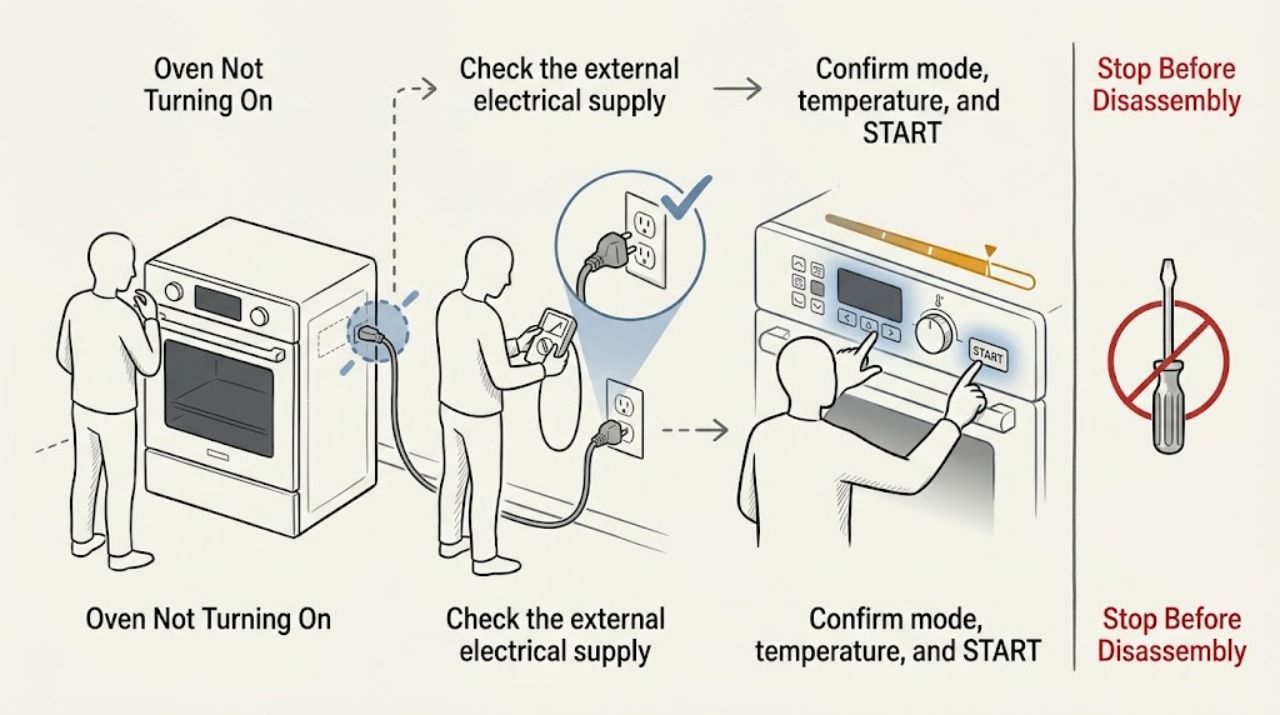
First decide whether the LG oven has no display at all or has power but will not begin a selected cycle. For a blank display, check the range's dedicated breaker and the dry, accessible plug connection without opening the appliance or repeatedly resetting a trip. If the panel is lit, select the intended mode and temperature, confirm the settings with START, and check for OVEN LOCKOUT, CHILD LOCK, or DELAY START. LG applies different supply and operating checks to gas and electric cooking appliances; a dual-fuel model must be identified by its exact manual before interpreting a fuel or ignition symptom. For a gas oven, make only a safe external observation of the documented shutoff position after a move or installation, and do not repeat ignition attempts. Persistent error codes, a locked door, gas odor, delayed ignition, abnormal flame, smoke, carbon-monoxide concern, arcing, burning smell, abnormal heat, or repeated breaker trips require stopping and qualified or emergency help as appropriate.
Work through in order
Diagnostic checks
Use only checks that match the exact appliance or system and its official guide.
-
Classify the oven's response
Press the normal Power or control button once only when the area is dry and free of gas odor, smoke, or visible damage. Record whether the display is blank, partially lit, showing a lock or error, or fully lit but the oven does not begin. Note whether the surface controls respond, without repeatedly igniting a burner or starting the oven.
Expected result: The display is blank; the display is on but START does nothing; a lock, delay, or error appears; or the oven starts and stops.
Next step: Follow the matching branch below. If gas odor, smoke, arcing, abnormal heat, or visible damage is present, stop using the oven and do not press more controls.
Why this matters
Why: No display sends the diagnosis toward electrical supply. A lit display sends it toward settings, lock or timer state, door recognition, a code, and—on a gas or dual-fuel model—safe fuel and ignition conditions.
-
Check the external electrical supply safely
If there is no gas odor or visible damage and the area is dry, inspect the dedicated breaker for the range and confirm the accessible plug is seated as the installation manual requires. Do not use an extension cord, adapter, wet outlet, or live-meter test to force a diagnosis, and do not keep resetting a tripped breaker.
Expected result: The breaker is open, the outlet appears dead, the plug or cord is loose or damaged, the breaker trips again, or the external supply appears normal but the display remains blank.
Next step: Leave a repeat-tripping circuit or damaged or wet power path out of service and arrange qualified electrical or appliance service. If the supply appears normal but the display remains blank, do not open the oven.
Why this matters
Why: LG identifies the power supply, circuit breaker, and cord as first checks for a no-power range. A repeat trip or visible heat or cord damage indicates a fault, not a reason for another start attempt.
-
Confirm mode, temperature, and START
For a lit panel, select the intended Bake, Broil, or other mode and temperature according to the exact LG manual, then confirm the settings with START. Record whether a preheat or cycle indication appears, whether the setting cancels, and whether the display returns to idle. Do not start a gas cycle when there is odor or an abnormal flame.
Expected result: The oven starts after START; the display stays idle; the setting cancels; or a code appears.
Next step: Monitor one normal start only when safe. If the sequence fails or the code returns, record it and stop repeated attempts; arrange model-specific service.
Why this matters
Why: LG states that unconfirmed settings can keep the appliance from operating. A setting that will not hold or a code that appears after confirmation points to control, lock, door, supply, or heating-system diagnosis.
-
Check lock, timer, and door states
Read the display for OVEN LOCKOUT, CHILD LOCK, or DELAY START and use only the exact model manual's documented external button sequence to clear an ordinary control state. Inspect the visible door edge for an obstruction and close it normally; do not force the door, pry a lock, or hold a safety switch closed.
Expected result: A lock or delay clears and the oven accepts a start; no such message is present; the door does not close normally; or a lock or control state will not clear.
Next step: If the state clears, make one safe start attempt. If the door or lock remains abnormal or the controls stay unresponsive, stop repeated sequences and arrange qualified repair.
Why this matters
Why: LG explains that lockout and child-lock states can block controls, while Delay Start can make a powered oven appear not to run. Door or lock recognition can also prevent a cycle, and a persistent state requires service.
-
Identify the fuel path without adjusting it
Use the exact model manual to identify whether the oven is electric, gas, or dual-fuel. For gas-capable equipment that was recently moved, make only a safe external observation of an obviously closed, user-accessible supply valve if the manual describes it. Do not move the range, loosen a fitting, adjust a regulator, or use a burner or repeated oven ignition as a fuel-flow test.
Expected result: The fuel type is uncertain; an external supply valve appears closed or its position is uncertain; the valve appears open; or the oven is electric and has no fuel path.
Next step: If fuel type or valve position is uncertain, stop and arrange qualified service. If an electric model has normal supply but no start, stay on the control and service path; do not apply gas checks.
Why this matters
Why: LG's gas guidance says a gas valve must be open and that valve and regulator locations vary by model. Fuel identity changes the diagnosis, but an uncertain connection or open valve with no start does not authorize gas work.
-
Record errors and ignition symptoms without repeated testing
Write down every error code, flashing pattern, selected mode, and exact cycle stage. From a safe position, note whether the oven produces a normal control response; do not stare into the burner area, reach inside, repeat an ignition attempt, or open panels. Stop at once for gas odor, delayed ignition, popping, abnormal flame, smoke, carbon-monoxide concern, arcing, unusual heat, or a breaker trip.
Expected result: No code is shown; a code returns; the oven does not initiate the expected heating path; ignition is delayed or abnormal; or a hazardous symptom occurs.
Next step: Keep the oven out of service and give the exact model, code, settings, fuel identity, and symptom timing to qualified repair. For persistent gas odor or smoke, leave the area and seek local emergency or gas-safety help from a safe location.
Why this matters
Why: LG notes that gas-oven ignition uses a hot-surface igniter and that error meanings vary by model. A persistent no-start or ignition problem after safe settings and supply observations requires qualified diagnosis.
Use your observations
Decision map
Find the observation that best matches what you see, then follow the next safe action.
-
PATH 01Next step
What you see
The display is blank and the breaker or outlet is not supplying power.
Do this next
Do not keep resetting the breaker. Arrange qualified electrical or appliance service for the range circuit and power path.
-
PATH 02Next step
What you see
The external supply appears normal but the display remains blank.
Do this next
Keep the oven out of service and arrange qualified LG appliance repair. Do not open the cabinet or test live wiring.
-
PATH 03Next step
What you see
The display is on but START is ignored until mode, temperature, lock, or timer state is corrected.
Do this next
Use the exact LG manual to complete the setting or clear the documented state, then make one safe start attempt. If it remains unavailable, arrange service.
-
PATH 04Next step
What you see
The oven is gas or dual-fuel and the supply valve or fuel identity is uncertain.
Do this next
Do not move the range, adjust the gas connection, or repeat ignition. Arrange qualified gas-appliance service; leave the area and seek emergency gas-safety help for persistent odor.
-
PATH 05Next step
What you see
The correct settings and safe external supply observations are normal but the oven still will not start or heat, or a code returns.
Do this next
Stop repeated attempts and arrange qualified LG service for model-specific diagnosis of the control, lock, supply, igniter, burner, or heating system.
-
PATH 06Next step
What you see
There is gas odor, delayed ignition, abnormal flame, smoke, carbon-monoxide concern, arcing, burning odor, abnormal heat, visible damage, or a repeat breaker trip.
Do this next
Stop using the oven immediately and do not restart it. If safe and dry, disconnect power without touching wet equipment; for gas odor or smoke, leave the area and obtain local emergency or gas-safety help from a safe location.
Helpful context
Understand the symptom
Blank display and no-start are different complaints
A blank display points toward the household supply, breaker, plug, cord, or appliance power path. A lit display that will not begin points toward mode selection, START confirmation, lock or delay state, door recognition, an error, or a fuel and ignition condition. Identify the response before choosing a check, and do not open the oven to compare paths.
Identify electric, gas, or dual-fuel equipment
LG publishes separate guidance for electric and gas cooking appliances. A gas oven still needs electrical power for its controls, while its heat path also depends on safe gas availability and ignition. A dual-fuel configuration can combine those paths. Use the full model number and its manual; do not transfer a gas valve or igniter conclusion to an electric oven.
Treat ignition and electrical symptoms as stop conditions
A safe external observation can show that a supply valve was closed after moving the range, but it cannot prove a gas component is safe to adjust. Do not repeat a failed ignition cycle or perform live electrical tests. Persistent codes, gas odor, delayed ignition, abnormal flame, smoke, carbon-monoxide concern, arcing, heat damage, or repeat breaker trips need qualified attention.
Safety boundary
Stop conditions
- Stop immediately for persistent or strong gas odor, delayed ignition, popping, abnormal flame, smoke, carbon-monoxide concern, arcing, burning odor, abnormal heat, visible heat damage, or a repeat breaker trip.
- Do not repeatedly ignite the oven, adjust a gas regulator, loosen gas fittings, move the range to reach a connection, open panels, test live wiring, or bypass a door or control safety feature.
- Do not force or pry an oven door lock, repeatedly reset a breaker or error state, or keep restarting a cycle that produces a hazardous symptom.
- Stop after the documented external power, setting, lock, and fuel-identity checks and one safe reset or start attempt if the oven remains unavailable; arrange qualified repair.
Only after diagnosis
Potential parts
- electronic control or user interface
Consider only when qualified diagnosis links a blank display, failed input, returning code, or persistent no-start state to the control system.
A no-start symptom alone does not identify this part; confirm exact model and professional diagnosis first. - door or control interlock
Relevant only when qualified diagnosis confirms a persistent door or lock-recognition fault with no visible obstruction.
Do not defeat or force the interlock; verify exact model fit before service. - hot-surface igniter or burner control
Relevant only for a gas-capable model when qualified diagnosis confirms an ignition or burner-control fault after safe settings and supply observations.
Do not access gas components or repeat ignition; use model-specific professional service. - electric heating element
Relevant only when the exact electric or dual-fuel model and qualified diagnosis identify a heating-element fault.
Do not perform live testing or assume fit from the symptom; confirm the complete model.
When checks do not resolve it
Need a professional?
Arrange qualified LG appliance, electrical, or gas-appliance service when the external supply is sound but the display is blank, when a lit oven will not accept the documented start sequence, when a lock or error persists, when fuel identity or gas supply cannot be safely confirmed, or whenever gas, ignition, smoke, electrical, heat, or breaker symptoms occur. Provide the complete model number and exact observations.
Common questions
FAQ
Why is my LG oven completely blank?
Treat a blank display as a power-path problem first. When the area is dry and free of gas odor or visible damage, check the dedicated breaker and accessible plug connection as LG documents. If the external supply appears normal but the display stays blank, keep the oven out of service and arrange qualified repair.
Why does my LG oven have power but not start?
Confirm the mode and temperature, press START as the exact model requires, and check for OVEN LOCKOUT, CHILD LOCK, or DELAY START. If the control state will not clear or an error returns, stop repeated attempts and arrange service.
How do I tell whether the LG oven is electric, gas, or dual-fuel?
Use the complete model number and the exact LG manual. Do not infer fuel type from the symptom or transfer gas ignition guidance to an electric oven. Gas-capable equipment needs a safe gas-supply and ignition path in addition to electrical controls.
Can I test a gas LG oven by trying ignition again?
Do not repeat ignition attempts. LG identifies a hot-surface igniter in the gas oven heating path, but gas and ignition components require model-specific professional diagnosis. Stop for odor, delayed ignition, popping, abnormal flame, smoke, or heat.
What should I do if the LG oven shows an error code?
Record the exact code, model, selected mode, and cycle stage, then use the model-specific LG guidance. Do not guess a part or repeatedly reset the oven. A returning code or any gas, smoke, electrical, heat, or breaker symptom requires qualified service.
Read the exact guide
Official sources
- LG Range, Oven, Electric Cooktop: Powers On, Won't RunLG USA Support · LG gas and electric appliance START, breaker, lockout, delay, error, and service guidance
- LG Electric Range / Gas Range: Power IssuesLG USA Support · LG electric and gas range no-power and powered-but-not-running troubleshooting
- LG Range – Troubleshooting the Control PanelLG USA Support · LG range lock, button response, error, reset, and service guidance
- Oven Not Heating - Gas Ranges | LG USA SupportLG USA Support · LG gas-range valve, model manual, error, and hot-surface ignition guidance
Community feedback
Share a repair observation
Share a plain-text repair observation. Accepted observations are published automatically; this page may take a moment to update.